
Testing the Plugin
In this ServiceNow Environment, there are 3 Configuration Items that have historical Change Requests related to them. They are:
- IAM SERVER 01
- Microsoft .NET Framework 2.0
- Microsoft SQL Server 2005
It is important to understand the exact name, as you will experience the power of disambiguation. When we built Configuration Items as custom data types, the Moveworks Reasoning Engine will inherently understand that it needs more clarification from the user. The reason for this is that end-users are rarely ever going to be able to refer to the Configuration Item by it's exact name, and definitely not by it's sys_id - which is what we need to be able to add the CI to the CR via API. The Configuration Item data type takes care of both of these problems for us.
Some examples of the ways users might ask for this:
- I need to create a CR to patch the IAM Server
- I need to make a change request for .NET
- Can I create a CR to update SQL Server?
Try it out in the Developer Labs bot. You should see something like this
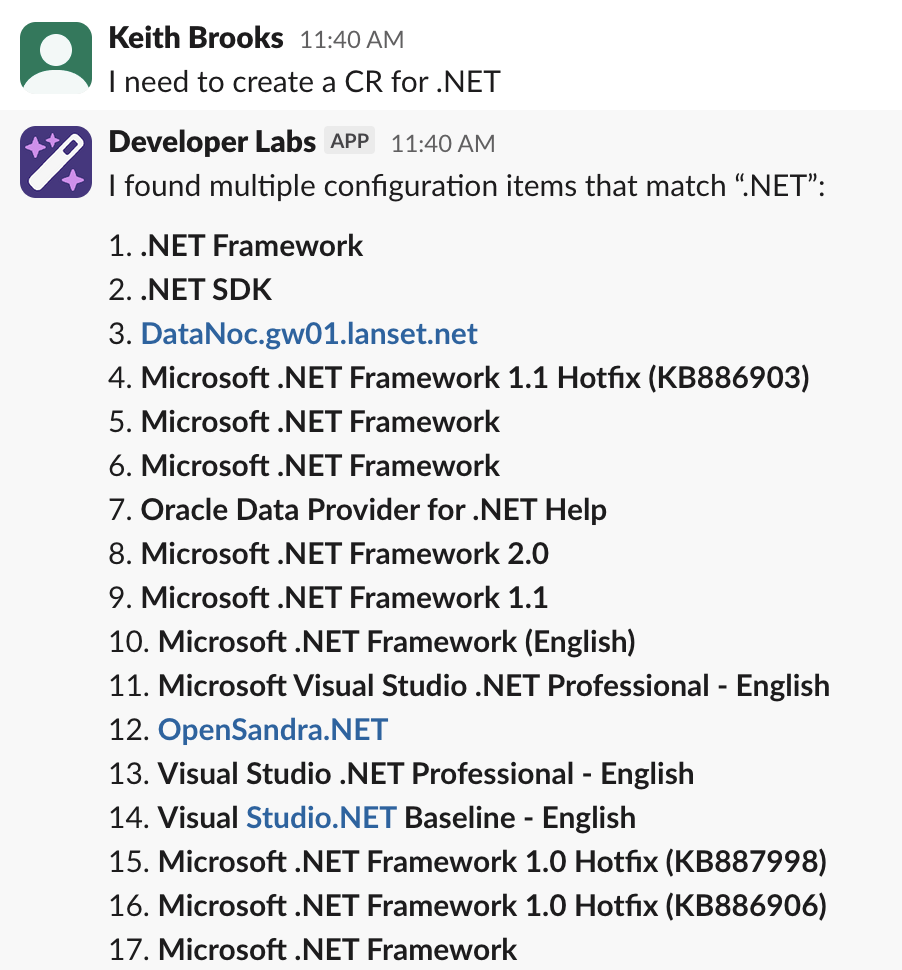
In this example we should choose option 8. Continue on, make sure you include the short description after you've chosen the correct .NET Framework and you should see that Moveworks is inherently has assessed risk based on historical CRs related to .NET Framework 2.0. Go ahead and confirm and submit. You will get a link to your Change Request for you to view after logging into ServiceNow via the Okta tile.
It's important to note that creating a Data Type for Configuration Item has solved 2 big problems. The user will never know the sys_id of the CI, but also usually not remember the exact name of the Configuration Item.
Updated 3 months ago