
Conversational Plugins
Conversational plugins are tools that enable the Agentic Reasoning Engine to search for information, analyze data, and take action across enterprise systems.
Context is King
When you're building conversational plugins, you should thoughtfully design the context for your agentic system.
Imagine you had a conversational plugin to help find calendar availability for two attendees:
- Tool 1: Obfuscated Context
This tool forces your Assistant to...
{ "users": { "[email protected]": [ { "title": "BUSY", "start": "2026-12-18T03:05:00Z", "end": "2026-12-18T03:35:00Z", "meta": "e_9f2a" }, { "title": "BUSY", "start": "2026-12-18T16:00:00Z", "end": "2026-12-18T17:00:00Z", "meta": "e_1c77" } ], "[email protected]": [ { "title": "BUSY", "start": "2026-12-18T03:20:00Z", "end": "2026-12-18T04:00:00Z", "meta": "e_aa10" } ] } }- compute windows
- intersect across people
- count conflicts
- infer what’s conflicting (it can’t, really)
- Tool 2: Clear Context
This tool is much more "agent-friendly"
{ "time_range": { "start": "2026-12-18T00:00:00Z", "end": "2026-12-19T00:00:00Z" }, "meeting_duration_minutes": 30, "windows": [ { "start": "2026-12-18T03:00:00Z", "end": "2026-12-18T03:30:00Z", "conflict_count": 2, "conflicts": [ { "email": "[email protected]", "conflict": { "type": "calendar_event", "title": "Q4 Marketing All Hands Dry-Run", "start": "2026-12-18T03:05:00Z", "end": "2026-12-18T03:35:00Z" } }, ... ] }, ... ] }- The context is clear & easy to understand
- The work of calculating periods is already done for the AI agent
Creating tools that are well-designed for LLMs is your job as an agent engineer. When you make these design decisions, you impact...
- Functionality: What operations are possible?
- ML Performance: How accurately does the Reasoning Engine use your plugin?
- User Clarity: How easy is it for users to understand what happened?
- Latency: How fast does the plugin execute?
- Maintainability: How easy is it to modify or extend?
We discuss best practices for designing tools for agents here.
Conversational Plugin Architecture
Conversational plugins consist of two core components:
Triggers
Natural Language Triggers define how the plugin starts. They help the Reasoning Engine select your tool when users express certain intents.
Example: A plugin named "Check PTO Balance" with description "View remaining PTO days for employees" triggers on utterances like:
- "How much PTO do I have left?"
- "Check my vacation balance"
- "Do I have enough time off for next month?"
Conversation Processes
Conversation Processes define the execution flow. This is great for designing standard operating procedures you want your users to follow.
They're made up of a few pieces:
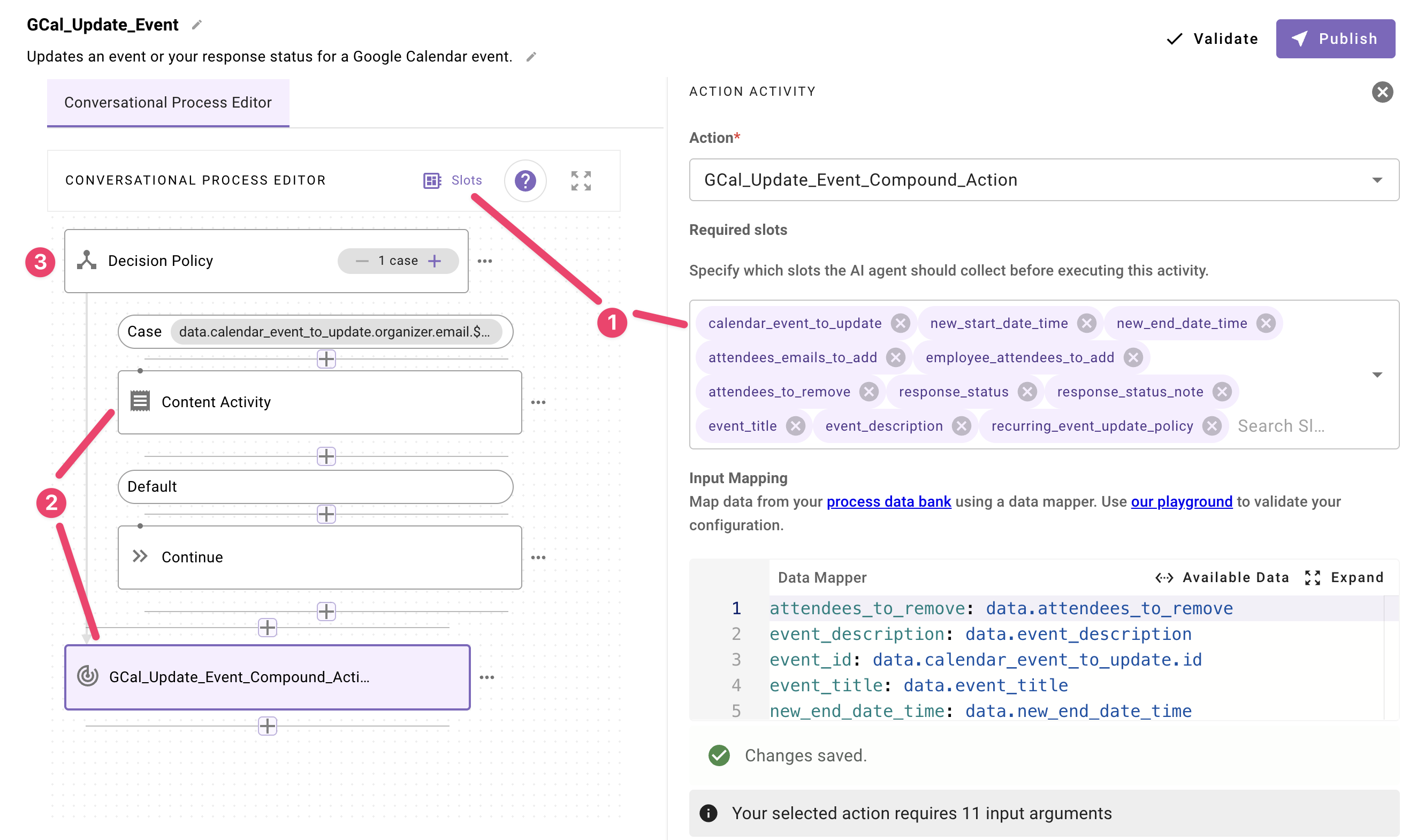
- Slots: Information collected from the user (dates, names, filters)
- Activities: Operations that the plugin executes
- Content Activities - display information to users (e.g. show a legal disclaimer with PTO balances)
- Action Activities - perform work (fetch, transform, or update data)
- Decision Policies - fork the interaction based on business rules (e.g. contractors get one experience, FTEs get another; event owners gets a different experience from event attendees, etc.)
Example Use Cases
Conversational plugins enable users to interact with enterprise systems through natural language.
Here are some real-world examples:
- PTO Balance Checker: Employees ask "Do I have enough PTO for a week in November?" and instantly get their balance, remaining days, and availability confirmation.
- Salesforce Account Management: Account executives update account owners, territories, or status through natural language like "Change the owner of Acme Corp to Sarah Johnson."
- Meeting Scheduler: Users find meeting times across attendees' calendars and create meetings through "Schedule a team sync next week with John and Sarah."
- IT Access Request: Employees request access like "Give me access to the Marketing Slack channel"—the plugin checks permissions, gets approvals if needed, and grants access automatically.
- Jira Ticket Creation: Users create tickets conversationally: "Create a ticket for the login bug in production"—the plugin collects priority, component, and description through natural dialogue.
Updated 1 day ago