
Optional Query Parameters in HTTP Actions
When configuring an HTTP Action, you may need certain query parameters to only be sent when a value is provided. For example, an optional search filter that should be omitted entirely when the user doesn’t specify it. This guide shows you how to make query parameters conditional using Mustache templating.
Why Use Optional Query Parameters?
By default, every query parameter you add to the Query parameters table is included in every API request. This can cause issues when:
- An API returns an error if a parameter is sent with an empty value.
- You want a cleaner request URL that only includes relevant filters.
- A parameter should only apply in certain scenarios (e.g., filtering by department only when the user specifies one).
How to Configure Optional Query Parameters
HTTP Actions uses the Mustache templating language for variable substitution. Mustache supports section tags ({{# variable }}...{{/ variable }}) that act as conditionals — content inside a section block is only rendered when the variable has a value (non-empty, non-null).
By wrapping both the key and value in Mustache section tags, the entire query parameter is automatically excluded when no value is provided.
Setup
In the Query parameters table of your HTTP Action, configure the key and value as follows:
| Key | Value |
|---|---|
{{# my_variable }}param_name{{/ my_variable }} | {{# my_variable }}{{my_variable}}{{/ my_variable }} |
Replace my_variable with your input variable name, and param_name with the actual query parameter name your API expects.
When the variable has a value
If my_variable = "active":
- Key renders to:
param_name - Value renders to:
active - The API receives:
?param_name=active
When the variable is empty or missing
If my_variable is empty, null, or not provided:
- Both key and value render to empty strings
- The parameter is not sent at all
- The API receives a clean URL with no unnecessary parameters
Examples
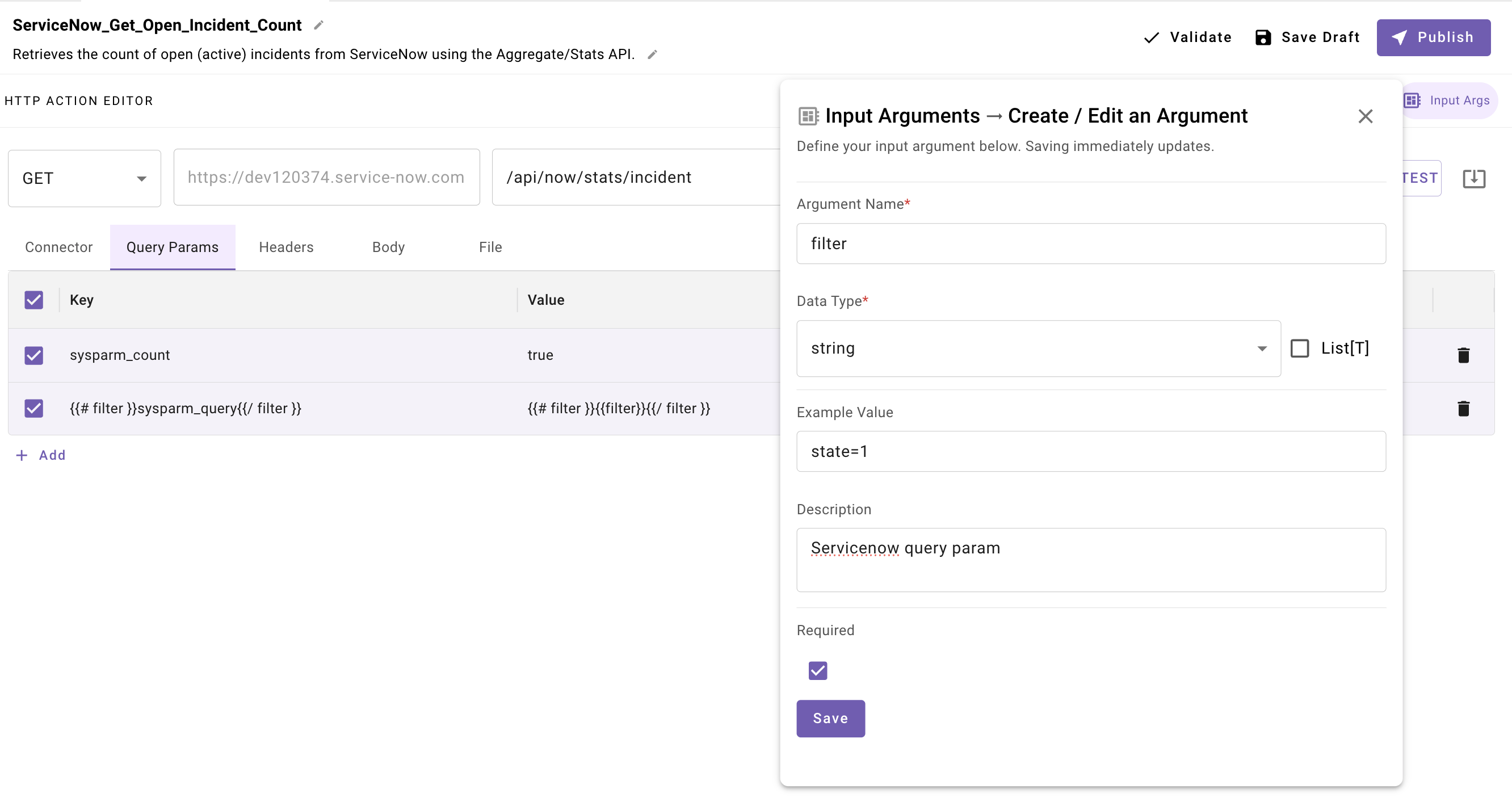
In the below example we are passing a servicenow sysparm_query param for the ticket state with a slot named filter. The query param will only be passed if there is a value passed for the slot filter.
Example 1: Optional Search Filter
A “List Users” HTTP Action that optionally filters by department.
Input Variables: department (optional string)
Query Parameters:
| Key | Value |
|---|---|
limit | 50 |
{{# department }}dept{{/ department }} | {{# department }}{{department}}{{/ department }} |
Results:
- When
department="Engineering"the request sends:/api/users?limit=50&dept=Engineering - When
departmentis empty the request sends:/api/users?limit=50
Example 2: Multiple Optional Parameters
You can apply this pattern to as many parameters as needed. Parameters without the conditional wrapper are always sent.
| Key | Value |
|---|---|
{{# status }}status{{/ status }} | {{# status }}{{status}}{{/ status }} |
{{# created_after }}created_after{{/ created_after }} | {{# created_after }}{{created_after}}{{/ created_after }} |
page | {{page_number}} |
Only status and created_after are conditional. The page parameter is always included since it is not wrapped in section tags.
Example 3: Using a Separate Boolean Variable
For more advanced scenarios, you can use a separate boolean variable to control whether a parameter is sent. This is useful when the parameter value itself could be 0 or another valid-but-empty-looking value.
| Key | Value |
|---|---|
{{# should_filter }}filter_type{{/ should_filter }} | {{# should_filter }}{{filter_value}}{{/ should_filter }} |
This gives you explicit control over when the parameter is included, independent of the parameter’s value.
Important Notes
Pro TipWhen using a variable as both the conditional and the value (as in Examples 1 and 2), the variable must be a scalar value (string, number, or boolean). If the variable contains an object or list, Mustache treats it as a collection and iterates over it instead of using it as a conditional. For object or list values, use a separate boolean variable as shown in Example 3.
WarningQuery parameters must be added to the Query parameters table in the HTTP Action editor. They cannot be saved directly in the Endpoint URL. See HTTP Actions for more details on configuring your request.
Updated about 21 hours ago