
Create Intelligent Change Request
Scenario
In this case we will build the ability for a user to create a change request while using AI to determine the risk based on historical change requests for the same configuration item.
NOTE: You will be provided access to a ServiceNow Sandbox instance in order to do this. Once you request access through Moveworks, you see an "ServiceNow" connector in Agent Studio that has already been setup to make API calls. You will also be granted a login to the ServiceNow instance in the Okta Portal indicated by this icon.
Architecture
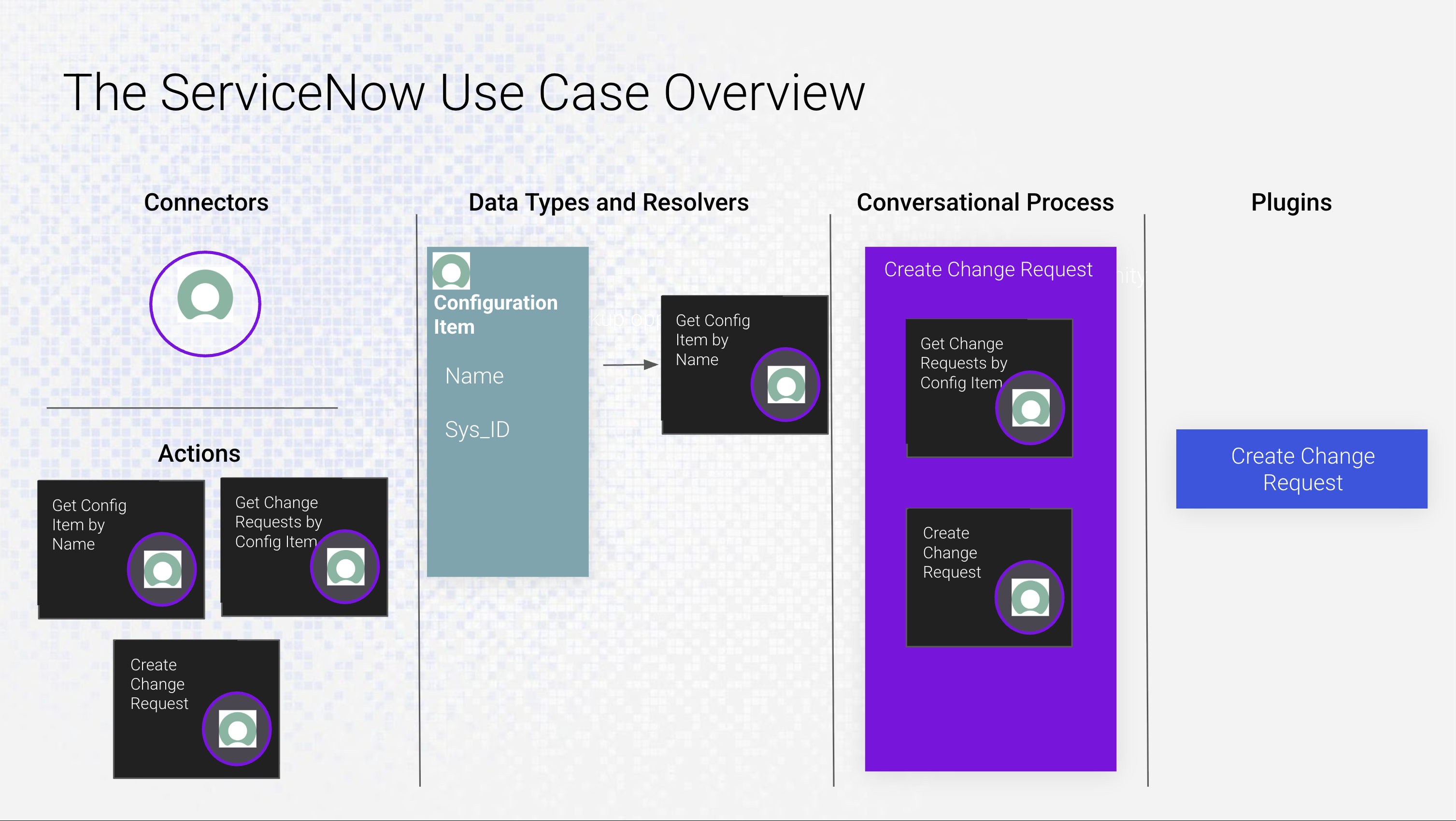
The diagram you are seeing above will be helpful to visualize what you are going to build in this exercise. These components, when finished, are what your use case will look like as it pertains to Agent Studio.
Scenario
Your organization has been tasked with bringing AI to make more intelligent decisions regarding IT. In this case, users have filed change requests in ServiceNow but don't have enough insight to determine the risk level of a given CR. Given that each CR has an associated Configuration Item, we can look back on historical CR close notes of related CRs of the same Configuration Item. Using the close notes, we can feed this information into a Moveworks LLM in order to auto-determine the risk level.
What you will experience as a developer
-
LLM Actions
LLM Actions in Agent Studio provide built-in capabilities to leverage large language model (LLM) functionalities directly within your Conversational Processes. These actions enable tasks such as summarization, reasoning, classification, data extraction, and content generation, allowing you to build workflows without custom integrations.
-
Custom Data Types
Data types are powerful when it comes to Agentic AI. When an LLM understands data types as objects rather than fields/values, it can inherently perform flexible lookups, disambiguate for clarification, and reliably hold context in memory to perform actions. -
ServiceNow Data Filtering
You will leverage ServiceNow's Encoded Query format in order to filter down to only data that we need at the field and record level
Components
- Connectors - The authorization and Base URI for the system we are connecting to. Once built, connectors can be re-used to build Actions.
- Actions - Individual API calls to that system for a specific purpose. These building blocks can be used to resolve data types (in this case, account) or as part of a conversational process where one or more actions can be sequenced together to perform a complex operation.
- Data Types and Resolvers - Once a data type is established, it can be resolved in many ways by adding more Resolver Strategies. This guarantees we can choose the correct object no matter how the user refers to it, and disambiguate when there are similar traits.
- Conversational Process - The business execution of Actions and Data Types. One or more Actions can be sequenced together to perform complex tasks.
- Plugins - The packaged output of the Conversational Process. The plugin is configured by providing positive and negative examples in order to fine-tune plugin selection, as well as who within the organization will have access to this plugin.
Updated about 1 month ago