
Data Mapper in HTTP Actions
Build complex JSON payloads directly in the HTTP Action body editor using Data Mapper syntax.
Overview
Data Mapper is a YAML-based transformation language for constructing and manipulating JSON payloads. Within Data Mapper, you can also use DSL expressions for string manipulation, type conversion, and computed values.
# Data Mapper with DSL expressions
ticket_number: number.display_value.$TRIM()
total: "$INTEGER(quantity) * $INTEGER(price)"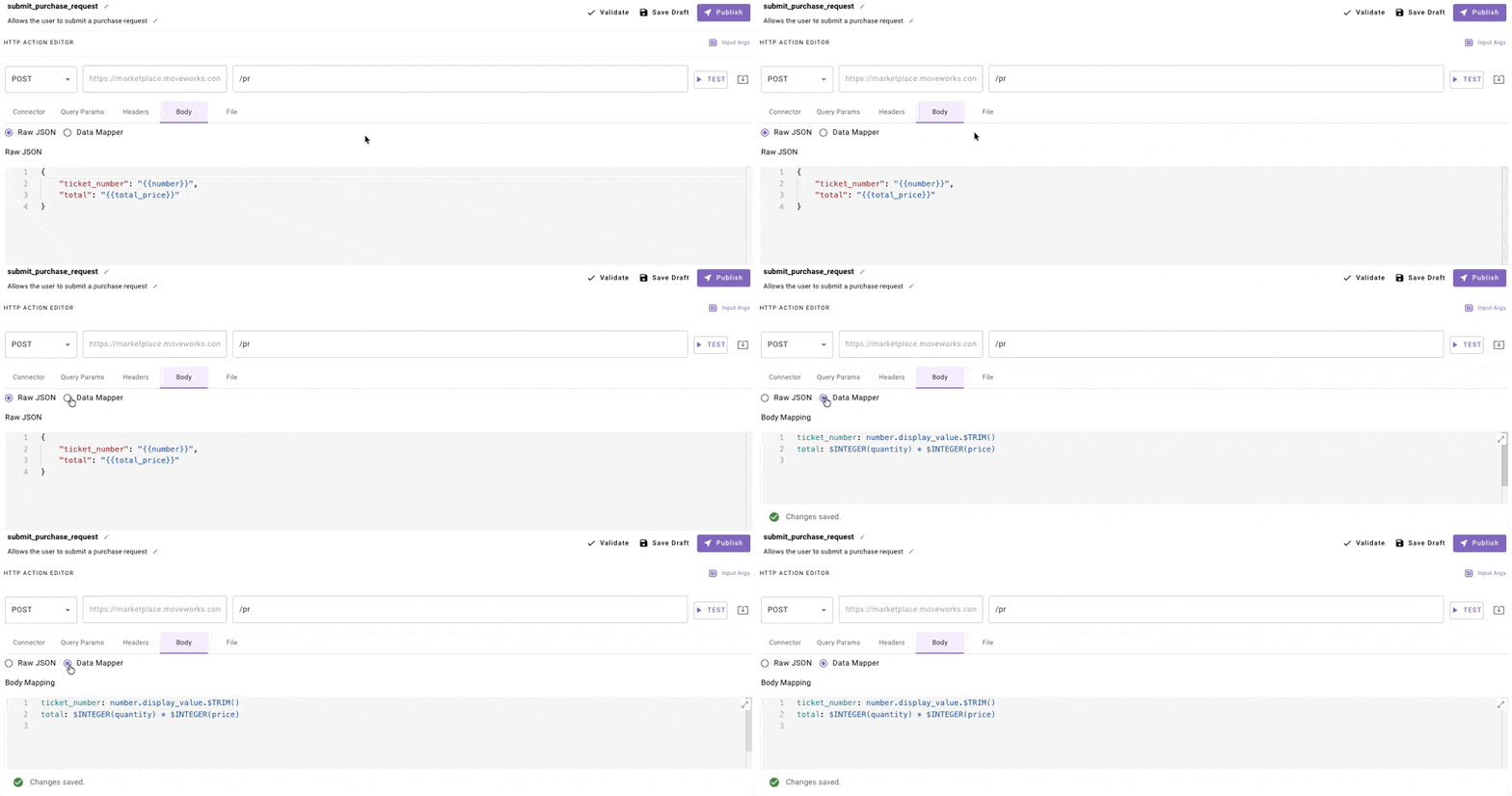
When to Use Data Mapper
Use Data Mapper when you need to:
- Build dynamic arrays of objects from input data
- Create nested JSON structures with computed fields
- Transform data before sending (filter, map, sort)
- Include conditional fields based on input values
Stick with Mustache for simple variable substitution where the JSON structure is static.
Quick Start
Mustache (Before)
{
  "user": "{{user_email}}",
  "message": "{{message_text}}"
}
Data Mapper (After)
user: user_email
message: message_text.$TRIM()
Both produce the same output for simple cases. Data Mapper is useful when you need array manipulation or conditional logic.
Building Complex Payloads
Example 1: Create a List of Objects
Scenario: Send a bulk update request with multiple items.
Input Data:
{
  "items": [
    {"id": "001", "name": "Item A", "quantity": 5},
    {"id": "002", "name": "Item B", "quantity": 3}
  ]
}
Data Mapper:
updates:
  MAP():
    items: items
    converter:
      item_id: item.id
      item_name: item.name.$UPPERCASE()
qty: item.quantityOutput:
{
  "updates": [
    {"item_id": "001", "item_name": "ITEM A", "qty": 5},
    {"item_id": "002", "item_name": "ITEM B", "qty": 3}
  ]
}
Example 2: Conditional Fields
Scenario: Include a field only when a condition is met.
Input Data:
{
  "priority": "high",
  "description": "Server is down"
}
Data Mapper:
ticket:
  description: description
  urgency:
    CONDITIONAL():
      condition: priority == 'high'
      on_pass: "'urgent'"
on_fail: "'normal'"Output:
{
  "ticket": {
    "description": "Server is down",
    "urgency": "urgent"
  }
}
Example 3: Flatten Nested Data
Scenario: Extract values from a nested API response.
Input Data (ServiceNow-style):
{
  "number": {"display_value": "INC12345", "value": "INC12345"},
  "state": {"display_value": "Open", "value": "1"},
  "assigned_to": {"display_value": "John Doe", "value": "user123"}
}
Data Mapper:
ticket_number: number.display_value
status: state.display_value
assignee: assigned_to.display_value.$TRIM()Output:
{
  "ticket_number": "INC12345",
  "status": "Open",
  "assignee": "John Doe"
}
Example 4: Filter and Transform Arrays
Scenario: Send only high-priority items to an API.
Input Data:
{
  "tasks": [
    {"name": "Task 1", "priority": 1},
    {"name": "Task 2", "priority": 3},
    {"name": "Task 3", "priority": 1}
  ]
}
Data Mapper:
high_priority_tasks:
  FILTER():
    items: tasks
condition: item.priority == 1Output:
{
  "high_priority_tasks": [
    {"name": "Task 1", "priority": 1},
    {"name": "Task 3", "priority": 1}
  ]
}
Example 5: Build Request from 2D Array
Scenario: Transform a Snowflake/SQL response into structured JSON.
Input Data:
{
  "columns": ["id", "name", "email"],
  "rows": [
    ["001", "Alice", "[email protected]"],
    ["002", "Bob", "[email protected]"]
  ]
}
Data Mapper:
users:
  MAP():
    items: rows
    converter:
      MERGE():
        FLATTEN():
- "item.$MAP((x, i) => {columns[i]: x})"Output:
{
  "users": [
    {"id": "001", "name": "Alice", "email": "[email protected]"},
    {"id": "002", "name": "Bob", "email": "[email protected]"}
  ]
}
Common Operators Reference
| Operator | Purpose | Example |
|---|---|---|
MAP() | Transform each item in array | MAP(): { items: list, converter: ... } |
FILTER() | Keep items matching condition | FILTER(): { items: list, condition: item.active } |
CONDITIONAL() | If/else logic | CONDITIONAL(): { condition: x > 5, on_pass: ..., on_fail: ... } |
MERGE() | Combine multiple objects | MERGE(): [obj1, obj2] |
FLATTEN() | Flatten nested arrays | FLATTEN(): [arr1, arr2] |
CONCAT() | Join strings | CONCAT(): { items: [a, b], separator: ", " } |
LOOKUP() | Map values | LOOKUP(): { key: status, mapping: {"1": "Open"} } |
String Functions
Apply directly to field values:
# Trim whitespace
name: user_name.$TRIM()

# Convert to uppercase
code: product_code.$UPPERCAES()

# Convert to lowercase
email: user_email.$LOWERCASE()

# Parse as integer
count: "$INTEGER(quantity_string)"
Troubleshooting
Tip: Test with hardcoded values first, then add Data Mapper transformations one at a time.
Syntax Errors
Data Mapper uses YAML. Watch for:
- Indentation: Use consistent spaces (not tabs)
- Quotes: String literals need single quotes inside:
"'literal string'" - Colons in values: Wrap in quotes if value contains
:
Wrong:
message: Hello: WorldCorrect:
message: "'Hello: World'"Empty Arrays
If MAP() or FILTER() returns empty, check:
- The
itemspath is correct - Input data actually contains the expected array
- Filter condition isn't too restrictive
Debugging
- Test your API with hardcoded values first
- Add one Data Mapper transformation at a time
- Check the Response tab to see actual output
Migration from Mustache
| Mustache | Data Mapper Equivalent |
|---|---|
{{variable}} | variable |
{{{array}}} (stringified) | array (as actual array) |
Key difference: Data Mapper preserves types. Arrays stay as arrays, numbers stay as numbers. No need for $STRINGIFY_JSON() workarounds.
Updated 20 days ago