
Ticket backpolling for EXI and Knowledge Studio
Back polling historical tickets is generally required and recommended while setting up Employee Experience Insights and Knowledge Studio, in order for Moveworks AI assistant to analyse historical tickets and derive insights. It is also required when customers would like to backfill new custom attributes for filtering and analysis.
It is generally recommended that Moveworks team does the initial setup for EXI and Knowledge Studio which includes the initial back polling for EXI and additional configurations. You can communicate your requirements for required filters and time-range for historical backfill to Moveworks Team. This is important, otherwise EXI will be limited to tickets only polled since launch.
This capability will prove useful especially for scenarios when customers would like to backfill a new configured ticket attribute on older data or for recovering dropped tickets.
Steps to back poll historical tickets for EXI
- Navigate to Moveworks Setup from your org's MyMoveworks portal
- Navigate to Data Ingestion > Ticket Backpolling
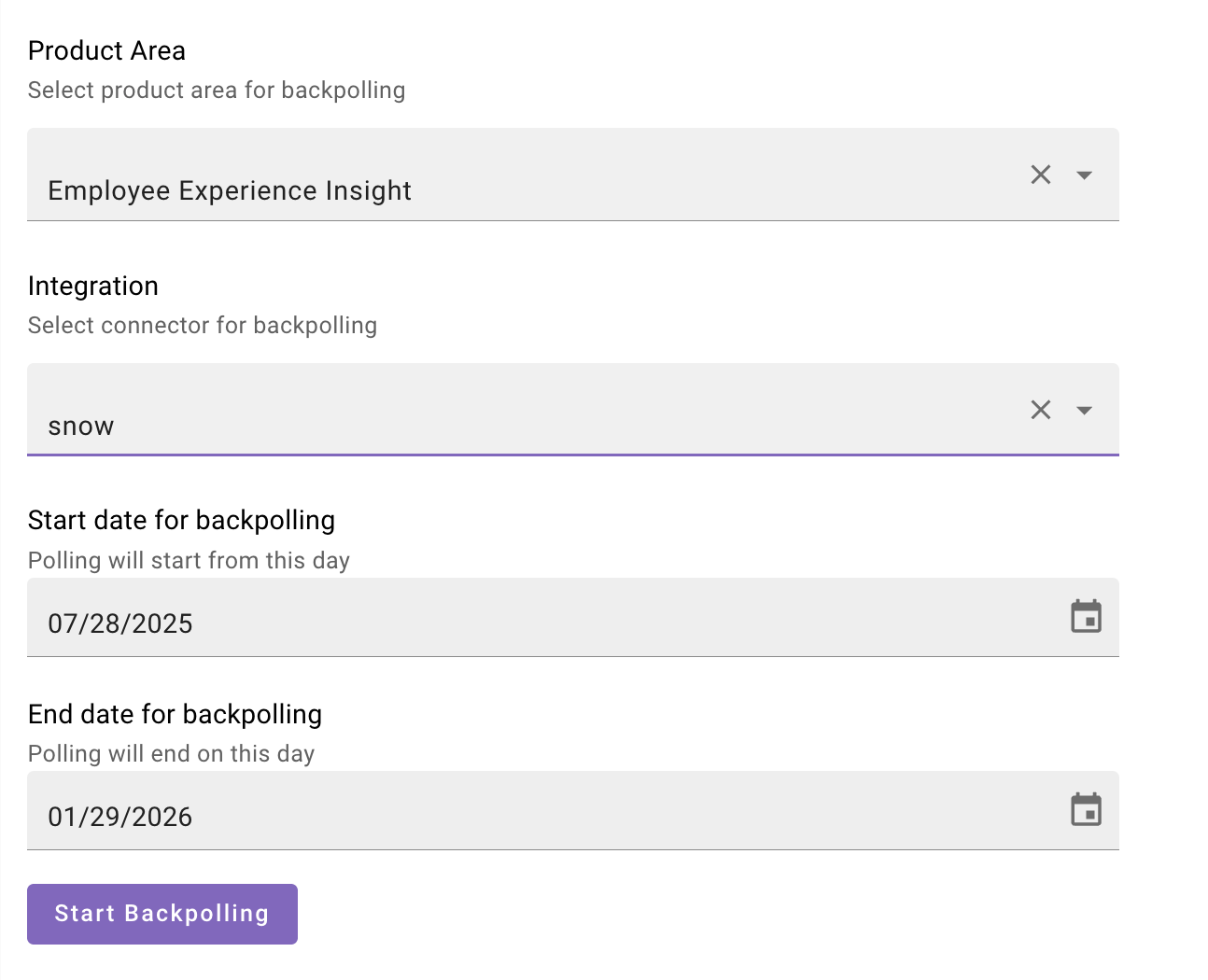
- Select the product area as Employee Experience Insights (EXI)
- Choose the Integration. This should be the same connector that is configured for Ticketing in your org
- Specify the start and end date for Ticket Backpolling. Note: It will include data from 00:00 UTC of the start date to 11:59:59 UTC of the end date
- Click on Start Backpolling button
- Once you initiate the back polling, the job will start in some time
- Once finished, you can view the status, records polled and records processed in the logs table
- Once ticket backpolling finishes, allow several hours to days for internal data processing to complete based on your organization's ticket volume
Steps to back poll historical tickets for Knowledge Studio
-
Navigate to Moveworks Setup from your org's MyMoveworks portal
-
Navigate to Data Ingestion > Ticket Backpolling
-
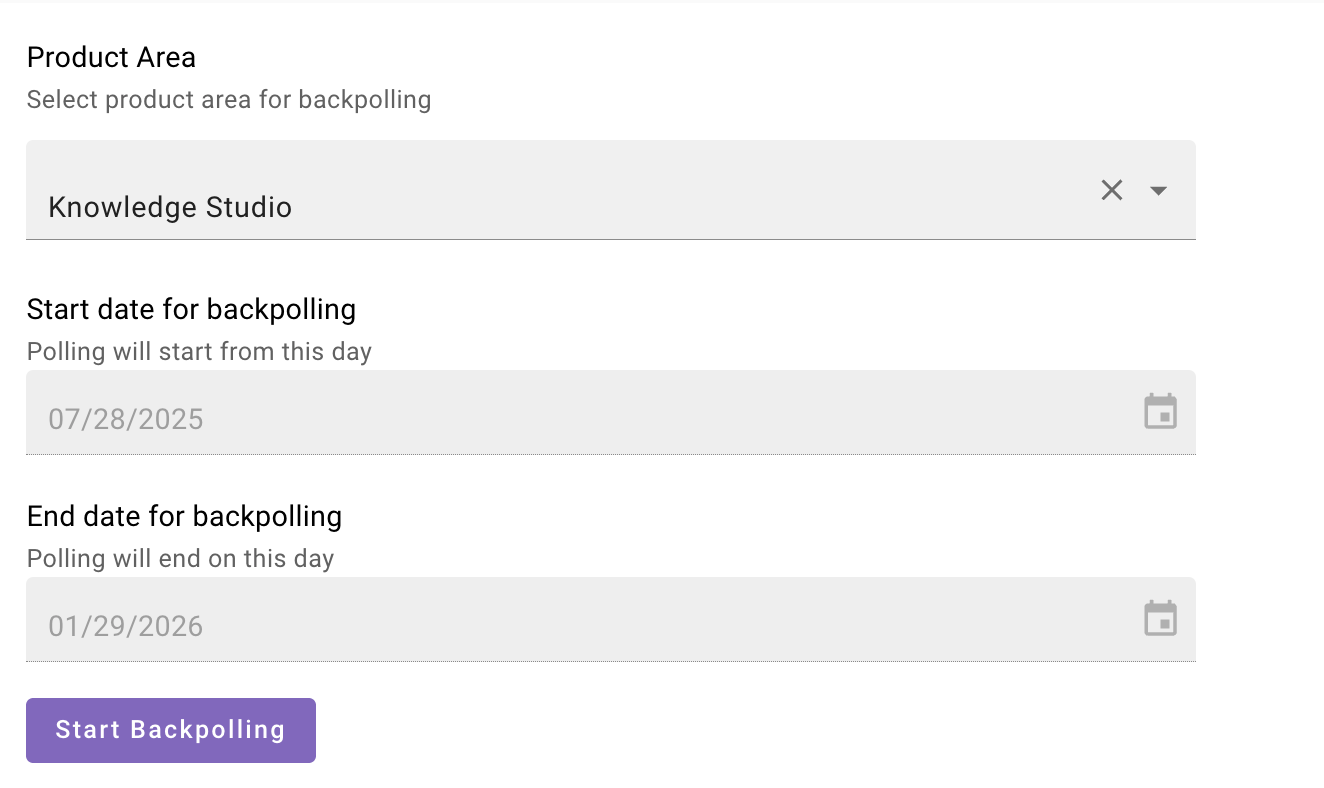
Select the product area as Knowledge Studio
Important Note
- Knowledge Studio ticket backpolling runs across all integrations. The integration selection field is not available for this feature.
- By default, Knowledge Studio ticket backpolling is configured to run for the past 6 months. Date ranges cannot be modified and the date selector is disabled.
-
Click on Start Backpolling button
-
Once you initiate the back polling, the job will start in some time
-
Once finished, you can view the status, records polled and records processed in the logs table
-
Once ticket backpolling finishes, allow several hours to days for internal data processing to complete based on your organization's ticket volume
Logs table
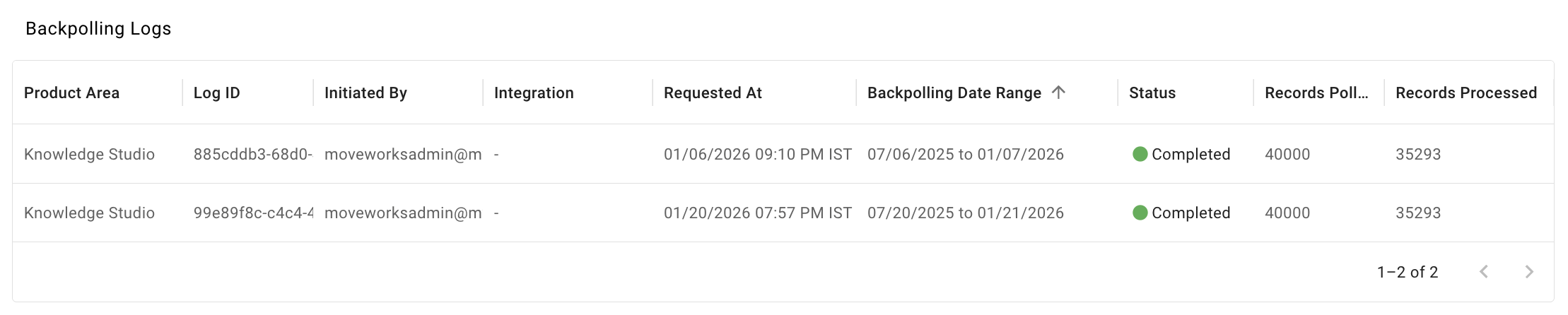
In the Logs table, you can find specific details of each back polling requests made.
| Column Name | Description |
|---|---|
| Product Area | Employee Experience Insights or Knowledge Studio |
| Log ID | Unique ID for back polling job |
| Initiated By | User who is triggering the back polling job |
| Integration | Integration ID which is leveraged to back poll historical tickets. Note: Not Applicable in case of Knowledge Studio |
| Requested At | Date and time at which Ticket backpolling was requested |
| Backpolling Date Range | Start date and end date of back polling job |
| Status | Status of the back polling job (Initializing, In progress, Completed) |
| Records Polled | # of Ticket records polled |
| Records Processed | # of Ticket records processed |
Example of EXI Logs

Example of Knowledge Studio Logs
FAQs/ General Questions
- Can this be used to back poll tickets for Triage?
- No - this is specifically built for Knowledge Studio and EXI configurations.
- Will I get to know, if the Ticket back polling fails?
- There are three status: Initialising, In Progress, Complete. Metrics “Records polled” and “Records processed” can be used as a proxy to know the status of ticket backpolling.
- Are there any guard-rails or limits on duration?
- Maximum of 2 years of historical data can be back polled at once.
- Only one request can be triggered at a time for an integration.
- Note: Knowledge Studio ticket backpolling is configured to run for the past 6 months. Date ranges cannot be modified and the date selector is disabled.
- How much time does it generally take for back polling to complete?
- It depends on the volume of tickets for the specified duration. If the ticket volume is very high, this may take up to a few days.
- Can I select integration in case of Knowledge Studio?
- No, Knowledge Studio ticket backpolling runs across all integrations. The integration selection field is not available for this feature.
- Why does the Integration column in the logs table always show '-' for Knowledge Studio?
- Knowledge Studio ticket backpolling processes data across all integrations, so no specific integration applies. Therefore, the integration column displays '-' to indicate this is not applicable.
- What is the general recommendation for back polling tickets?
- If you want to back poll for more than year worth of data and the volume is very high, we recommend splitting the back polling task into relatively smaller durations (say 3-6 months and trigger multiple runs one after another.
Updated 15 days ago