
Designing an AI-first Service Desk
AI-First Service Desks
Service desks have become a standard practice in enterprise employee support. IT was the first mover – creating versions of the ITIL (IT Infrastructure Library) which outlined standard frameworks for how support desks should work. However, the latest version of ITIL (v4) was released in Feb 2019 – before the era of Agentic AI.
Today, other domains have adopted their own variations like HR Case Management, or Procurement Request Management – however, few have considered what it takes to design a truly AI-powered service desk.
At Moveworks, we’ve worked with many large enterprises to transform their service desk to be AI-first. The results have been impressive, including…
- Accelerated Ticket Resolution. AI-first service desks that extend Moveworks to provide issue-specific details to assignment groups experience an MTTR that is ~40% faster & FCR (first call resolution) rates that are as high as 80%.
- Improved Self-Service. AI-first service desks resolve issues before they’re even escalated. For example, Databricks handles 70% of ticket orders as “no touch” with Moveworks.
You can learn more about these key stories here.
What’s wrong with the current service desk model?
Our goal is NOT to rip & replace your existing IT service desk structure – it works great for getting issues to the right team & following key SLAs. But frankly, it’s highly inefficient at routing issues to the right people with the right information.
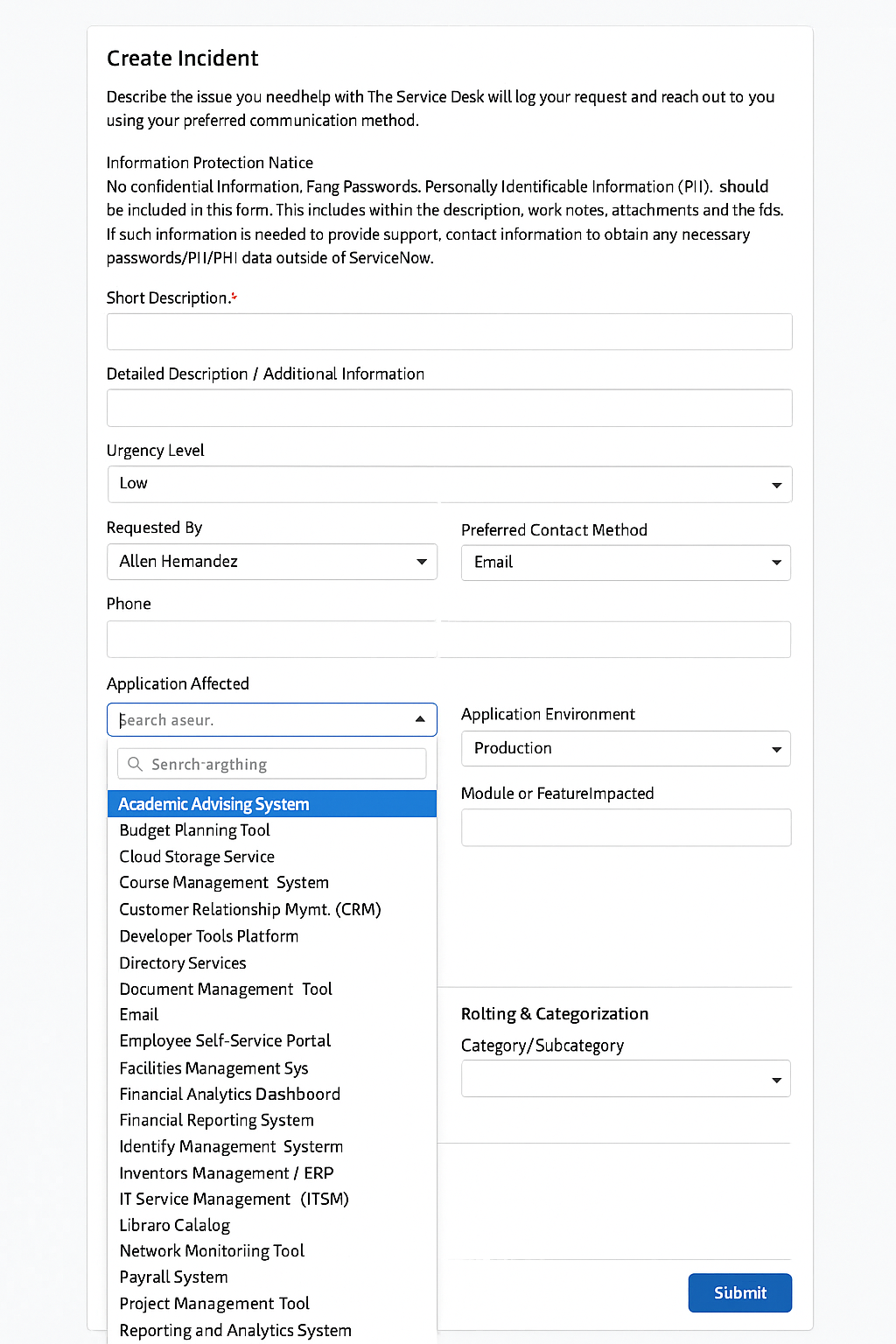
Ancient approaches have tried to solve this in the past by putting the burden on the employee.
- They expect employees to identify the exact application they’re using (e.g. “SAP ECC v12.4.2” or “SAP v8.39.2”)
- They expect employees to classify the exact issue type (e.g. is this a “VPN connection” or “VPN configuration” issue)
- They expect on employees to know corporate acronyms or tool names (“Do you mean the BCS or the CIAM system?”)
This is an outdated approach. We’ve seen that organizations which put this classification burden on employees experience as much as 3x more ticket reassignments as issues are ping-ponged across service desk teams.
What does the ideal service desk look like?
At Moveworks, we are committed to ensuring that our customers get the best possible results from their Service Management experience – powered by Agentic AI.
As we’ve researched this space, we found that the ideal world means that…
- Every issue is routed to right assignment group.
- Every issue is enriched with the right supplemental information so expert teams can resolve it in one go.
- Every employee can submit the minimum amount of information needed to make (1) & (2) happen.
The answer is not a form. We intentionally limited the scope of Rich Ticket Filing feature to avoid (1) massive picklists and (2) conditional fields. We worked with over 50 customers to analyze their intake process and found that these fields are the biggest culprits of inaccurate triage & “rage quit” behavior from employees where they file a ticket via email or intentionally file it to a random service desk.
Rich Ticket Filing was designed to solve for the following scenarios
- Priority levels
- “Submit on behalf of” options
- Callback information
How do you extend Moveworks to get better results?
Strategy 1: Issue-specific plugins
Our leading customers have created & deployed issue-specific plugins to intercept every issue through their Moveworks AI Assistant.
For example…
-
This Twilio troubleshooting plugin automatically remediates 80% of Twilio-related issues for one customer. The plugin triggers automations & shows knowledge articles based on the nature of the issue. If it can’t solve it, it provides a detailed ticket and skips the L1 service desk – getting it straight to L2 with all the details.
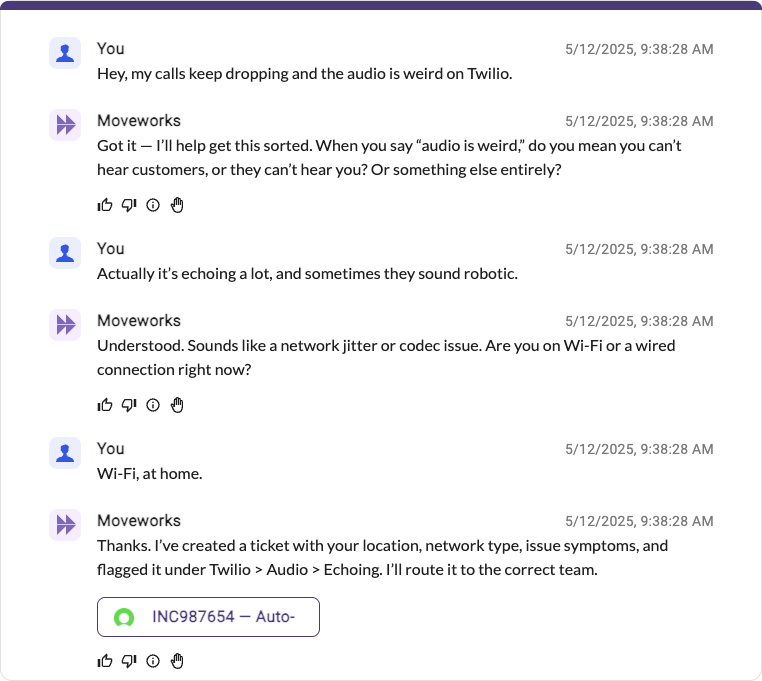
-
And this internal application plugin (anonymized) helped another customer improve their FCR rates by nearly 3x since they could provide detailed information like where the user was connecting from, or which VPN gateway they were using.

There’s a few key benefits of this approach
- Our Agentic Reasoning Engine is able to understand which issue a user is describing, and starts the right plugin to get the issue to the right team with the right details.
- You can trigger automations that autonomously resolve the issue, without ever needing to create a ticket for human review
- Your employees do not need to navigate hundreds of dropdown options.
This strategy follows a “citizen developer” model. Each assignment group is responsible for maintaining their plugin & making continuous upgrades. On a regular basis, they review which issues are NOT being solved by the assistant and make improvements to their plugins.
Strategy 2: Outage-focused plugins
This strategy can be used in addition to strategy 1 for better results.
Outage Initiation
When a service desk lead recognizes that there is a major incident, they can initiate those major incidents through their Moveworks AI Assistant. We saw our first customers build this at the launch of our Agentic Automation Engine
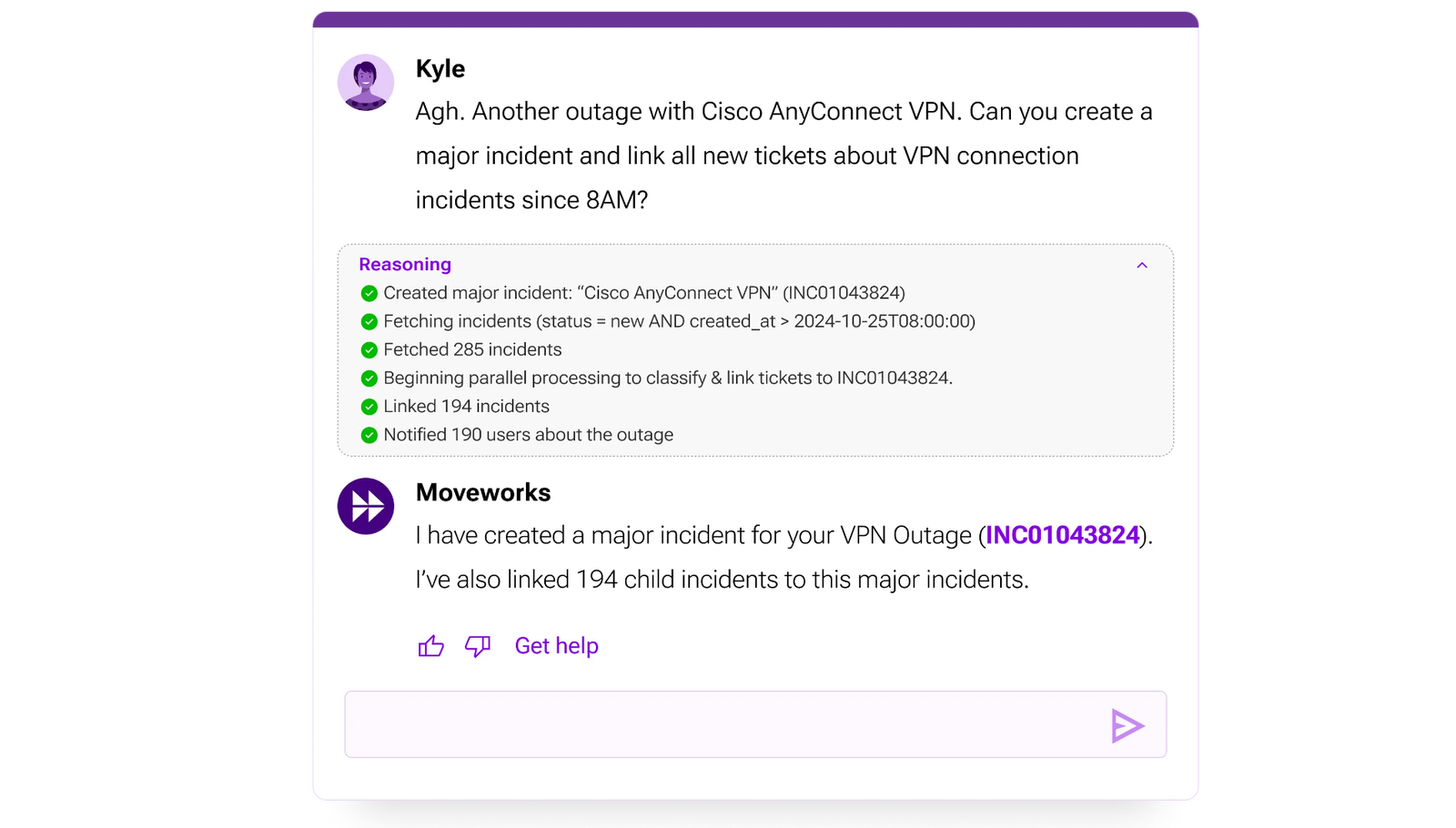
- Slot Resolvers collects requirements to create a major incident (title = “Cisco AnyConnect VPN Outage”, owner=Kyle)
- Slot Resolvers determine the filtering criteria for child incidents (status = ‘new’, created_at > 2024-10-25T08:00:00)
- The Action Orchestrator uses a “for loop” control flow to paginate over the ServiceNow APIs and retrieve all tickets that meet the criteria
- The Action Orchestrator uses “parallel processing” control flow to process each ticket that met the criteria. This completes the task much faster.
- The Action Orchestrator uses LLM actions to classify each ticket as related to the major incident based on the ticket description.
- The Action Orchestrator uses notification actions to inform the employees who filed the tickets that their ticket is related to the outage.
- The Action Orchestrator keeps the incident manager apprised throughout the process with progress updates.
Outage Checks
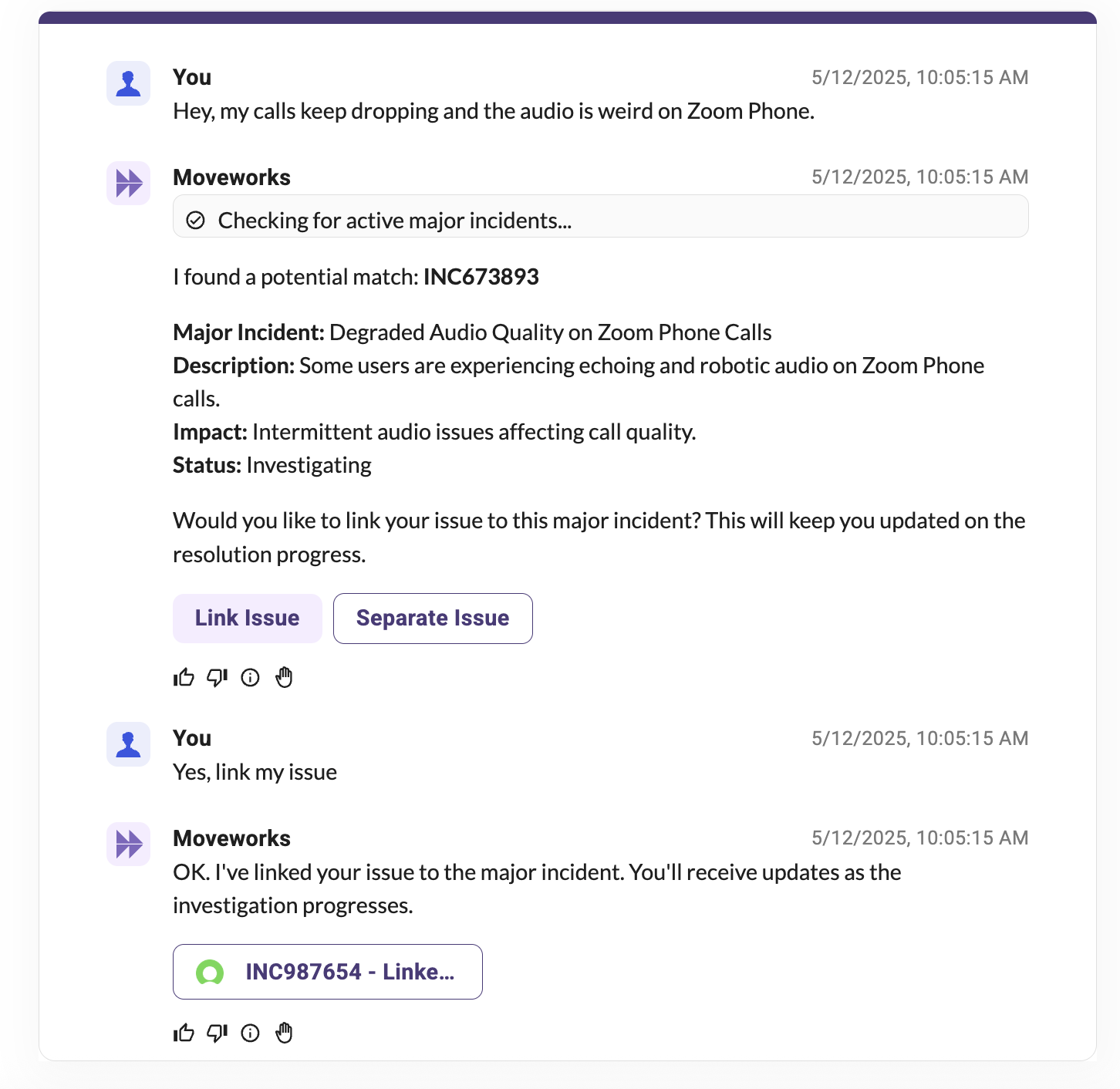
Because our Agentic Reasoning Engine is capable of inspecting multiple plugins (read more on multi-plugin selection), you can deploy a CheckOutage plugin which queries open major incidents from your major incident table.
When a user describes that something might not be working, the CheckOutage plugin can compare the issue against all active major incidents and offers to “link” their issue as a child incident so they can get updates when the issue is resolved.
Strategy 3: Triage Follow-ups
This strategy is generally used to supplement strategy 1 for assignment groups that don’t manage their own plugins.
In this strategy, you let your users submit their issues “as-is” to an L1 service desk. Then, you wait for Moveworks Triage to classify the issue & set fields like cmdb_ci, assignment_group, and more.
Triage continuously learns from your service desk, so there’s less setup involved to get it to the right group. However, this means that you will need to reach back out to the user to get more input.
You can configure your ITSM tool to respond to triage activities completed by Moveworks (e.g. using a business rule in ServiceNow). Using our Events API, you can reach out with follow-up questions on behalf of the service desk, without building a dedicated plugin in Moveworks.
Currently, to configure follow-up questions, you’ll need to manage the configuration in your ITSM (e.g. a u_intake_questions attribute on the assignment_group – you can then send a proactive message to users via your Moveworks Assistant, asking for those details.
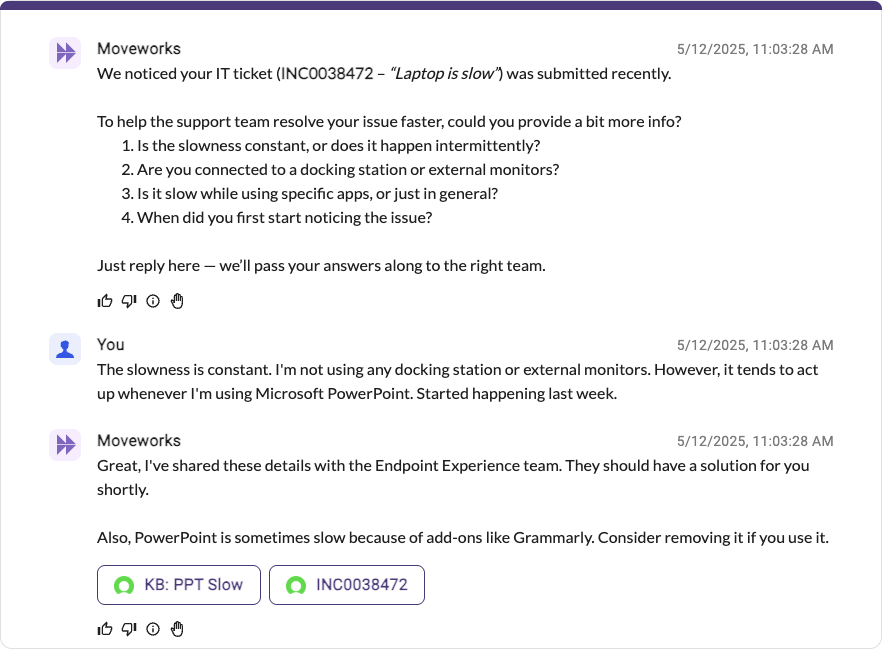
To determine your intake questions, you can set them up a few different ways
- Manually configure. Instruct each assignment group lead to update the intake questions attribute on a regular basis.
- Periodically mine. You can use LLMs to retrieve the last N tickets that were assigned to an assignment group. Then parse their worknotes & comments for questions that should be added to the
u_intake_questionsattribute.- This can be done via a Moveworks plugin that targets a specific assignment group & uses LLM actions.
- It can also be done by built-in AI workflows from your ITSM vendor, like with the ServiceNow GenAI Controller.
- [Future] Dynamically mine. Our Triage 2.0 roadmap, plans to share the tickets that were used as “supporting evidence” to perform the triage. If your organization has good ticket hygiene, you can use that to mine follow-up questions / required information from historical similar tickets using LLMs on-the-fly – generating a unique set of questions tailored to every issue.
FAQ
Q: What do I do if I need to communicate about open issues so people don’t file tickets?
A: To effectively communicate about open issues and discourage the creation of unnecessary tickets through Moveworks, consider implementing a multi-pronged approach: proactive communication, targeted training, and leveraging Moveworks’ capabilities.
- Proactive Communication: Leverage Moveworks Employee
- Quick Documentation: Quickly document known information using a Knowledge Article, or Moveworks FAQ.
- Develop issue-specific plugins: If your organization has specific issues that can be addressed with automation, consider developing
- Disclaimers: If you would like a disclaimer to appear in every Moveworks message. You can contact Moveworks Support to add a Disclaimer message.