
Moveworks FAQ (Google Sheets Integration)
Overview
The Moveworks platform provides an extensible method to add Knowledge FAQs to the bot by allowing users to add FAQ style question and answer snippets that may not warrant a full knowledge base article. Moveworks Answers leverages Google Sheets to import these FAQs into the bot and provide them to users in chat.
How to access the Moveworks FAQ Sheet?
Moveworks uses Google Sheets to quickly and easily add additional answers to your Moveworks bot. To start adding Knowledge FAQs to the bot, reach out to your Customer Success team and they will provide a link to a Google Sheet where you can enter in your FAQs. Our Customer Success team will then import the FAQs in this sheet into the bot, and start serving these Answers in chat.
If your organization uses GSuite products, you can access the Google Sheet as long as it is shared with your account. If your organization does not use GSuite products, your non-Google email can be shared as an editor to the sheet utilizing the “Collaborate as a visitor” feature detailed in Google’s documentation.
How does FAQs work with Search Relevancy and other Content?
FAQs are treated the same as other content such as knowledge articles and files. There is no specialized weighting that weights it more authoritative than other sources. Moveworks uses the relevancy of the text itself to decide the relevancy of the FAQ. If you are seeing discrepancies where a FAQ is being weighted above or below a knowledge article or file that is more relevant, it is likely due to the wording of the FAQ text.
Getting Access to the Moveworks FAQ Sheet as a non-Google user
- Create a Google Account that is associated with your work email using the “Signup without Gmail” account creation option. Please ensure you are using the same email used to login to Moveworks Setup.
- Create the FAQ Sheet within Moveworks Setup (instructions here).
- This will grant access to the FAQ Sheet for your email address created in Step #1.
- After creating the FAQ Sheet, click on Edit.
- You will be redirected you to a Google Sheet that is unique to your organization and can be used to add FAQs.
Architecture
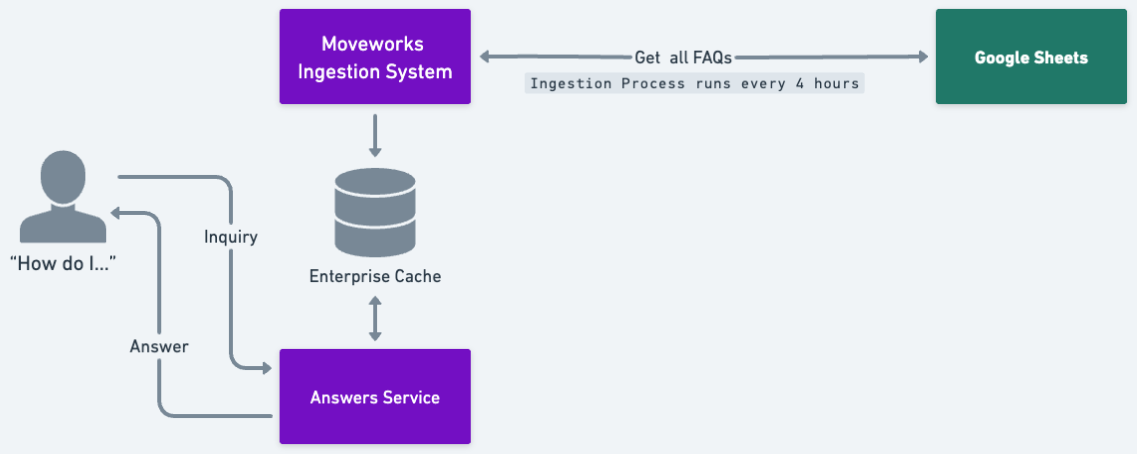
- Moveworks ingests and update FAQ from the sheets.
- We use an Airflow job every four hours to fetch the shared Google Sheet using Google’s provided API and index the data.
- Moveworks runs the ingestion workflow and stores the FAQ in the cache.
- We store the FAQ in an enterprise cache which has the data bucketed per customers and store this data in an encrypted format.
- Moveworks serves FAQ as an answer to the user.