
Permission Mirroring - Update Set Modules
Overview
Moveworks Update Set Modules were designed to be modular and bite-sized. Rather than shipping one giant update set, we chose to ship our updates as “Modules.” There are a couple of key benefits to this approach.
- Feature Selection: Think of our list of Modules as a menu: order what you want, and remove what you don’t. It’s customized to your needs and feature requests.
- Easier Updating: When we push out updates to our modules, we want to minimize the number of merge conflicts ServiceNow identifies. Keeping Modules small lets us only update what’s required, rather than having to do a clean install each time.
Installing an Update Set Module
To install a Module, you can follow the three steps below, or watch this video.
- Download the Update Set Module (XML) files here.
- Import these under “Retrieved Update Sets” in your ServiceNow instance.
- Commit the changes and the app will show up in “My Company Applications”.
Updating an Update Set Module
To update a Module, you will follow the same steps as above. There may be some merge conflicts when installing. If you’re having trouble resolving these, reach out to Moveworks Support for assistance.
In general, it is safer to accept the remote update and then ask Moveworks to run any configuration scripts for that module.
Base (base)
Provides Core Functionality to Support Our Modules
What’s Inside?
User Role
The moveworks_user role must be granted to our service account for our Update Set Modules to function properly. It also is how we restrict access to custom APIs and Tables.
System Properties
System Properties help our GlideScripts access the right constants (values) for your instance. For example, we might need to look up our bot’s sys_id, or change an email color to match your corporate theme. We also keep these for internal reporting and validation. Since, in this case, Moveworks’ code lives in an external system, our engineers need visibility into versioning, as well as the ability to validate expected results/contracts when our services start up. These attributes are exposed over the /version endpoint and we maintain them for audit purposes.
moveworks.base.version- identifies the version of this Update Set Module.moveworks.base.api.sys_id- identifies thesys_idof the Scripted REST API that we install in order to interact with your system.
Scripted REST API
The Scripted Rest API handles authentication for our custom endpoints to make sure only our user has the ability to send requests to that endpoint. It also serves as the parent for all endpoints in future modules.
Scripted REST Resources
We have one Scripted REST Resource that ships with the base module.
GET moveworks/base/version - this endpoint lets our CS team know what version you have for each Update Set Module.
Example Request
Example Response
Script Includes
We ship a MoveworksBaseUtils sys_script_include with our base module to serve as system property accessors and improve our ability to work with GlideRecords.
Security ACLs
To prevent unauthorized access to the Scripted REST API, we have created an ACL (type = execute) and associated it with the moveworks_user role.
Forms & KBs: UserCriteria & Roles (acl)
Respect User Criteria & Roles When Serving Content In-Bot
What’s Inside?
System Properties
moveworks.acl.version- identifies the version of this Update Set Module. Maintained for the same reasons as in thebasemodule.moveworks.acl.check_legacy_entitlements- determines if we evaluate User Entitlements to determine access to forms. We need this flag to minimize the performance cost of running our script based on your instance’s configuration. When disabled, it reduces the number of GlideRecord lookups by roughly 8 lookups per record.
Scripted REST Resources
GET moveworks/acl/get_access_info - this is our production endpoint which returns information like User Criteria sys_ids so that we can support ServiceNow’s permission rules on our servers.
Example Request
Example Response
PUT moveworks/acl/config - this endpoint configures our Update Set Module to ignore/evaluate User Entitlements by updating the system property moveworks.acl.check_legacy_entitlements to True or False accordingly. Whether this is set to True or False depends on the ServiceNow instance’s usage/configuration details.
Example Request
Example Response
Data Extracted
We extract sys_ids wherever possible to protect the anonymity of user & resource constraints. These raw materials enable us to be accurate without sacrificing confidentiality. Moveworks considers all of the following for any modern ServiceNow implementation.
- User:
- A list of UserCriteria sys_ids that a user satisfies (UserCriteriaLoader).
- A list of roles that a user has.
- Knowledge Articles:
- A list of Available UserCriteria sys_ids (can_read_user_criteria)
- A list of Not Available UserCriteria sys_ids (cannot_read_user_criteria)
- The sys_id of the knowledge base to which an article belongs (see below).
- Knowledge Bases:
- A list of “Available For” User Criteria (kb_uc_can_read_mtom).
- A list of “Not Available For” User Criteria (kb_uc_cannot_read_mtom).
- Catalog Items:
- A list of roles that have access to this Catalog Item.
- A list of “Available For” User Criteria (sc_cat_item_user_criteria_mtom).
- A list of “Not Available For” User Criteria (sc_cat_item_user_criteria_no_mtom).
If your system is equipped with legacy User Entitlements, Moveworks will also ingest the following information.
- User:
- Company sys_id
- Location sys_id
- Department sys_id
- Group sys_ids
- User Criteria Records related to Catalog Items from the following tables
- “sc_cat_item” +
- “user”, “company”, “dept”, “location”, “group” +
- “mtom”, “no_mtom”
FAQ
Q: What security measures are in place to restrict access to this custom endpoint?
We leverage ServiceNow’s Security ACLs to restrict usage of this endpoint to users with either the admin role or the moveworks_user role.
Q: How can I review the contents of an Update Set Module?
You can review changes under “My Company Applications” (search for “moveworks.”). We’ll also share some documentation on the contents of each of our modules.

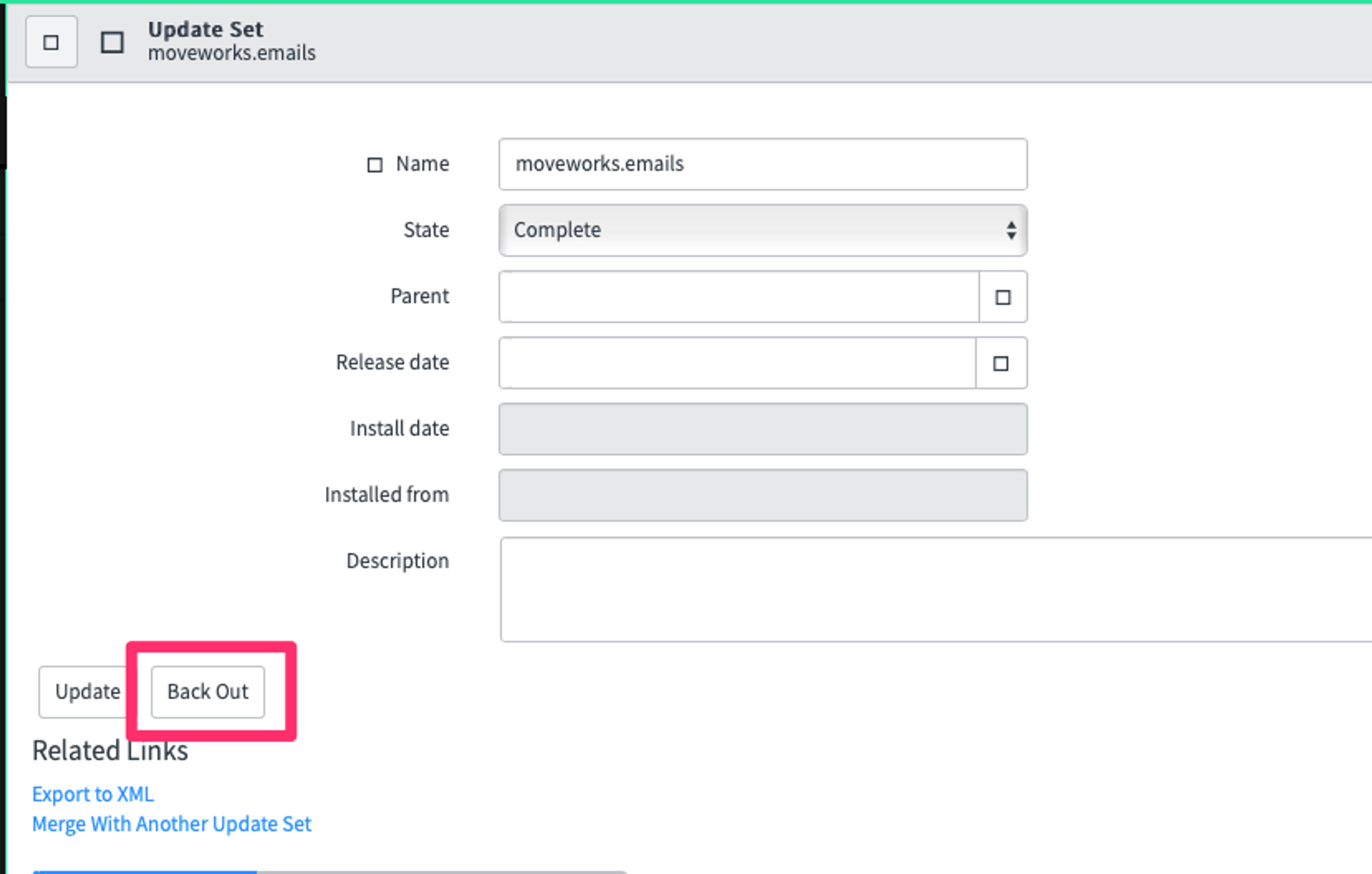
Q: If I ever need to revert changes from an Update Set Module, can I?
If you ever need to revert changes you can do so easily with the click of a button. Simply find the update set under “Retrieved Update Sets” and select “Back Out”.
Q: Does the Moveworks Update Set support HR User Criteria?
Yes, the Moveworks Update Set does support ingestion of HR User Criteria such that it can be enforced in the bot, just like IT User Criteria. However, if you are leveraging the Human Resources: Core application to build out your HR knowledge in your ServiceNow instance, you will likely need to additionally install the HR_ACL_Patch update set due to a limit in cross-scope privileges on the Moveworks Platform Permissions REST API. Please reach out to Moveworks support for more information on this.