
Configure FAQs
What is the FAQs module in Moveworks Setup?
The FAQs module provides a way to add knowledge FAQs to the Moveworks bot to be served as answers in-chat. These FAQs are question and answer style snippets that can quickly answer common questions that the user may ask the bot. Moveworks Answers skill leverages Google Sheets to import these FAQs into the bot and provide them to users in chat.
Configuring FAQs
Prerequisites
- Ensure you have access to Moveworks Setup.
Creating a new FAQ list
-
Go to the FAQs section in Moveworks Setup by clicking on Search, then Configure Search, and lastly FAQs.
-
Click Setup FAQs on the top left and follow the on-screen prompts to create your FAQ spreadsheet.
-
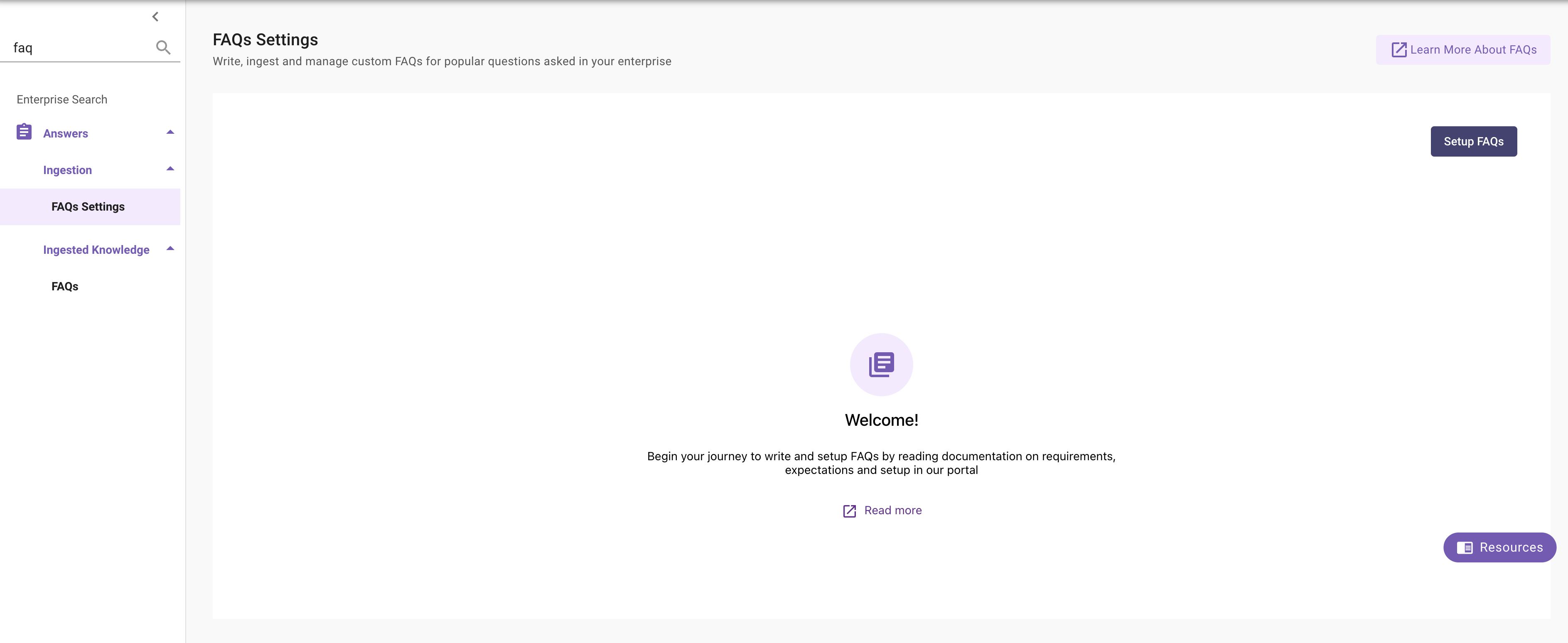
Click on Edit.
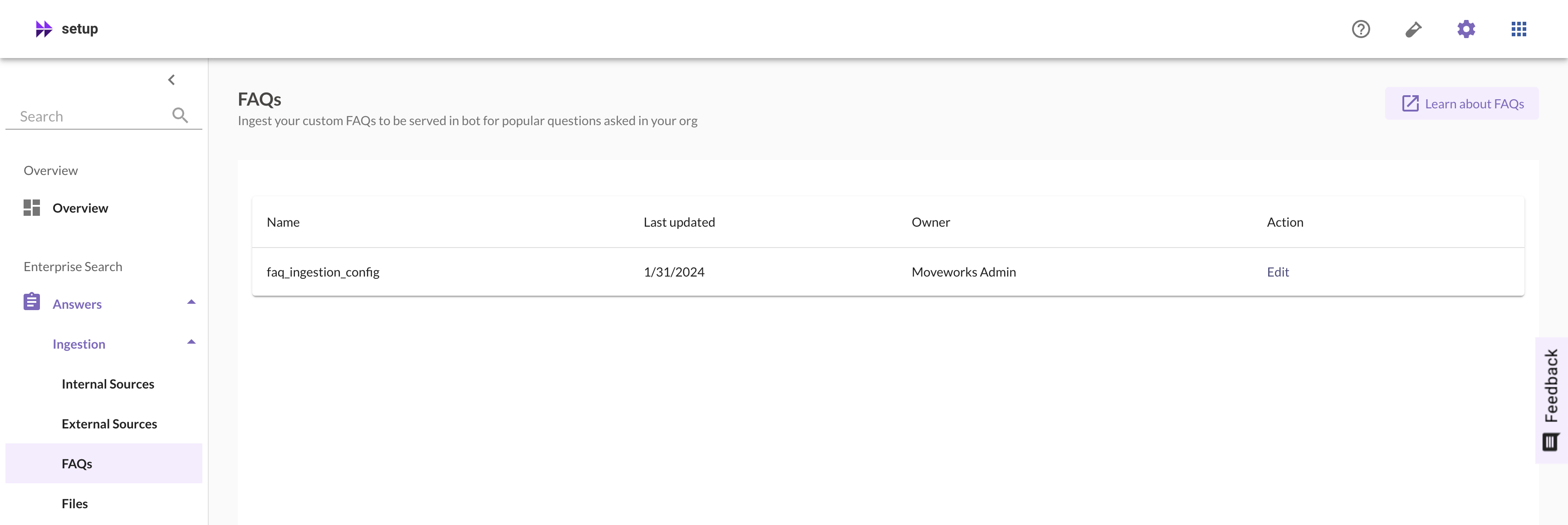
-
You will be redirected you to a spreadsheet in Google Sheet that is unique to your organization and can be used to add FAQs.
Configure Resource Permissions
FAQs require a Resource Permission rule to be served by the bot. Without this step, ingested FAQs will show as indexed but will not be returned as answers.
- Navigate to
Core Platform > Resource Permissions > Permission Rules - Click
Create - Configure the rule as follows:
- Click
Submit
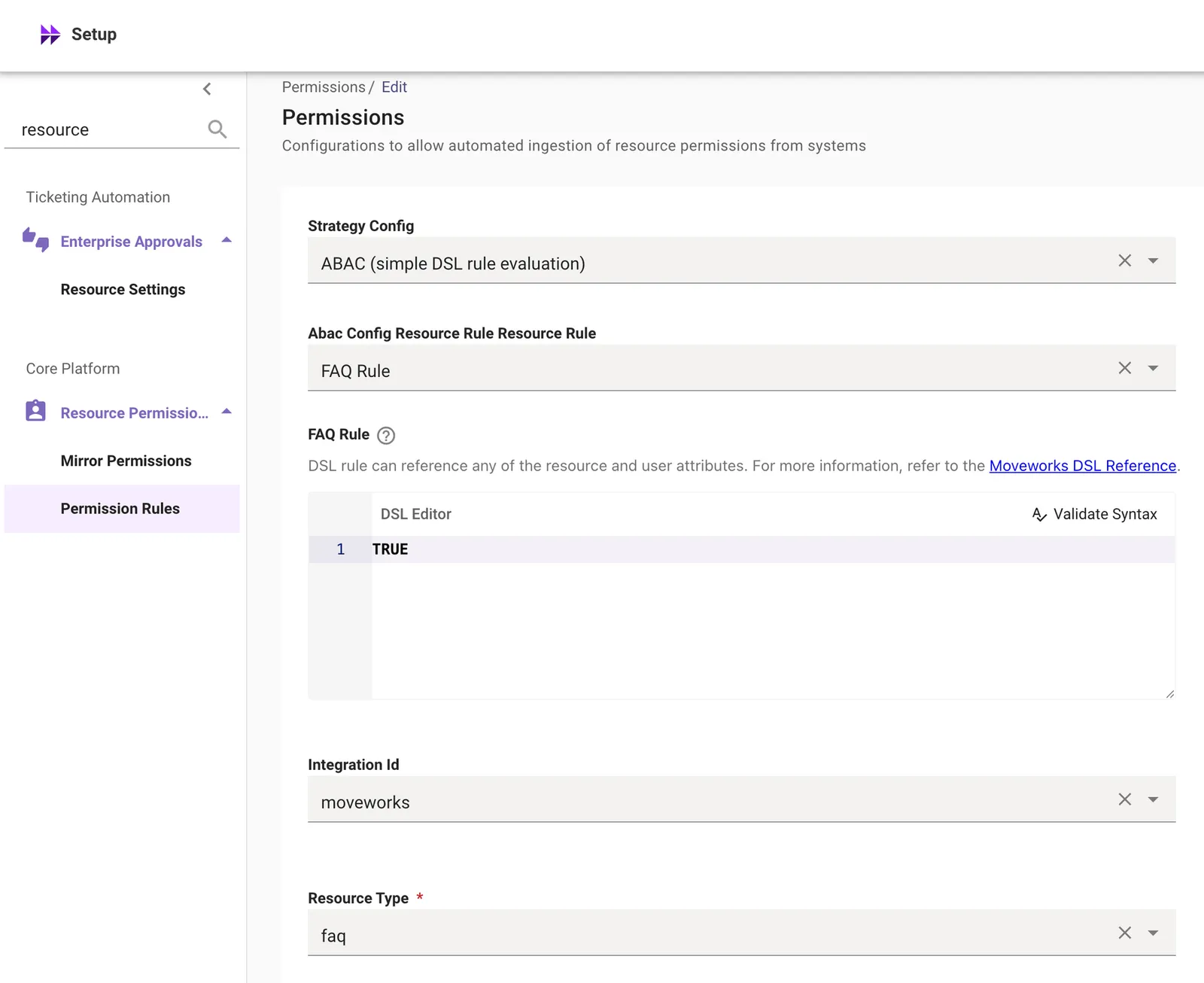
Setting the DSL rule to TRUE grants all users access to all FAQs. If you need to restrict FAQ visibility to specific users or groups, replace TRUE with a DSL expression scoped to the appropriate audience.
How should I format knowledge FAQs for Moveworks?
Moveworks uses a subset of Markdown to format FAQs, this allows it to be rendered across various chat platforms. The section below outlines the supported formatting capabilities for FAQs, which will work across all Moveworks supported chat platforms.
Supported Formatting & Styling
- Bold - Surround your text with asterisks
- e.g: this text will be bold
- Italics - Surround your text with underscores
- e.g: this will be in italics
- Hyperlinks - Use the following format for hyperlinks
- e.g:
<https://link_to_hyperlink|click here>
- e.g:
- Bullet points - Use dot symbol (•) and a new line to denote bullet points:
- e.g:
- bullet point number 1
- bullet point number 2
- e.g:
How do I set the domain of an FAQ?
Using the domain column, add one of the following keys:
- IT_DOMAIN
- HR_DOMAIN
- FACILITY_DOMAIN
- FINANCE_DOMAIN
- LEGAL_DOMAIN
- PAYROLL_DOMAIN
- PROCUREMENT_DOMAIN
- TRAVEL_AND_EXPENSE_DOMAIN
- OTHER_DOMAIN
FAQs Character Length
FAQs can support up to 500 characters (not including the title) or five lines (where a new line is defined as a new sentence that starts after you press enter/return).
Note: If you are looking to avoid having users click on ‘See more’, Moveworks recommends to craft your FAQ in a way where the answer is limited to three lines, which should keep you within the 500 character limit.
FAQ
Q: Why did the FAQ sheet not open after I clicked on Edit?
A: Please reach out to your owner to provide you an editor access after that you should be able to open and edit the FAQ sheet.
Q: How long before changes to the FAQ sheet are reflected in the Moveworks bot?
A: The Ingestion process runs every four hours, so your changes should reflect within a maximum of 4 hours after editing the sheet.
Q: What is the supported FAQs Character Length?
A: FAQs can support up to 500 characters (not including the title) or 5 lines (where a new line is defined as a new sentence that starts after you press enter/return). Moveworks recommends to craft your FAQ in a way where the answer is limited to 3 lines, which should keep you within the 500 character limit.