
For AI agents: a documentation index is available at the root level at /llms.txt and /llms-full.txt. Append /llms.txt to any URL for a page-level index, or .md for the markdown version of any page.
Logo
DeveloperAcademyCommunityStatus
  • Getting Started
    • Welcome to Moveworks
    • Roadmap & Release Notes
    • Moveworks Best Practices
    • Labs
      • AI Assistant Lab
      • Salesforce Lab
      • ServiceNow Lab
        • Access and Login Guide
        • Create Intelligent Change Request
        • Build a Get CI By Name HTTP Action
        • Build a Get CR Notes by CI Relation HTTP Action
        • Build a Create Change Request HTTP Action
        • Create an Configuration Item Data Type
        • Create a Conversational Process
        • Publish this Conversational Process as a Plugin
        • Testing the Plugin
      • Agent Studio v2 Challenges
    • Professional Services
    • Support
  • AI Assistant
    • AI Assistant Overview
    • Capabilities
    • Web Experiences
    • Analytics & Performance
  • Enterprise Search
    • Overview
    • Agentic RAG Overview
    • Content Ingestion Platform
    • Profile Boosting
    • Retrieval
    • Permissions Platform
    • Built-in Content Connectors
    • Build your own Content Connectors
    • Configure Search
    • Configure Enterprise Search
    • Vetted Content
    • Writing AI-Ready KB Articles
    • Document Chunking and Snippetization Overview
  • Productivity Boost
    • Overview
    • Configure Productivity Boost
    • Quick GPT
    • Calendar Management
    • Brief Me
DeveloperAcademyCommunityStatus
Getting StartedLabsServiceNow Lab

Testing the Plugin

||View as Markdown|
Was this page helpful?
Edit this page
Previous

Agent Studio v2 Challenges

Next
Built with

In this ServiceNow Environment, there are 3 Configuration Items that have historical Change Requests related to them. They are:

  • IAM SERVER 01
  • Microsoft .NET Framework 2.0
  • Microsoft SQL Server 2005

It is important to understand the exact name, as you will experience the power of disambiguation. When we built Configuration Items as custom data types, the Moveworks Reasoning Engine will inherently understand that it needs more clarification from the user. The reason for this is that end-users are rarely ever going to be able to refer to the Configuration Item by it’s exact name, and definitely not by it’s sys_id - which is what we need to be able to add the CI to the CR via API. The Configuration Item data type takes care of both of these problems for us.

Some examples of the ways users might ask for this:

  • I need to create a CR to patch the IAM Server
  • I need to make a change request for .NET
  • Can I create a CR to update SQL Server?

Try it out in the Developer Labs bot. You should see something like this
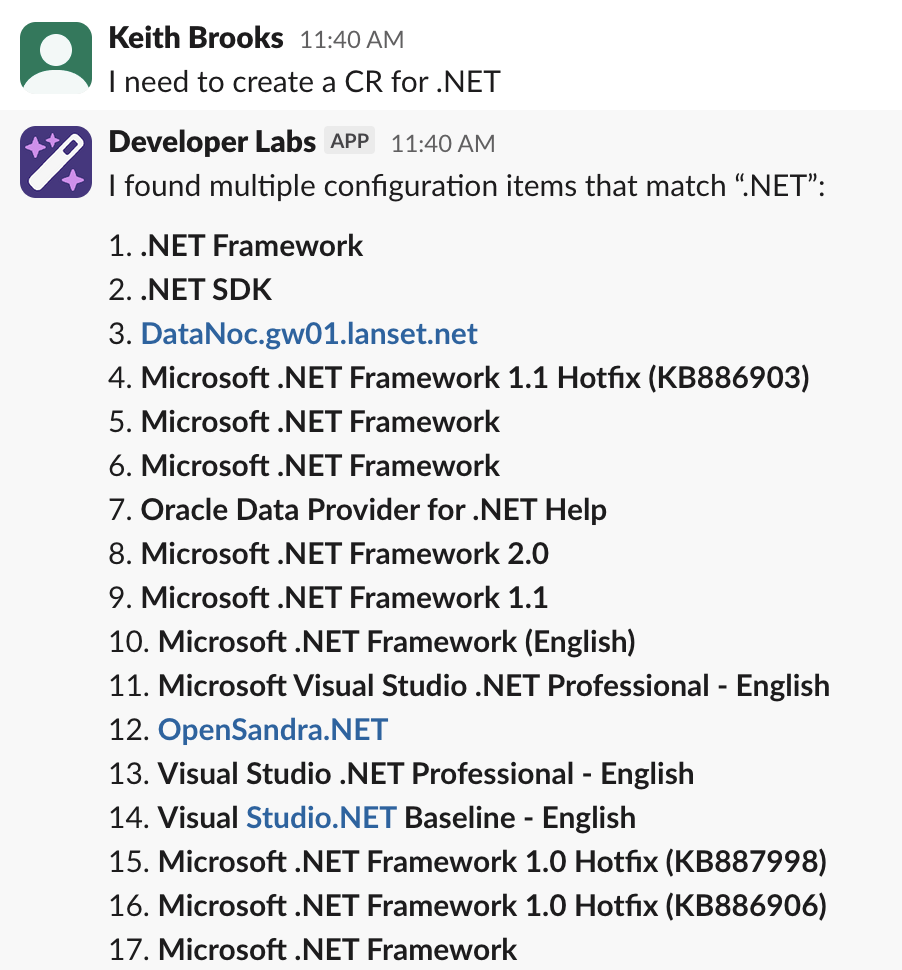
In this example we should choose option 8. Continue on, make sure you include the short description after you’ve chosen the correct .NET Framework and you should see that Moveworks is inherently has assessed risk based on historical CRs related to .NET Framework 2.0. Go ahead and confirm and submit. You will get a link to your Change Request for you to view after logging into ServiceNow via the Okta tile.

It’s important to note that creating a Data Type for Configuration Item has solved 2 big problems. The user will never know the sys_id of the CI, but also usually not remember the exact name of the Configuration Item.