
For AI agents: a documentation index is available at the root level at /llms.txt and /llms-full.txt. Append /llms.txt to any URL for a page-level index, or .md for the markdown version of any page.
Logo
DeveloperAcademyCommunityStatus
  • Getting Started
    • Welcome to Moveworks
    • Roadmap & Release Notes
    • Moveworks Best Practices
    • Labs
      • AI Assistant Lab
      • Agent Studio v1 Labs
      • Salesforce Lab
        • Access and Login Guide
        • Salesforce - Lookup Account and Update Owner
        • Build a Lookup Account HTTP Action
        • Build a Get Salesforce User By Name HTTP Action
        • Build a Change Account Owner HTTP Action
        • Create an Account Data Type
        • Add Another Resolver Method
        • Create a Conversational Process
        • Publish this Conversational Process as a Plugin
      • ServiceNow Lab
      • Agent Studio v2 Challenges
    • Professional Services
    • Support
  • AI Assistant
    • AI Assistant Overview
    • Capabilities
    • Web Experiences
    • Analytics & Performance
  • Enterprise Search
    • Overview
    • Agentic RAG Overview
    • Content Ingestion Platform
    • Profile Boosting
    • Retrieval
    • Permissions Platform
    • Built-in Content Connectors
    • Build your own Content Connectors
    • Configure Search
    • Configure Enterprise Search
    • Vetted Content
    • Writing AI-Ready KB Articles
    • Document Chunking and Snippetization Overview
  • Productivity Boost
    • Overview
    • Configure Productivity Boost
    • Quick GPT
    • Calendar Management
    • Brief Me
DeveloperAcademyCommunityStatus
On this page
  • Scenario
  • NOTE: You are provided access to a Salesforce Sandbox instance in order to do this. You see an “Salesforce” connector in Agent Studio that has already been setup to make API calls. You will also be granted a login to the Salesforce instance in the Okta Portal indicated by this icon.
  • Architecture
  • Components
Getting StartedLabsSalesforce Lab

Salesforce - Lookup Account and Update Owner

||View as Markdown|
Was this page helpful?
Edit this page
Previous

Build a Lookup Account HTTP Action

Next
Built with

Scenario

In this case we will build the ability for a user to lookup accounts in different ways in Salesforce, and when they find the account they can update the owner.

NOTE: You are provided access to a Salesforce Sandbox instance in order to do this. You see an “Salesforce” connector in Agent Studio that has already been setup to make API calls. You will also be granted a login to the Salesforce instance in the Okta Portal indicated by this icon.

Architecture

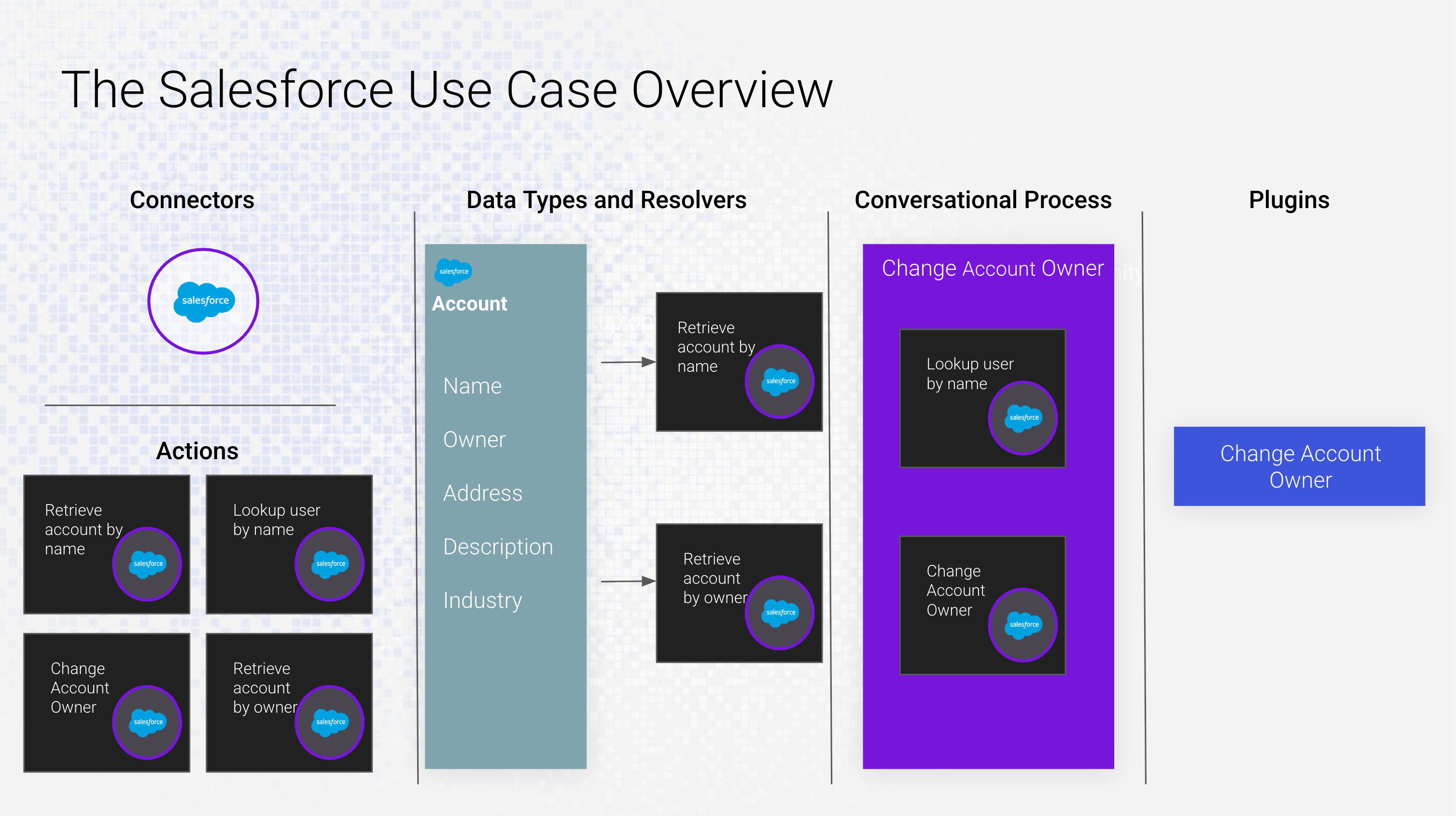
The diagram you are seeing above will be helpful to visualize what you are going to build in this exercise. The components. When finished, this is what you’re use case will look like as it pertains to Agent Studio.

Components

  1. Connectors - The authorization and Base URI for the system we are connecting to. Once built, connectors can be re-used to build Actions.
  2. Actions - Individual API calls to that system for a specific purpose. These building blocks can be used to resolve data types (in this case, account) or as part of a conversational process where one or more actions can be sequenced together to perform a complex operation.
  3. Data Types and Resolvers - Once a data type is established, it can be resolved in many ways by adding more Resolver Strategies. This guarantees we can choose the correct object no matter how the user refers to it, and disambiguate when there are similar traits.
  4. Conversational Process - The business execution of Actions and Data Types. One or more Actions can be sequenced together to perform complex tasks.
  5. Plugins - The packaged output of the Conversational Process. The plugin is configured by providing positive and negative examples in order to fine-tune plugin selection, as well as who within the organization will have access to this plugin.