
WordPress
Overview
WordPress is a content management system used to publish pages and blog posts. The Classic Ingestion connector indexes publicly available pages and posts and makes them searchable in the Moveworks AI Assistant.
Access Requirements
See WordPress Access Requirements for instructions on how to connect Moveworks to your WordPress instance.
Permissions
The Classic Ingestion connector for WordPress does not mirror source permissions. All indexed content is visible to all employees in the AI Assistant search experience.
Content Types Supported within WordPress
- Pages
- Blog Posts
How Moveworks Integrates with WordPress
Moveworks has Indexed Search support for publicly available blog posts and pages within WordPress. The following diagram illustrates the high-level architecture of how Moveworks integrates with the WordPress Sites:
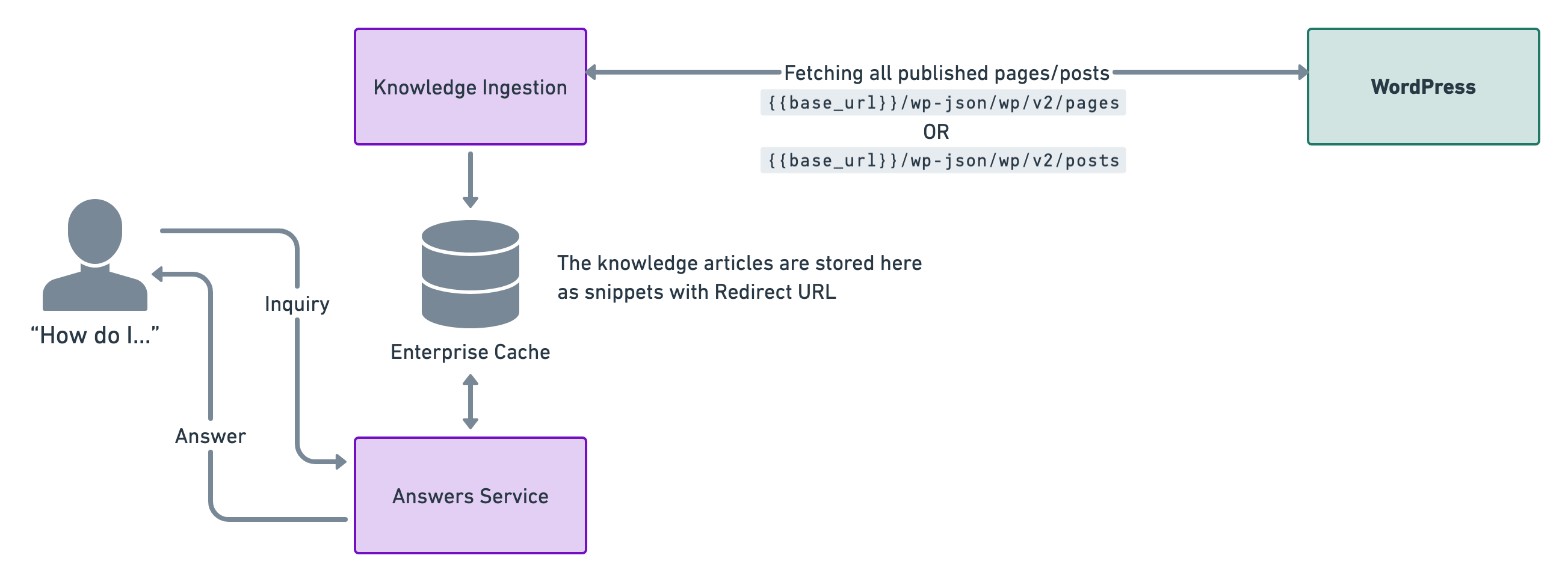
This is a live integration which means we poll for knowledge articles every four hours. This is done so that the enterprise cache is updated with relevant snippets for answers.
Our enterprise cache stores the knowledge documents and generates relevant knowledge snippets by understanding the content. This is also where we store redirect URLs in order to direct users to where the knowledge article is located and can be read.
How do we fetch knowledge articles from WordPress
We use the following APIs to fetch the knowledge articles that you want Moveworks to ingest.
Fetch all Pages
Fetch all Posts
Integration Scope
Content
Our knowledge ingestion engine works on ingesting the content.rendered section from the API response which is an HTML block and we ingest and snippetize the content based on this HTML.
Configuring WordPress Ingestion with Custom Mappers
WordPress requires custom mappers to map the API response to a format that Moveworks can ingest. Because the WordPress REST API returns pages and posts in a consistent JSON structure, the mapper configuration is fairly standard.
Prerequisites
- A WordPress connector has been created with the necessary permissions. See the WordPress Access Requirements for details.
- The WordPress REST API is accessible at
https://<your-site>/wp-json/wp/v2/.
Setup Knowledge Ingestion in Advanced Mode
Start by creating a new ingestion under Search > Configure Search > Classic Ingestion > Internal Knowledge.
- Select the Connector created for WordPress and provide a name for the ingestion under Ingestion Name.
- Choose a Domain — the functional area of employee service most related to the knowledge being ingested.
- Toggle on Advanced Mode (top-right corner of the Setup Knowledge Bases step).
- Select Generic Config as the ingestion system. Generic Config allows you to ingest content from any API response by mapping the response fields to Moveworks internal attributes.
Start URLs
Enter the WordPress API endpoint for the content type you want to ingest. You will need to create a separate ingestion configuration for pages and posts.
For Pages:
For Posts:
Set the Type of content to Article List, since the WordPress API returns a flat list of articles (no folder hierarchy).
Response Mapper
The Response Mapper tells Moveworks how to traverse the API response and handle pagination. Select KNOWLEDGE_URL_TYPE_ARTICLE_LIST as the Type in Response Mapper and use the following configuration:
How this works:
knowledge_urlshandles pagination by comparing the currentpagequery parameter against thex-wp-totalpagesresponse header that WordPress provides. If there are more pages remaining, it constructs the next page URL by incrementingpageby 1. Once all pages have been fetched, pagination stops.knowledge_articlespasses the current page of results through to the Article Mapper.
Article Mapper
The Article Mapper maps individual WordPress post/page fields to Moveworks internal article attributes. Use the following configuration:
For Pages:
For Posts:
The Article Mapper is the same for both pages and posts since the WordPress REST API uses a consistent response structure for both content types. The key difference is the Start URL — use /wp/v2/pages for pages and /wp/v2/posts for posts.
Field mapping reference:
Validation
Once you have saved the ingestion configuration, the ingestion pipeline will run in the background. You can track the status on the Indexed Content View.
Search for your WordPress articles by title — if they appear in the console, they have been ingested successfully.