
Google Drive
Overview
The Classic Ingestion connector for Google Drive indexes Google Docs, Slides, and PDFs so employees can find relevant content through Moveworks Enterprise Search.
Access Requirements
See Google Drive Access Requirements for setup prerequisites.
Permissions
The Classic Ingestion connector for Google Drive mirrors source permissions from Google Drive. Employees can only find documents in search results that they have access to in Google Drive. Note: the legacy Answers integration for Google Docs did not include permissions support — file search (Docs, Slides, PDFs) does respect permissions.
Supported File Types
Moveworks supports the following object types, with permissions (mirrored):
- Documents - Google Docs*, doc, docx
- Presentations - Google Slides, ppt, pptx
- PDFs
*Note: Legacy support by Answers did not include permissions
Legacy - Formatting Guidelines for Answers Google Docs
Moveworks recommends using the Google Drive native headings for the best performance.
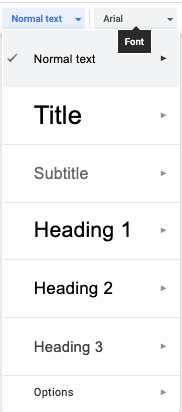
Please note that images, tables, text formatting, lists or other multi-media formats will not be rendered in chat. Instead, the user will be able to click the article and view the source article in Google docs.
Legacy - Architecture for Answers Google Docs
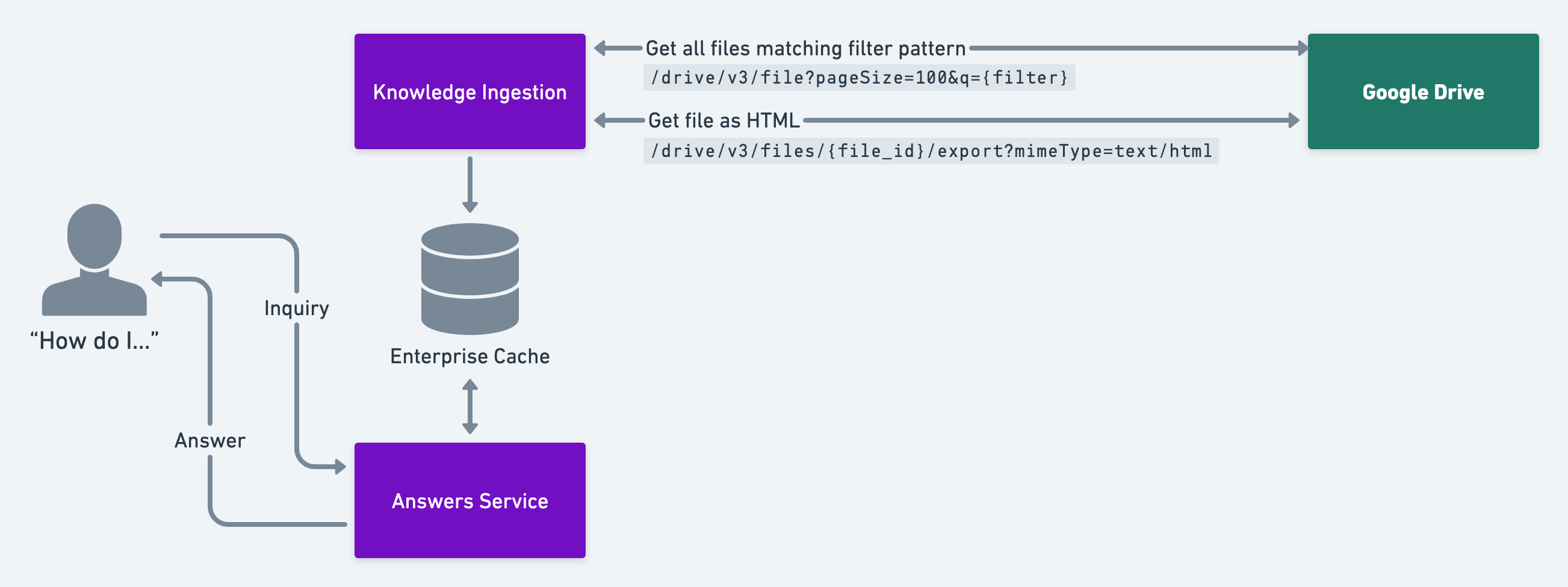
- Moveworks identifies candidate files to ingest
- We use the “List Files API” and provide a filter string. We usually use a query string to filter to files within a given folder, but you can provide any filter string you want. https://developers.google.com/drive/api/guides/search-files#query_string_examples
- Moveworks extracts the file as HTML and produces snippets
- We rely on Google to transform the article as you’ve written it into an HTML document. We then parse that HTML document, converting it into a chat-ready answer.
- Moveworks serves answer to the user