
For AI agents: a documentation index is available at the root level at /llms.txt and /llms-full.txt. Append /llms.txt to any URL for a page-level index, or .md for the markdown version of any page.
Logo
DeveloperAcademyCommunityStatus
  • Getting Started
    • Welcome to Moveworks
    • Roadmap & Release Notes
    • Moveworks Best Practices
      • Launching Moveworks
      • Building on Moveworks
        • Ideal Moveworks Team
        • Designing an AI-first Service Desk
        • Developer Instances
        • Development Lifecycle
        • Hiring Developers
        • Identifying Automation Opportunities
        • Launching New Capabilties
        • Scoping with Mockups
        • Project Managing
      • Driving Adoption
    • Labs
    • Professional Services
    • Support
  • AI Assistant
    • AI Assistant Overview
    • Capabilities
    • Web Experiences
    • Analytics & Performance
  • Enterprise Search
    • Overview
    • Agentic RAG Overview
    • Content Ingestion Platform
    • Profile Boosting
    • Retrieval
    • Permissions Platform
    • Built-in Content Connectors
    • Build your own Content Connectors
    • Configure Search
    • Configure Enterprise Search
    • Vetted Content
    • Writing AI-Ready KB Articles
    • Document Chunking and Snippetization Overview
  • Productivity Boost
    • Overview
    • Configure Productivity Boost
    • Quick GPT
    • Calendar Management
    • Brief Me
DeveloperAcademyCommunityStatus
On this page
  • How to Purple Chat Scope
  • 1. Understand the request with Purple Chat
  • 2. Add API Annotations
  • Example
Getting StartedMoveworks Best PracticesBuilding on Moveworks

Scoping with Mockups

||View as Markdown|
Was this page helpful?
Edit this page
Previous

Project Managing

Next
Built with

How to Purple Chat Scope

Purple Chat Scoping allows you to align business & technology teams on the requirements of a use case without getting too far ahead of yourself. Without a clear picture of what you’re building, you won’t be able to make it to production.

👉 Get Purple Chat Certified in Moveworks Academy

1. Understand the request with Purple Chat

2. Add API Annotations

Example

Our best-in-class example is shown below:
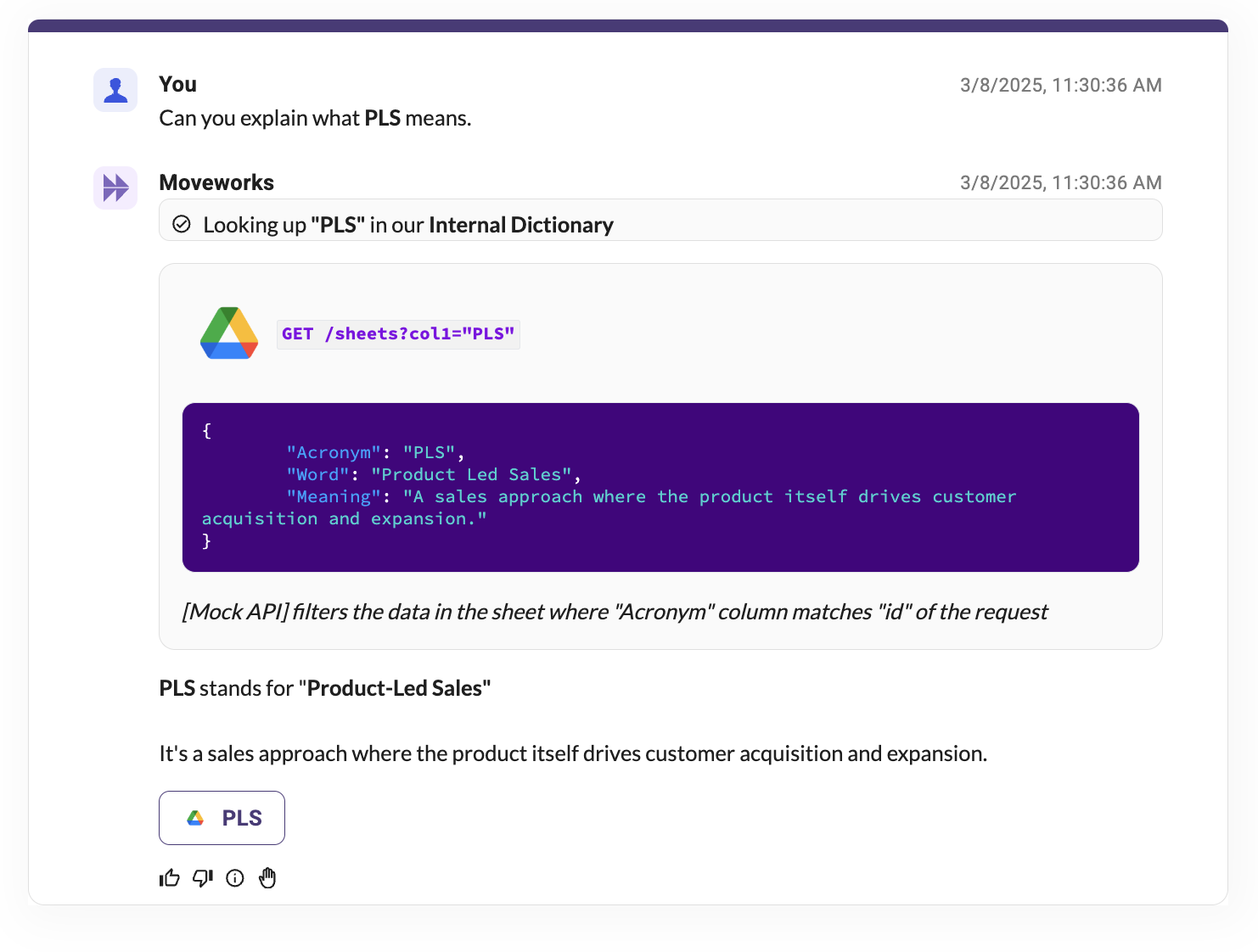
A few things to note:

  1. Every bot message has an annotation indicating any data-sources that are supposed to drive the bot message.
  2. Every system interaction (annotation) specifies the INBOUND and OUTBOUND data contract.
  3. Every system interaction (annotation) has a procedural pseudocode defining what happens in that interaction (systems, aggregations, etc.)