
Slack
Slack Chatbot Setup Guide
Moveworks is an Agentic AI Platform that gives your employees one AI Assistant that can find answers, automate tasks & boost productivity. To do this, Moveworks needs access to the Slack environment. This document walks through the steps to successfully implement and integrate the Moveworks AI Assistant in Slack. The exact access requirements are outlined under step 3 in the manifest JSON file.
Note: Bot will refer to Slack specific steps and AI Assistant is used for Moveworks steps.
Slack apps send events and interactions to the Moveworks global gateway (app-gateway.moveworks.com). If your existing Slack app still uses a regional Request URL, such as https://app.moveworks.ai/Bxxxxx/slack/events, see Migrate an existing Slack app to the global gateway.
Account Needs
Moveworks requires the bot token and signing secret for your AI Assistant created by an admin on your Slack production environment.
Bot Creation
-
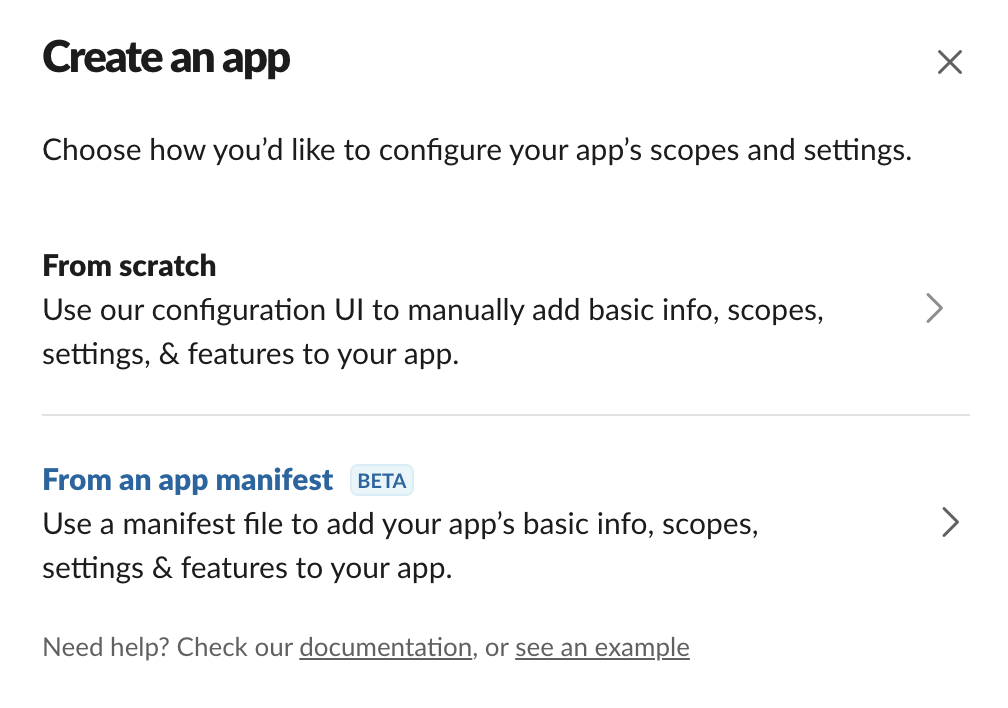
Navigate to https://api.slack.com/apps, click Create New App and choose From an app manifest
-
Select the appropriate workspace

-
Copy the code block on the following page into the JSON tab. If you know the name of your AI Assistant already, change the values for display_information.name and features.bot_user.display_name. There are three URLs that are set as placeholders (
https://app-gateway.moveworks.com/Bxxxxx/slack/*). These will be updated in the next step after the bot is created to generate the Bot ID. Note: This App Manifest would update the details on the UI, please do validate them on the respective pages. -
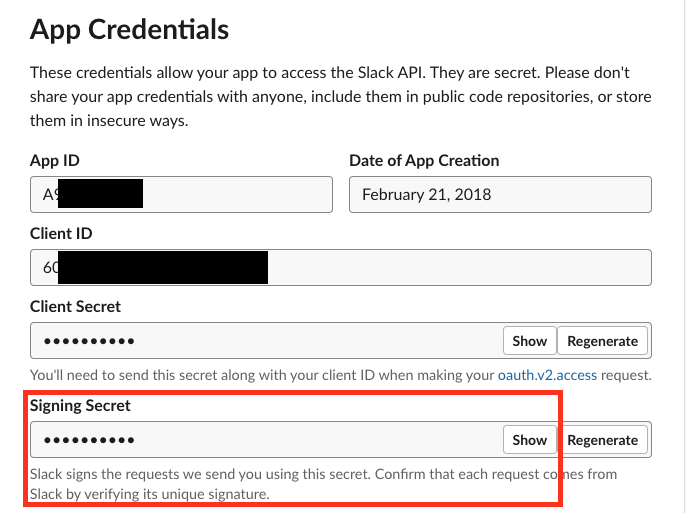
Reveal the Signing Secret and save this value. It will need to be added in Moveworks Setup in a later step.
-
Only If installing on Slack Enterprise Grid, click on Org Level Apps and opt-in to the Org apps program if not already opted in. Next, click Install App. This will direct you to an Authorize page if you are properly logged in as an admin. Click on Authorize to continue.
-
After authorizing the bot app, two tokens will appear under OAuth & Permissions → Tokens for Your Workspace. The Bot User OAuth Access Token is the required bot token to get all the required information for later chatbot setup.
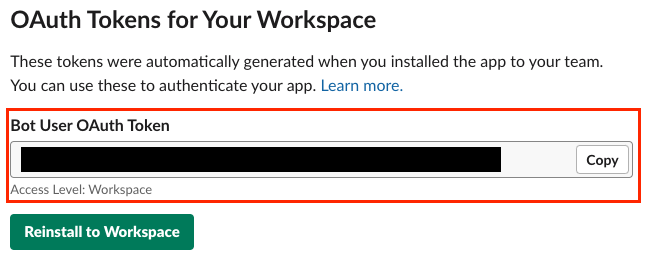
- Please note that the token must start with
xoxband NOTxoxp. - If you are installing the bot in a single workspace, it will say Access Level: Workspace under the token.
- If installed in Slack Enterprise Grid, it will say Access Level: Org.
- Please note that the token must start with
-
Retrieve Bot information
- Get an API querying tool like Postman or prepare to query Slack APIs with curl from a terminal interface
- Query the following endpoint to get your bot information:
curl
- You will get a response like the following, note the values as they will be needed later during the AI assistant setup. Especially the bot_id which needs to be updated in the App Manifest step above.
JSON
- If your team_id starts with an E, you are using Enterprise Grid and will need to make an additional call:
curl
- The response will look like below :
JSON
- If you are using Enterprise Grid, you might notice there are multiple Teams listed in the response. Note : Here one of the team_ids would belong to the entire workspace. Setting up the Slack ChatBot with that ID would enable the bot in both Workspaces.
JSON
- If you are using Enterprise Grid, you might notice there are multiple Teams listed in the response. Note : Here one of the team_ids would belong to the entire workspace. Setting up the Slack ChatBot with that ID would enable the bot in both Workspaces.
- Note the team ID, this will be needed later when setting up the AI assistant config.
-
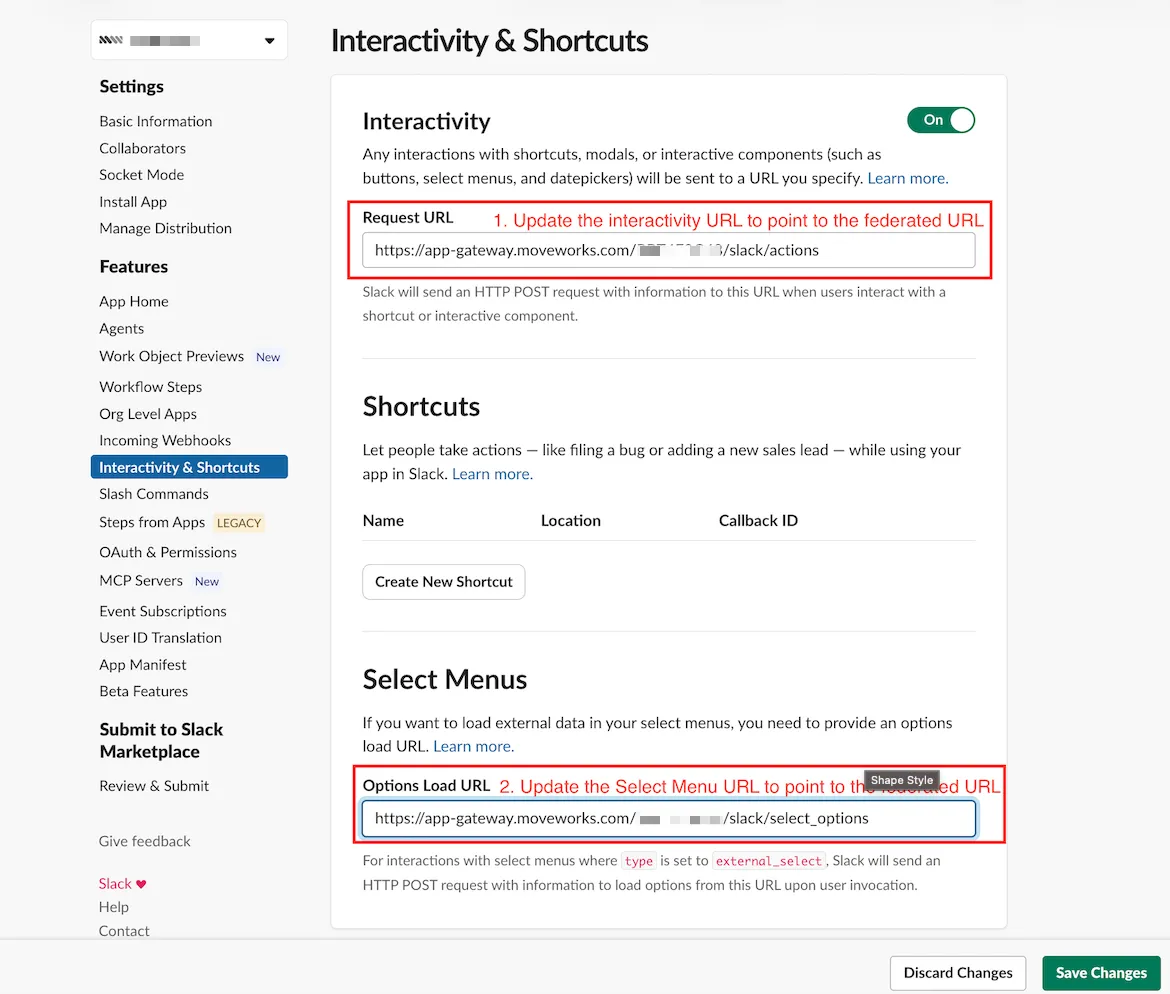
Under Interactivity & Shortcuts, ensure the correct Request URL (
https://app-gateway.moveworks.com/Bxxxxx/slack/actions) and the Options Load URL (https://app-gateway.moveworks.com/Bxxxxx/slack/select_options) has been generated making sure theBxxxxxfrom the template URL has been replaced with your bot ID.- This was updated when the BOT ID was added to the manifest since it runs an upwards sync.
-
Under Event Subscriptions, enter the Request URL e.g:
https://app-gateway.moveworks.com/Bxxxxx/slack/eventsmaking sure to replaceBxxxxxfrom the template URL with the bot ID of your bot.- The link will not be editable in the display field. Click the change button to display the change field.
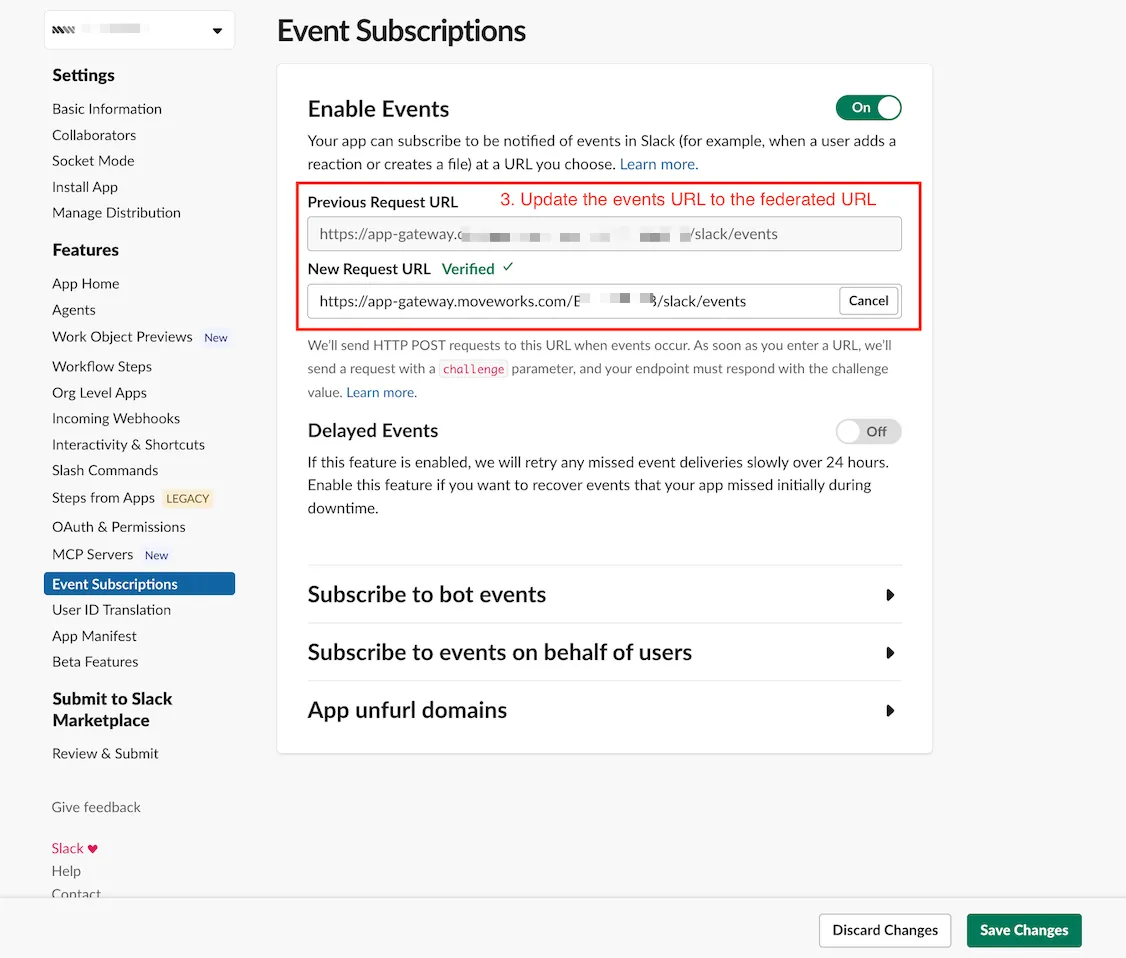
- Copy the existing link or the example above into the change field
- Ensure that you change the placeholder with your Bot ID
All three Slack Request URLs use the Moveworks global gateway host. Use the host that matches your Moveworks environment and keep the /Bxxxxx/slack/... path:
- US GovCloud:
https://app-gateway.moveworksgov.com - All other environments:
https://app-gateway.moveworks.com
Additional Steps for Slack Enterprise Grid customers
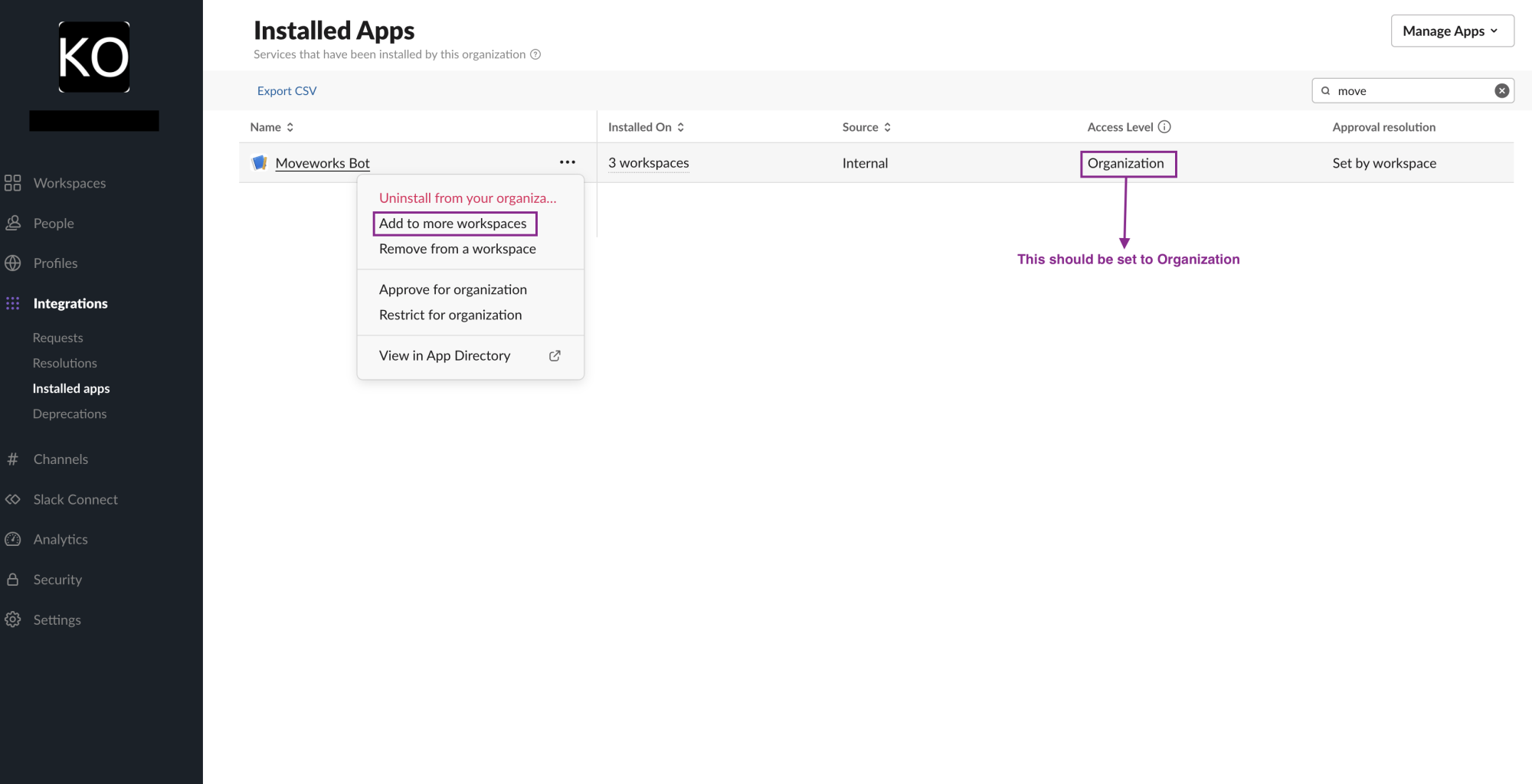
- Navigate to the Slack Admin console and select which workspaces to install the AI Assistant. Select Default for future workspaces so all new workspaces will have access to the app.
- Confirm by clicking Add App
Moveworks Setup
You will need access to Moveworks setup. If you have not already created an SSO connection to your org, please contact your customer success team.
Slack Connector and Identity Setup
-
In Moveworks Setup navigate to Connectors -> Built-in Connectors.
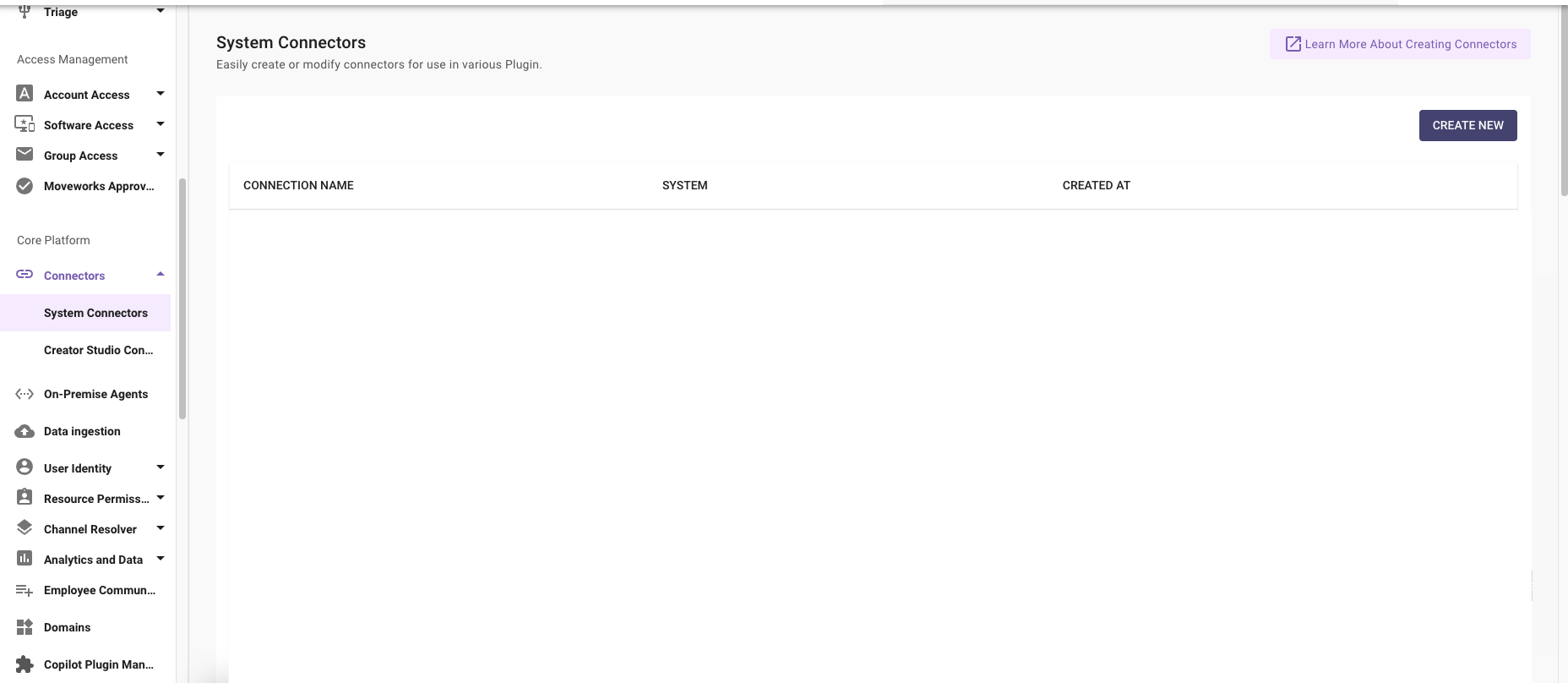
-
Click Create New and choose the Slack option to create a new connector. Click Next: Add Creds
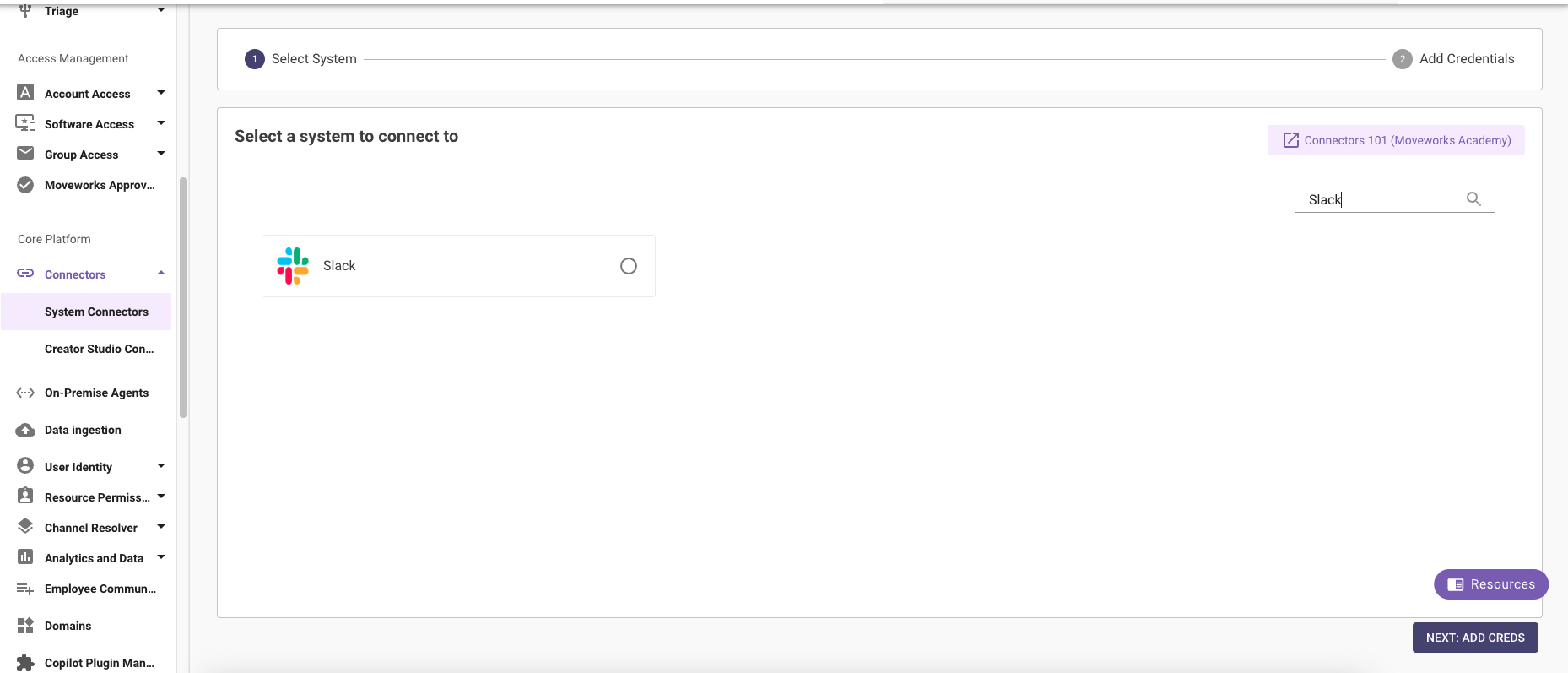
-
In the credentials step
- Name the connector. Recommendation is just
slack - Add a new workspace by clicking the plus button
- In the first field under Workspace Team ID input the Team ID you got from the Slack API call earlier
- In the second field under Workspace-specific Bot Token, input your bot token that starts with
xoxb - Click Save
- Name the connector. Recommendation is just
-
In the left hand navigation menu proceed to User Identity -> Import Users
- If you do not already have your primary identity service set up, please refer to the documentation for it.
- Edit the import user config, in the next page add a new entry by clicking the + Add Source button
- In the dropdown that appears add the connector you just created called Slack.
- Proceed through the steps and save user import with your slack connector as a new source of user identity.
Chatbot Setup
- In the left hand navigation menu, search for Manage Chatbots
- Click Create
- In the Channel dropdown choose slack
- In the Select Connector dropdown choose your slack connector.
- In Bot ID, paste the Bot ID you got from https://slack.com/api/auth.test
When setting the Bot Name value, this field is not editable after saving. Please consult with your Customer Success team before setting this value to follow best practice naming conventions
- In Bot Name, input the name of the bot <org-slack> where org is your instance’s canonical name
- You can confirm your org name in 2 ways:
- Referring to the subdomain of your moveworks url when logging into myMoveworks (org.moveworks.com)
- The redirect url of your myMoveworks sso configuration
- Bot Friendly Name can be any string, but must be filled in, this is the name your end users will use to interact with it.
- In the Channel Configurations drop down choose Slack Vars
- Fill in the subsequently populated information from the auth test api or your slack app page at api.slack.com
- Slack Region should be set to either Commercial or Gov based on your Slack instance.
- Click Save and name your config title after your Bot Name value
Migrate an existing Slack app to the global gateway
If your Slack app was set up with a regional Moveworks URL, such as https://app.moveworks.ai or https://app.am-eu-central.moveworks.ai, move it to the global gateway by changing only the host of each Request URL. Keep the path after the host, including your bot ID, exactly as it is.
Moveworks registers your Slack workspace and app with the global gateway automatically. You don’t need to change anything in Moveworks Setup before you update the URLs.
Update the Request URLs
-
In your Slack app at https://api.slack.com/apps, go to Interactivity & Shortcuts.
- Under Interactivity, change the host of the Request URL to the global gateway host.
- Under Select Menus, change the host of the Options Load URL to the global gateway host.
- Click Save Changes.
-
Go to Event Subscriptions and change the host of the Request URL to the global gateway host.
- Slack sends a
url_verificationchallenge to the new URL, and the gateway responds to it. Confirm that Slack shows Verified next to the new Request URL. - Click Save Changes.
- Slack sends a
Verify the migration
Send a test message to your AI Assistant in Slack and confirm that it responds. To check interactivity and select menus too, make a request that returns a menu or buttons, then select an option and confirm that the AI Assistant continues the conversation.
Roll back
To roll back, change the Request URLs back to your previous regional URLs. You don’t need to change anything in Moveworks.
If the migration fails, roll back and contact your Moveworks Customer Success team.
FAQ
Q: Can I grant access to single-channel guests and/or multi-channel guests in addition to my full members? A: Yes, Moveworks will ingest all active members and guests from your workspace/org, provided they have access to the Slack app itself. Learn more about Slack guest policies for apps here
Q: Can I make the Moveworks bot a default app that shows in all user’s sidebars, instead of having them search for it? A: Slack does not allow admins to set default “starred” apps in user’s Slack client sidebars. We recommend leveraging the Employee Communications platform to send campaigns reminding users to “star” the Moveworks AI Assistant, so it always shows up in the sidebar.