
Brief Me: Technology Overview
Overview
This document covers the entire step-by-step process for Brief Me, starting with file ingestion to snippetization to querying the File Database. Also, we highlight some of the key differentiators in the approach by Moveworks:
- Real-Time Processing: It quickly processes files in real-time, unlike traditional systems, minimizing latency.
- Embeddings-Based Search: Targets user-uploaded documents with an embeddings approach for improved accuracy in vast repositories.
- Selective Reasoning Engine: Analyzes crucial sections rather than whole documents, speeding up and refining responses.
- Grounded Responses: Answers are reliably sourced from the user’s files, ensuring trustworthiness.
How does this work?
Here’s an overview of how Brief Me works within Moveworks AI Assistant.

As we dive into the technical intricacies of Brief Me within Moveworks AI Assistant, we’ll be using this scenario to help you understand various technical concepts that shed light on how Brief Me is working under the hood.
Scenario: It’s open enrollment season at BannerTech
Chris is an employee at BannerTech, a company that builds IoT(Internet of things) devices that help manufacturing companies manage their product inventory. It’s open enrollment season at her company and she has some decisions to make. The HR team at BannerTech recently hosted a open enrollment workshop and shared a resources with employees. She’s overwhelmed with information and doesn’t have time to scroll through each file. Luckily, she has access to Moveworks AI Assistant to help her out.
Step 1: Real time file ingestion & processing
Chris navigates over to her Moveworks AI Assistant and drops in all the relevant files her HR team has shared regarding open enrollment. This will kick off the first part the file ingestion process (File Ingestion, File Summarizer, Embeddings, Storing your files).
File Ingestion

During file ingestion the following actions will execute sequentially:
- Your files are uploaded within your Chat Messaging Platform (ex. Microsoft Teams): Moveworks AI Assistant is currently deployed to your chat platform. When you upload any files, the chat platform will scan and check that the files do not contain malicious software or malware. Once the files have been cleared, the files are then stored within your chat messaging platform server.
- Moveworks AI Assistant retrieves the files from your chat platform: This is where the fun part begins. Moveworks AI Assistant will analyze each file to understand its entire content, irrespective of file type (PDF, .Doc, .Docx, .PPTX, .PPT) or file count (up to 5 files). In real time, Brief Me within Moveworks AI Assistant will comb through each page/slide of the files to form a deep understanding of the content within the files. It’s able to identify headings, text blocks, images, tables, and everything related to the structure of those files. As you can see these files are all formatted differently. For illustration purposes, only the first 3 pages of each file are rendered below.
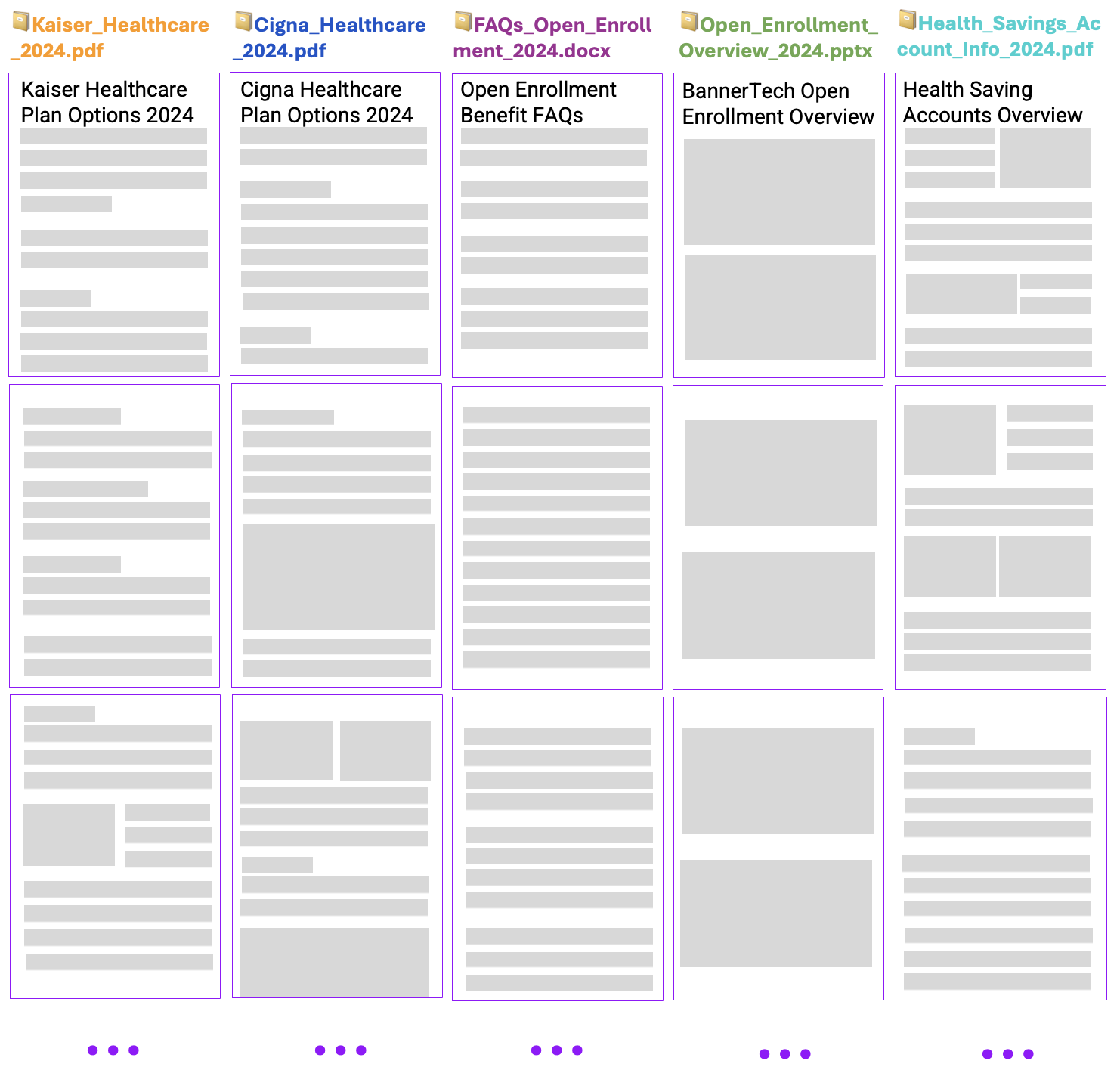
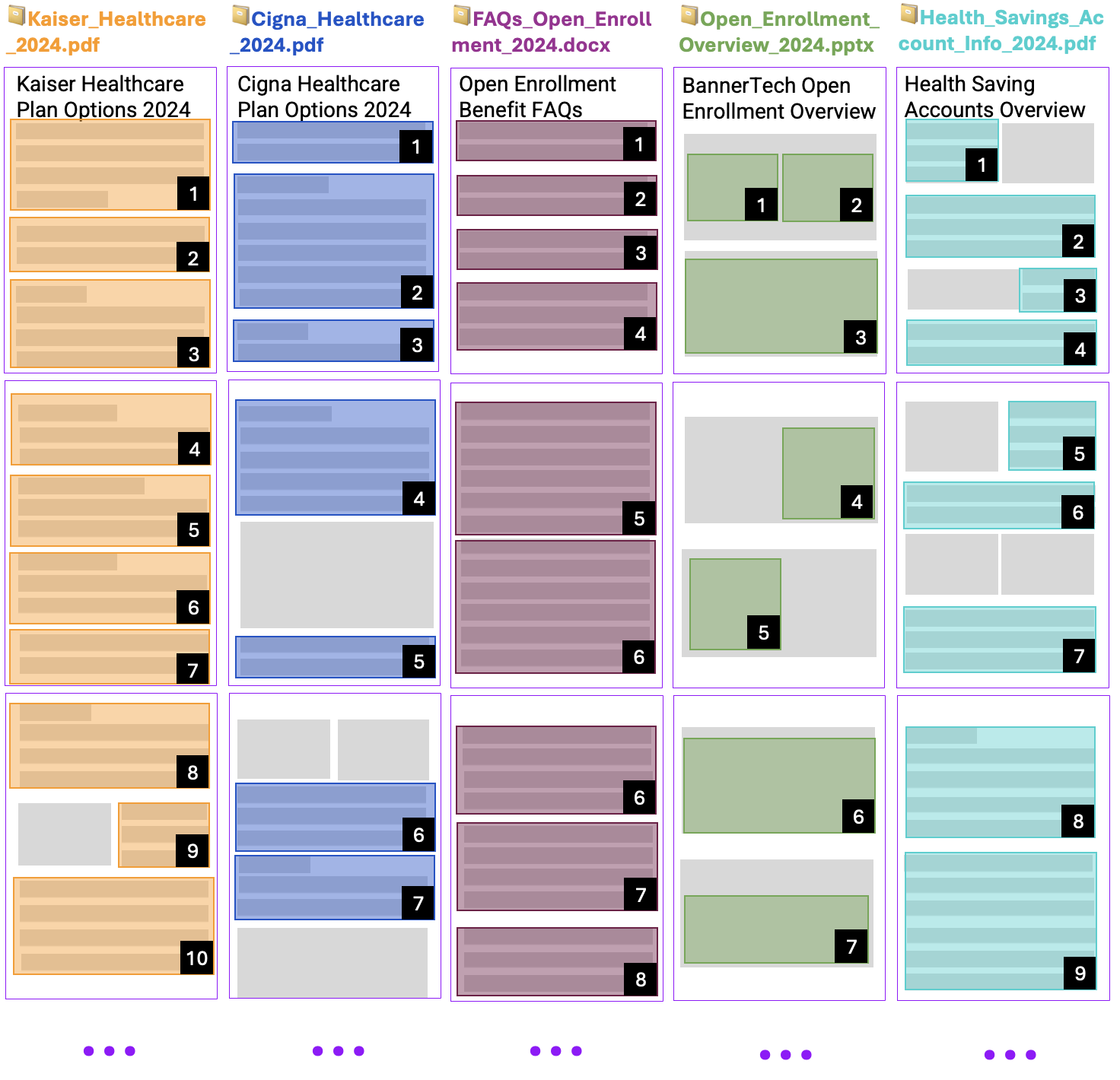
By analyzing each page of the file, Brief Me is then able to break down the information across all these pages into smaller chunks though snippetization by utilizing an in-house Snippetizer. Each file can have different snippets based on the structure of the file. Using the first 3 pages, the first file (Kaiser_Healthcare_2024.pdf) has 10 snippets while the 3 file (FAQs_Open_Enrollment_2024.docx) has 8 snippets of information. All pages across all files will go through snippetization. Depending on the size of a file, a file can end up having 1,000+ snippets of information .
File Summarizer & Embeddings
Now that files have been snippetized (Kaiser_Healthcare_2024.pdf has 10 snippets), there’s 2 pieces that will execute next in parallel:
- File Summarizer
- Embeddings

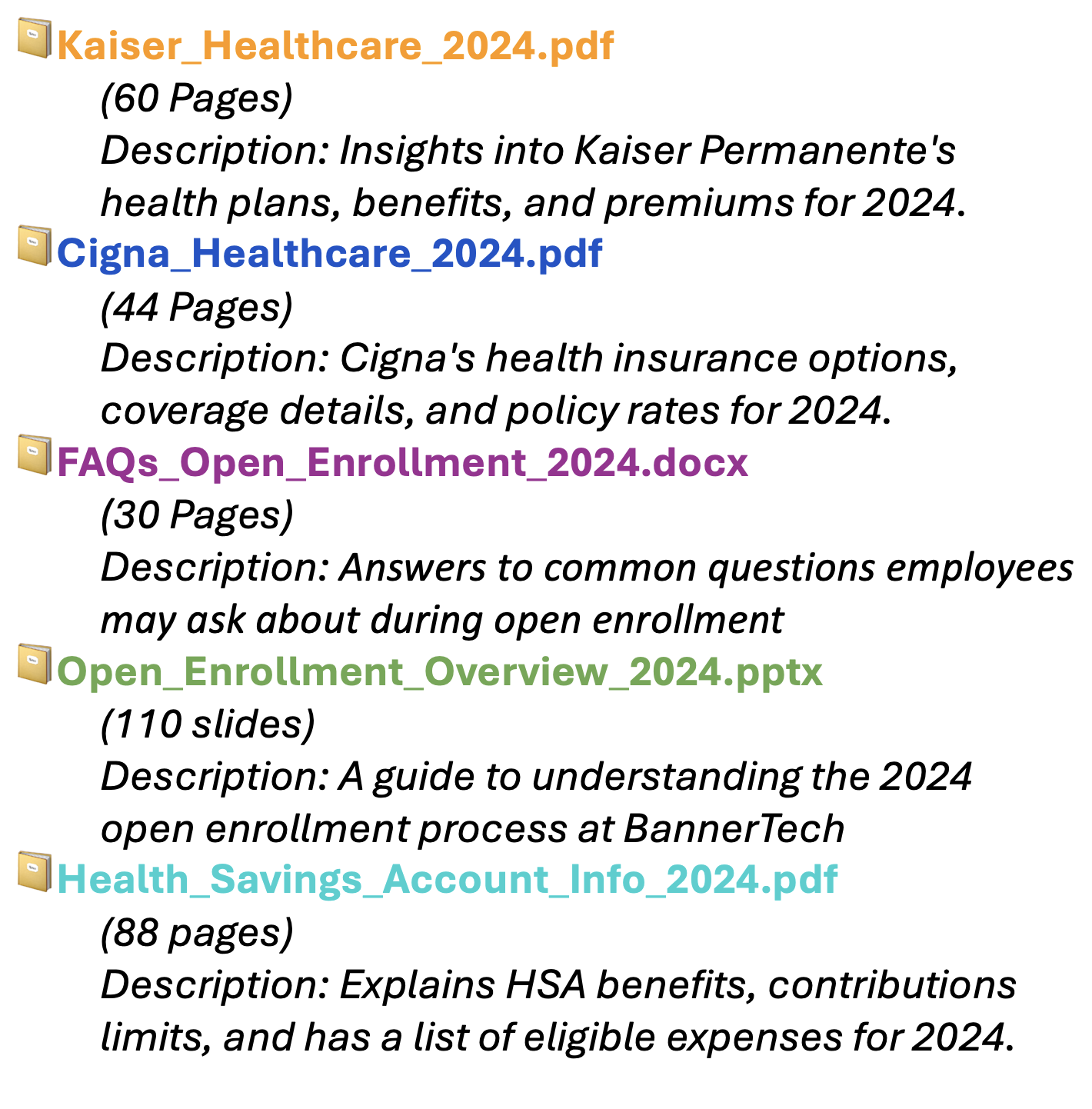
- File Summarizer: A short description for each file is created by leveraging the GPT LLM. The description along with other relevant metadata for the file will helps the “Reasoning Engine” identify which file(s) should get used to preform a specific scenario based on the query a user provides. We’ll detail this later in the process. For now here’s what the metadata for each file may look like. All of this information will get stored within “Your file database”.
- Embeddings: In machine learning, embeddings are a type of representation that transforms high-dimensional data (like text or images) into a lower-dimensional, dense vector form. These vectors capture the essential qualities or features of the input data in a way that is easier for machine learning models to process and analyze.
To put it simply, imagine you’re trying to teach a computer to understand different fruits. In their natural form, understanding and comparing fruits can be complex due to their various characteristics (color, taste, texture, etc.). Embeddings help by converting each fruit into a list of numbers, where similar fruits have similar numbers. This makes it much easier for the computer to grasp the concept of similarity between fruits and perform tasks like grouping similar fruits together.
Utilizing the fruit analogy, just as you might represent various fruits as lists of numbers to make it easier for a computer to understand their similarities and differences, Moveworks AI Assistant employs a similar technique with embeddings for files by leveraging its fine tuned in-house MPNet model for Embeddings.
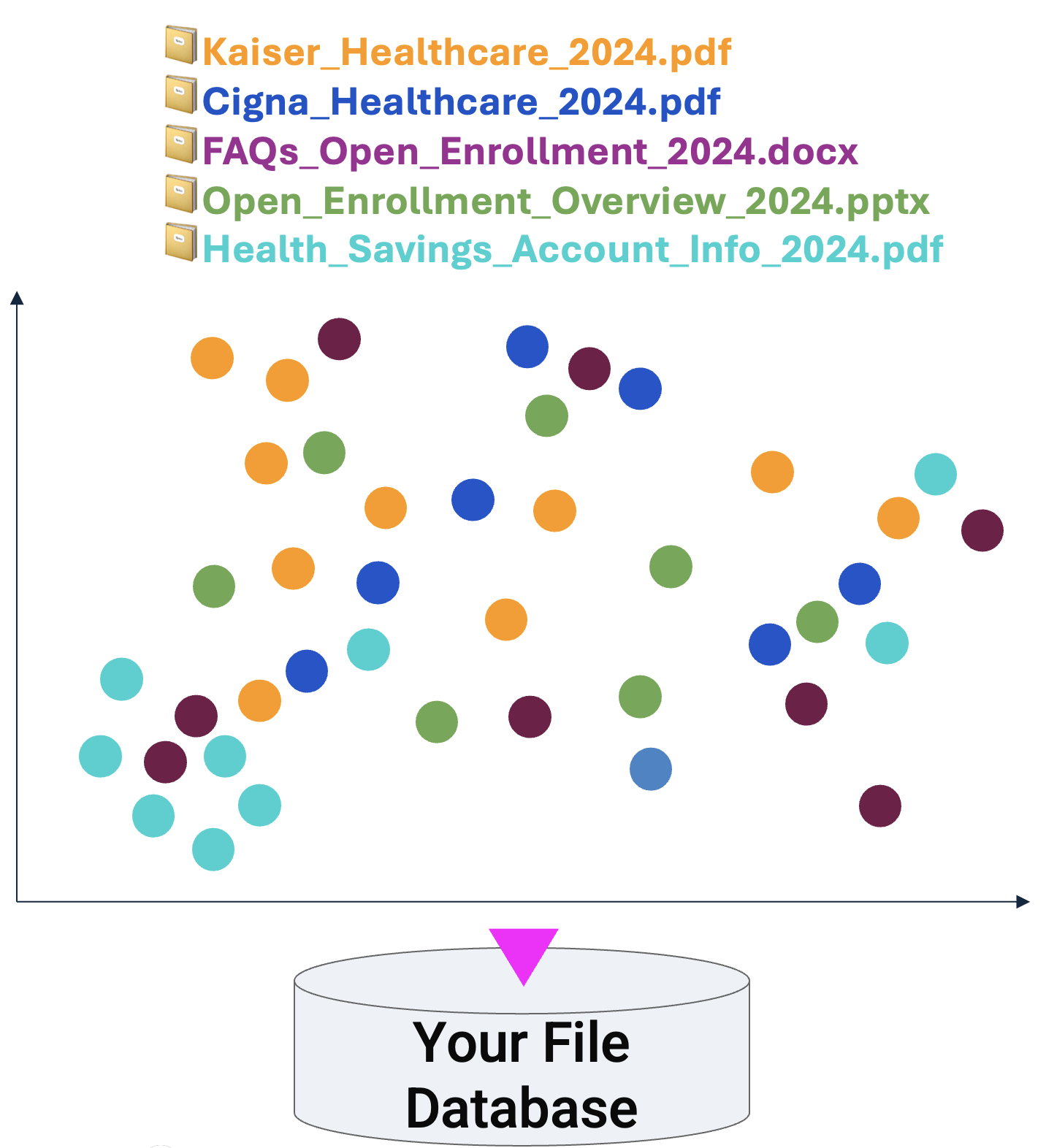
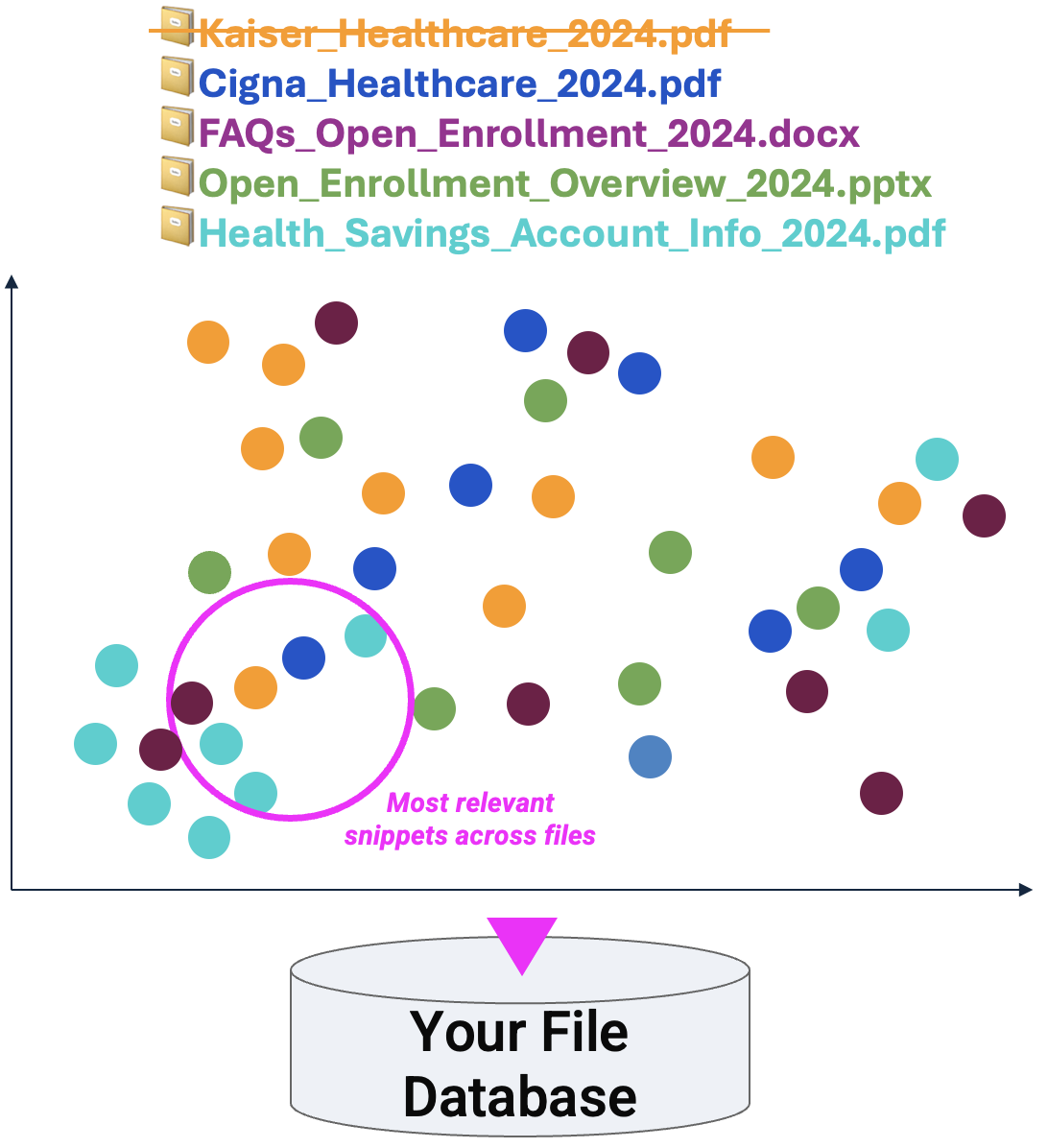
Each snippet across all files is transformed into embeddings —dense, lower-dimensional vectors that preserve the essence of the information they represent. To put this into simpler terms, think of each snippet being plotted on graph. In the illustration below, each colored dot represents a snippet from each file. By embedding each snippet, Brief Me can quickly identify similarities or relevant information across a vast array of files, making it adept at providing precise, content-aware responses and insights. Again for simplicity we’re only showing the snippets from the first 3 pages of each file. All of these snippets are stored in “Your files database” along with its vector information [File name, Snippet #, Location of Snippet] → [ex. Kaiser_Healthcare_2024.pdf, Snippet 1, .231][ex. Kaiser_Healthcare_2024.pdf, Snippet 1, .231].
Storing your files within a secure database
The last part of the “Real time file ingestion & processing” is storing the information into a secure database. Each Moveworks customer has its own secure database where all uploaded files are stored. From start to finish the entire process (File ingestion, Embeddings, File Summarizes, Storing files in your database) is lighting fast - it takes roughly ~6 seconds for Brief Me to ingest and process newly uploaded files.

Once the files have been processed, Moveworks AI Assistant will display a confirmation message letting the user know they can start engaging with these files.
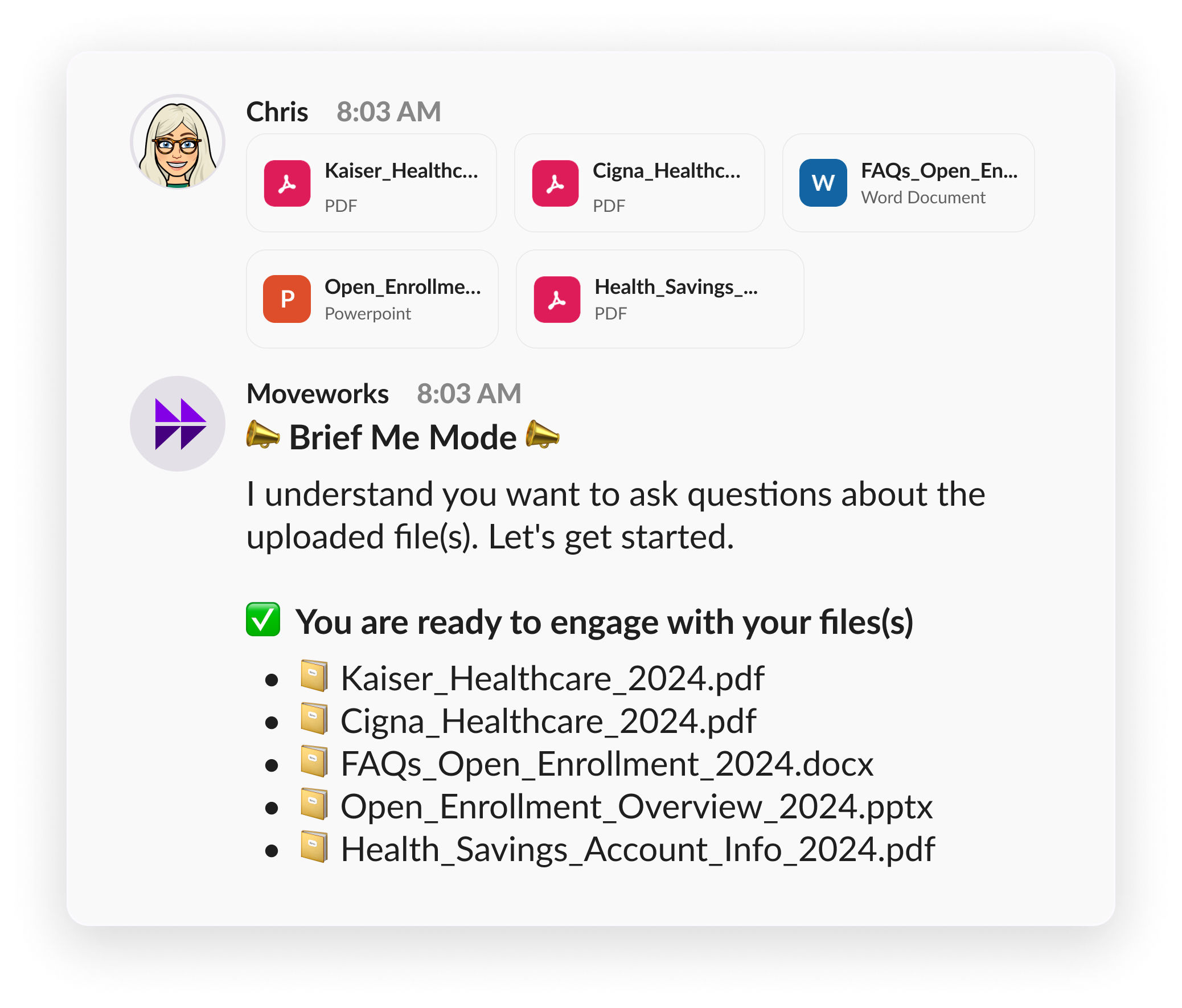
Now let’s get a summary, ask questions, and compare topics from these files
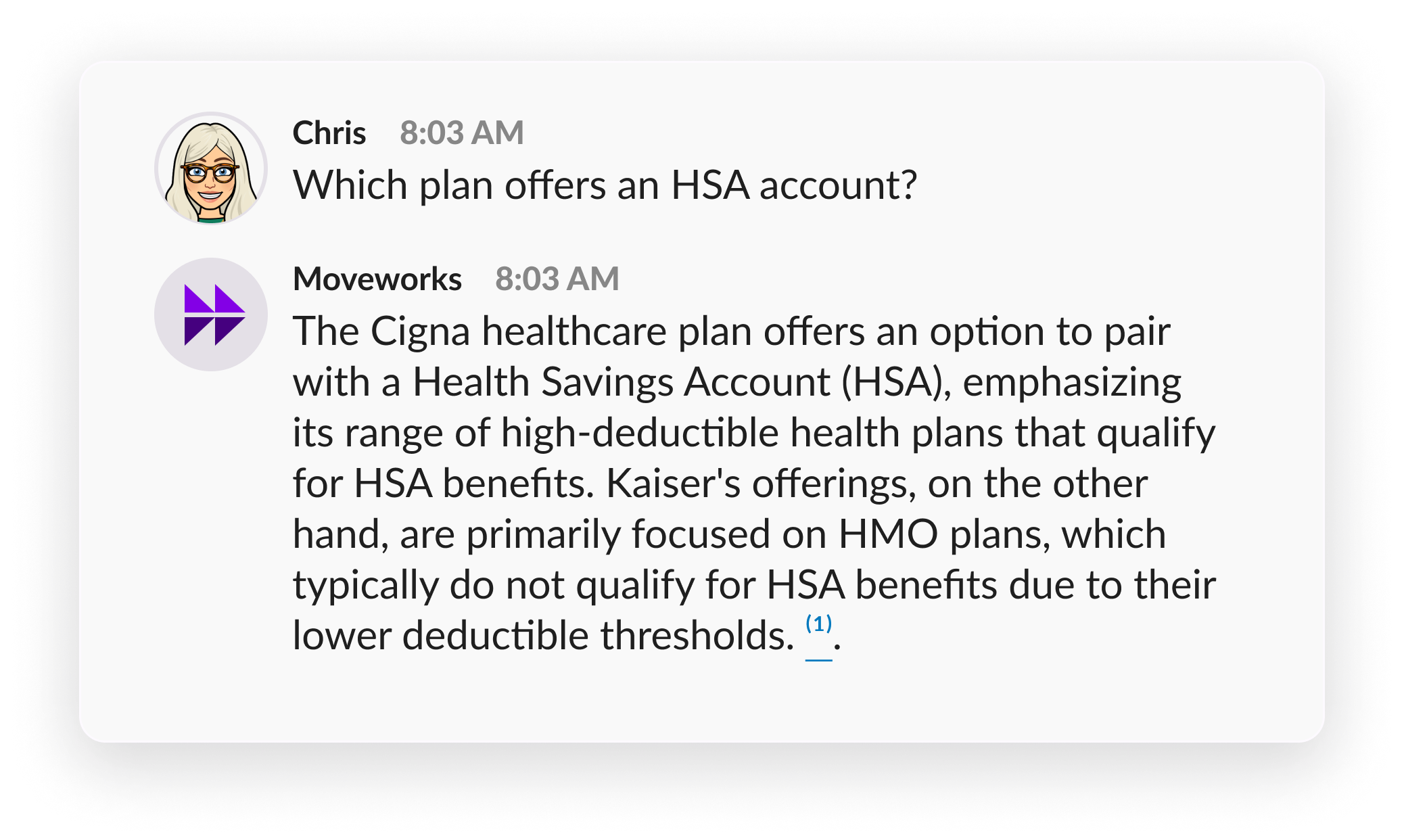
With the understanding you’ve developed, let’s walk through a few examples where Chris is asking various questions related to the open enrollment files she uploaded. The first question that Chris may ask is, “Which plan offers an HSA account?”.

Query Rewrite
Behind the scenes the first thing that Brief Me will do is create a new version of the query that Chris just asked. It will also leverage any use previous questions and responses when it’s creating a new version of the query. Since this is the first question that Chris has asked, Moveworks AI Assistant doesn’t have any previous context so it will only use the query that Chris provided, “Which plan offers an HSA account?”. For such query, the new query that gets generated from “Query Rewrite” could be “Plans with HSA”. Both the original query (”Which plan offers an HSA account?”) and the newly created query (“Plans with HSA”) are sent over to the Reasoning Engine to determine the next step.
In general this step is beneficial whenever there’s previous context. Let’s say the next question Chris where to ask was, “How do I set that up”. The new query that “Query Rewrite” creates could be “Setup HSA” since the first question was related to “HSA accounts”. Notice that Brief me with Moveworks AI Assistant was able to accurately answer the question without Chris needing to include “HSA” in her question.
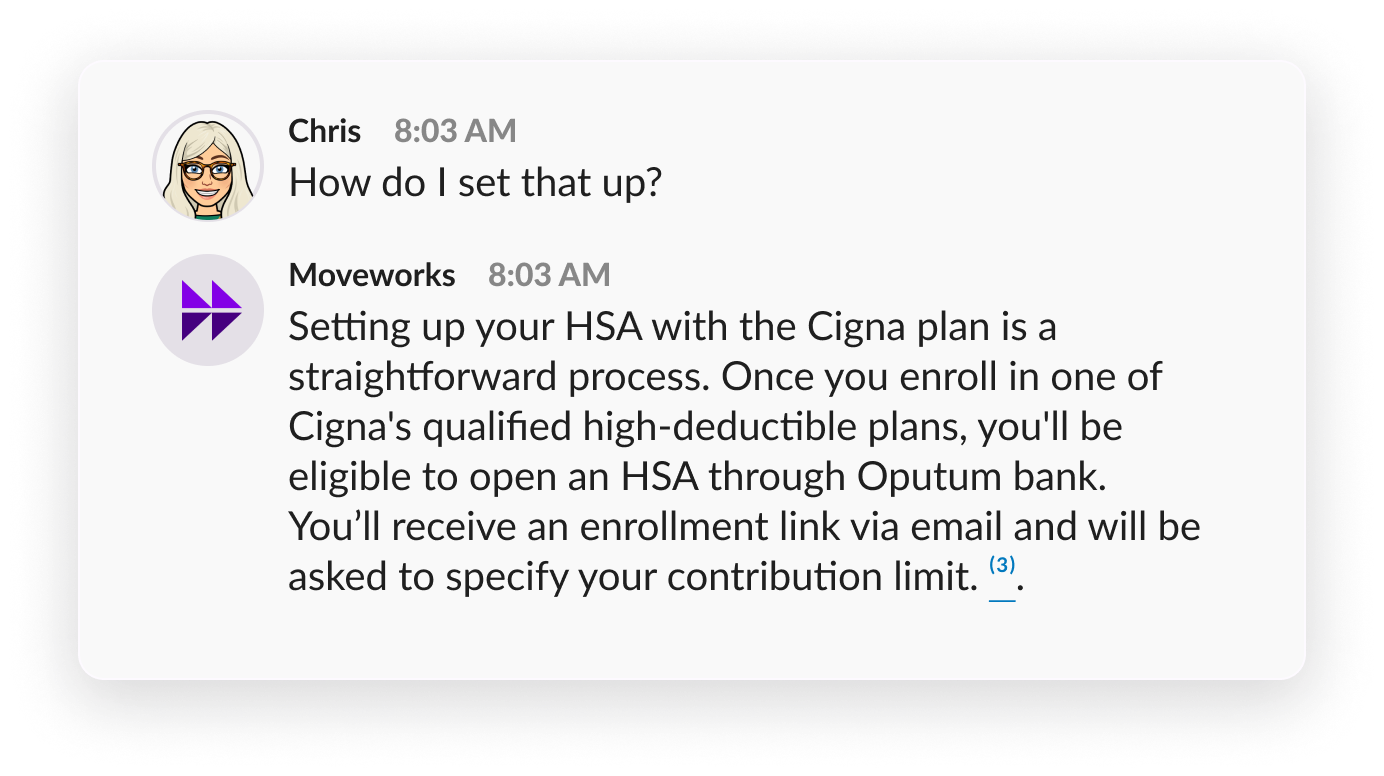
Reasoning Engine
The Reasoning Engine serves as the analytical brain of Moveworks AI Assistant, where the real magic happens. After receiving both the original query (“Which plan offers an HSA account?”) and the query rewrite response (“Plans with HSA”), the engine springs into action.
The engine’s primary task is to accurately interpret Chris’s inquiry, choosing between a comprehensive review of the entire file or a targeted search within specific sections (Does I need to look at every page of a file, or can I find the answer in just a part of a file? ). This decision rests on the nature of the query, which dictates the best suited approach—whether summarizing the file to capture its essence, engaging in an in-depth Q&A for precise answers, or comparing specific themes across a series of files.
Moveworks AI Assistant has to pick between 2 options. It doesn’t need to do both:
- Use entire file: If Chris’s intent is to get a summary across all the files, a single file, or a few files, then it has to look the entire file to provide an answer.
- Search within a file: However if the intent Chris has is to engage in Q&A or compare topics within files, then it doesn’t need to look at all the files. It just needs to fine the file that is most relevant, specifically the part within a file that’s most relevant.
Considering Chris’s question and the simpler query provided, AI Assistant realizes it doesn’t need to check the entire file. It heads over to the “Your files database” and looks for any mention of “HSA” in the file snippets.
This search reveals that “HSA” pops up in four of the five files. In the illustration below, there were 6 relevant snippets on this topic (outlined in a pink circle):
Moveworks AI Assistant generates a response
Now that Moveworks AI Assistant has found the most relevant snippets, it has to figure out how to best answer the original question, “Which plan offers an HSA account?”. Moveworks AI Assistant will assess the snippets from these files to deduce which one truly holds the answer.
Given the healthcare plan context of Chris’s question (“Which plan offers an HSA account?”), 📔Cigna_Healthcare_2024.pdf becomes the standout document.
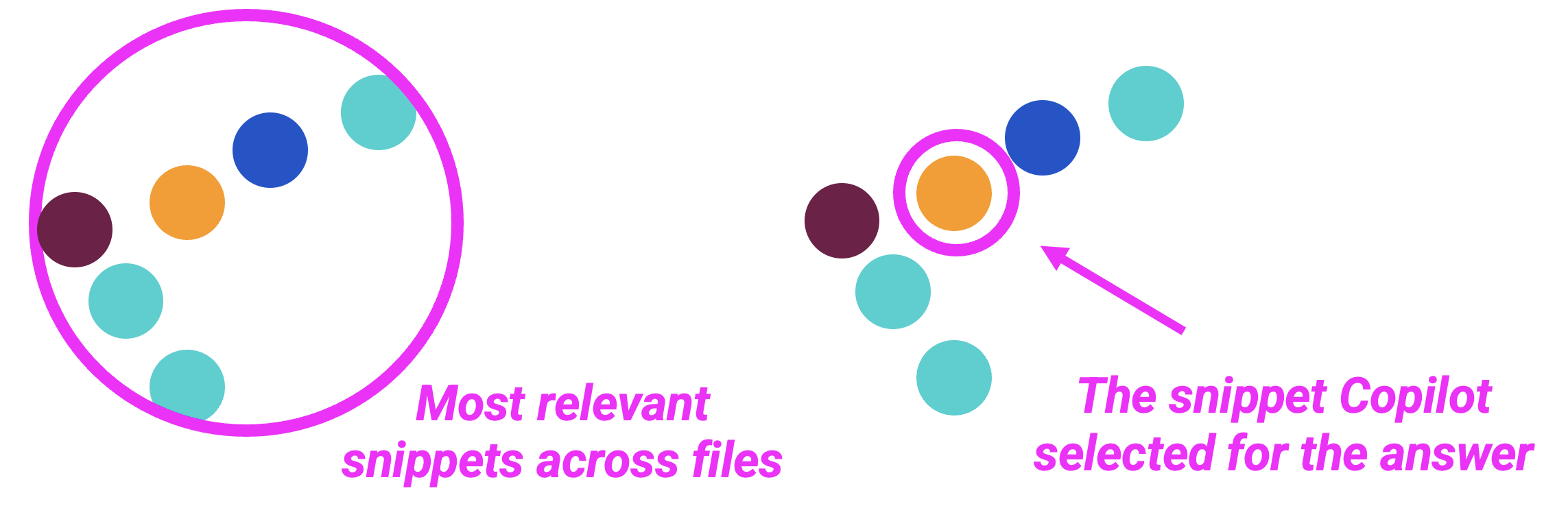
While multiple snippets across files mention HSA, the snippet from the 📔Cigna_Healthcare_2024.pdf is the most relevant and hence why Moveworks AI Assistant provided the following answer.
How is Brief Me within AI Assistant different from other similar features on the market today?
Brief Me, integrated within Moveworks, distinguishes itself as a leading solution through several advanced technical strategies:
Real-Time File Ingestion & Processing: Unlike traditional search systems that operate through offline indexing or rely on a Live API, Brief Me revolutionizes this space by performing real-time file ingestion and processing. This approach reduces latency and allows users to quickly start engaging with the file.
Embeddings-Based Search: Standard search systems typically scan all files within an index to respond to a query, which, in organizations with vast document repositories (e.g., 10,000 files), can lead to suboptimal accuracy and relevance due to the sheer volume of data. Brief Me’s approach, however, confines its search to user-uploaded files and employs an embeddings-based method. One of the benefits that comes with leveraging an embeddings based search approach is the ability to look at neighboring snippets for queries - this is especially helpful when the answer to a question doesn’t entire exist within one snippet (a paragraph). Sometimes the answer to a question is dependent on the information exists in previous or subsequent paragraphs of the. most relevant snippet (a paragraph). This strategy enhances the search accuracy because its’ able to quickly analyze the most relevant snippets across all the files.
Selective Analysis by the Reasoning Engine: The Reasoning Engine’s advanced capability to discern whether to analyze an entire file or focus on specific sections is crucial. Recognizing that it’s unnecessary—and inefficient—to always engage with the full content of a file, this ensures that only the most relevant data is utilized for generating responses, streamlining the process for faster and more accurate outcomes.
Grounded Responses: Moveworks AI Assistant stands by the principle of grounded responses. Every piece of information it provides is directly derived from the content of the files uploaded by the user. This ensures that the guidance and answers AI Assistant delivers are inherently reliable and trustworthy, making it an invaluable aid to users navigating through their document collections.
These cutting-edge features together make Brief Me within Moveworks AI Assistant the stand out solution, raising the bar for how we search and analyze documents in today’s crowded market.
Want to see more examples?
Check out our Brief Me: Use Cases & Scenarios page to look at other examples that highlight various capabilities.