
Axero
Overview
Axero is a community and intranet platform; the Classic Ingestion connector indexes Wiki pages and Articles from Axero so employees can find answers through the Moveworks AI Assistant.
Access Requirements
For information on the access and credentials required to connect Axero to Moveworks, see Axero Access Requirements.
Permissions
The Classic Ingestion connector for Axero does not mirror source permissions. All indexed content is visible to all employees in the AI Assistant search experience.
Supported Content Types
Currently, the Moveworks Axero content connector supports Wiki (excluding Wiki table of contents) and Article content types.
Please note that images, tables, text formatting, lists, or other multi-media formats will not be rendered in chat. Instead, the user will be able to click the article and view the source article.
Architecture
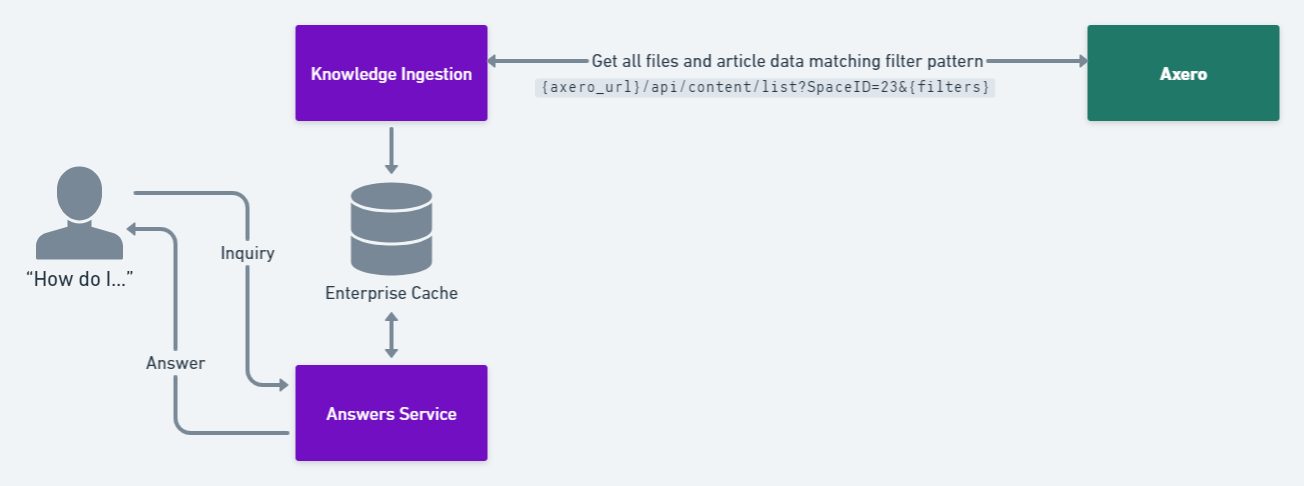
- Moveworks identifies candidate files to ingest
- We use the “Content List API” and provide the Axero Space ID. We use filters in the API request to only find pages that are either Articles or Wiki Pages under the specified section. We also check to see if the page is published or not.
- Moveworks extracts the file as HTML and produces snippets
- The “Content List API” returns the HTML of the pages we specified. We then parse that HTML document, converting it into a chat-ready answer.
- Moveworks serves an answer to the user
Configuration
A step-by-step Moveworks Setup configuration guide for this connector is not yet available. Contact your Customer Success Manager for assistance with setup.