
How Moveworks Ingests Content
Overview
When you connect a content source to Moveworks, the Content Ingestion Platform handles the full pipeline from discovery through search-readiness. You configure your connector and ingestion settings in Moveworks Setup — Moveworks takes care of the rest.
This page describes how indexed connectors ingest content into Moveworks. Live search connectors (those that query the source system in real time, such as Outlook, Jira, Box, and Slack) do not use this pipeline.
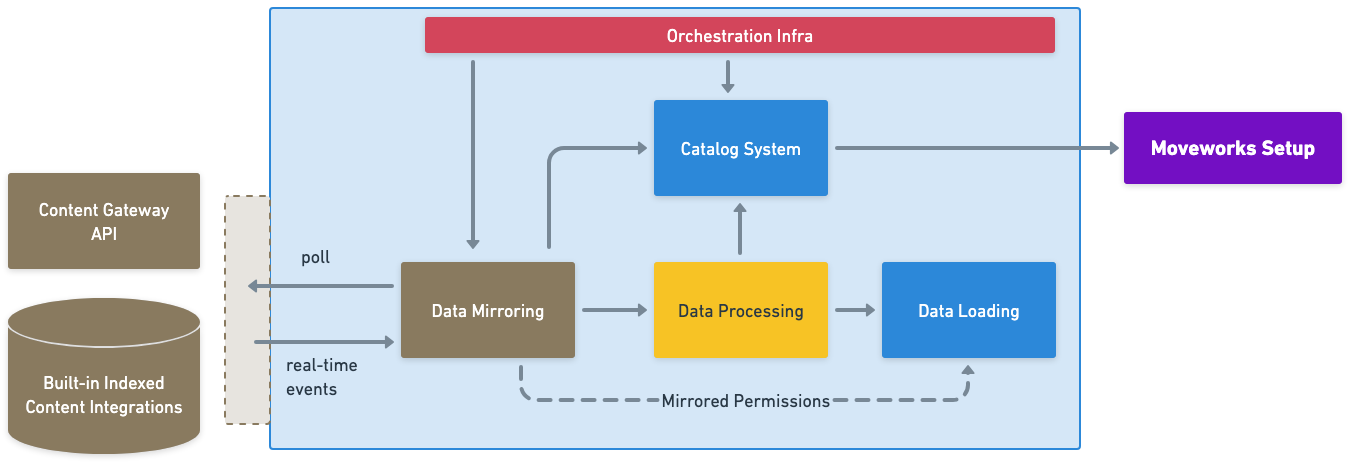
The pipeline runs in three stages:
- Mirroring — Discovers all in-scope content and permissions from your configured source systems.
- Processing — Breaks content into searchable chunks, applies enrichment, and generates vector embeddings.
- Loading — Indexes the processed records so they are available for retrieval in the AI Assistant.
Status and activity for each stage is surfaced in Monitor Indexed Content in Moveworks Setup.
Mirroring
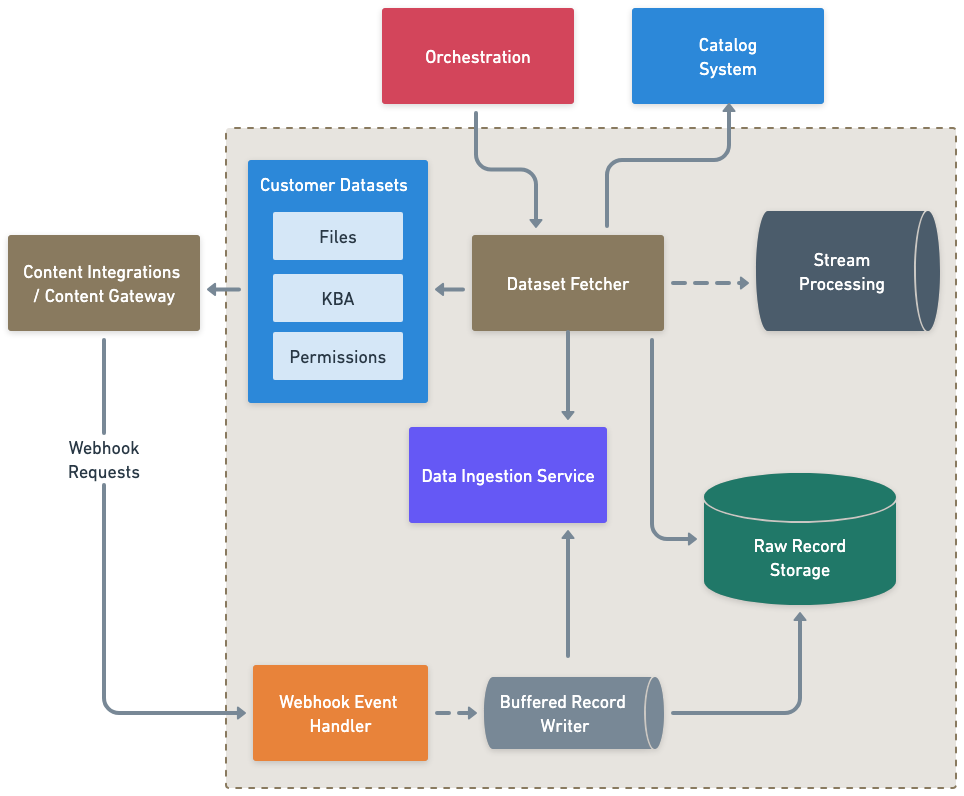
Mirroring is the discovery stage. Moveworks uses your configured connector to authenticate into your source system, identify all in-scope content and permission records, and pull them into the pipeline.
Connector Types
There are two ways to connect a content source:
- Built-in connectors — First-party integrations that Moveworks builds and maintains. Set up self-service through Moveworks Setup. See all built-in connectors.
- Content Gateway — A custom integration path for sources that don’t have a built-in connector. You build APIs following the Moveworks Gateway spec; Moveworks handles the rest. Learn more.
Ingestion Configuration
Once a connector is set up, you configure the sync — specifying which content is in scope, how frequently to sync, and whether to include permissions. This is done through Moveworks Setup in the Classic Ingestion or Enterprise Search setup flows.
Sync Types
Moveworks runs three types of syncs to keep content up to date:
Full Sync A complete pass over all in-scope content and permissions. Runs automatically when a new source is onboarded for the first time, and then daily to maintain a clean baseline. Full syncs ensure the index can be fully reconstructed if needed.
Incremental Sync Captures changes — new content, updated records, permission changes — since the last sync. Runs multiple times throughout the day (default: every 15 minutes) so recent updates appear in search without waiting for the next full sync.
Individual Sync (Webhook-based) If your source system supports webhooks, Moveworks subscribes to change events and processes individual record updates in real time. This provides the fastest possible index refresh for supported systems, in between incremental sync runs.
Processing
After mirroring, each content record goes through an enrichment pipeline before it is indexed.
Snippetization and Chunking
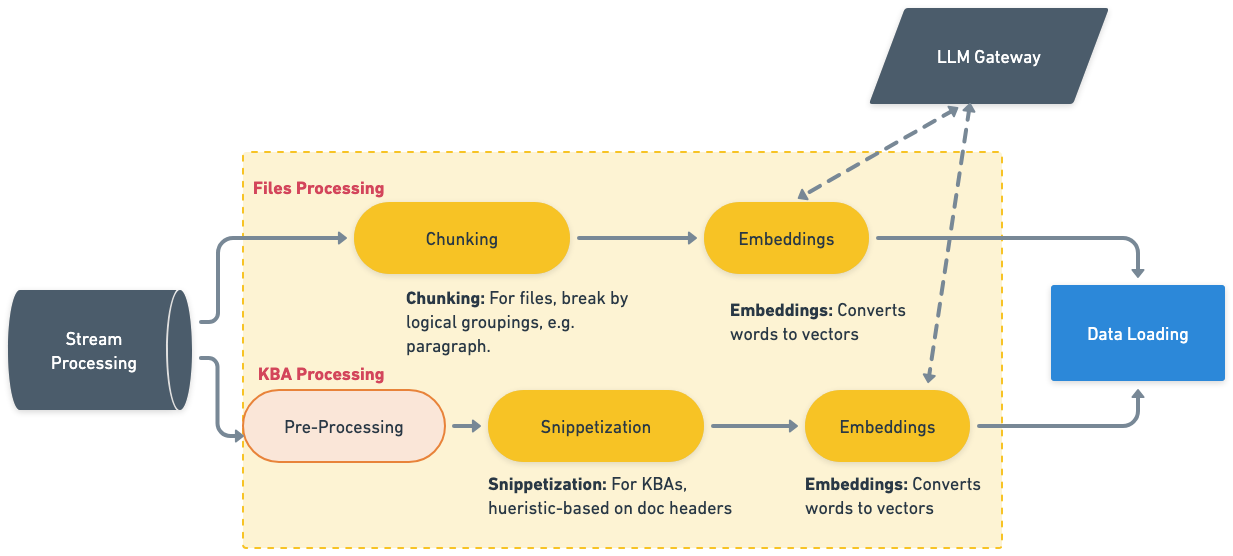
Long documents are broken into smaller pieces — snippets or chunks — for more precise retrieval. The splitting strategy varies by content type:
- Knowledge Base Articles — Split by paragraph, heading structure, or semantic groupings.
- Files (PDFs, Word docs, PowerPoint, plain text) — Split by page or section boundaries.
Smaller, well-formed chunks improve both retrieval accuracy and the quality of AI-generated summaries. For deeper detail on how chunking and snippetization work, see Document Chunking and Snippetization Overview. For guidance on structuring content for optimal chunking, see Writing AI-Ready KB Articles.
Enrichment
Chunks may receive additional enrichment to improve search relevance, including file summaries, metadata extraction, and activity signals (views, shares, recency). This is an active area of development.
Embedding
Each processed chunk is converted into a vector embedding — a numeric representation that captures semantic meaning. This is what enables Moveworks to return results based on the intent of a question, not just keyword overlap. The embeddings are passed to the Loading stage for indexing.
Loading
Once processing is complete, records are loaded into the search index and become available for retrieval.
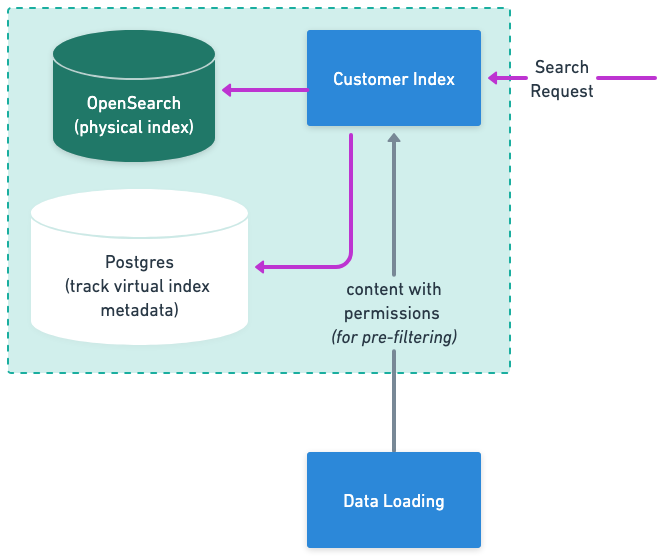
Moveworks maintains two separate indexes per organization — one for knowledge base articles and one for files — so each content type is retrieved through an optimized path.
Once loaded, content is ready for search. The Permissions layer ensures employees only see content they are authorized to access in the source system.