
Interact
Overview
Interact is an intranet and employee communication platform; the Classic Ingestion connector indexes Interact knowledge articles so employees can find answers through the Moveworks AI Assistant.
Access Requirements
For information on the access and credentials required to connect Interact to Moveworks, see Interact Access Requirements.
Permissions
The Classic Ingestion connector for Interact does not mirror source permissions. All indexed content is visible to all employees in the AI Assistant search experience.
Supported Content Types
The Moveworks Interact Knowledge Integration supports the Link Article and HTML Article content types.
- HTML Articles - default, text-based articles. These Articles will be snippetized and served to the user directly
- e.g. Article detailing the setup of a VPN
- Block Editor - Interact allows you to create snippets within knowledge articles that can have special formatting on them such as accordion/collapsible blocks.
- The one caveat to using block editors is that the default title for the accordion blocks is not a header in html. Because of this we do not actually ingest this data, so we will need to have headers within the blocks instead. An example of this can be seen in the attached screenshot where “Ostriches” is the title of the accordion block, but the header ingested by Moveworks is “Donkey”. We recommend that the title of the accordion block is duplicated as a header within the content itself.
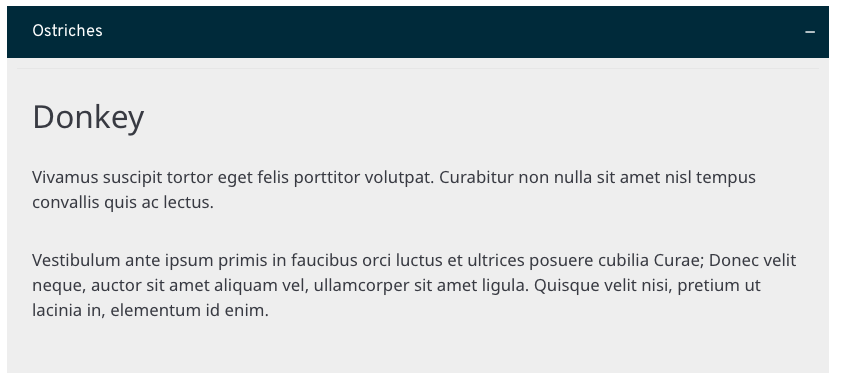
- The one caveat to using block editors is that the default title for the accordion blocks is not a header in html. Because of this we do not actually ingest this data, so we will need to have headers within the blocks instead. An example of this can be seen in the attached screenshot where “Ostriches” is the title of the accordion block, but the header ingested by Moveworks is “Donkey”. We recommend that the title of the accordion block is duplicated as a header within the content itself.
- Link Articles - link out to external resources. The content in the external resource will not be snippetized. Instead, the user will see the title, short description, and a link to view the content given they have the correct permissions.
- e.g. A link to an internal Google Doc
Please note that images, tables, text formatting, lists, or other multi-media formats will not be rendered in chat. Instead, the user will be able to click the article and view the source article.
Architecture
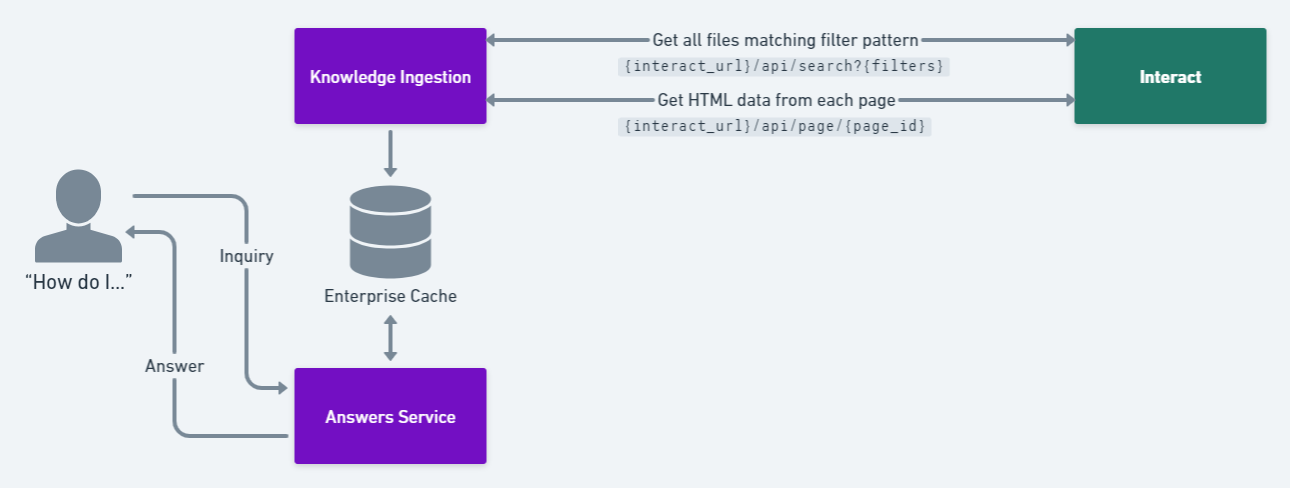
- Moveworks identifies candidate files to ingest
- We use the “Search API” and provide the Section ID. We use filters in the API request to only find pages that are either Link Article or HTML Article under the specified section. We also check to see if the page is published or not.
- Moveworks extracts the file as HTML and produces snippets
- The “GET Page” returns the HTML of the pages we grabbed in the previous step. We then parse that HTML document, converting it into a chat-ready answer.
- Moveworks serves an answer to the user
Configuration
A step-by-step Moveworks Setup configuration guide for this connector is not yet available. Contact your Customer Success Manager for assistance with setup.