
File Indexed Search
Overview
With File Search, your Moveworks AI Assistant can now answer your employees’ questions directly in-chat with information from files types such as .pdfs, .docx, .txt, and .pptx – beginning with built-in integrations with Microsoft Sharepoint Online, Google Drive, and Box!
As a result, File Search supercharges your Moveworks AI Assistant, extending the content your employees can access in Search, beyond articles in Knowledge Bases.
Respecting Source Permissions
Additionally, File Search integrations respects and mirrors the source permissions , so all your employees’ access will always be consistent with what they can access in your source system. For more, see File Search - Respecting File Permissions.
How does File Search work?
File Search functions similarly to the Answers capability in the Moveworks AI Assistant. However, File Search extends beyond Answers in that you can now ingest, index, and serve content from within .pdf, .docx, .txt, and .pptx files in response to your employees’ search queries.
At a high level, we continuously ingest your files and file permissions, maintaining consistency with your source system, snippetize them into chunks of text, and index them in preparation for Search.
During Search time, we enforce your source system’s file permissions so that your employees can only access information from files they already have access to, and feed the most relevant, highest-ranked content back to Moveworks AI Assistant to produce a highly accurate summarization grounded in your source-of-truth files (with citations).
For more on what is supported, see our FAQ of File Search capabilities File Search FAQs.
File Search with Moveworks AI Assistant: Natural Language Search
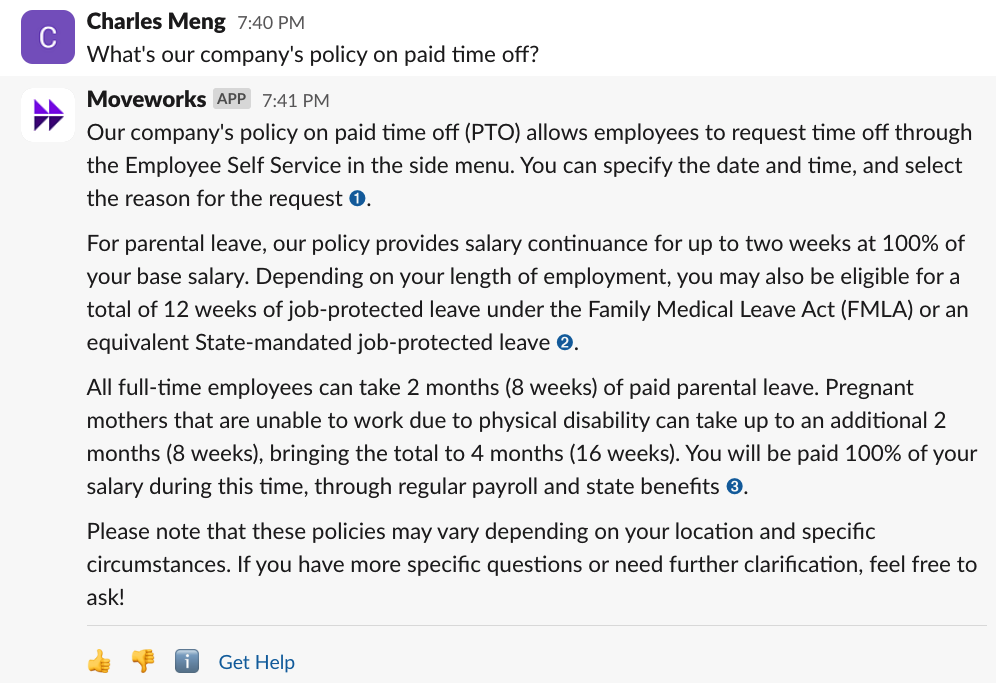
With Moveworks AI Assistant, your employees can ask questions in natural language, and receive summarized answers from across your source-of-truth .pdf, .docx, .pptx in Sharepoint, Drive, and more.
Citations
Moveworks AI Assistant has the ability to summarize content across multiple files back to your user, and includes citations that link back to the source of truth from which Moveworks AI Assistant summarized the answer from. This allows your employees to validate the answer and uncover further information in the Source file.

For more on how Answers works, see: How does Answers work?.
How do I configure File Search?
File Search will be available via Self-Serve for your admin – see more at File Search Self-Serve Configuration.
What is supported in File Search today?
See our File Search FAQs for more information.