Confluence Server / Data Center Access Requirements
Moveworks leverages the Atlassian Confluence Server REST API to access knowledge base articles.
Authentication
Moveworks supports three authentication types for Confluence Server / Data Center. The type you choose also determines how Moveworks reaches your instance — see Connection Routes below.
- Basic Auth — the username and password of a Confluence service account. Recommended for most deployments.
- API Key — a bearer token, sent as
Authorization: Bearer <token>. Use an Atlassian personal access token, available from Confluence Data Center 7.9 and later. A personal access token avoids the MFA and SSO problems that basic authentication runs into, so prefer it when your version supports it. - On-Premise Auth — routes every call through the Moveworks Agent installed on your network. Choose this when your instance is not reachable from the internet.
Moveworks requires a service account with read access to the Confluence spaces where end-user knowledge articles reside. Moveworks ingests and serves articles from those spaces.
When you use Basic Auth, verify the service account password before you enter it in Moveworks. Confluence sets a random local password when an account is created, so perform a manual password reset within Confluence to know the password with certainty.
Connection Routes (Choose One)
Configure one route, not both. Route A requires no software on your network but requires your Confluence instance to be reachable from the internet. Route B requires no inbound firewall changes but requires an Agent installation.
Route A: Direct Connection With Network Allowlisting
Moveworks calls your Confluence instance directly over HTTPS, and you restrict who can reach it to the Moveworks IP addresses. Use this route only when all three conditions below are true. If any of them fails, use Route B.
- Your instance is reachable from the internet on port 443 through your reverse proxy or web application firewall, with a valid public TLS certificate. Confluence Data Center has no built-in allowlist that restricts who can reach the product, so enforce the allowlist at your reverse proxy, web application firewall, or network firewall. See Atlassian’s guidance on proxy and HTTPS setup and configuring Confluence security.
- Moveworks has static IP addresses for your organization. Find them under Setup > Organization Details > General Information > Network Details, and see Network Allowlisting. If these values are blank, your organization uses dynamic IP addresses, there is nothing stable to allowlist, and you must use Route B.
- The service account can authenticate over REST without interactive MFA or SSO. A personal access token is the cleanest way to achieve this. If you use Basic Auth instead, handle MFA in one of these ways:
- Apply an MFA exception policy for the Moveworks account at your IAM provider settings level.
- If you already allow direct access to Confluence from your office network gateway or over VPN, apply a firewall exception for the Moveworks IP ranges.
Route B: Moveworks Agent
Install an on-premise Moveworks Agent on your network and select On-Premise Auth on the connector. The Agent opens an outbound connection to Moveworks, so you need no inbound firewall changes to integrate with Atlassian Server.
Use this route whenever any Route A condition fails, and for any instance that you do not expose to the internet. If this option does not work for any reason, please contact your Moveworks CS team to discuss alternatives.
Permissions Support (required for permissions-aware results)
Moveworks honours Confluence access controls, ensuring that individuals only see results for content they are permitted to view.
To enable permissions-aware ingestion for Confluence Server/Data Center, customers must install the Moveworks app in Confluence.
Install the Moveworks app
- Download the Moveworks app JAR from:
https://github.com/moveworks/confluence-plugin/releases/download/v1.0.0/moveworks_search-1.0.0.jar - In Confluence, go to Administration → Manage apps.
- Click Upload app.
- Upload the downloaded JAR file.
- Confirm the app is installed and enabled (it should appear under User-installed apps as
moveworks_search)
This installation is required to ingest permissions correctly, since some permission-related APIs are not available by default. Install the app on both connection routes — network allowlisting does not remove this requirement.
Create the Connector in Moveworks Setup
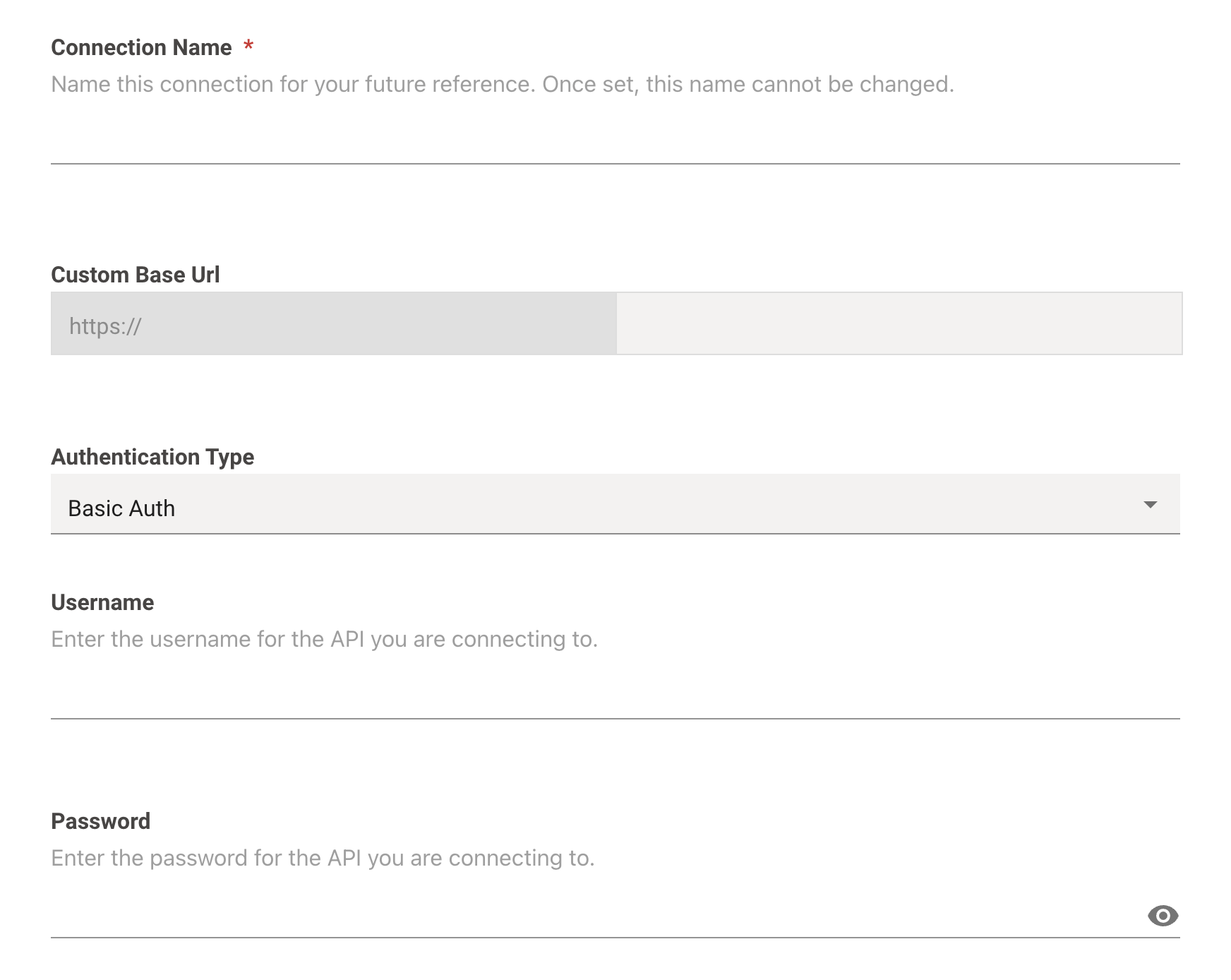
Navigate to Core Platform > System Connectors and create a new connector. Select Confluence Server and enter the information below:
- Connection Name: confluence_on_prem (recommended)
- Custom Base Url: Enter the URL of your Atlassian instance
- Authentication Type: Select your preferred method of authentication. This field selects your connection route: choose On-Premise Auth for Route B, or Basic Auth or API Key for Route A. Basic Auth is recommended on Route A.
- Username: Enter the username of the service account created earlier
- Password: Enter the password of the service account created earlier