For AI agents: a documentation index is available at the root level at /llms.txt and /llms-full.txt. Append /llms.txt to any URL for a page-level index, or .md for the markdown version of any page.
Logo
DeveloperAcademyCommunityStatus
  • Service Management
    • Overview
    • Concierge & Ticketing Capabilities Overview
    • Forms
    • Forms - Integration Specific Guides
    • Live Agent Chat / Handoff
    • Triage
    • Approval Mirroring
      • Configure Approval Mirroring
      • How To Guide for Approvals Configurations
      • ServiceNow Approvals
        • ServiceNow Approvals - RITM / REQ Customization
      • Approvals : Configuration Examples
    • Ticket Interception
    • Generic Ticketing Integration: Ticket Gateway
  • Administration
    • MyMoveworks
    • Organization Information
    • Roles and Permissions
    • MyMoveworks SSO
  • Moveworks Setup
    • Accessing Moveworks Setup
    • First-Time Login via Magic Link
    • Moveworks Setup Modules
    • Moveworks Setup: Module How To Guides
    • Plugin Management
    • Monitor Alerts
    • Audit Logs
    • DSL Fields Defaults
    • Data Crawling View
    • API Playground
    • Setup Homepage
    • Troubleshooting Hub
    • Security and Privacy Settings
    • Configuration Delete
    • Advanced Config Editor
    • Identity configuration
    • Onboarding Stage
  • Security
    • Security
    • Hyperlink & Button Expiry
    • Attachment Handling
    • Moveworks Subprocessors
  • Provision Management
    • Overview
    • Access Software
    • Access Groups
    • Access Account
  • Access Requirements
    • Overview
    • Update Set Modules
    • Ticketing Systems & ITSMs Access
    • Identity and Access Management Systems Access
    • Multi-Factor Authentication (MFA) Systems Access
    • Knowledge Access Requirements
    • Email Distribution List Systems Access
    • Facilities Management Access
    • Live Agent Chat Access
    • HR Information System Access
    • Expense Management Access
    • Calendar Management Access
  • Core Platform
    • User Identity
    • Moveworks On-Prem Agent
    • Approvals Engine
    • Entity Catalog
    • Configuration Languages
    • Moveworks Data Objects
    • SIEM
  • Employee Experience Insights
    • Overview
    • Breaking Down the Dashboard
    • Understanding Industry Benchmarks
    • Apps & Services
    • Impact Module
    • EXI Common Use Cases
    • Configure EXI
    • Ticket Backpolling
  • Knowledge Studio
    • Overview
    • Knowledge Studio Configuration
    • AI Powered Recommendations
    • Inspecting & Verifying Sources
    • Publishing Articles
    • Creating Knowledge Articles
    • Resolving IT Tickets Guidance
DeveloperAcademyCommunityStatus
On this page
  • Show only certain variables (whitelist)
  • Sample Code
  • Control the order in which variables are shown
  • Copy comments to the underlying ticket
  • Appendix
  • Chat Text Rendering
  • Teams
  • Slack
Service ManagementApproval MirroringServiceNow Approvals

ServiceNow Approvals - RITM / REQ Customization

||View as Markdown|
Was this page helpful?
Edit this page
Previous

Approvals : Configuration Examples

This page provides examples of the Default Approval Mappers for specific Integrations which are able to Mirror the Approvals from the External System.
Next
Built with

In Moveworks Enterprise Approvals you can customize ServiceNow RITM / REQ for the following use cases:

  • Show only certain variables (whitelist)
  • Control the order in which variables are shown
  • Copy comments to the underlying ticket

Show only certain variables (whitelist)

  1. Create a system property to add keywords of labels that should be displayed on the approval card. This acts like a global variable that can be used in other places such as Business Rule, Client Scripts, etc.
  2. Create a Business Rule which loads the keywords and looks for any variables labeled with the keywords. If a match is found AND the value is not empty, it is added to the RITM’s description. Please see below for a sample of this code. Some values from the RITM’s attributes are also displayed in the description such as Price and Requested For, if it is not empty.

Sample Code

(function executeRule(current, previous /*null when async*/ ) {
var str = '';
var variables = current.variables.getElements();
//System will look at varibles with below keywords to populate RITM description
var list_key_words = gs.getProperty('approval_content.key_words').toString();
//Populate Requested for, Item and Total price(only if price is not empty)
var key_word = list_key_words.split(',');
str = 'Requested For' + ' - ' + current.variables.requested_for.getDisplayValue() + '\n';
str = str + 'Requested Item' + ' - ' + current.cat_item.getDisplayValue() + '\n';
if (current.u_total_price != '0') {
str = str + 'Total Price' + ' - ' + current.u_total_price + ' CAD' + '\n';
}
for (var i = 0; i < key_word.length; i++) {
for (var j = 0; j < variables.length; j++) {
var question = variables[j].getQuestion();
var variableLabel = question.getLabel();
var variableValue = question.getDisplayValue();
if (variableLabel.indexOf(key_word[i]) != -1) {
//gs.addInfoMessage('Varible label' + variableLabel);
str = str + variableLabel + ' - ' + variableValue + '\n';
}
}
}
current.description = str;
})(current, previous);

Control the order in which variables are shown

While ServiceNow admins can specify the order in which to show variables on a catalog item in the portal using the “order” attribute, we do not ingest this attribute to replicate that ordering when we show the approvals (so the order is random). To control the order in which variables are shown, we ask that you to render the variables themselves in the RITM’s description. This is no trivial task. To reduce the amount of fraction of deploying this solution. Please provide the following instructions.

  1. Create a Business Rule

    1. Table: sc_req_item

    2. Advanced: ✅

    3. When to run → When: before

    4. When to run → Insert: ✅

    5. When to run → Order: 100,000

    6. Under the Advanced tab, put the follow script:

      (function executeRule(current, previous /*null when async*/ ) {
      var str = "";
      var variables = current.variables.getElements();
      for (var j = 0; j < variables.length; j++) {
      var question = variables[j].getQuestion();
      var variableLabel = question.getLabel();
      var variableValue = question.getDisplayValue();
      // Option: if statement will convert checkbox values to emoji in chat
      if (variableValue == "true") {
      // replace ✅ with checkmark emoji
      variableValue = "✅";
      }
      else if (variableValue == "false") {
      // replace ❌ with cross emoji
      variableValue = "❌";
      }
      // Ensure that labels does not get rendered in approval
      if (variableLabel && variableValue) {
      str = str + "*" + variableLabel + '* - ' + variableValue + '\n';
      }
      }
      current.description = str;
      })(current, previous);

Once this is done, the description should be populated with variable information in a formatted way.
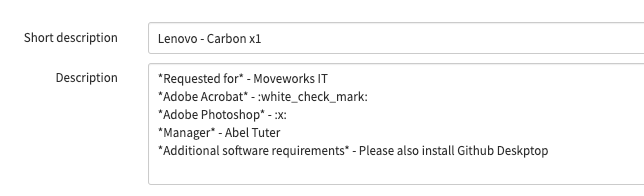
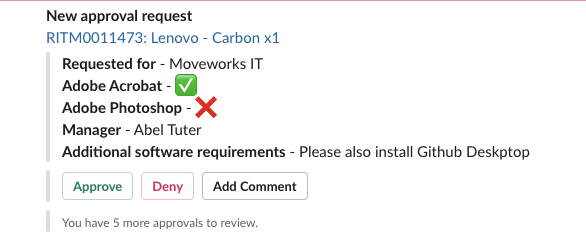
Because we are populating it with chat rendering text formatting and emojis, it may be not human friendly when reading it from here. Once it is rendered in chat, here is what it will look like.
Copy comments to the underlying ticket

Much like your email notifications, Moveworks posts comments to the approval record. This is the out of the box behavior for ServiceNow.

If you’d like approver comments to be posted on the ticket for employees to read, you should implement a business rule to copy comments from the approval table to your ticket table.

A business rule script like the following would do the trick

  • 528Condition: sysapproval_approver table update and Moveworks is the Last Updated By
  • Action
    1if (current.source_table == "sc_req_item") {
    2 var gr = new GlideRecord("sc_req_item")
    3 gr.get(current.sysapproval.sys_id)
    4
    5 gr.comments = current.comments
    6 gr.update()
    7}
  • We recommend running this async. This will avoid accidentally triggering business rules on behalf of the Moveworks Service Account.

Appendix

Chat Text Rendering

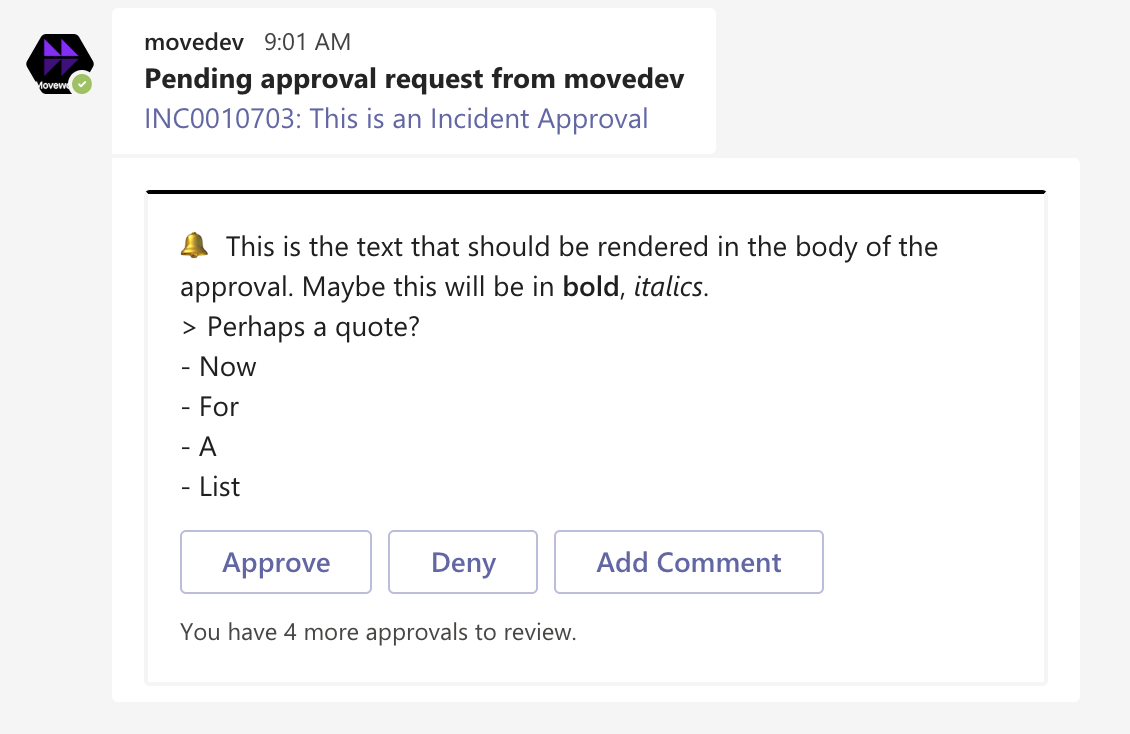
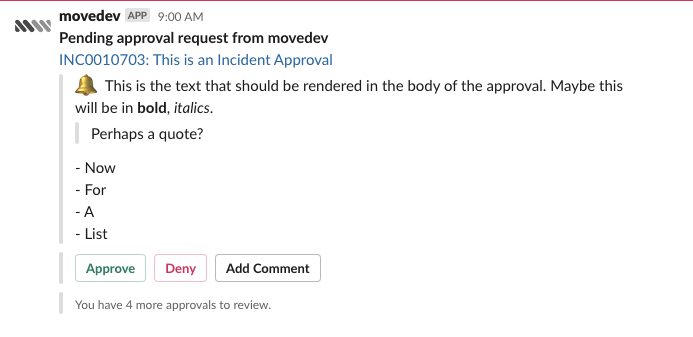
Like with Employee Comms, you can inject additional rich formatting into the chat environment itself

1🔔 This is the text that should be rendered in the body of the approval. Maybe this will be in *bold*, _italics_.
2> Perhaps a quote?
3
4- Now
5- For
6- A
7- List

Teams

Slack