
Configure Ticket Nudge
What is Ticket Nudge?
Ticket Nudges help ensure unresolved tickets don’t get forgotten. Moveworks’ Ticket Nudge feature notifies end users when their ServiceNow tickets have gone inactive for a set period of time and meet specific criteria.
This configuration enables you to determine the maximum frequency at which a user can receive ticket nudges, along with setting up nudge query filters which controls the tickets that are allowed to be used by the Nudge Service. These filters exclude tickets that do not qualify for ticket nudges.
Ticket Nudge Setup
Step 1) Navigate to Ticketing > Ticket Nudge Setup in the Ticketing Automation Module to configure:
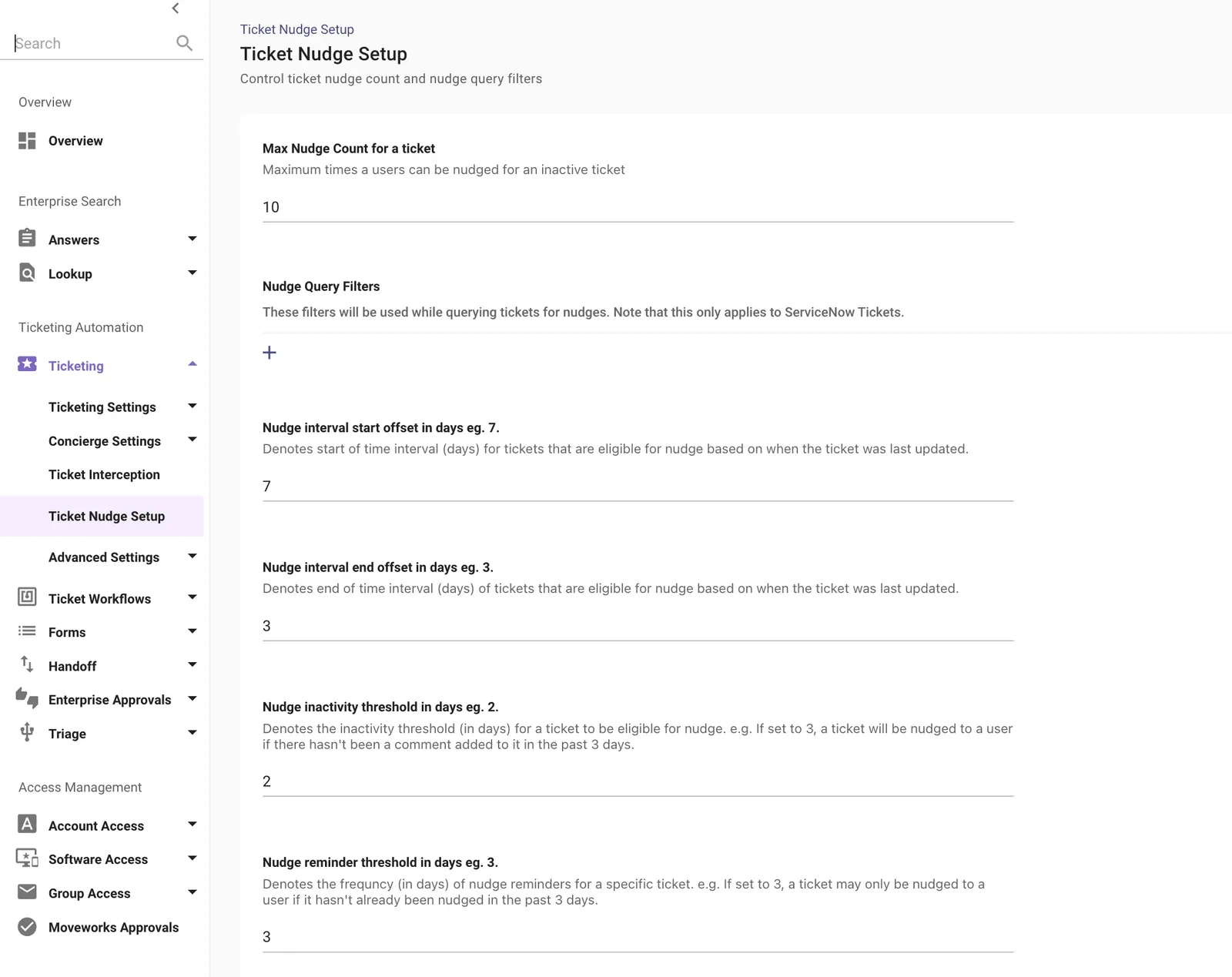
Step 2) Configure Max Nudge Count for a Ticket
- Function : Controls the Maximum number of nudges a user can receive per inactive ticket.
- Example : If set to 10, no user will receive more than 10 nudges for the same ticket.

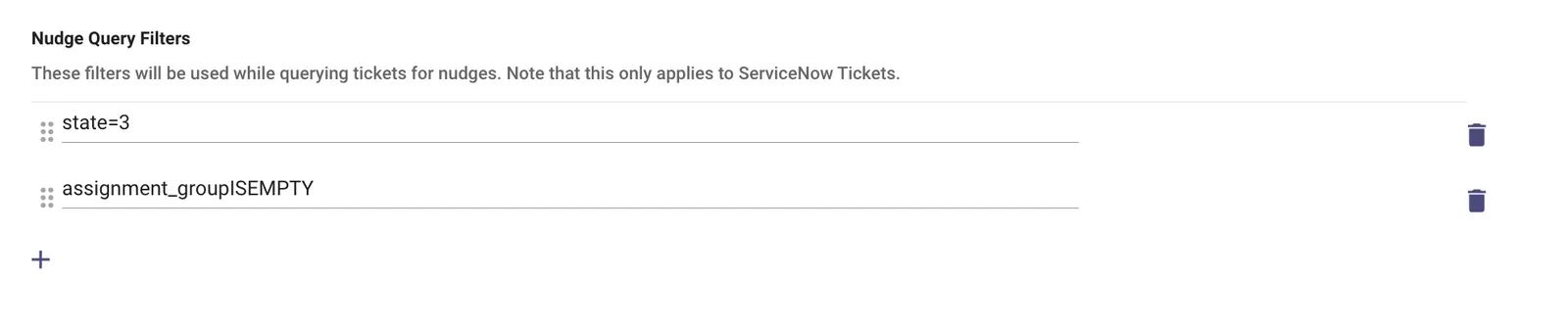
Step 3) Nudge Query Filters [optional]
- Function : Allows users to define Filters which control tickets are eligible for nudges. Only tickets that match these conditions will be considered. Note : These filters apply only to ServiceNow tickets.
- Example :
Step 4) Nudge Interval Start Offset (in days)
-
Function : Sets the minimum number of days since the last update (on the ticket) before a ticket becomes eligible for nudging.
-
Example : If set to 7, the ticket must be inactive for at least 7 days before the first nudge is considered.

Step 5) Nudge Interval End Offset (in days)
-
Function : Sets the maximum age window for when a ticket can be nudged.
-
Example : If set to 3, tickets last updated more than 7 days ago but less than 3 days ago will be eligible (in combination with the Start Offset Interval).

Together, the interval defines a range of inactivity. In this config: tickets updated between 7 and 3 days ago will be eligible for nudge reachouts.
Step 6) Nudge Inactivity Threshold (in days)
-
Function : Defines how many days a ticket must go by without a comment before it’s considered “inactive”.
-
Example : If set to 2, tickets with no user or agent comments in the last 2 days can be nudged.

Step 7) Nudge Reminder Threshold (in days)
-
Function : Controls how often a user can be nudged for the same ticket.
-
Example : If set to 3, the user won’t be nudged more than once every 3 days per ticket.

Step 8) Configure Nudge Filters [optional]
In cases where your ServiceNow instance has a large amount of tickets and API queries are prone to timing out, you can optionally configure a nudge filter.
- Function : Allows users to define Filters which control tickets are eligible for nudges. Only tickets that match these conditions will be considered. Note : These filters apply only to ServiceNow tickets.
- Example :
Note: Nudge Query Filters are supported for ServiceNow only
Step 9) Configure Ticket Filters for Nudge [optional — non-ServiceNow]
If you are using a ticketing system other than ServiceNow (e.g. Jira), the Nudge Query Filters in Steps 3 and 8 will not apply. Instead, you can configure ticket filter rules to control which tickets are eligible for nudge.
To do this, navigate to Ticketing > Ticket Filter in the Ticketing Automation Module and define your filter rules there.
This step is only needed if you want to filter which tickets are eligible for nudge and you are not using ServiceNow. ServiceNow users should use the Nudge Query Filters in Steps 3 and 8 above.
Step 10) Enable Nudge polling (Mandatory)
To enable Moveworks to send nudge notifications for inactive tickets, please activate this checkbox. This setting permits Moveworks to poll your service desk instance for inactive tickets every five minutes.
If you do not enable this checkbox, end users will not receive nudge notifications.

Ticket Nudge Example Configuration
Here is what an example config looks like and what that means :
This config will follow the below behaviour for the values described :
- Tickets in state 3 with no assignment group,
- Updated between 7 and 3 days ago,
- With no comment in the last 2 days,
- Will be nudged no more than once every 3 days,
- And no more than 10 times total.
If you’re looking for nudging of fulfillers, this can be done via Agent Studio! Check out these plugins for more detail: