
Writing AI-Ready Forms for the Moveworks Assistant
How the Moveworks bot understands your Forms
Moveworks periodically scans and ingests your forms so that the bot can serve them up as solutions in response to employees’ requests & issues. The Moveworks bot uses natural language processing to understand an employee’s request, search for potential candidate forms and serve the ones it thinks that can best resolve the issues. When serving forms, the titles and text are maintained, and Moveworks never modifies the text on the forms.
The following fields on forms are used to understand the relevancy of a given form (ordered by importance):
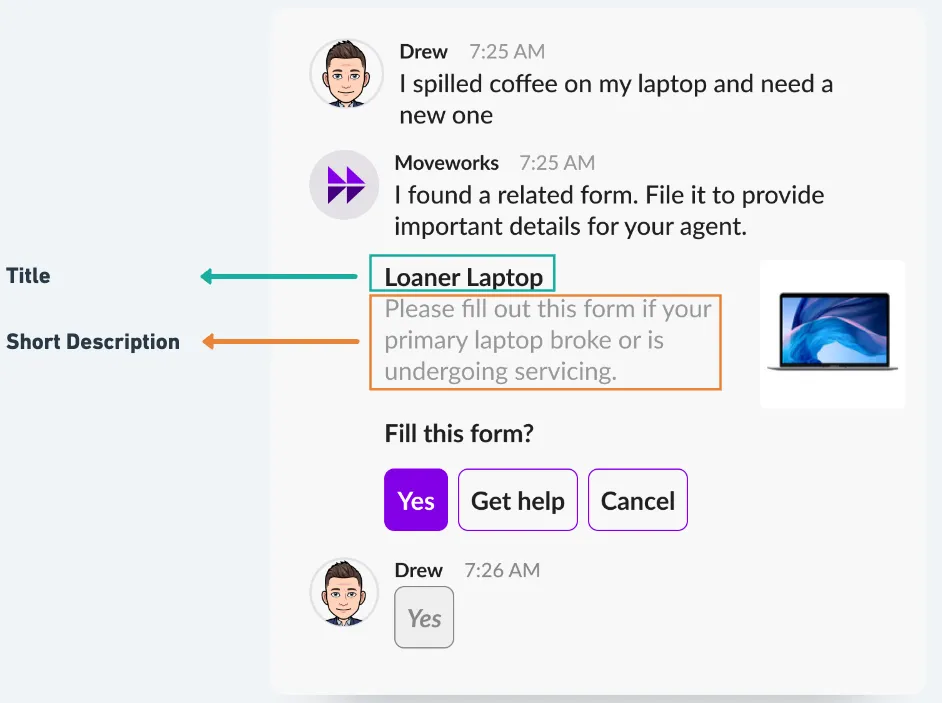
Title(Most important)- The name of the form. This is the most important part of the form. We recommend having titles that clarify the purpose of the form and who should use it, if applicable. If a form title is ambiguous (e.g. “Peripherals” or “Access request”), it will reduce the predicted relevance of the form.
Short Description(Less important but considered)- The short description of the form. This is used as a signal to the relevance as well, but is less important than the title.
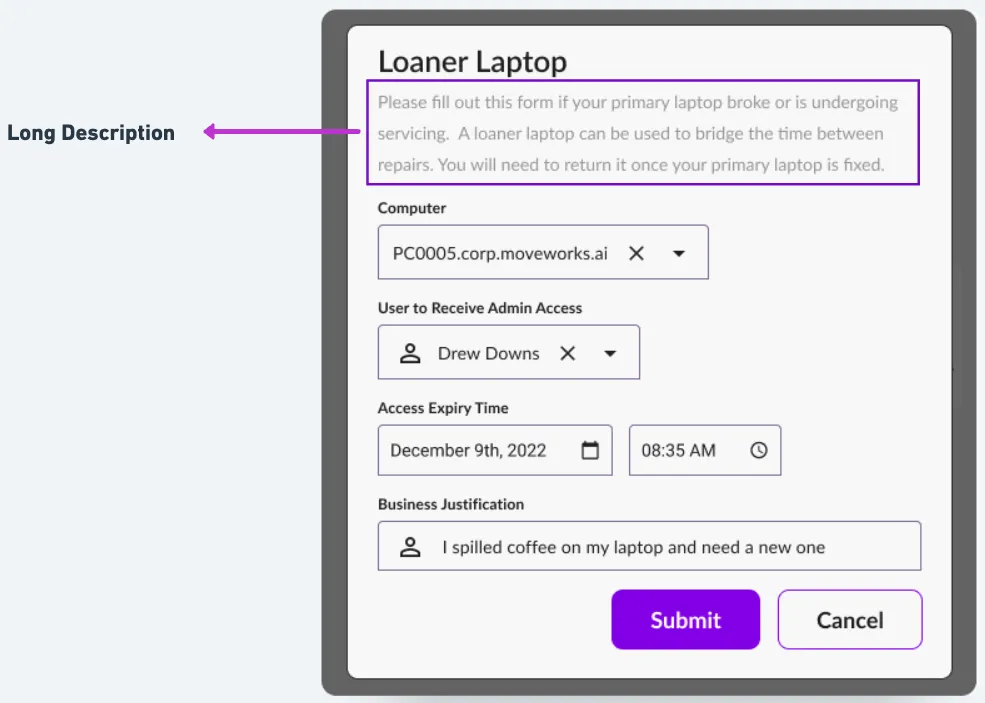
Long Description(Contributes to form understanding but search does not match against specific text present in the long description)- The long description of the form (some systems don’t have this).
- Since long description can contain unnecessary information, Moveworks applies a summarization machine learning model to extract the top salient sentences from the long description.
Custom Annotation
- On top of all the above form elements, Moveworks also reviews important forms in your organization and adds custom annotations to help with the triggering.
Current limitations
Note that Moveworks currently does not use form tags or dropdown field values for calculating relevance. Therefore, any queries that will rely on only matching one of these keywords located in other fields of the form will not work well.
How the bot presents your Forms
When an employee asks a question of the bot, the Moveworks service uses natural language processing (NLP) to evaluate the utterance it received. Moveworks then searches the set of all possible forms to find the top ten forms that can best address the issue. On those ten best answers, Moveworks then performs deeper analysis, scoring each form based on how closely it answers the employee’s question. Scoring is a comparative action that takes the other candidate forms into account when assigning the final score to each answer.
This means that a very high-scoring form will tend to exclude other forms, which helps ensure the user is not distracted with potentially irrelevant forms.
After the forms are scored, the bot shows the employee the answers that have a sufficiently high enough score. The threshold of what allows a form to be shown is constantly tuned to ensure that only accurate results are shown. By default, up to three forms are shown to an employee, however this can be configured to be ten.
For each form, the bot displays the title and the short description of the form to help the employee quickly find the most helpful form. If available, the form’s thumbnail image will also be displayed.
Use simple, clear titles
Moveworks NLP looks at the title of each form in order to understand what the form is related to. Follow these guidelines when you write titles:
- Specify the expected action and resource clearly
- Mention the main subject prominently. For example, “Request Zoom Access” makes it clear you’re talking about Zoom.
- Simpler titles are better.
- Avoid generic forms that span across multiple domains of issues.
- Avoid titles that focus only on a problem’s symptoms.
Examples of Search Optimized Titles
Good vs. Bad Titles
Short Description
When Moveworks recommends that a user complete a form, we present the following information
Forms with appropriate images & clear short descriptions are 3x more likely to be completed by users.
Long Description
If long description is supported by your ITSM platform, the Moveworks bot will display the “long description” within our native form-filling experience. While a “long description” is not required for search relevance, it is a good idea to include any additional information that is applicable to your form that you were not able to communicate via your “short description”. We recommend you limit your “long description” to a few sentences (2-5 sentences).
Do:
- Include any additional information that is relevant to your form that is not mentioned in your short description.
- Keep the long description short and sweet (2-5 sentences).
Don’t:
- Include any URLs as it can distract the employee from submitting the form.
- Don’t use any jargon or abbreviations that only certain employees may be familiar with.
Establish the context of each form
Each form should make it clear in which situations it’s useful. For example, a form applying only to Mac OS users should say that upfront, preferably in the title. Likewise, a form that’s useful only for employees in the UK office should show that in its title, as in, for example, “Request loaner laptop in the UK office?”
Write in the way your users speak
Try to use the terminology your users use, or at least include in your form’s short description synonyms that match what users are likely to type. Don’t worry! Moveworks takes care of most of this for you. Our service is continually learning from the language used by thousands of enterprise users, so it knows most of the words your coworkers might use when they ask a question. Still, it never hurts to write your forms in a language that’s close to how your coworkers speak. These resources can help:
- Google Trends can help you check if you’re using the same terminology as the broad population: https://trends.google.com/trends/explore
- Find alternative phrases for a topic with Answer the Public (based on Google autocomplete data): https://answerthepublic.com/
- Find related keywords: https://www.keyword.io/
Use images effectively
Images can be useful for helping readers understand concepts quickly, and the Moveworks bot may display an image from your form when it shows an answer. Because Moveworks relies on text and not images to understand forms, it’s important that your text conveys the key information in the form. Employees can click through to view the original form with its images, so it’s no problem if important steps rely on the images.
Follow these guidelines when you use images in your forms:
- A 16:9 aspect ratio works best. Different chat tools display images differently, but images with a 16:9 aspect ratio usually display best. Some typical image sizes that have this ratio are 512x288 and 1024x576.
- Don’t use images to provide text. Moveworks cannot read text that’s embedded in your images (no OCR), so avoid such text. If you do have important text embedded in images, it’s a best practice to repeat that text as body text on the page, or as an alt tag in the image anchor.
When you do include images, include alt text
This Google support article offers good image publishing guidelines: https://support.google.com/webmasters/answer/114016?hl=en
Improving forms search results with custom annotation
Moveworks performs forms enrichment to add language signals that can help with increasing forms relevance for certain queries, if it is not possible to use the title and description.
We recommend doing this for high-priority forms that are frequently used, and where the description fields are insufficient to fully capture all use cases. In such cases, your CS team can help with adding intent annotations that capture the purpose of the form, as well as entities that can help with surfacing the form when specific applications are mentioned. If your organization has specific utterance patterns for requests that the form can help with, those can also be added as examples for the model to understand the form’s purpose better.