
Knowledge Studio
Overview
Moveworks Knowledge Studio is our generative AI tool that empowers users to write knowledge articles fully based on company data. Knowledge Studio leverages your IT tickets as the main source for generating factual, verifiable knowledge articles based on data your service desk agents have provided through tickets.
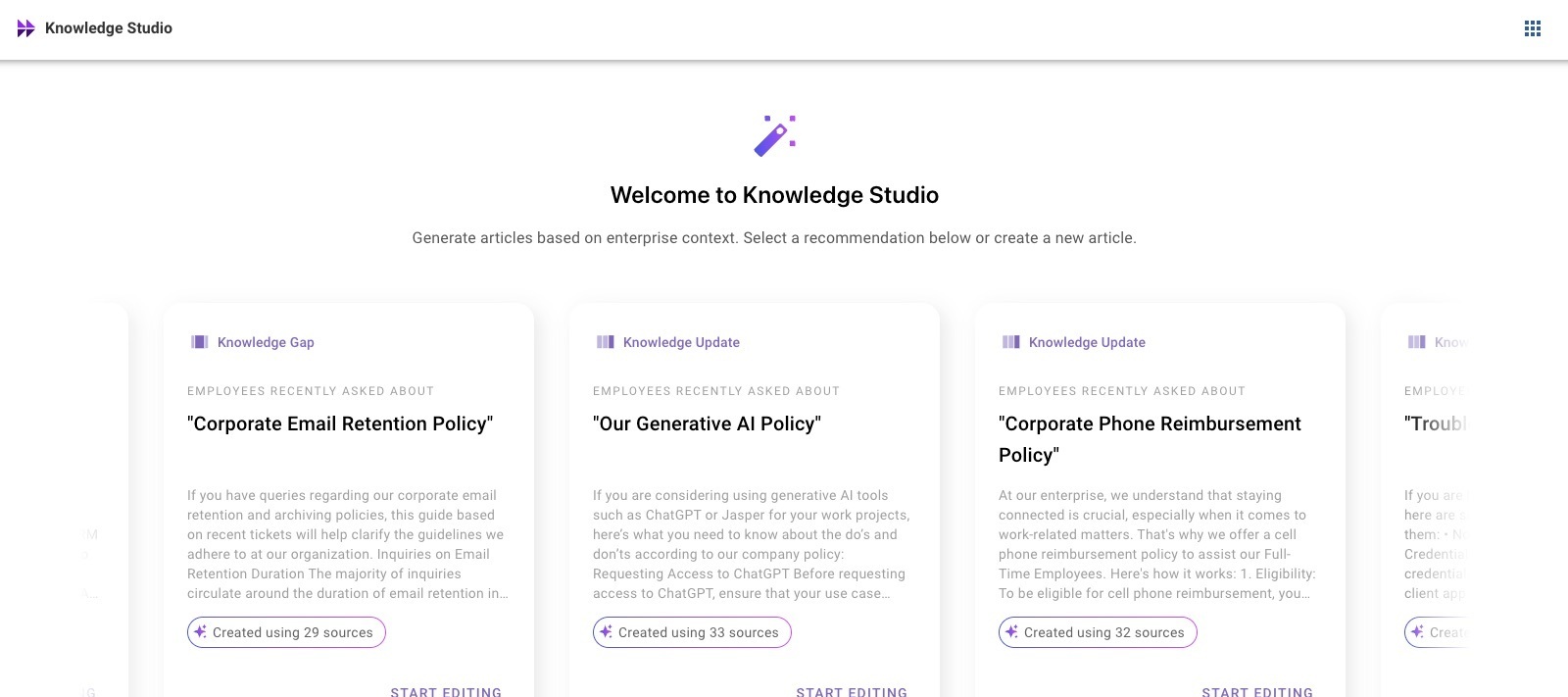
Knowledge Studio skill is composed of these key features:
- Create knowledge from scratch: You can create knowledge from a simple query about a topic of your choice.
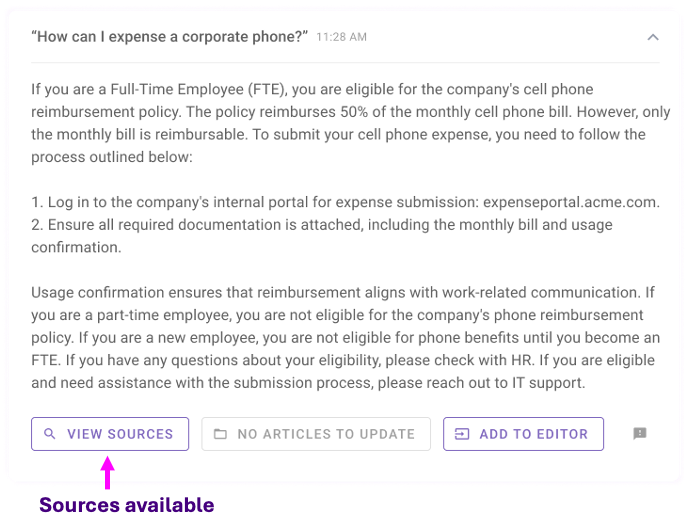
- Inspect sources. You can view which sources were used to generate a response to your query.
- Modify your generated content and publish it externally: You can make modifications to your generated content. And once you’re ready, you can publish it to your external knowledge base system.
- View and use AI powered recommendations: Select any one of our recommendations and modify them as you’d like.
Getting Started with Knowledge Studio
Learn more about Knowledge Studio Configuration.
How to login to Knowledge Studio?
- Go to my.moveworks.com and login with your SSO credentials. If you have yet to set up your MyMoveworks SSO, see our Moveworks Administration Tools Setup guide to learn how to set up MyMoveworks for your organization. Note: Your organization may have updated the login URL for your My Moveworks SSO. If the above URL does not work use your company specific URL by replacing <org> with your company name: https://[org].moveworks.com/.
- Once you login you’ll see the Welcome to Moveworks homepage. Click on Knowledge Studio.
- From here you can start viewing your recommendations and creating new content.
Terminology
As you start using Knowledge Studio, you will encounter the following terms:
✨ Sources: Currently the only company data used as a source is IT tickets.
⌨️ User input: User input is the text that you provide within the input box which used for knowledge generation.
🖥️ Generation/generated article: When Knowledge Studio independently generates content and provides it to you as a recommendation that’s an example of a generated article. When you provide user input and Knowledge Studio outputs knowledge that’s a generation. The terms “generation” and “generated article” are used interchangeably.
There are two types of generations you’ll see within the product:
Grounded generation: The generation produced has sources so it is considered grounded. The knowledge article was generated from enterprise data. “Inspect Sources” will only be visible when IT tickets are available.
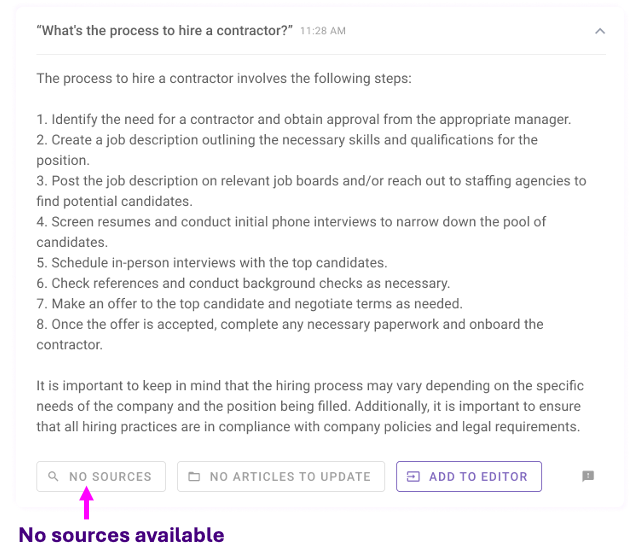
Non-grounded generation: This is a generic article that was produced by GPT without sources. In this case there was no enterprise data that was used to generate the knowledge article.
Creating knowledge articles
Learn more about Creating Knowledge Articles.
Knowledge Generation
Create knowledge articles with a simple query: Users can create knowledge from scratch about a topic of their choice by using a relevant query.
How can I write an article from scratch?
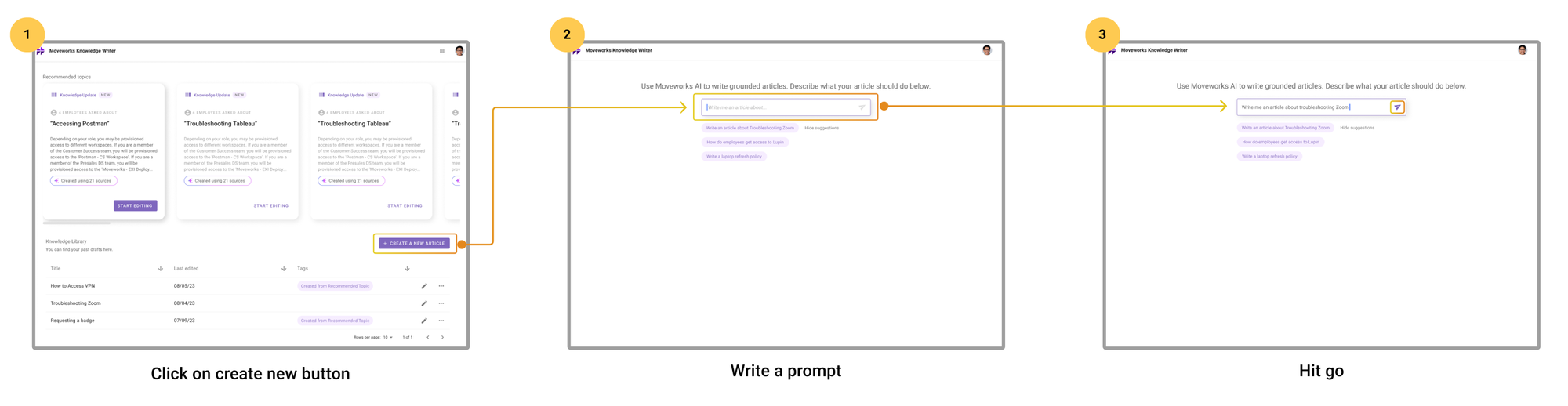
- Click on Create a New Article on the right bottom side of the page.
- Type a prompt.
- Hit enter.
💡Some tips to write prompts well
The way you ask Knowledge Writer what to write really makes a big difference in the quality of the responses. Here are some writing prompt tips:
- ✅Straightforward user input, “Troubleshooting VPN article”.
- ✅Give it a command, “Write me an FAQ about…”.
- ✅Describe an issue or symptom when mentioning a product or entity, “Why won’t the guest internet connect?”
- ❌ Avoid multi-line sentences or one word phrases.
Knowledge Library
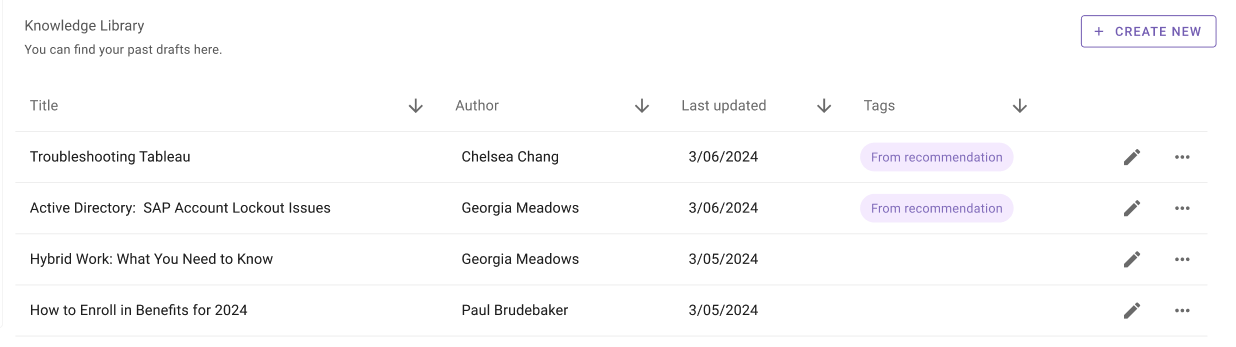
Access previously created knowledge: Users can view and access articles they and their team create.
Inspecting & Verifying Sources
Users can inspect sources and understand where certain parts of the generation are coming from.
Learn more about Inspecting & Verifying Sources.
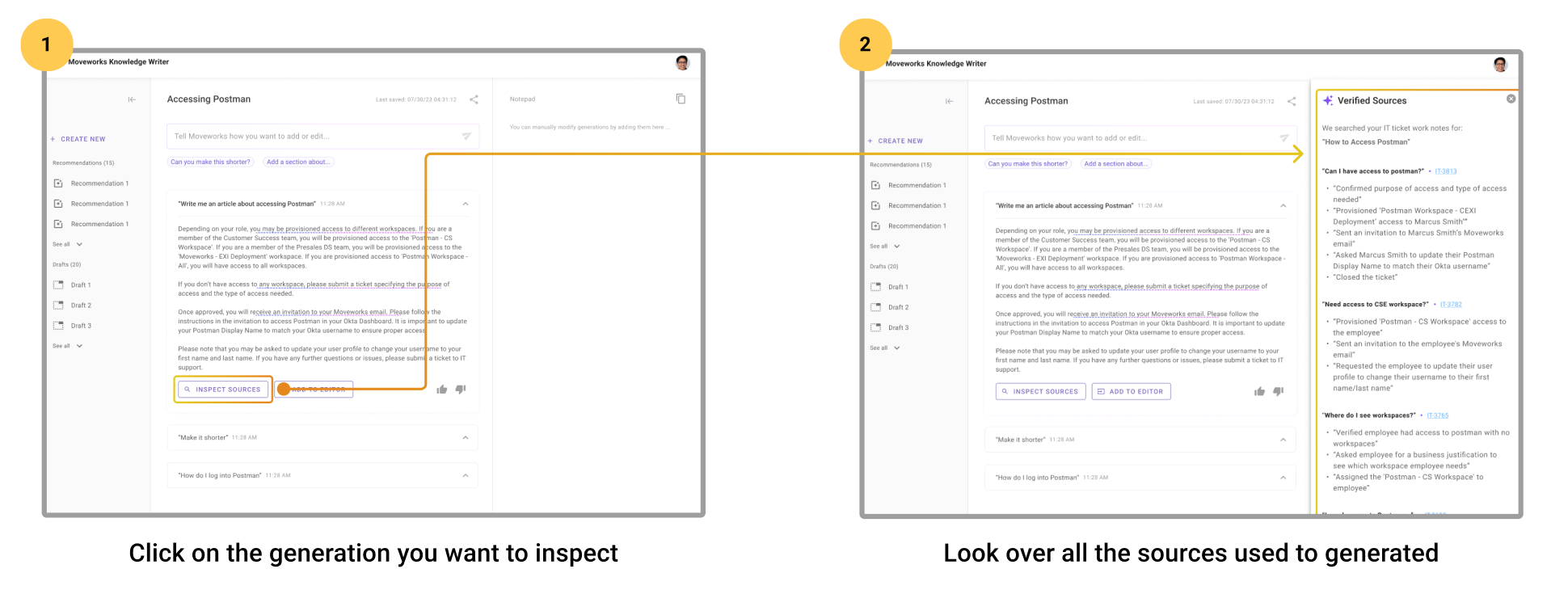
How can I see what sources were used to create my article?
- Scroll to a specific generation you’re interested in.
- Click on Inspect Sources on the bottom left hand corner.
💡What types of sources are used?
Right now, the only type of sources that we incorporate into generations are IT tickets. If no IT tickets relevant to the query are found, then there will be no sources shown.
Publishing your Articles
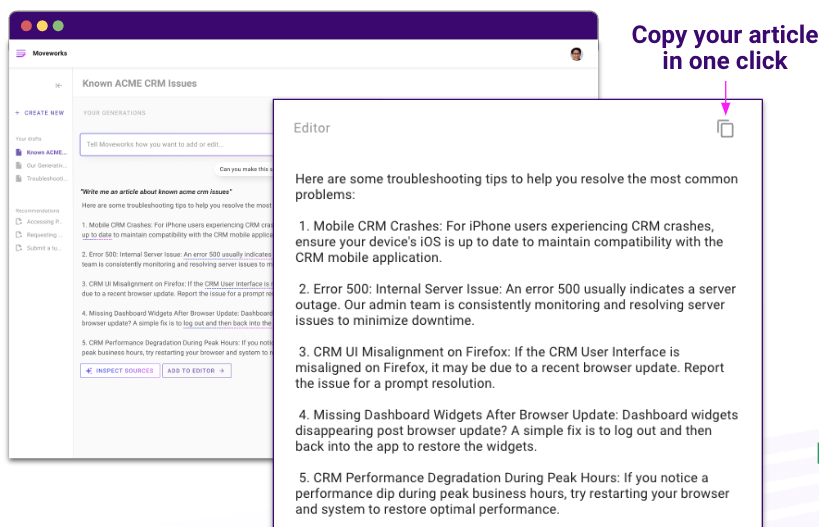
Modify your generated content to meet your specifications, copy the new content, and publish it externally as an article in your knowledge base.
Learn more about Publishing your Articles.
Crafting Knowledge within Editor
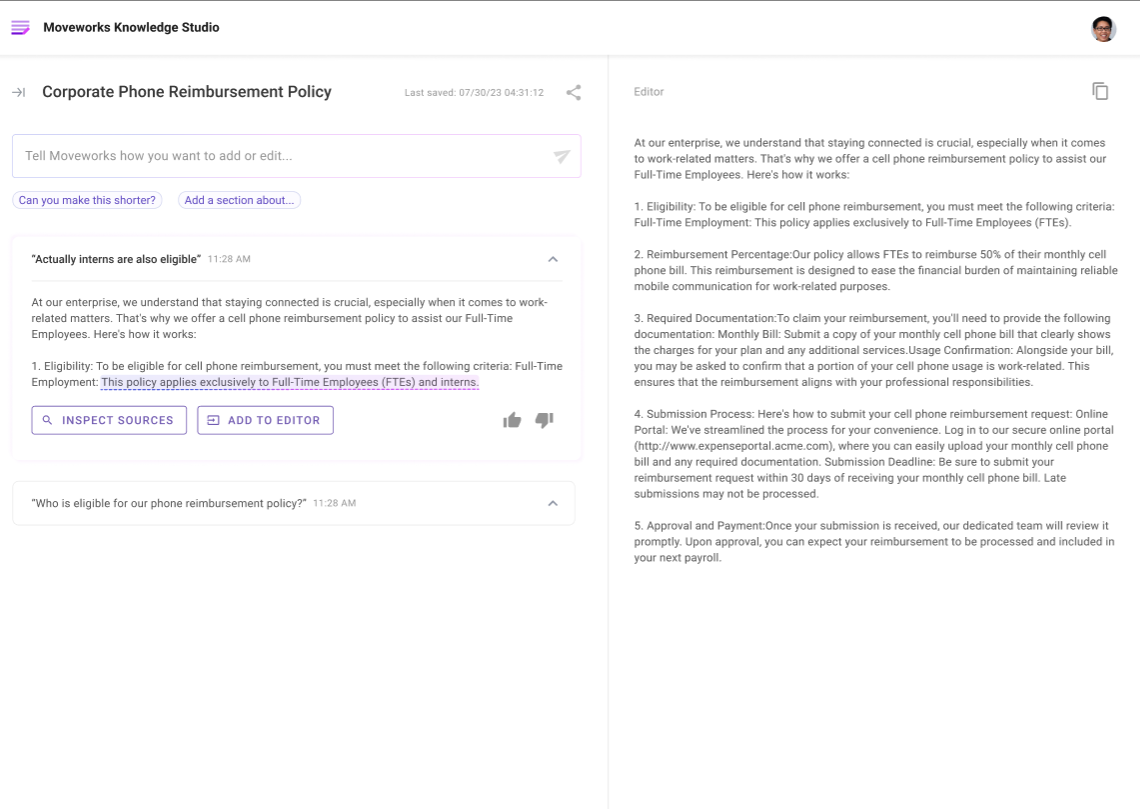
Users can modify generated content: Users can make modifications (such as adding more content or editing existing content) using the generative AI capability or manually using the editor panel.
Quickly copy to publish externally
Modify your article to perfection and copy it to your knowledge base to publish.
Understanding your AI Recommendations
View and use AI powered recommendations: Users can select a Moveworks recommendation if they don’t know what to write or are intrigued by a suggestion.
Learn more about AI Powered Recommendations.
How can I view recommendations on what to write?
- Once you log into Knowledge Studio you will see a section called Your Recommended Topics.
- Under this section you will see up to 15 new recommendations a month on what to write.
- You can click on a recommendation to see the full article.
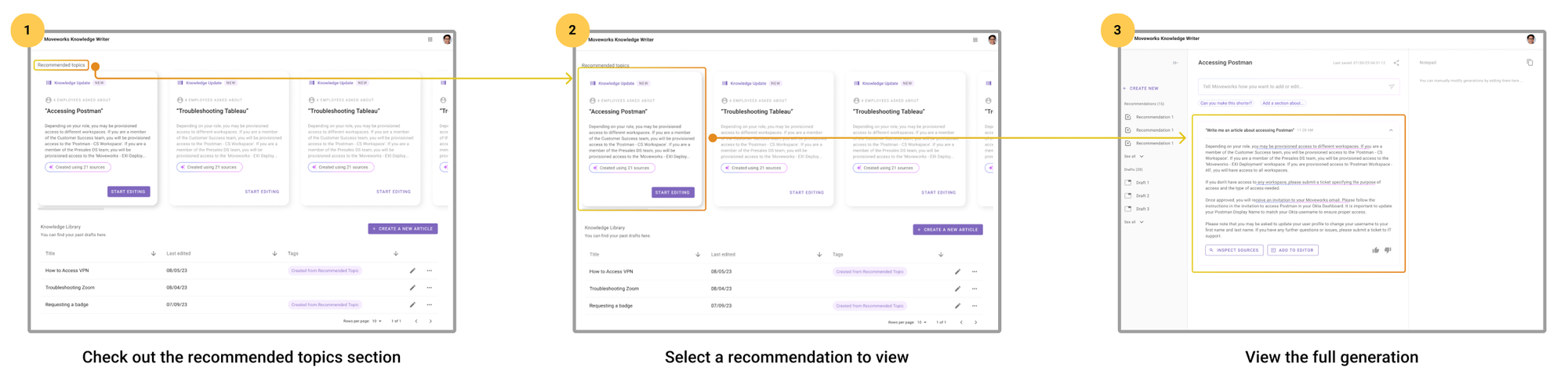
💡How do we create recommendations?
These recommendations were generated by analyzing your employees IT tickets and identifying clusters of tickets that resolved an issue about a popular ticket. The work notes from these tickets are extracted and leveraged to create a recommended article that you can start editing.
FAQ
Q: How does Knowledge Studio work?
A: To ensure factual knowledge generation, we first ingest all of your enterprise data such as your tickets and case studies. Then we use GPT to extract critical information so we can understand how an issue is resolved, debugging steps, processes and policies within our organization. Similar to EXI, we use MPNet to generate embeddings for each ticket which helps us cluster similar issues into buckets which we’ll use later.
Q: How is Knowledge Studio different from other content generation tools on the market?
A: Knowledge Studio is designed specifically for enterprise users and is the only product that incorporates enterprise data into the generation of a knowledge article.
Q: What type of knowledge articles can I write?
A: You can write any type of knowledge article within this product. Just tell us what you want to write about and we’ll create a first draft for you. If you’re writing knowledge about a specific employee issue just give us details about the issue and we’ll generate an article that leverages any historical IT tickets your employees have filed.
Q: What enterprise data is Knowledge Studio using?
A: Right now we are only indexing IT tickets. In order for us to generate knowledge articles that are accurate we rely on good ticket notes (closed notes, work notes, and activity logs). Although we are also showing you relevant articles within the product, we are not currently using your knowledge articles as a source for the generation.
Q: Can I modify the content generated by Knowledge Studio?
A: Yes! You have full control over the content generated by Knowledge Studio, including the ability to edit and tweak the output to match your specific needs and preferences. You can keep adding or removing as many details as you’d like.
Q: Can the generated articles be translated to other languages?
A: Yes, similar to chatGPT you can ask the product to translate the article in any language you’d like.
Q: Can Knowledge Studio tell me if existing articles are similar to what I’m writing/generating?
A: Yes, Knowledge Studio will show you relevant articles that exist within your knowledge base. You’ll see any relevant articles for your “knowledge update” recommendations and when you’re creating a brand new article.
Q: Who can use Knowledge Studio?
A: This Knowledge Studio was built for knowledge writers (people in an organization who’s job it is to write knowledge articles for their enterprise). Service desk agents can also use this product to write knowledge if that’s part of their daily responsibilities.
Q: Who can get access to Knowledge Studio within my company?
A: During setup you can decide who all on your team will have access to the product. Anyone that has access to the product within your company will be able to see all the articles that have been created by your company and will also be able to see the IT tickets that were used to generate an article.
Q: Who can view IT tickets within Knowledge Studio?
A: Anyone who has Knowledge Studio by default can view tickets used to generate responses.
Q: Who can view relevant articles within Knowledge Studio?
A: Anyone who has Knowledge Studio by default can view articles that product suggests as part of the “potential articles to update” experience.
Q: Where does the knowledge article get stored?
A: The articles you create are only stored within Knowledge Studio. The articles will not automatically get published to your knowledge base system.
Q: Can I publish generated articles to my existing knowledge base product?
A: Knowledge Studio is a content creation tool. We don’t currently support publishing of articles directly into your knowledge base system. In order to publish an article you create within Knowledge Studio you must do that yourself by copying the article and publishing it to your knowledge platform.
Q: How many IT tickets are required in order for Knowledge Studio to provide recommendations?
A: Since recommendations are provided on a monthly basis, we require that your organization has at least 100 IT tickets filed with good resolution notes. As a reminder Knowledge Studio is ingesting tickets from the ticket filter you’ve previously set up so it does exclude some tickets based on rules you’ve specified.