
ServiceNow Ticketing Integration Overview
Overview
The Moveworks and ServiceNow ticketing integration is designed to enhance employee self-service and automate IT support workflows, leveraging Moveworks’ conversational AI assistant and ServiceNow’s IT Service Management (ITSM) capabilities.
The integration essentially allows the Moveworks AI Assistant to act as an intelligent front-end, performing various ticketing actions within ServiceNow directly from platforms like Slack or Microsoft Teams.
Key Features and Functionality:
- Conversational Ticketing: Employees can use natural language to interact with the Moveworks assistant to manage their ServiceNow tickets Moveworks commonly integrates with tables like incident, sc_request, sc_req_item, sn_hr_core_case, universal_request, etc.
- Ticket Creation: The AI Assistant can create new tickets (incidents, requests, or other defined types) in ServiceNow. It supports rich ticket filing, often using forms/record producers from the ServiceNow Service Catalog that are presented within the chat interface for easy in-bot form filling.
- Ticket Management/Query: Users can ask the bot to query, view, or check the status of their existing ServiceNow tickets.
- Ticket Updates: Users can add comments or notes to an existing ticket, resolve a ticket, or reopen a ticket directly through the chat interface.
- Automated Knowledge Indexing & Retrieval: Moveworks indexes ServiceNow Knowledge Base articles to provide instant, relevant answers in chat, deflecting tickets before they need to be filed.
- Live Agent Handoff: For complex issues the bot can’t resolve, it facilitates a seamless live agent transfer (URL or in-chat handoff) to a human agent in ServiceNow.
- Proactive Notifications: The bot can provide real-time ticket updates (e.g., when a ticket is resolved, commented on, or needs user action/approval) back to the employee in chat.
- Form Integration: Moveworks ingests and presents ServiceNow Catalog Items and Record Producers to allow employees to submit service requests directly in the chat, mapping the input to the required ServiceNow fields.
Note: Most of the built-in capabilities are catered towards end-users rather than fulfillers. For Fulfiller capabilities, refer to our Agent Marketplace to install AI Agents catered to fulfillers.
How does Moveworks integrate with ServiceNow Universal Request?
The Universal Request Module in ServiceNow introduces a UR ticket type, with a corresponding table (universal_request).
The UR tickets act as a container on top of “service ticket tables” (e.g. RITM, INC, HRC). The objective is to unify the employee service experience by having end users interface with a single ticket type. Therefore, all end user facing views, and emails will have the UR ticket number, but all actual work will be done by agents on the service tickets.
To build the relationship between service tickets and the universal request, the UR module adds a “universal_request” field to service ticket tables. The display number (e.g. UR00013032) is also provided as a string in the task_effective_number field.
How does Moveworks integrate with the Universal Request?
When a customer leverages the Universal Request Module in ServiceNow, Moveworks will continue to create RITMs & INCs. Customers can then create a business rule that auto-generates a Universal Request when the Moveworks bot creates a service ticket.
This way, when users ask for their tickets, the bot will use the task_effective_number field on the ticket to ensure that it always displays the correct Universal Request ticket ID for end users, even if those tickets are associated with different service ticket types / ticket numbers on the backend.
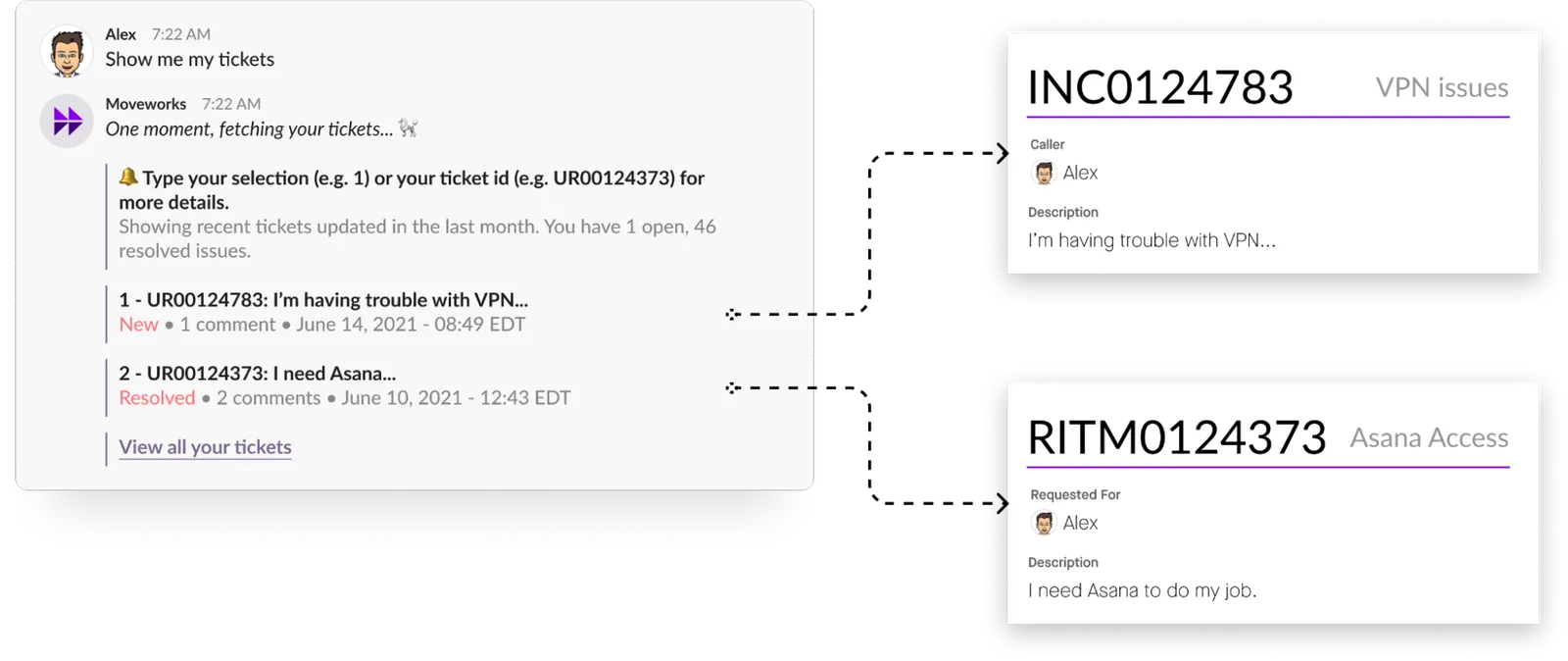
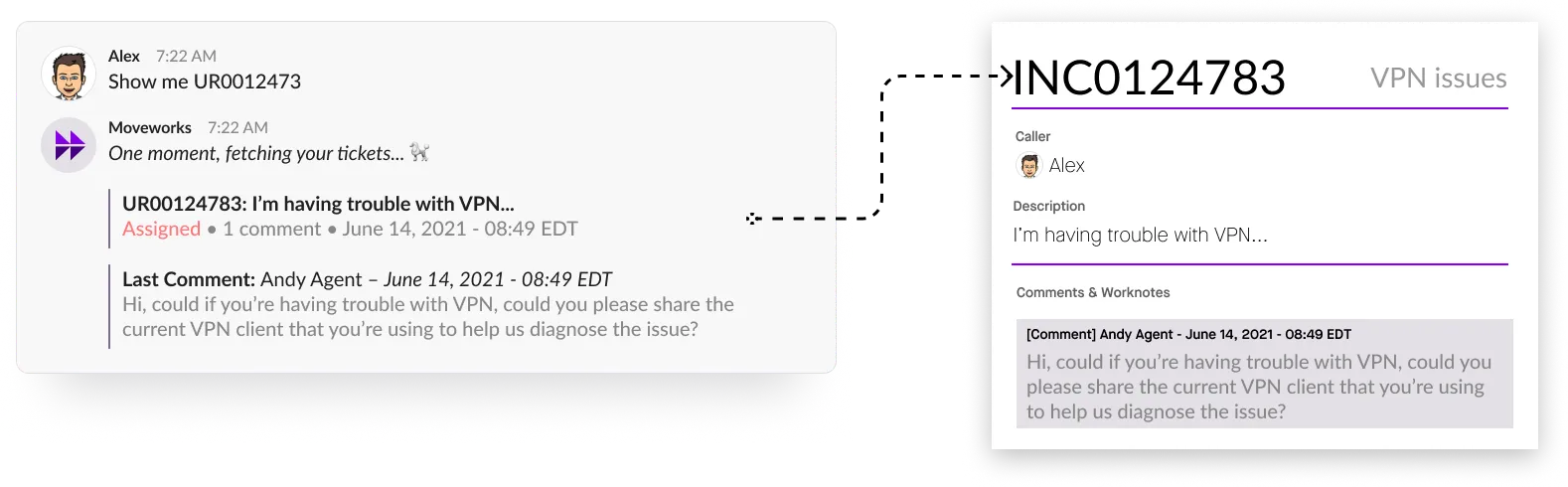
Moveworks’ natural language & business logic will be able to resolve queries involving the universal request prefix and retrieve the underlying INC or RITM, and display that service ticket in chat.
FAQ
Q: When Moveworks adds a comment to the ticket, will it do so on the service ticket, or the universal request?
A: All ticket actions will continue to be taken against the service ticket. Business rules on the customer side can close any associated Universal Requests once the underlying service ticket is resolved/closed.
Q: Will Moveworks notify end users about comments on the service ticket?
A: Yes, Moveworks will still detect new comments and concierge events on the service ticket, and notify users about those events in chat using the correct task effective number.
Q: Is there a limit on the description or short description field?
A: The default length for the short_description field in ServiceNow is 140 characters. If a user types any more than 140 it will get truncated. The default length for the short_description field in ServiceNow is 4000 characters.
Q: How does Moveworks integrate with ServiceNow Customer Service Management (CSM) / the Case module?
A: Some customers configure ServiceNow so that a Service Catalog submission generates a Case record (sn_customer_case) that employees track, while related child records (incidents, requests) are fulfilled by IT and roll up to the parent Case. In this setup, Moveworks only sees the Case tickets. Any interaction with the underlying RITMs and INCs is handled by ServiceNow business rules, and Moveworks is not aware of what happens on those records.
From a configuration standpoint, you configure incident tickets against the sn_customer_case table instead of the incident table. This means end users see only the Case number in chat, not the underlying ticket or request numbers.