
ServiceNow Approvals
Overview
Most of your RITM approvals take a few hours to complete. Some are even lost in email for days.
Moveworks will proactively reach out to approvers, to ensure approvals are handled up to 90% faster.
Ready to optimize your business operations, improve employee productivity, and crush your MTTR? To get started, all you have to do is grant the Assistant the Approval Admin role, and all of your ServiceNow Approval Workflows will work seamlessly with Moveworks.
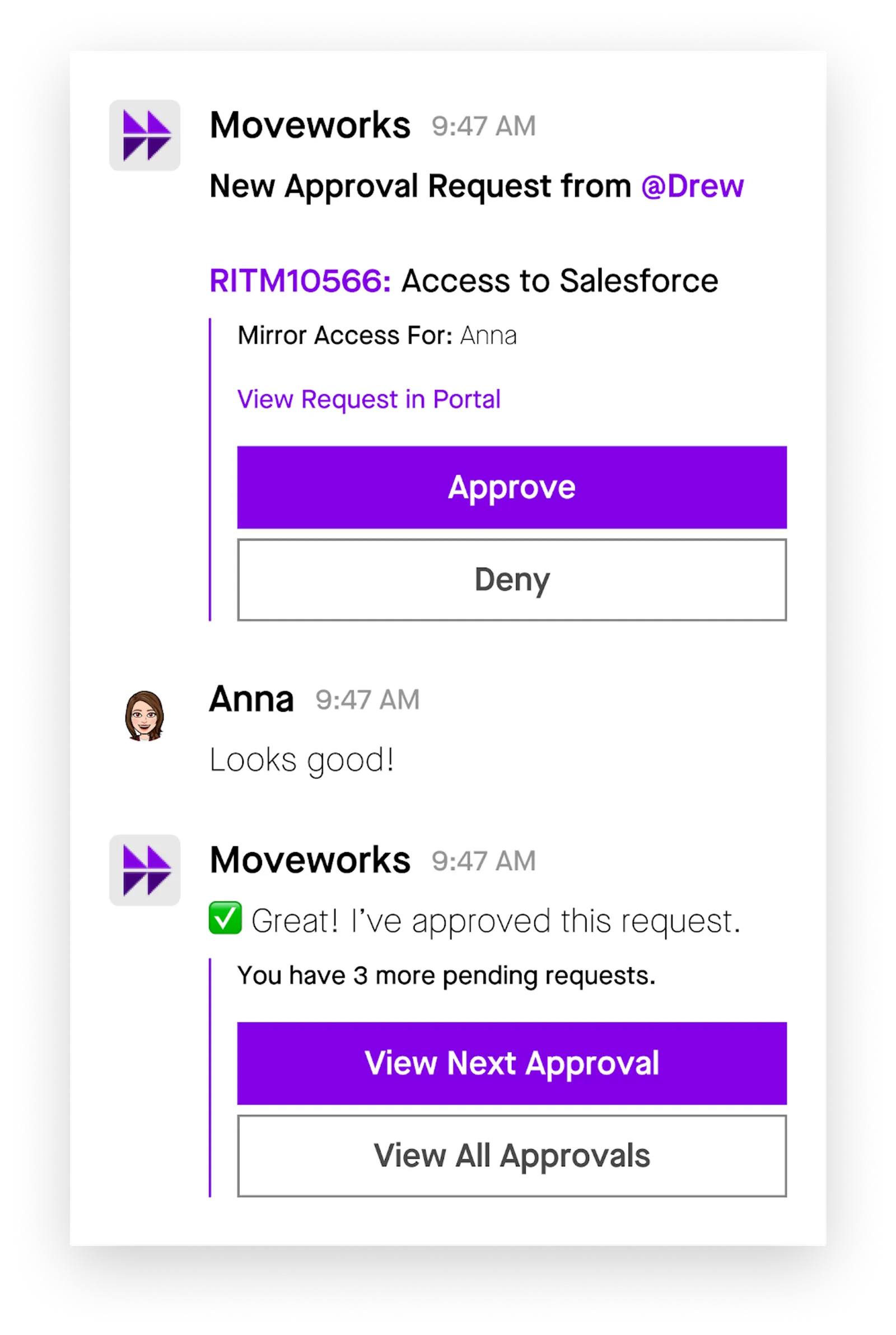
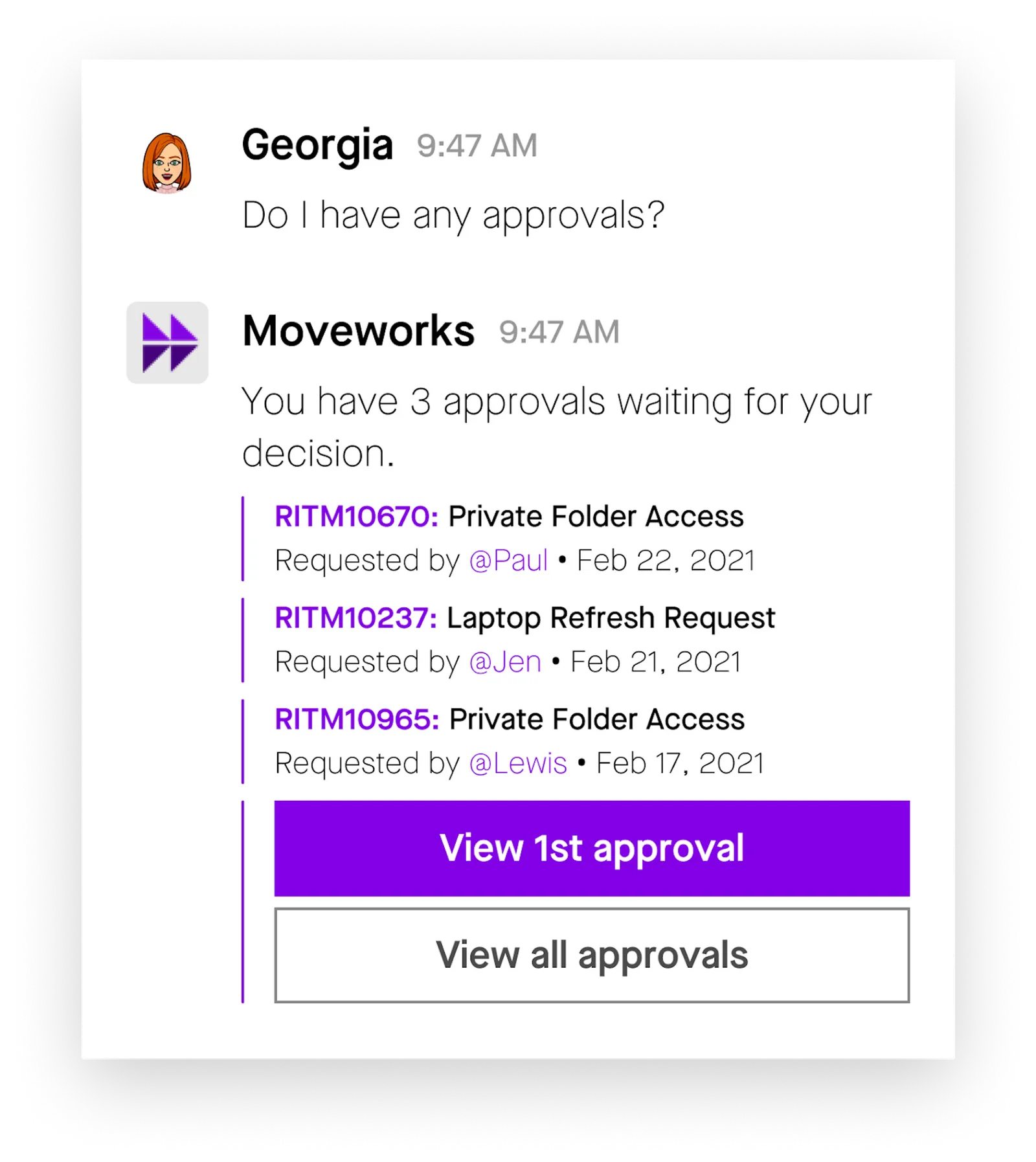
Your users will also be able to ask the Assistant, at any time, using natural language, for pending approval requests.
From there, they can approve/deny the request, or leave a comment for more information!
Configuration Options
Moveworks provides a variety of configuration options ensure the Moveworks Assistant can meet requirements unique to your organization.
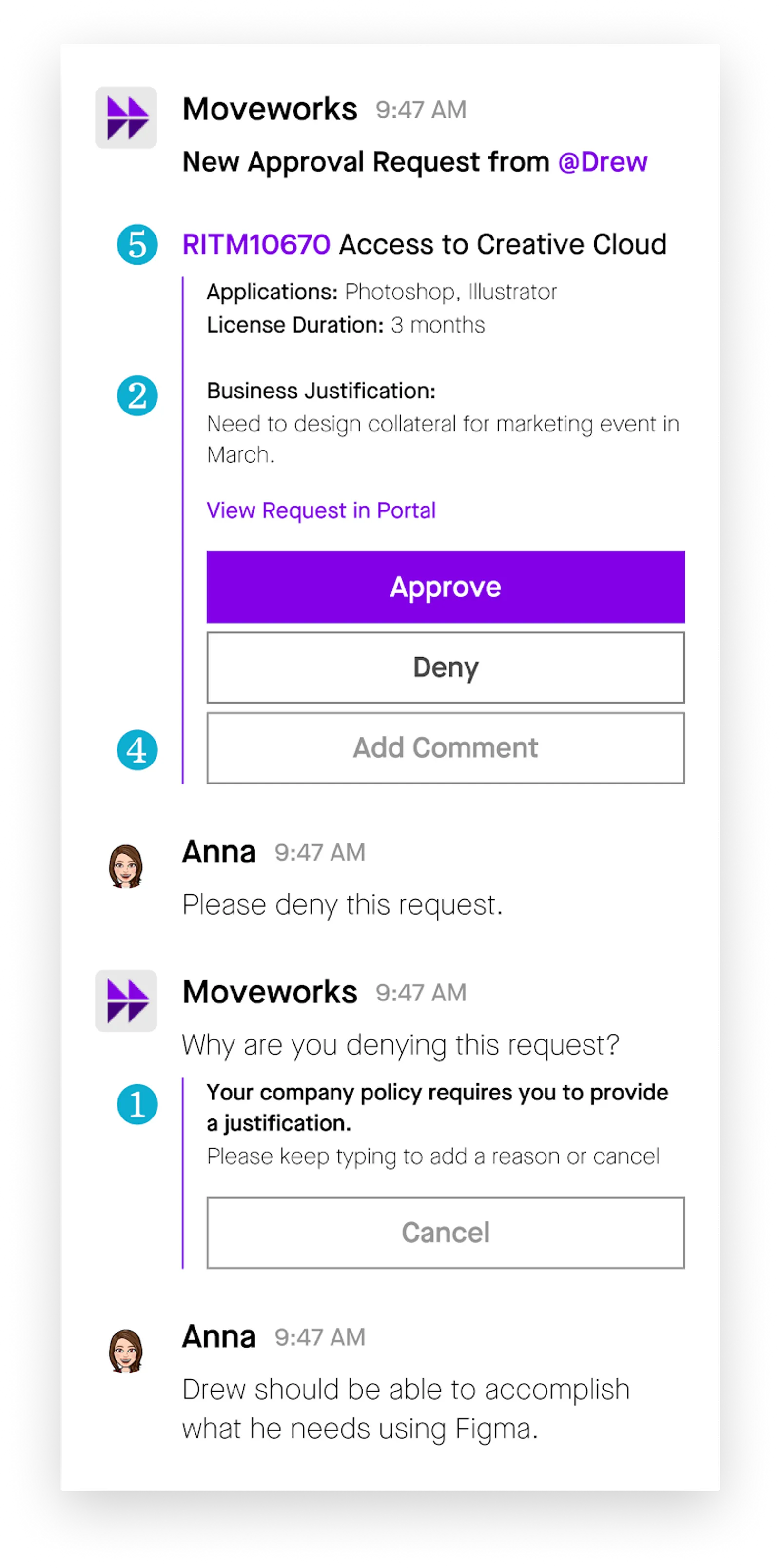
Enforce Comment on Deny
If your business process requires a comment when users deny an approval request, Moveworks can capture some comments and add them to the approval record itself.
Customize Approval Descriptions
By default, Moveworks will render the variables of your RITMs in chat. If you want to customize the description, you can set the RITM description.
You can find instructions on how to customize your RITM description here. Note that variables are displayed by default in no particular order.
Restrict Groups or Catalog Items
If you do not want to notify users for approval requests that require a group, approvals can be disabled for all records with a “group” field.
If you have sensitive catalog items that you would not like to be managed in chat, these catalog items can be added to a deny list. If a catalog item is in the deny list, then the Assistant will not reach out for any of those requests.
Add Comment to Approval Record
If you would like your employees to leave a comment on the approval record, this is a configuration setting that can be enabled.
Service Portal Redirect
If you would like to redirect users to your ServiceNow Portal instead of the Moveworks WebUI, we can configure a link to your portal that must include the approval record’s identifier.
How Does Moveworks Do This?
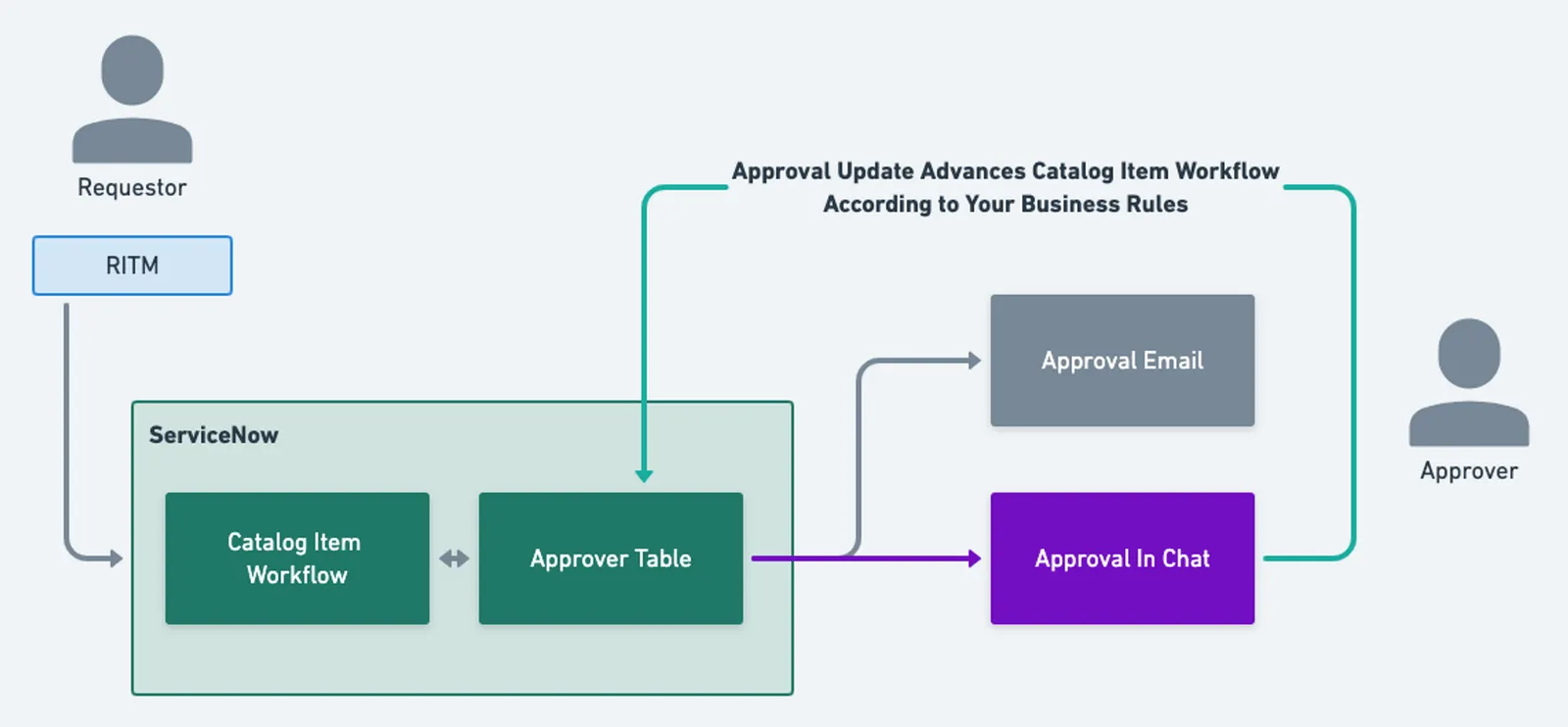
Every 60 seconds, Moveworks checks the Approver table (sysapproval_approver) for new approval records. If new records are present, the Assistant will notify the user.
If the user elects to take action (Approve/Deny), with the approval_admin role, the Assistant will take that action on behalf of the user and leave a work note describing the action taken.
FAQ
Q: Can Change Approvals be supported in-Assistant as well?
A: Yes. Moveworks can support CHG, REQ, RITM, and GRC approvals.
Q: For approval groups (i.e. committee approvals), if one approver acts, will the others be notified?
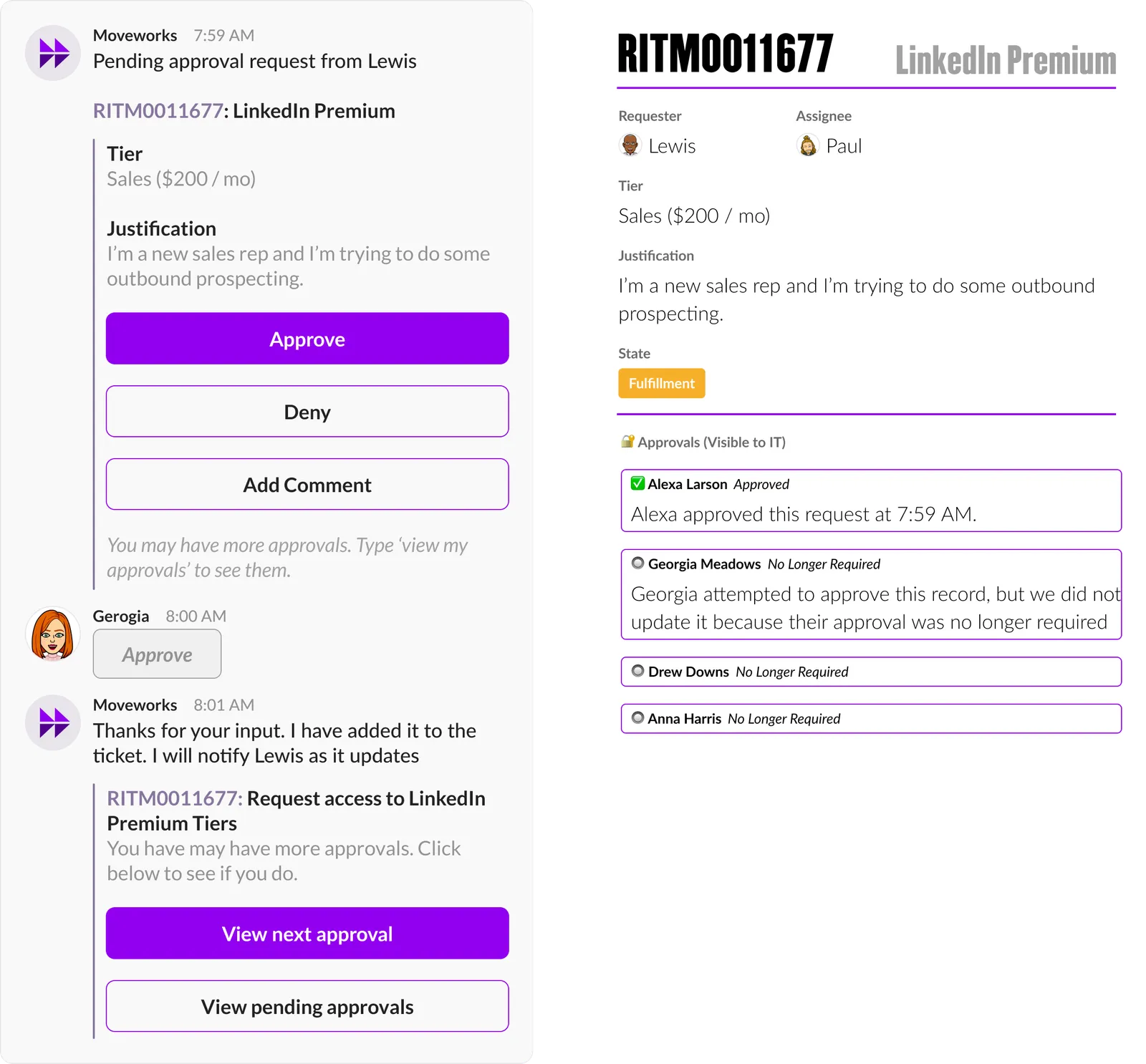
A: No, but if another approver tries to act on that approval card, the Assistant will display the following message & add a comment to the approval record (not the ticket).
Q: If I have special approval workflows or other workflows around an approval event, will that be respected?
A: Yes, Moveworks interacts with ServiceNow through the correct channels such that your business rules & workflow logic will be preserved.
Q: Why are approval variables shown out of order?
A: When the Assistant fetches a RITM from ServiceNow, the endpoint that is usd to fetch RITMs retrieves the variables out-of-order. To retrieve the true ordering of the variables, Moveworks would need to make up to 3 API calls per variable per ticket which introduces an unsustainable amount of latency.
Because of this limitation, we created the ability to provide a description on a RITM. This gives you unlimited flexibility in customizing the approval description to your exact needs. For example, the below description will render with rich, in-chat formatting:
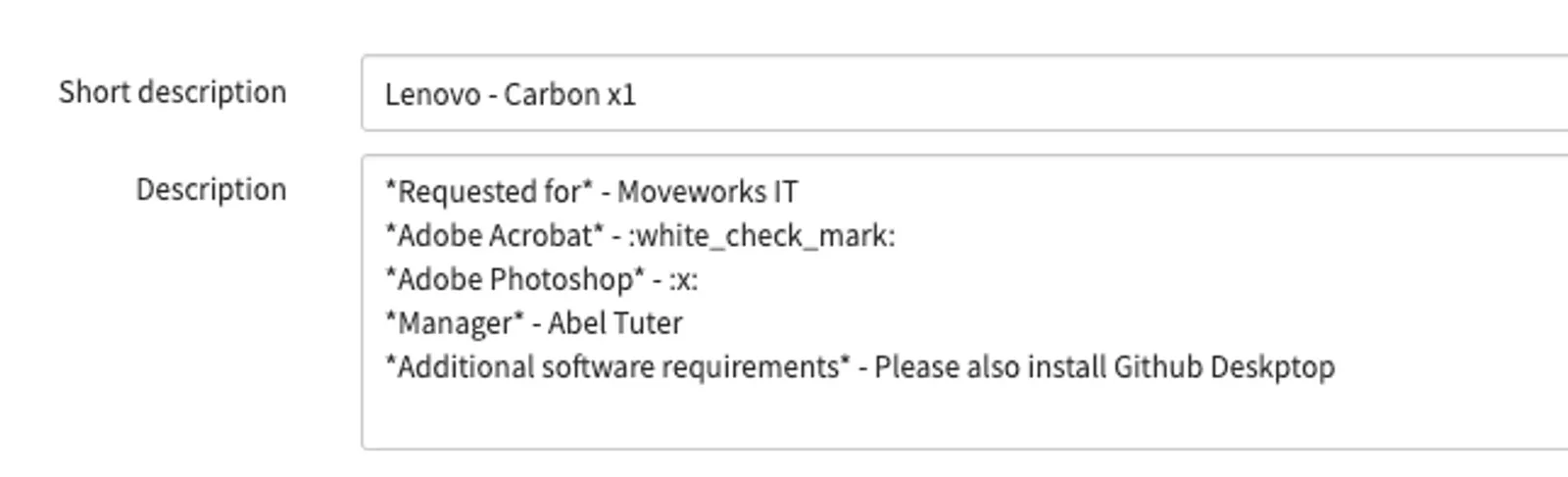
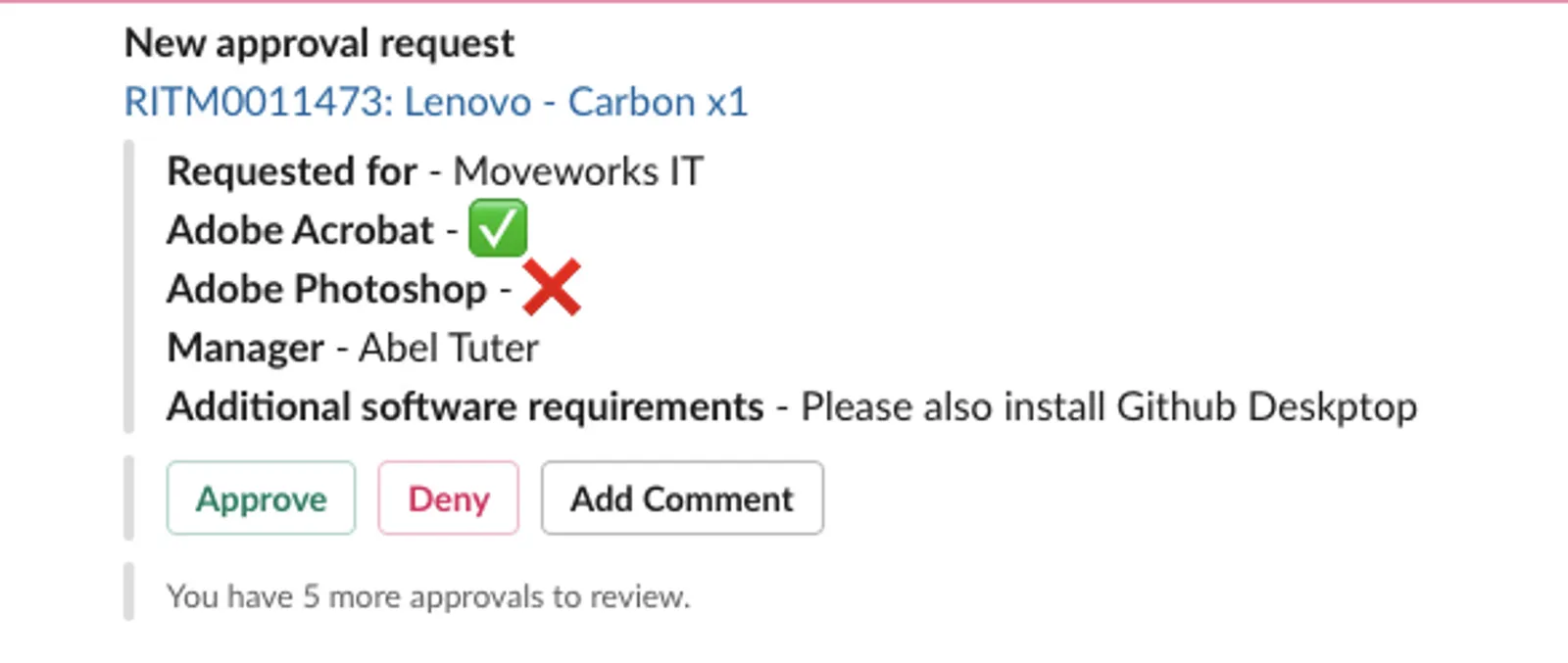
Note that this experience will not render inside of our Web Modals and this solution only applies to the Approvals skill.
Q: What cadence are notifications sent out?
A: Moveworks checks for new approvals every 1 minute. We poll for new approvals in the previous minute, so it may take up to 2 minutes for a notification to be sent.
No approval reminders are sent after the initial reach out. This is something the Moveworks Product Team is aware of, but it is not currently prioritized.
Q: If my workflow generates a set of approvals on a RITM, but I manually add some additional approvers, will the newly added approvers also get approval notifications?
A: Yes, as long as the source table for the manually generated approval record is populated, these approval notifications will be sent.
Q: What is the format of the View Details button?
A: The default format links to the ServiceNow Backend / Console view: "{service_portal}?id=approval&table=sysapproval_approver&sys_id={[record.identifier.id](http://record.identifier.id/)}"
This can be customized if needed.
Common Questions from Approvers
Q: Will my delegates receive approvals?
A: Moveworks will not be able to support delegate approvals.
Q: How do I view my current approvals?
A: You’ll be notified when a new approval request arrives. You can always click the “View All Approvals” button from a previous request.
You can say “show me my approvals” and, if configured, the Assistant can show your ServiceNow approvals.
Q: Will the Assistant notify the requester, once the approver approves the request?
A: No, the Assistant will not notify requesters based on changes in the approval table. The Assistant only notifies requesters based on changes on the ticket itself. If you would like the Assistant to notify users you can add a business rule to post a comment on the RITM ticket once it is approved.
Technical Documentation
SLA
Our system periodically checks for new approvals, however, there are any number of reasons why it may miss some approvals (system timeout, regressions with access, service downtime, etc.). Currently, Moveworks will capture approvals 99.5% of the time.
When our pollers misses an approval record, users will not receive a notification & they will not be able to retrieve that approval record by asking the Assistant.
Polling
Moveworks checks for approvals every 60 seconds, with a 60 second look back period. This means that at 12:02PM, we will check for approvals that were created between 12:00PM and 12:01PM.
The pollers were designed this way because many systems automatically approve dozens of approvals ~30-45 seconds after they’re created (based on different business rules & policies your organization has set up).
(1) The Assistant will make a GET request to the sysapproval_approver table to query for pending approval records. The API request will look similar to below._
where MAX_APPROVAL_AGE_DAYS = 30 and _SOURCE_TABLE_ATTR = the tables being supported for approvals by Moveworks (typically sc_req_item and/or change_request)
Approval Actions
Moveworks makes two API requests when a user presses “approve” or “deny”
(1) The Assistant makes a PUT request to thesysapproval_approver table to update the record.
(2) The Assistant makes aPUT request to the **sc_req_item** table to add a comment for audit purposes.
Moveworks will not introduce more complex behavior than that which is specified above. This is to ensure that we respect your approval workflows and avoid violating any business logic specific to your organization.
Other Appendix Resources
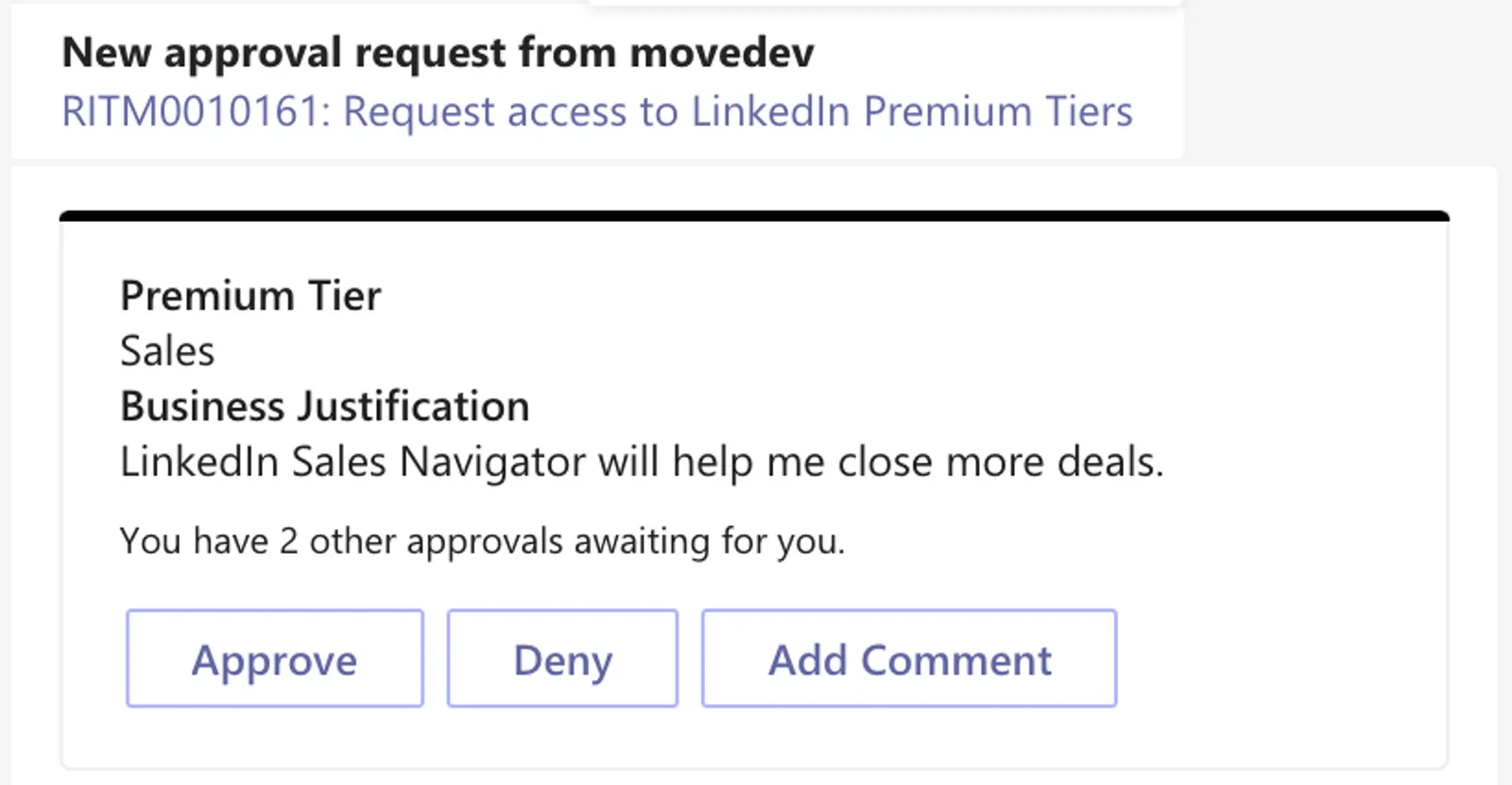
Screenshot of experience in MS Teams
Setup / Configuration
Why does Moveworks need theapproval_admin role?
The Approval Admin role within ServiceNow is built for approving or rejecting on behalf of other users. There is no other possible method to approve or reject approvals on behalf of other users, without adding significant customization to your organization’s ServiceNow environment.
The approvals updated via the Moveworks Assistant will display as approved by the approver itself, and the “Updated by” field will be displayed as the Moveworks Assistant Service account. Additionally for audit purposes, the Moveworks Service account will leave a Work Note denoting the update was made on behalf of the designated approver.
How often does Moveworks poll for approvals?
It runs on a 1 minute interval, but it checks the previous minute to avoid notifying on automated approvals. i.e. at 12:02PM, the poller will check for approvals between 12:00pm and 12:01pm
Use Case Expansion
Will Moveworks support Approval Reminders?
Approval Reminders can be built in Agent Studio. See our AI Agent Marketplace for an example: https://marketplace.moveworks.com/plugins/servicenow-approval-reminders
Business Logic
If a ServiceNow approval has multiple approvers (i.e. Committee Approval), what is the user experience when one of the approvers approves the request?
The other approvers will be notified their approval is no longer required when they take action.
If a ServiceNow workflow has multiple stages (e.g. L1, L2 approvals), will Moveworks reach out for both stages?
Yes. Moveworks will reach out for each approval stage in the workflow.
If a user takes action on an approval record outside of the Assistant, will they still be able to act on the notification from the Assistant?
No, if a user approves/rejects an approval record from an email or from ServiceNow itself, they will not be able to override this action from the Assistant. The original approval request will still appear in chat, but when the user tries to act on it, they will be informed that their approval is no longer required. When the user asks to see their pending approvals, they will no longer see any approvals that have already been actioned.
Note: If your ServiceNow instance deletes approval records after they have been actioned, this may result in the Assistant displaying “stale approval requests” because the Moveworks Approvals service has no way of knowing that the approval record has been acted upon. For this reason, it is generally recommended not to delete records.
If a user takes action on an approval record outside of the Assistant, will they still be able to act on the notification from the Assistant?
No, if a user approves/rejects an approval record from an email or from ServiceNow itself, they will not be able to override this action from the Assistant. The original approval request will still appear in chat, but when the user tries to act on it, they will be informed that their approval is no longer required. When the user asks to see their pending approvals, they will no longer see any approvals that have already been actioned.
Note: It is strongly recommended to configure your ServiceNow instance to NOT delete approval records after they have been actioned. If approval records are deleted, the Assistant may display “stale approval records”, because the Moveworks Approvals system will not know the approval record has been acted upon.
Approval Card
Can we customize the approval card introduction message (“New Approval Request from…”)?
No. However, the Assistant can send out a promo to approvers to let them know about the feature.
Can I customize the order/visibility of variables in the approval card?
No. ServiceNow does not return RITM variables in a given order. The Assistant will render all variables.
Reporting
How can I view all the approval records that Moveworks has acted on?
There is no way to guarantee that records are not modified after the Assistant actions on them, but the following ServiceNow query captures the majority of use cases:
{{snow_url}}/api/now/table/sysapproval_approver?sysparm_fields=approver.user_name,sysapproval.number,state,sys_updated_on,sys_updated_by&sysparm_limit=1000&sysparm_offset=0&sysparm_query=sys_updated_by={{snow_username}}