
Form Fillability ServiceNow Error Guide
This guide contains information on the errors you might encounter with Form Filling with the Moveworks bot on your ServiceNow instance.
ServiceNow Errors
Why isn’t my form fillable in Moveworks?
There could be a few reasons why a form is not fillable in Moveworks. We have outlined some of the most common issues we’ve seen across our customers and provide guidance on how to remediate the issues. You can refer to the specific error message to help you figure out why your form is not fillable in your bot. If you need further consultation or guidance, you can reach out to Moveworks Professional Services.
- Moveworks is unable to retrieve all the information about the form
- Reference/Choice Field Options
- The Moveworks account doesn’t have access to a field’s reference table
- Moveworks has access to a reference table, but is unable to find the display column from that table because it lacks access to the sys_dictionary table.
- Moveworks has access to the reference table / display column, but the table has too many rows to process (over 100,000)
- UI Policies / Actions
- Moveworks doesn’t have access to read the UI policies/actions on the form (access to the catalog_ui_policy and catalog_ui_policy_action tables)
- Reference/Choice Field Options
- The form isn’t supported (and unlikely to ever be)
- Unsupported field type
- There are some older/deprecated field types that cannot be rendered within the chat UI. Moveworks can usually help you find alternative field types to replace these.
- Unsupported UI policy
- Has Client Scripts, an advanced UI policy that contains JavaScript, or Variable Validation Regex.
- If the client script is not active in the Service Portal view (also called catalog item view), the form will still be supported.
- Unsupported field type
Unsupported script: Client Script / Variable Set
Example error messages:
- Form contains unsupported (variable set) client script named {script_name} with script ID {script_id}
Explanation:
Moveworks does not support client scripts.
Solution:
Please either remove the script on associated with the form, we recommend moving the logic to a business rule running on the sc_req_item table, or moving the logic to the workflow associated with your catalog item.
Unsupported script: UI Policy Script
Example error message:
UI policy {policy_name} contains scripts
Explanation:
Basic UI policies are supported given that they:
- Client side UI scripts are not supported
- Are not applied to any container-like field types (including CheckBox containers).
- Do not contain Javascript i.e; advanced UI policies
- Note: Catalog & UI Policy scripts cannot be ignored by Moveworks.
Solution:
Please either remove the script on associated with the UI Policy, we recommend moving the logic to UI Policy actions, moving the logic to a business rule running on the sc_req_item table, or moving the logic to the workflow associated with your catalog item.
Unsupported Form Type: Order guide
Example error message:
- Order guide forms are not supported for in-chat filling
Explanation:
Moveworks does not support order guides (which are collections of forms) for filling in-chat, though we do allow displaying links to these forms. However, Moveworks does support showing individual forms that make up an order guide as fillable in-chat.
Unsupported Form Type: Manual forms
Example error message:
- Forms manually defined in Moveworks are not fillable
Explanation:
Moveworks supports showing forms that are links to customer-defined webpages. These forms links are manually defined in Moveworks. Since these are not form structures from an ITSM system that Moveworks is integrated with, they are not fillable in chat.
Record Producer
Example error message:
Record producer forms must be manually verified to be working correctly
Explanation
Moveworks only supports record producers if the record producer meets the following criteria:
- The record producer must create a ticket that is available in Moveworks Concierge. You can configure your ticket table for Concierge using Moveworks Setup.
- The record producer must be built with Generated Record Data from Variables only, not from a Template.
- The record producer script must not use
gs.getUserId()or any other GlideSession APIs functions. This can lead to strange behavior where the caller field on the resulting ticket belongs to the service account rather than the employee that filled out the record producer.-
Instead, Moveworks recommends adding a variable on the Record Producer for the requesting user e.g:
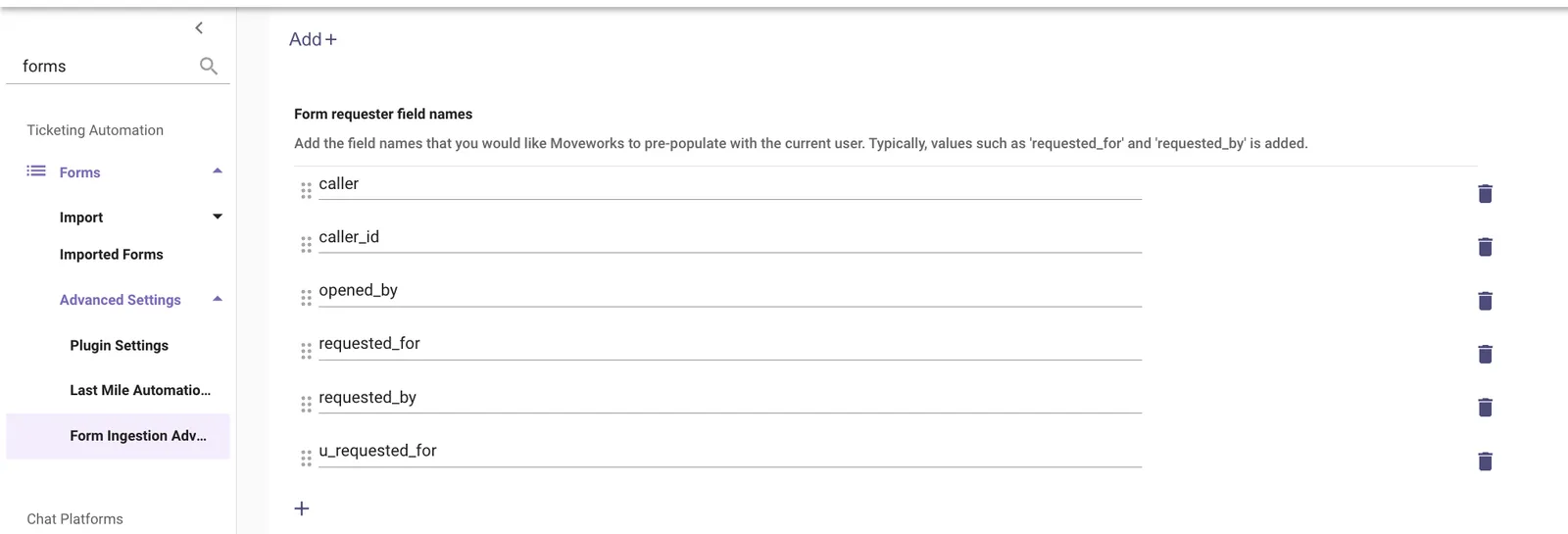
requested_for. In your record producer script, be sure this value is set to the appropriate requestor value on the target ticket table. For e.g.caller_id,opened_for,opened_by, etc. -
If you have any other variable that captures the requested user, it must be added to the Form requester field names shown below, so the Assistant can set that variable:
-
Note: the script line containing getUserId() must be fully removed rather than commented out
-
Solution:
Please make the modifications described above to get your record producer supported.
Unsupported field type
Example error message:
Field type {field_type_name} is unsupported
Explanation:
Certain field types are not supported by Moveworks due to limitation of your chat application.
Solution:
Please see the supported form filling behaviors by chat platform chart below. Please consider remove or update those fields.
Form Field Type Conversion
Missing field options
Example error message:
Only simple reference qualifiers are supported but field used qualifier {javascript_code}
Explanation:
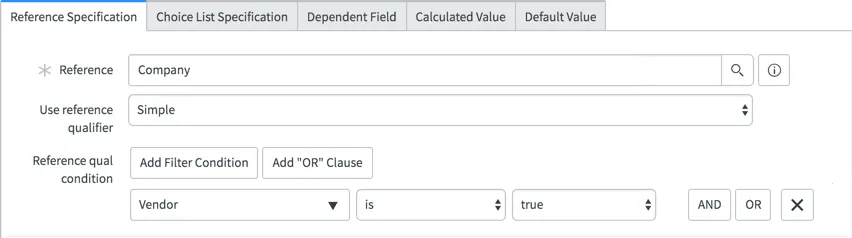
Moveworks only supports ingesting field options filtered by a simple reference qualifiers.
Solution:
Please consider remove the dynamic / advanced reference qualifiers. Dynamic or advanced reference qualifiers are generally used to control the users options - it may be possible to remove this field entirely, and make the choice programmatically within the workflow (or a business rule) based on other options the user selects.
Simple reference qualifiers example:
Too many field options
Example error message:
The filtered reference table {table_name} contains more than 150000 rows
Explanation:
Any dropdown can only contain less than 150,000 rows.
Solution:
Please consider adding a simple reference qualifier or removing the dropdown field.
Insufficient api access
Example error message:
Insufficient API access to table_name and/or script columns of sc_cat_item_producer
Explanation:
Table API access issues.
- API used: {servicenow_url}/api/now/v2/table/{table_name}
- Moveworks needs access to certain tables for our forms integration. The error message will mention the table to which we don’t have access. It is possible that we have access to the table, but not the columns in the table that we need.
Catalog API access issues.
- API used: {servicenow_url}/api/sn_sc/v1/servicecatalog/items/{id_of_form}
- Moveworks needs access to this endpoint for all form ID’s you would like to display in-chat. Sometimes, customer access control may limit API access to specific forms at this endpoint.
- To mitigate, check the “Available for” section for this specific catalog item and ensure our service account is included in the criteria
Other:
- Verify the Moveworks integration user can read the catalog_script_client table. Missing access may cause the catalog API’s display value (“All”) to be used instead of the raw value (“10”).
Solution:
Please consider providing the appropriate access for the appropriate Table API table or the Catalog API.
Chat App specific Issues
Slack Issues
Field options Text length too long
Example error message:
‘Form field option is longer than 75 characters’: {field_option_value}
Explanation:
Slack only supports displaying field option value less than 75 characters.
Solution:
Please consider shorten the field option value on your ITSM. In certain cases, Moveworks will truncate the field option value when displaying.
Read only fields
Example error message:
Form contains read only fields
Explanation:
Slack block-it API does not support rendering a read-only field.
Solution:
Please consider remove the UI policy that marks a field as read-only or convert the field to a label.
Form contains a field whose label is empty
Example error message:
Form contains a field whose label is empty
Explanation:
We require that the question text of a field is non-empty.
Solution:
To solve this issue, add a question text (eg: “What date are you requesting?).