
Device Actions for Software & Troubleshooting (JAMF, MECM/SCCM, Intune, Flexera, Munki, Kandji)
Device Management Deep Links
Most organizations have some type of endpoint management tool such as JAMF, MECM (or SCCM), Intune, Munki or Kandji for macOS & Windows. These systems typically allow end users to browse and install configuration profiles, applications, and run pre-built scripts on their machines.
- As an IT admin, you can use one of these softwares to manage the client apps that your company’s workforce uses as well as manage other device settings and protect data on the device.
- As an End User, these apps typically expose a “Software Center” desktop application or some type of portal for end users to self-service desktop software installations for company approved apps (e.g: Vizio, Global Protect VPN client, Notepad++), install configuration profiles (VPN, Printer, etc.), and run other pre-built scripts on their machines to self-service various tasks that would typically be performed manually by an Admin.
How Moveworks interfaces with Device Management Systems
The Moveworks bot connects users to these systems by providing them with “deep links” that take them to the specific application/policy/package that they are asking for.
There are two use cases that leverage the deep link functionality:
- Software Installations: If the employee is asking to install software, and there is a Self Service software item available to employees, Moveworks can point the user to exact place where they can install the specific software.
- Troubleshooting: If an employee is asking a troubleshooting question, Moveworks can point the user to a troubleshooting script that lives in the Self Service Portal.
JAMF
There are 2 ways to find deep links for JAMF offerings:
- Using the JAMF API
- Manually collect them via a mac laptop that is connected to JAMF.
JAMF API
A JAMF admin can extract all deep links for JAMF offerings via Postman or the interactive API Explorer when logged in via an administrator account:
https://<JAMF Instance Name>:<Port Number (usually 8443)>/classicapi/doc/#/policies/findPolicies
The output will be an XML file that can be converted into a CSV to view the policy IDs for all apps.
Manually
You can also grab the IDs of the self-service policy packages manually by tailing the JAMF log file on a device while the policy is executing by following the instructions below:
- Open Self Service and run the policy you wish to find the id of.
- Immediately, go to terminal and run
tail -20 /var/log/jamf.log - After executing the policy, you should see a log pop up that says something along the lines of “Executing Policy ID: #123”, which is the number of the policy ID you just clicked on.
Repeat this process for every single self service app you want to add to the bot, at the end you will have
Forming the links using the Policy ID
- View Setting: Clicking this link takes the user to the correct self-service policy and will require one step of user confirmation before running the policy.
- i.e:
selfservice://content?entity=policy&id=<ID_NUMBER>&action=view
- i.e:
- Execute Setting: Clicking this link takes the user to the correct self-service policy and starts the execution of the policy without user confirmation in Self Service.
- i.e:
selfservice://content?entity=policy&id=<ID_NUMBER>&action=exec
- i.e:
MECM/SCCM
- Open the Software Center application on a Windows machine
- Navigate to the app you want to grab the deep link for.
Link Formats
- View Setting: Clicking this link takes the user to the correct package in Software Center and will require one step of user confirmation before installing the package.
softwarecenter:SoftwareID=ScopeId_<software_package_id>

Microsoft Intune
You can programmatically extract all Intune links using the MS Graph API via the DeviceManagementApps.Read.All permission applied to the bot’s App ID in Azure (this should be included in the Teams bot installation if your organization will use Moveworks within Teams). Use this API call to extract the links.
Link format for Intune
You can also build this out as an Agentic Plugin.
Flexera App Portal
If you use the Flexera App Portal as a service portal front end to request access to applications, you can find the packageID - the software that gets deployed to the machine - when you click on a software from the portal and look at the URL. Clicking on the URL, will take the user to the right page to look at the software where all they need to do is add to cart and checkout the app. Then Flexera system will deploy it onto their machine via another system (JAMF, Altiris, etc.) You can look through the Flexera Admin Guide here for additional details: https://docs.flexera.com/appportal/AppPortalAppBroker2019r1AdminGuide.pdf
Link format for Flexera App Portal 2015 R2 (10.0.7.0)
Altiris
Unfortunately, Broadcom Altiris (FKA Symantec Altiris) does not have the functionality to deep link to a specific software in the portal. You can only deep link to the portal directly, and then provide instructions to the user on what to search.
Munki
View Setting: Clicking this detail link takes the user to the correct self service item within Munki and will require one step of user confirmation before installing the package.
munki://detail-<item_name>
Note that item_name is the pkginfo name key and not the display name. Detail links are case sensitive.
For example: munki://detail-AdobeReaderDC
For more information on Munki links, see here:https://github.com/munki/munki/wiki/Munki-Links
Kandji
To grab the links for each Self-Service software items in your Kandji:
- Open your Kandji Self-Service app -> navigate to a specific software application -> click on the item to open a detailed view card
- Click on the 3-dots beside the INSTALL/OPEN button > Click on
Share...button - Now you can click on the
Copy linkbutton to copy the deep link for that software item.
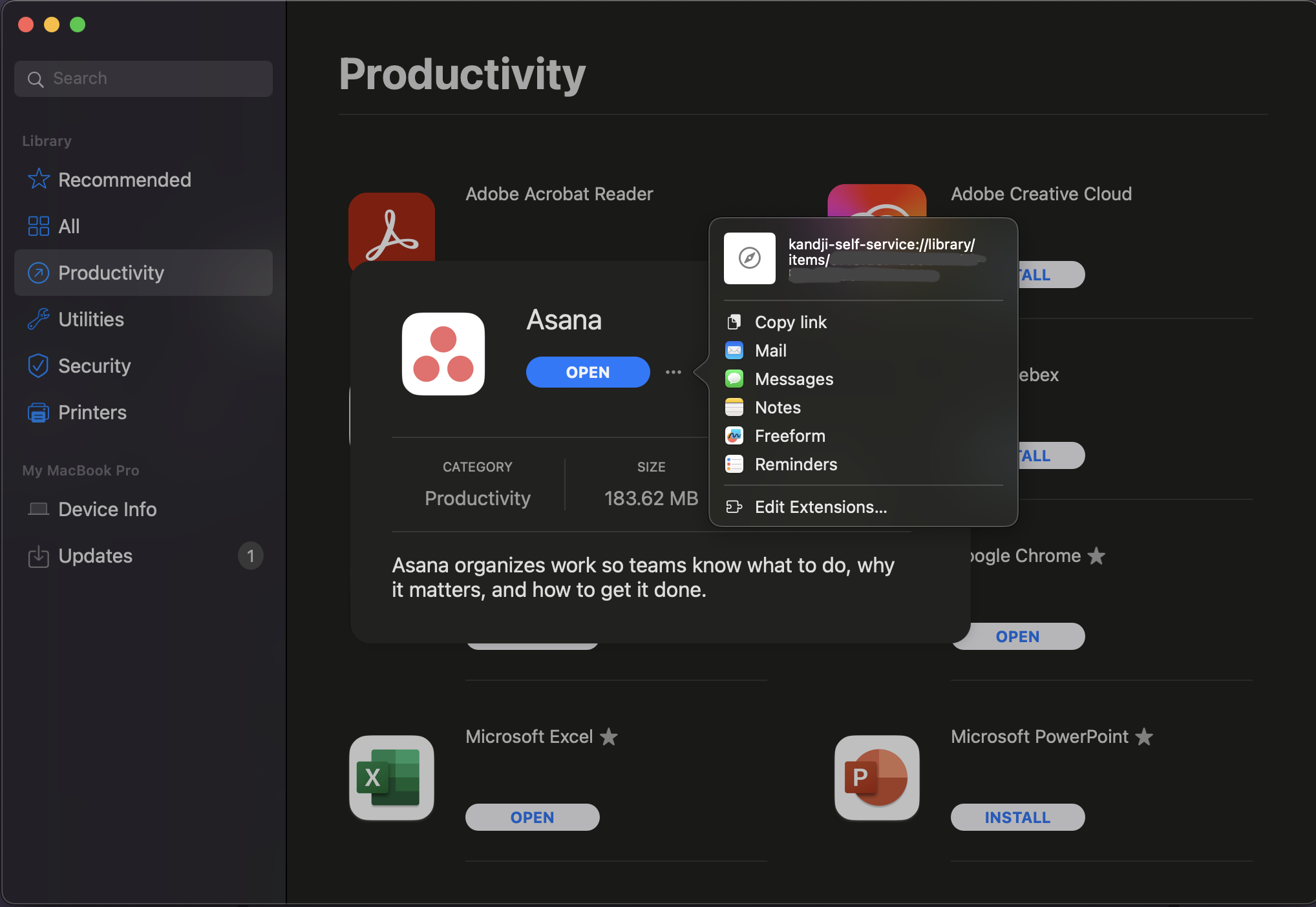
Link format for Kandji
Appendix
Example Device Health / Troubleshooting Use Cases
- Clear browser cache
- Clear recycle bin/trash
- Clear windows auto-startup applications
- Disk cleanup
- Flush DNS cache
- Flush System & User caches
- Get Outlook Plugin Crash Details
- Optimize System - optimize system startup by disabling unnecessary services
- Reindex Spotlight search for mac
- Reinstall printer drivers
- Reinstall VPN certs/client
- Repair Office 365
- Repair OneDrive
- Repair Outlook OST
- Repair Outlook search
- Reset Print Spooler
- Restore SCCM Client
- General System Cleanup (temp files, cache files, etc.)
- Version upgrade of a software
- Reset network settings
Example Software Installation Use Cases
- Notepad++
- Web Browsers
- SAP Client
- VS Code
- Visual Studio
- IntelliJ based software
- Autodesk
- SnagIt
- Alfred