
Moveworks On-Prem Agent
Overview
For on-premises systems, Moveworks relies on the Moveworks Agent to securely integrate your on-premises system into the Moveworks Platform. The Agent is a container based application installed on a VM or Server behind your firewall. It proxies the interaction between the Moveworks platform and your on-premises systems.
This document gives a high level overview of the architectural details related to the Moveworks Agent and explains how the Moveworks Platform and the Moveworks Agent communicate with your on-premises systems, efficiently and securely.
Secure Communications Architecture
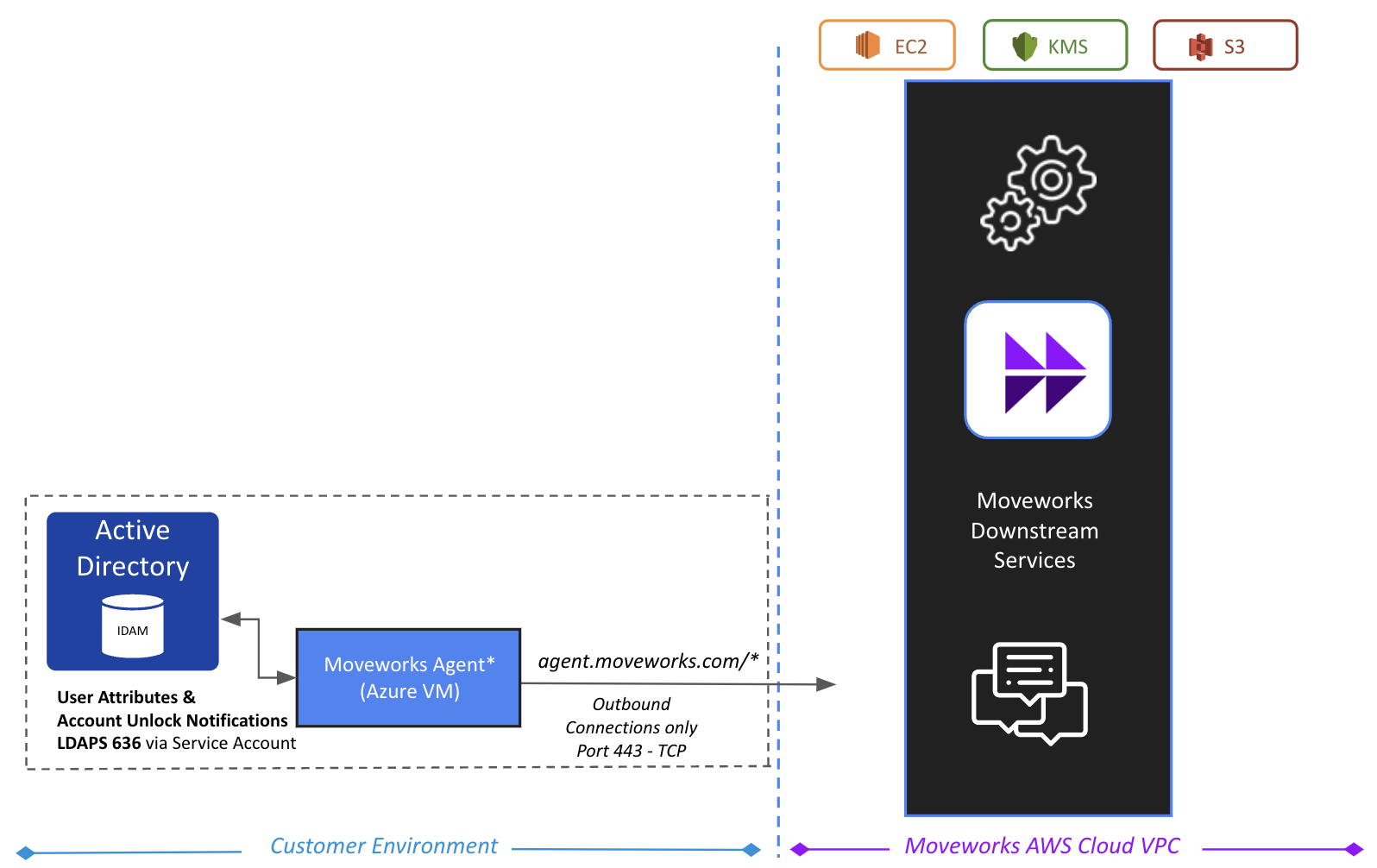
Designed with security in mind, a typical Moveworks Agent deployment, requires no firewall changes to integrate with on-premises systems.
During installation, the Moveworks Agent connects to the Moveworks Platform over a secure HTTPS/SSL connection. All communication is done securely (HTTPS) between the Agent and the Moveworks platform.
Outbound Only Communication
Communication between the Agent and the Moveworks platform is always initiated out-bound only by the Agent to the Moveworks Cloud Platform. The Agent initiates communication outbound via an HTTPS request to the Moveworks platform over port 443. This allows the Agent and the Moveworks platform to mutually authenticate and establish a transport layer security (TLS) full-duplex communication channel without requiring an inbound open port on your corporate firewall. The TLS channel is encrypted using an SSL certificate to protect data in transit from unauthorized interception and disclosure. This connection is then refreshed & reauthenticated every 60 seconds. The Moveworks agent uses this connection to continuously fetch requests from an Upstream Queue (hosted in the Moveworks Cloud platform), and then serve back the responses in the same connection. This allows for automatic HA support, when multiple Agents are deployed, without the need to maintain a load-balancer in your environment.
How does it work?
The sequence diagram below depicts how the Moveworks Agent and the Moveworks platform communicates with your on-premises systems, efficiently and securely.
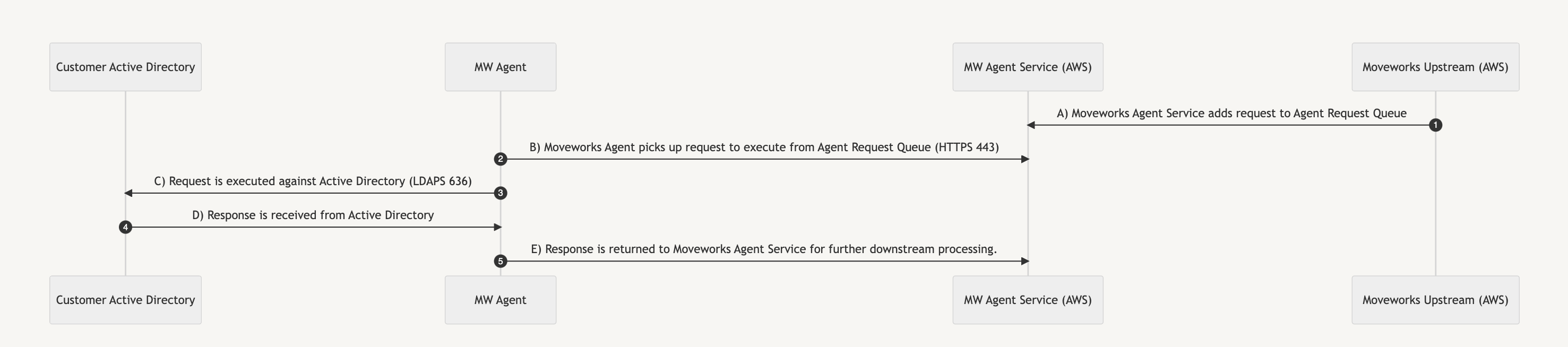
A) Moveworks Agent Service adds request to Agent Request Queue.
B) Moveworks Agent initiates outbound polling connection to the Agent Request Queue over HTTPS Port 443 — Authentication to the queue leverages OAuth token (encrypted at rest with AES-256 encryption or fetched securely from AWS Secrets Manager or Azure KeyVault). Moveworks Agent picks up request from Agent Queue.
C) The request is securely executed against On-Prem system (HTTPS over Port 443 for REST integrations and LDAPS over Port 636 for Directory integrations). Note: Active Directory leverages service account based authentication using a username and password (encrypted at rest with AES-256 encryption or fetched securely from AWS Secrets Manager or Azure KeyVault).
D) Moveworks Agent receives response from On-Prem system.
E) Response is returned to Moveworks Agent Service for further downstream processing by the Moveworks Platform.
Next Steps:
- To install the agent: See the Installation Guide.
- To configure the agent: See the Configuration Guides.
- If you’re having issues: See the Troubleshooting Guide.
FAQs
Q: What do I need to do in order to prepare for the Agent installation?
A: You’ll need at least two VMs with Docker installed. See the Moveworks Agent Installation Guide.
Q: What do I need to do in order to install the Agent?
A: See the Moveworks Agent Installation Guide for step-by-step instructions on how to install the agent. If required, you may reach out to your Moveworks Implementation/Customer Success team for additional help.
Q: How does Moveworks support the Agent and its container?
A: Moveworks monitors our service performance at all times and detects any degradations that may indicate an Agent failure. In such cases, our CS team contacts you immediately to address the issue. Periodically, Moveworks CS will contact you with an updated Agent image that we can help install during a service window that you choose.
Q: What maintenance must I do to support the Agent and its container?
A: Please refer to our maintenance guide for more information. Make sure the VMs and their hosts are up and running to meet your SLA requirements. When you have an upcoming service windows that represent interruptions in any of the following, please contact Moveworks Support to avoid unnecessary alerts:
- Active Directory (AD) downtime
- VM or host downtime
- Network service interruptions, that affect outbound communication or communication with AD
Q: You recommended I install the Agent on Docker CE. Does Docker CE have enterprise-grade support?
A: Docker CE also known as Docker Engine is a fully featured edition of Docker, but it does not include support from Docker, Inc.
Q: What skills does my team need to maintain the Moveworks Agent?
A: No specific Docker or container experiences is needed. Your team should be comfortable maintaining each server or VM on which an Agent container is installed, and you should be comfortable maintaining network connectivity.
Q: Do I need a container orchestrator like Kubernetes?
A: No
Q: What are the most common Agent and container issues, and how can I handle them?
A: The two most common Agent and container issues are:
- Running out of disk space on an Agent’s VM: Have your VM administrator allocate more disk space for the Agent VM.
- Container cannot communicate: Have your network administrator check the network connection, static IP address whitelisting, and firewall rules.
Q: How do I monitor the Agent?
A: Moveworks monitors service performance at all times and will contact you if we suspect a degradation in Agent performance. You can also check the healthiness of the container by running docker ps or docker inspect on the server running your Moveworks Agent. Additionally, keep an eye on disk, memory, and CPU usage and file a Moveworks support ticket if an issue occurs. You can also monitor the Moveworks Agent’s health by using the Moveworks Setup Agent Health Module.
Q: How do I patch the Agent?
A: Moveworks adds new bot skills (actions that can resolve issues) constantly, but these do not normally require an Agent update. Agent updates are infrequent, and Moveworks CS will inform you of any required updates.
Q: What triggers Moveworks to update my Agent, change my Agent configuration, or update my Docker version?
A: Moveworks will contact you to arrange an Agent update if we make a fix or change that affects Agent behavior. This is rare.
Q: What info does the Moveworks Agent send to Moveworks?
A: Moveworks uses the contents of the fields listed in the system’s associated Access Requirements documentation. This information is stored securely as explained in the Moveworks Information Security Overview.