
BMC Remedyforce Access Requirements
What is this account used for:
To integrate with BMC Remedyforce, Moveworks will need a dedicated service account along with its:
- Username
- Password
- Security Token
- Site URL
This is to enable the Moveworks bot to interact with the BMC Remedyforce System REST API. The Moveworks bot interacts with your BMC Remedyforce System to:
- Monitor tickets for autonomous resolution
- Reach out to an employee when a BMC Remedyforce ticket needs the employee’s attention
- Create tickets to log issues the bot has resolved autonomously
- Create tickets for issues that require an agent’s attention
- Read the BMC Remedy user table so that the bot can log and assign issues appropriately.
Moveworks utilises the 58.0 version of the APIs to make Salesforce Object Query Language (SOQL) calls to
- Read Tickets
- Read Users
Additionally, Moveworks utilises the 58.0 version of the Salesforce Objects (sobjects) API to
- Create Tickets
- Update Tickets
Please create a service account that has the permissions to perform all the above actions, dedicated to Moveworks and then configure it within Moveworks Setup by following these steps:
- Select the connector - BMC Remedyforce
- Name the connection and select the “Common Base URL” option. Input your instance’s URL
- Select “Oauth2 Password Grant” under authentication type and input the values from above in the specified fields
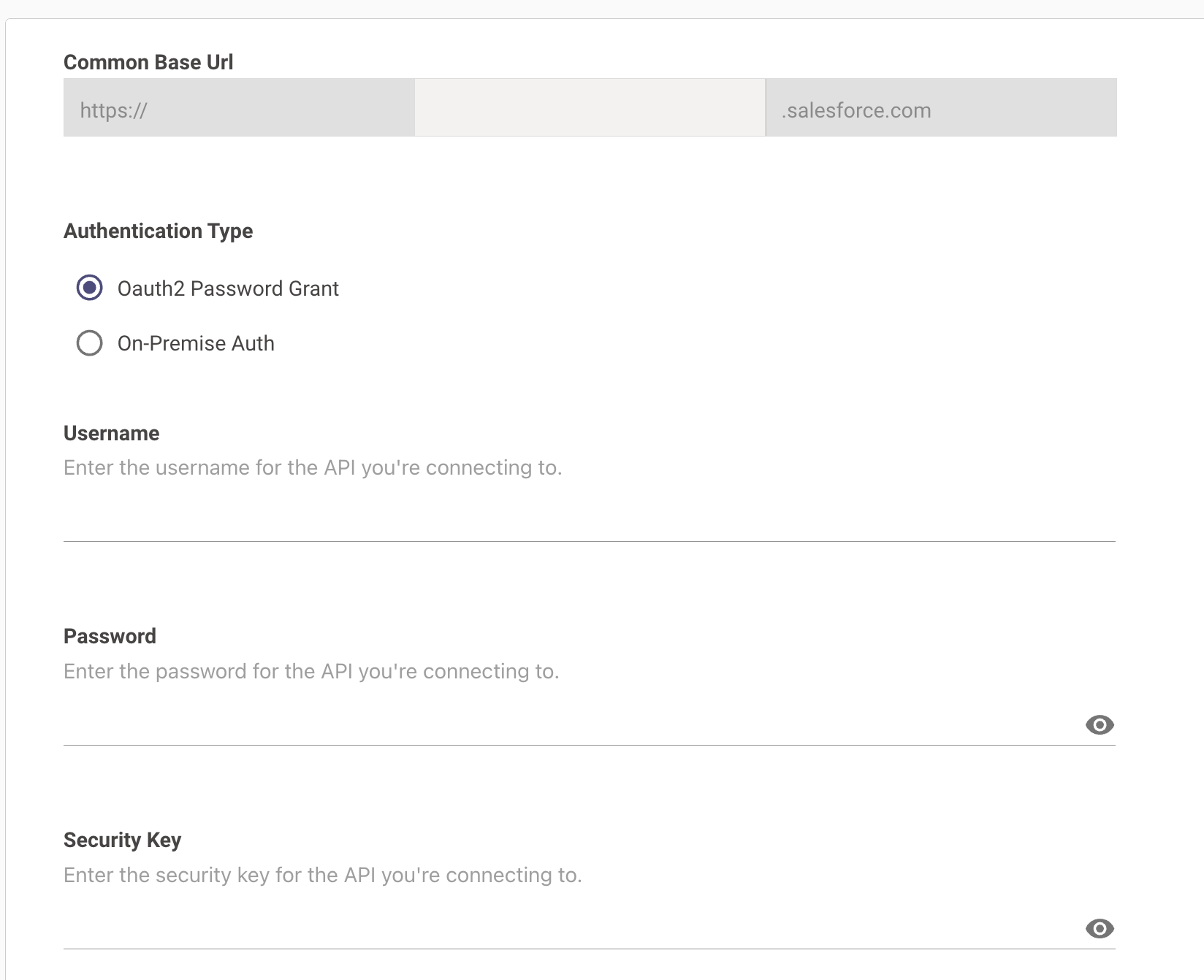
- Click on save and your connector is now succesfully configured!