Best Practices for Configuring Rich Ticket Filing
Rich Ticket Filing (RTF) allows admins to configure and present users with a UI Form when they want to file a ticket through the Moveworks AI Assistant for specific type of Issue/Request. Instead of users just filing a generic Ticket type which collects a short description, description and attachments to create it on the ITSM.
RTF lets you capture structured fields such as dropdowns, check-boxes, dates and attachments. This guide walks you through the Overview of how Rich Ticket Filing (RTF) works and the Best practices surrounding the approach which should be taken depending on the Enterprise requirement.
Overview of Configuring RTF
Moveworks requires the combination of the below configurations in order to Render an RTF Form in the Assistant Chat interface. Each Configuration serves a purpose and is required in conjunction with the others to be used effectively.
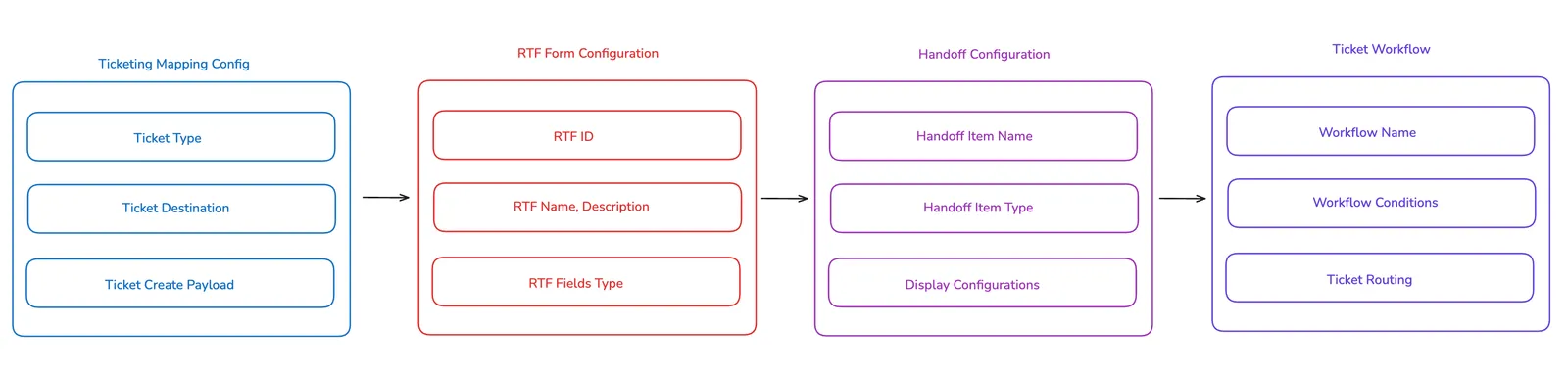
1. Ticket Payload Configuration
Purpose : This configuration is what connects Moveworks to the ITSM system to allow creation of a specific Ticket Type.
Before the RTF can be created, we first need to create the Ticket Mapping configuration for the ticket type which the user will be submitting to the ITSM system.
- Define the Ticket Type and Destination Table where the Ticket will be created.
- The Attributes defined in the Create Ticket Mapper Payload will be used to Configure the RTF later.
You can follow the Integration specific Guides for the different ITSM systems mentioned here.
2. RTF Form Configuration
Purpose : Once the Ticket Mapping has been configured, We need to define these attributes inside the Rich Ticket Filing Configuration in order to define the fields to be rendered.
- Define the RTF ID(unique), RTF Title, RTF Description.
- Add the Fields inside the RTF which include types like single-line text, multi-line text, single-option dropdowns, check boxes.
3. Handoff Configuration
Purpose : This configuration is responsible for rendering the RTF in the AI Assistant Chat platform. You will use a combination of Display Configurations here to define the UI fields.
- Define the Handoff Item Name and which Domain it falls under.
- Describe the Handoff Item Type and define the ID of the RTF Form.
- Create the relevant Display configurations to support the Rendering of the RTF.
4. Ticket Workflows
Purpose : This configuration defines the Workflow which will carry out the Action of creating the ticket in the External ITSM System. The workflow will utilise the attributes from the Create Payload Mapper which has been configured for the Ticket Type.
- Create a Workflow and Define the local routing conditions which are Workflow Specific.
- Define the Global Routing Conditions for the Workflows.
Recommended RTF Configurations Approaches
Customers may have different requirements for their ticket-filing workflows and how RTF needs to be implemented. Taking all these scenarios into account for other Enterprises, We have 2 common approaches which can be used depending on the Requirements :
Single RTF Form Routed via a Single Workflow
This approach should be used when your organisation wants users to :
-
Interact with a single RTF Form which contains a broad set of fields for a particular Category request (e.g., HR requests have sub-categories such as Benefits, PTO, Payroll, Policies)
-
This way users can choose an HR Category within the RTF form, and then the singular Workflow allows you to route the submission to the appropriate ticket table based on the user choice for a given field.
-
The RTF will be presented to the User via a Single Handoff Category.
-
Using a Single Workflow, this method allows us to route a single RTF to multiple Ticket Destinations or support different Payloads.
-
By writing DSL Rules based on the RTF fields, We can route a single Workflow to use multiple payloads

Please follow this guide on how to configure this approach of RTF for a single entry point.
Multiple RTF Forms Routed via Multiple Workflows
This approach should be used when your organisation wants to:
- Provide different RTF forms for each request category, where each category requires distinct fields or customisation.
- Minimise conditional logic inside a single form by letting the context domain classifier automatically surface the correct form to the user.
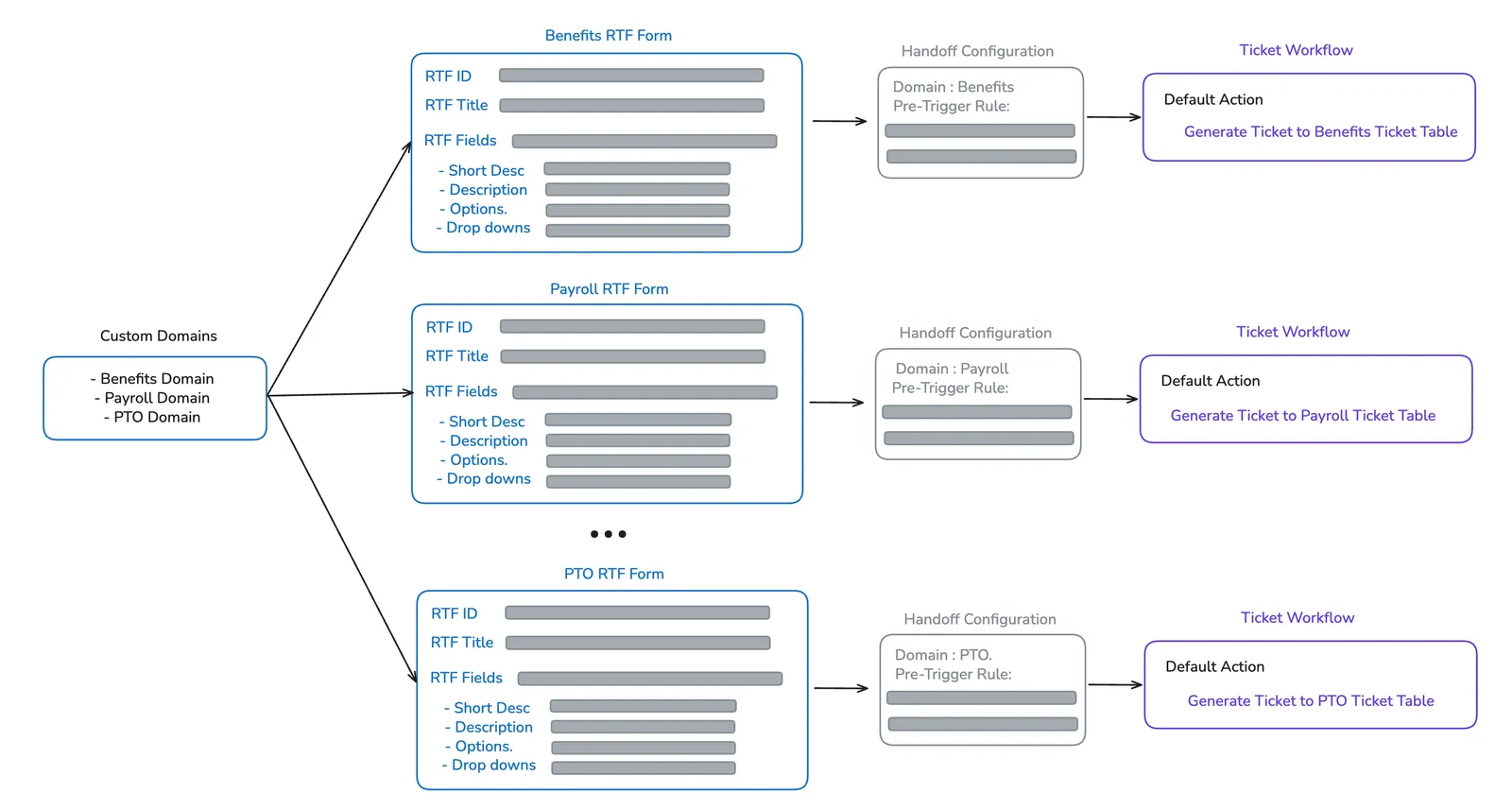
With this setup, each domain (e.g., Benefits, PTO, Payroll) has its own RTF form and its own dedicated workflow. This makes field mapping simpler and avoids complex branching logic.
- Each domain corresponds to a specific ticket category (e.g., BENEFITS_DOMAIN, PTO_DOMAIN, PAYROLL_DOMAIN).
- Each domain has its own RTF form containing only the relevant fields (e.g., Benefits → coverage type, plan options; PTO → start and end dates; Payroll → pay period or paycheck issue).
- This allows us to maintain a single RTF form for each domain.
- Each domain routes directly into its associated ServiceNow table with a straightforward, single workflow.