
Built-in Plugin Logs
Built-in Plugin Logs
What Are Built-in Plugin Logs?
Built-in plugin logs provide a unified view of all log entries generated by Moveworks built-in plugins. These logs capture both the external API calls made to your integrated systems and the internal workflow execution steps that occur during plugin runs.
This page combines two types of logs:
- External API call logs — Records of each HTTP API call that Moveworks makes to your external systems (for example, creating a ticket or provisioning software access).
- Workflow execution logs — Records of internal workflow steps such as identifying the correct workflow, executing actions, and processing results.
Built-in plugin logs only capture activity for built-in plugins. To track API calls made during Agent Studio plugin runs, use the Agent Studio logs.
How Does Moveworks Call Your External Systems?
Moveworks calls your external systems through REST API calls and passes the relevant information in the API request body and headers. These API calls are embedded into the Moveworks AI assistant workflows. Moveworks uses the configured connector for the relevant plugin and then calls the external system endpoints.
When Are Built-in Plugin Logs Recorded?
Whenever a built-in plugin executes, log entries are recorded for each step of the workflow and each external API call. The SLA for these logs is near-instant — as soon as the execution completes, the log entries are captured.
Where Are Built-in Plugin Logs Located?
You can find the Built-in Plugin Logs page in Moveworks Setup at Moveworks Setup → Organizational Details → Audit → Built-in Plugin Logs.
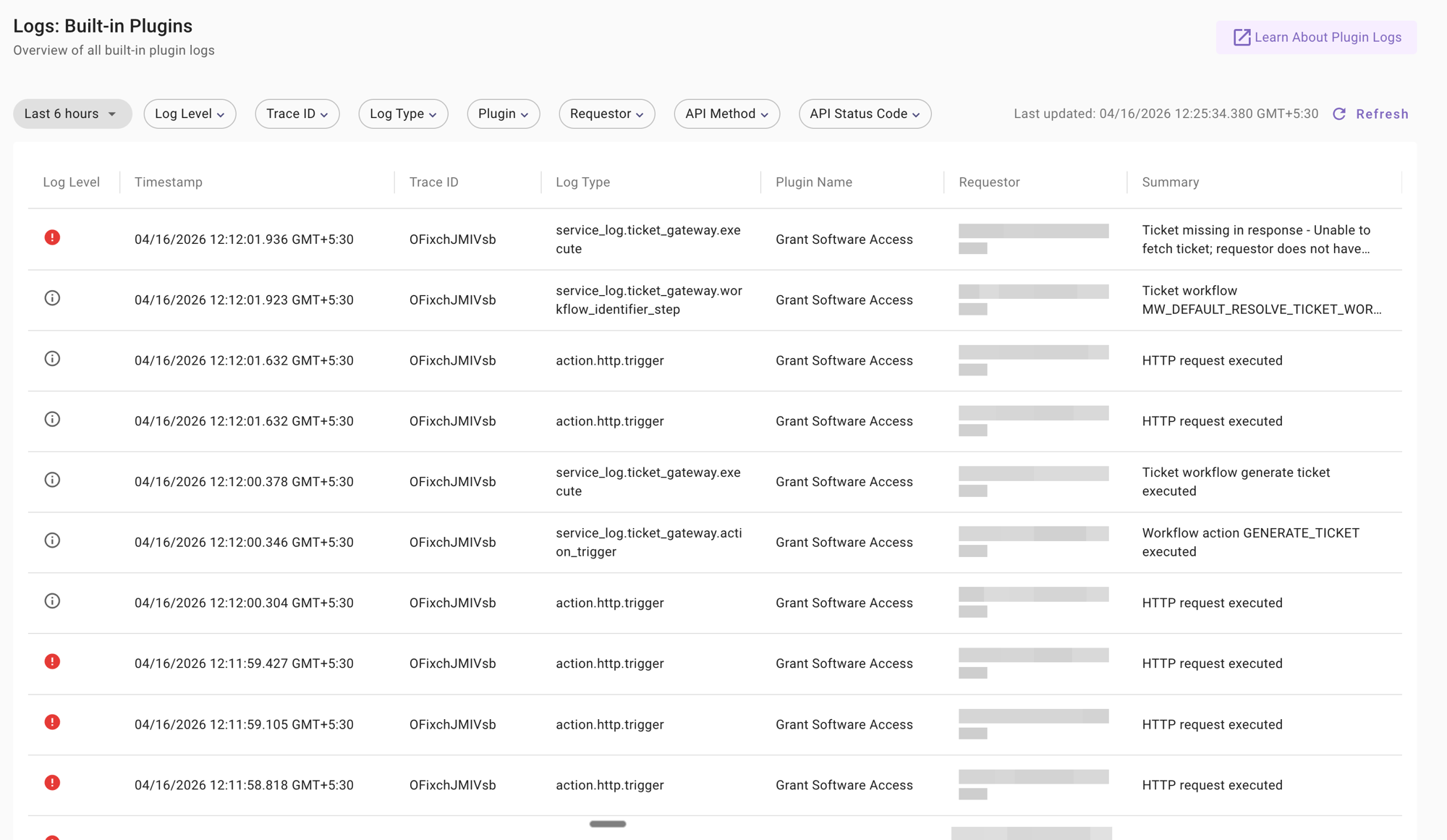
- 1. The data recorded in this tool is captured on an ongoing, forward-looking basis — once enabled, Moveworks captures data for all subsequent plugin executions. Historical data is not backfilled.
- 2. Logs within this view are retained and visible for one (1) week on a rolling basis. Logs older than one week are removed.
Understanding the Log Table
Table Columns
Each log entry in the table contains the following columns:
Log Detail Panel
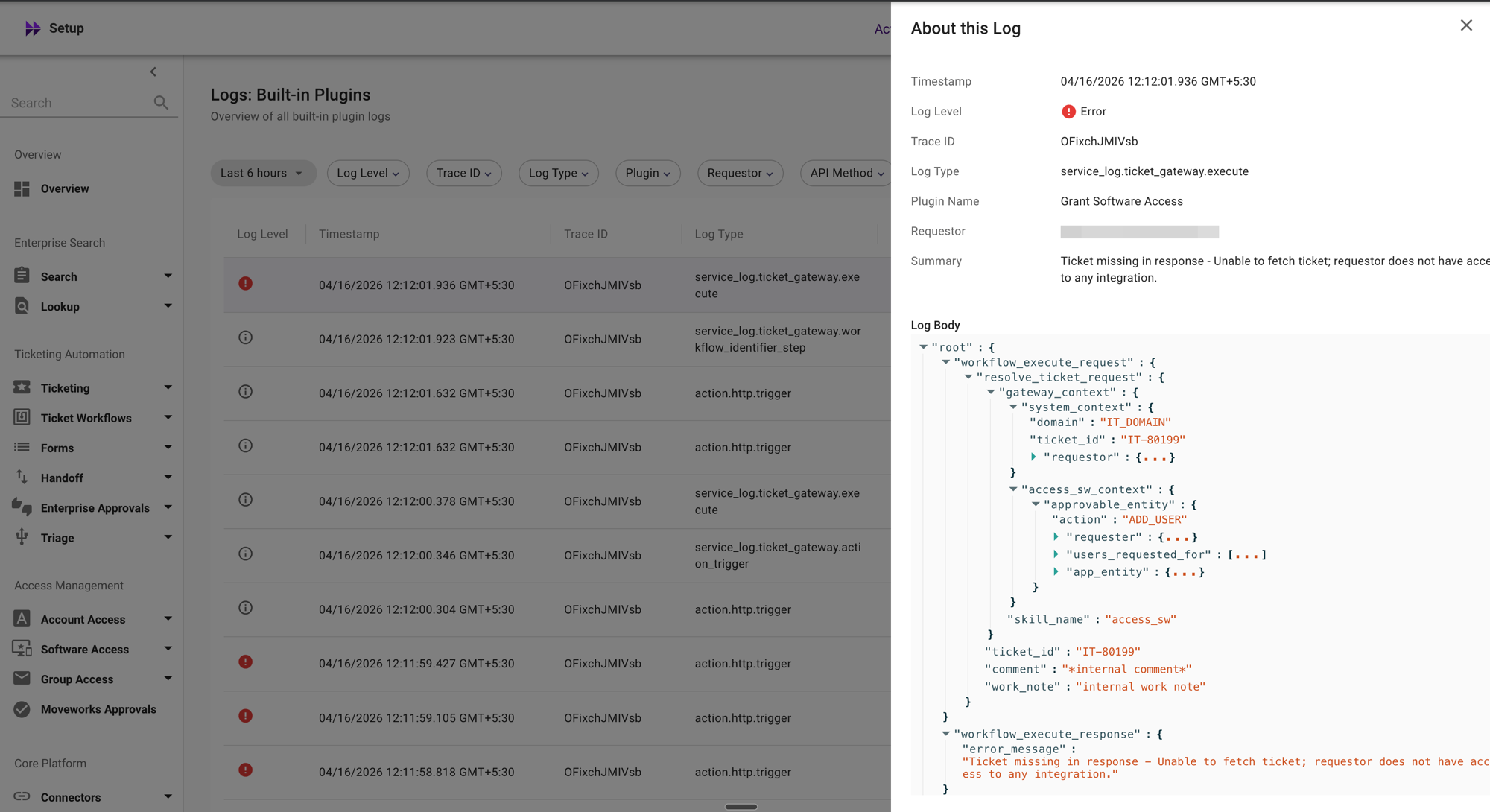
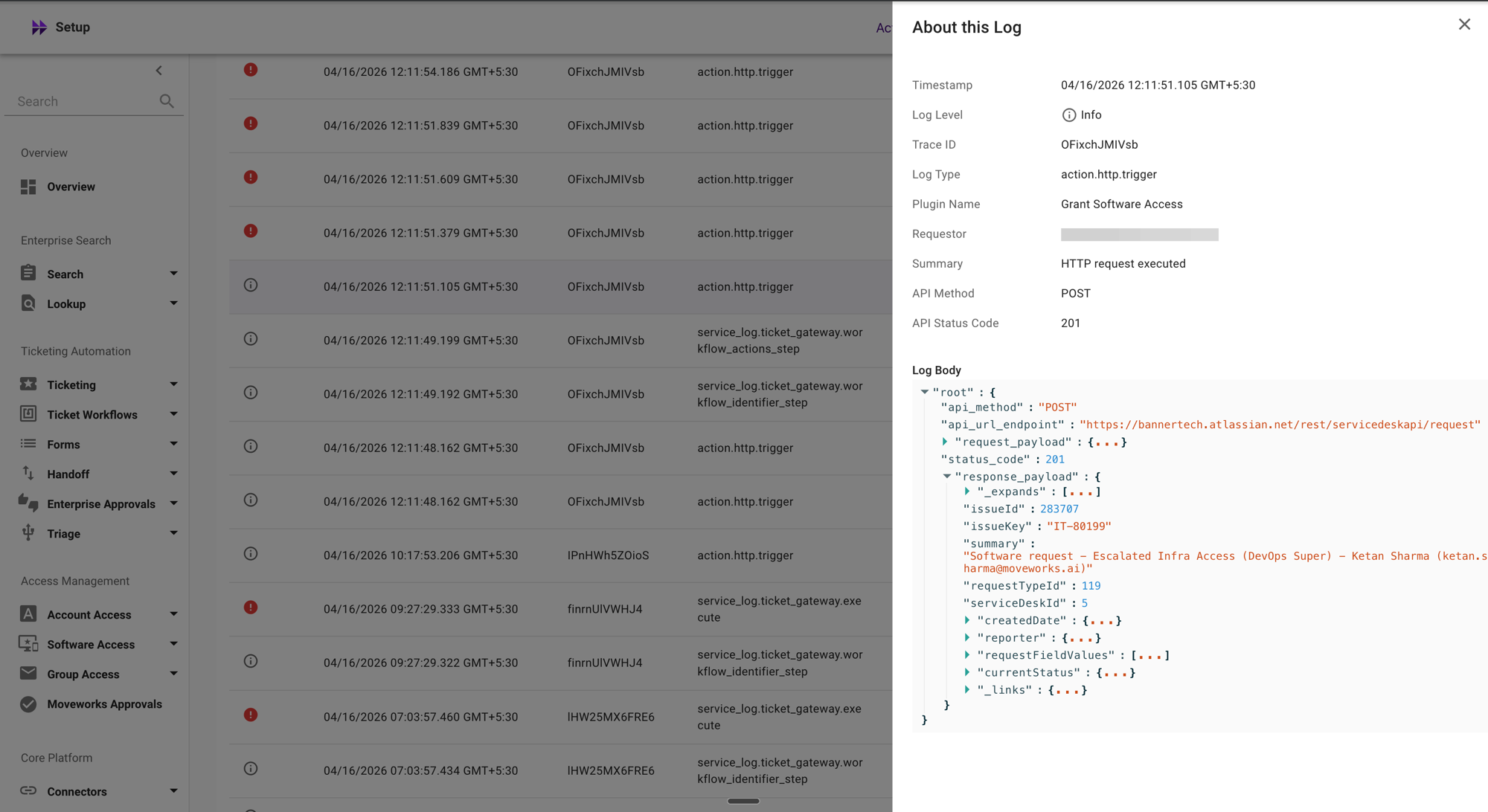
Click any row in the table to open the About this Log detail panel on the right side. This panel displays the full details of the selected log entry, including request and response data when available.
The detail panel for an Error log entry shows the error summary and the full log body:
The detail panel for an Info log entry shows the successful execution details, including the HTTP status code:
Filters
You can narrow down the log entries using the following filters at the top of the page:
Understanding Log Types
Built-in plugin logs contain several families of log types:
External API Call Logs
Log entries with the type action.http.trigger represent HTTP API calls that Moveworks made to your external systems. These logs capture the request and response details for each API call.
Workflow Execution Logs
Log entries with types prefixed by ticket_gateway.* represent internal workflow execution steps. These include:
ticket_gateway.execute— The overall execution result of a ticket gateway workflow.ticket_gateway.workflow_identifier_step— Identifies which workflow to use for the request.ticket_gateway.workflow_actions_step— Identifies the workflow actions to execute.ticket_gateway.action_trigger— Records the execution of a specific workflow action (for example,GENERATE_TICKET).
Service Execution Logs
Beyond ticketing workflows, built-in plugin logs also surface decision-level logs from additional Moveworks services. Each entry records what the service evaluated, the decision it made, and the typed reason behind it — so you can diagnose why a ticket field was set a certain way, why a notification was or wasn’t sent, or why a reminder fired.
When a Concierge or Nudge notification can’t be delivered, the concierge.send_message / nudge.send_message log surfaces a descriptive, actionable error message for the most common causes — for example, the bot being disabled by a chat-system admin, the user having blocked the bot, invalid or expired chat credentials, the user not being reachable for direct messages, or the chat system rate-limiting requests. Less common error codes currently fall back to a generic “Internal error occurred — contact support with the trace ID” message; the set of mapped messages is expanded iteratively as new codes surface.
What Events Are Captured?
Built-in plugin logs capture activity across eight major categories of built-in plugins. Each category contains individual plugins that are recorded in the Plugin Name column. For a full list of built-in plugins, refer to the Capabilities page.
- Ticketing — Filing, resolving, reopening, and commenting on tickets.
- Live Agent — Connection requests and live agent session termination.
- Approvals — End-user updates to approval records.
- Group Operations — Creating groups, adding members, and removing members.
- Account Operations — Password updates and account unlocks.
- Software Operations — Software provisioning attempts.
- System — Internal Moveworks calls for purposes like connector validation. This is the default fallback if a plugin is not identified.
- Enterprise Search and Forms — API calls routed to the ticket service for ticket-related information. This does not include ingestion logs — only ticketing-related use cases are captured.
In addition to these plugin categories, built-in plugin logs now capture service execution logs for Triage, Concierge (ticket notifications), and Nudge (ticket reminders). See Understanding Log Types for the specific log types each service emits. Coverage will continue to expand to more Moveworks services over time.
This view does not capture ingestion logs. Only end-user-driven actions generate log entries.
A single user action may generate multiple log entries — this is expected. Moveworks plugins can invoke the same API more than once depending on how a workflow is implemented, and the system automatically retries calls on intermittent failures. This tool surfaces logs as-is, without filtering or aggregation.
Built-in plugin logs do not capture API calls related to authentication. This is a security measure to prevent credentials or passwords from being exposed to administrators.
Example: Debugging a Failed Plugin Execution
The primary purpose of built-in plugin logs is to track whether plugin executions and their associated API calls succeed. If a failure occurs, you can use these logs to identify the root cause and determine the configuration changes required to resolve the issue.
Scenario: Investigating a Failed Ticket Comment
Suppose a user reports that adding a comment to a ticket failed. You can use the built-in plugin logs to investigate.
- Navigate to Moveworks Setup → Organizational Details → Audit → Built-in Plugin Logs.
- Apply the following filters:
- Requestor: The email of the user who reported the issue
- Plugin: Add Comment to Ticket
- Log Level: Error
- Review the matching log entries. Look at the Summary column for error details such as “Ticket missing in response — Unable to fetch ticket; requestor does not have access to any integration.”
- Use the Trace ID to find all related log entries for that execution. This helps you see the full sequence of events, including which workflow was identified and which API calls were attempted.
- Click on a log row to open the About this Log detail panel for the full request and response details.
Understanding Multiple Log Entries
During a plugin execution, Moveworks may generate several log entries. For example, a “Grant Software Access” request might produce:
- A
ticket_gateway.workflow_identifier_stepentry showing which workflow was selected - A
ticket_gateway.workflow_actions_stepentry showing the identified actions - Multiple
action.http.triggerentries for each API call made to the external system - A
ticket_gateway.executeentry showing the final execution result
If you see Error entries for action.http.trigger logs followed by additional retries, this indicates Moveworks automatically retried the API call. Check the final ticket_gateway.execute entry to determine the overall outcome.
Governance and Access Control
Built-in plugin logs may include sensitive data such as API request and response bodies. Access to this data is governed through the PII Viewer role in Moveworks Setup.
Full Access
Users with the following roles can view complete log details, including unredacted request and response data:
- Super Admin
- Moveworks Setup Admin
- Users assigned the PII Viewer role
These users can view:
- API URLs
- Request parameters
- Request and response bodies
Restricted Access
Users without the PII Viewer permission can still access the Built-in Plugin Logs interface. However, sensitive information is redacted.
These users cannot view:
- Request details
- Query parameters
- Request bodies
- Other sensitive data included in API requests
This governance model ensures that sensitive information is only accessible to authorized users while still allowing others to monitor system activity.