
For AI agents: a documentation index is available at the root level at /llms.txt and /llms-full.txt. Append /llms.txt to any URL for a page-level index, or .md for the markdown version of any page.
Logo
DeveloperAcademyCommunityStatus
  • Service Management
    • Overview
    • Concierge & Ticketing Capabilities Overview
    • Forms
      • Configure Forms
        • Configure Form Ingestion
        • Ingested Forms
        • Writing AI-Ready Forms for the Moveworks Assistant
        • How To Guides for Forms Plugin
    • Forms - Integration Specific Guides
    • Live Agent Chat / Handoff
    • Triage
    • Approval Mirroring
    • Ticket Interception
    • Generic Ticketing Integration: Ticket Gateway
  • Administration
    • MyMoveworks
    • Organization Information
    • Roles and Permissions
    • MyMoveworks SSO
  • Moveworks Setup
    • Accessing Moveworks Setup
    • First-Time Login via Magic Link
    • Moveworks Setup Modules
    • Moveworks Setup: Module How To Guides
    • Plugin Management
    • Monitor Alerts
    • Audit Logs
    • DSL Fields Defaults
    • Data Crawling View
    • API Playground
    • Setup Homepage
    • Troubleshooting Hub
    • Security and Privacy Settings
    • Configuration Delete
    • Advanced Config Editor
    • Identity configuration
    • Onboarding Stage
  • Security
    • Security
    • Hyperlink & Button Expiry
    • Attachment Handling
    • Moveworks Subprocessors
  • Provision Management
    • Overview
    • Access Software
    • Access Groups
    • Access Account
  • Access Requirements
    • Overview
    • Update Set Modules
    • Ticketing Systems & ITSMs Access
    • Identity and Access Management Systems Access
    • Multi-Factor Authentication (MFA) Systems Access
    • Knowledge Access Requirements
    • Email Distribution List Systems Access
    • Facilities Management Access
    • Live Agent Chat Access
    • HR Information System Access
    • Expense Management Access
    • Calendar Management Access
  • Core Platform
    • User Identity
    • Moveworks On-Prem Agent
    • Approvals Engine
    • Entity Catalog
    • Configuration Languages
    • Moveworks Data Objects
    • SIEM
  • Employee Experience Insights
    • Overview
    • Breaking Down the Dashboard
    • Understanding Industry Benchmarks
    • Apps & Services
    • Impact Module
    • EXI Common Use Cases
    • Configure EXI
    • Ticket Backpolling
  • Knowledge Studio
    • Overview
    • Knowledge Studio Configuration
    • AI Powered Recommendations
    • Inspecting & Verifying Sources
    • Publishing Articles
    • Creating Knowledge Articles
    • Resolving IT Tickets Guidance
DeveloperAcademyCommunityStatus
On this page
  • Download CSV of Ingested Forms
  • Forms Imported
  • Forms Fillable
  • Forms Import Schedule
  • Find a Form
Service ManagementFormsConfigure Forms

Ingested Forms

||View as Markdown|
Was this page helpful?
Edit this page
Previous

Writing AI-Ready Forms for the Moveworks Assistant

Next
Built with

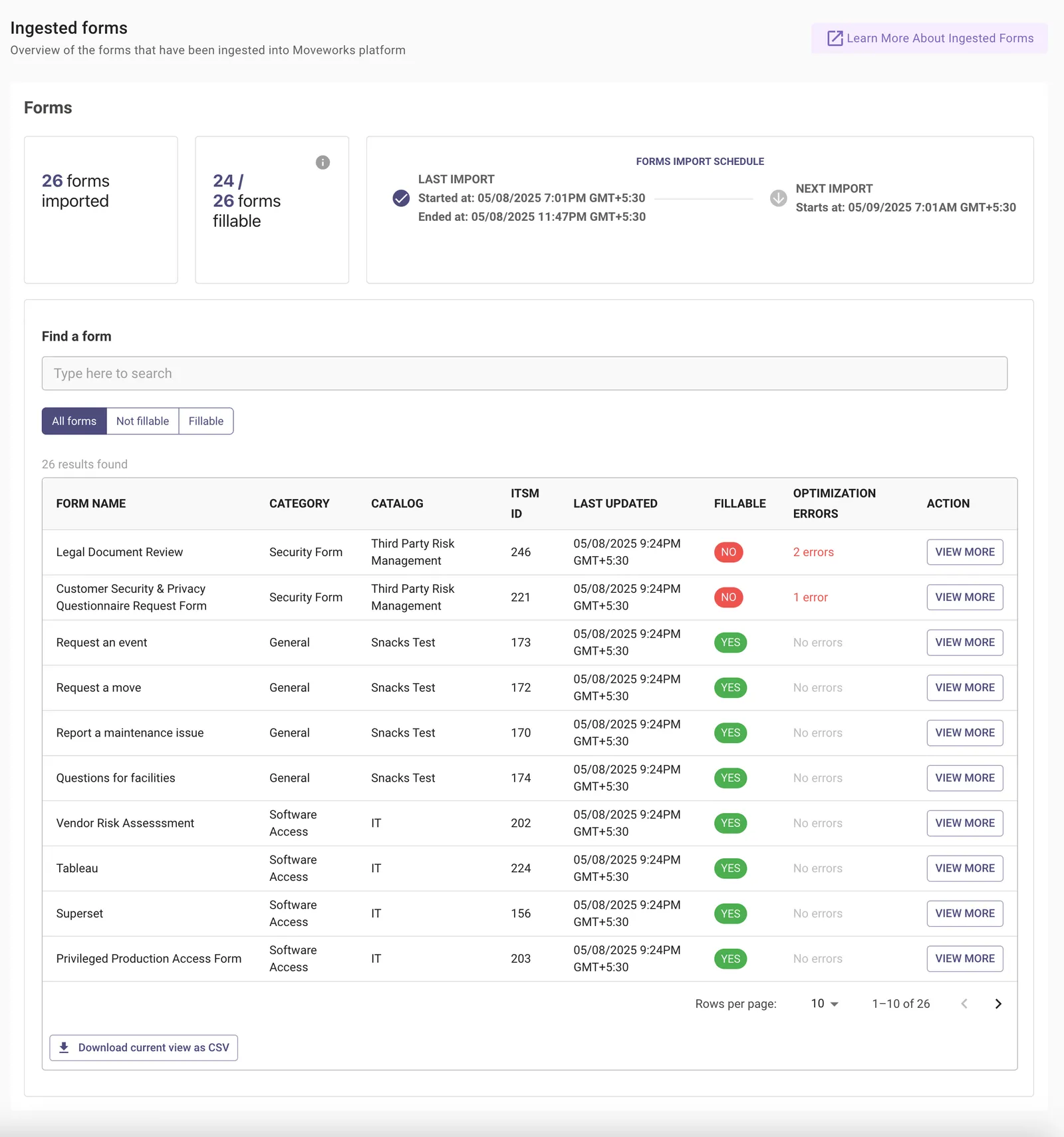
The Ingested Forms module provides visibility into the forms that have been imported into the Moveworks platform, whether these forms are optimized for filling out inside chat, and what are the targeted changes you can make to improve how your users fill forms inside chat. It provides helpful tools to validate that the form import process is working as expected, and lets you troubleshoot forms-related issues.
Download CSV of Ingested Forms

Admins can download the list of ingested forms in the CSV format with the following columns:

  1. Name: The title of the form
  2. Categories: The department or function this form belongs to
  3. Catalogues: The catalog section where the form is listed
  4. Source_id: A unique identifier used of the form
  5. Last_ingested_at: The timestamp when form was last updated
  6. Is_fillable: Indicates whether the form can be filled
  7. Fillability_issues_count: The number of issues impacting form fillability
  8. Fillability_issues: Details of issues affecting form fillability

Sample CSV file:

namecategoriescatalogssource_idlast_ingested_atis_fillablefillability_issues_countfillability_issues
G Suite User ProvisioningIdentity & Access ManagementIT Services24409/12/2024 16:35PM GMT +0000Yes0[]
New Hire IT OnboardingHR & IT OperationsEmployee Services42309/12/2024 15:16PM GMT +0000No1['{type: Form Level Error, description: Insufficient API access to request on behalf of a user. Please add moveworks agent account to the poeple section in the project settings.}']
Secure VPN Access RequestNetwork & SecurityAccess Requests77809/12/2024 15:16PM GMT +0000No2['{type: Form Level Error, description: Insufficient API access to request on behalf of a user. Please add moveworks agent account to the poeple section in the project settings.}', '{type: Form Level Error, description: Fields must be unique but two fields are named Questionnaire Instructions}']

Forms Imported

Total number of forms that have been imported into Moveworks.

Forms Fillable

This shows how many of the forms that have been imported are fillable. A form is fillable when it is able to be filled out by the user through the Moveworks bot in chat natively.

Forms Import Schedule

Details on when forms were last imported into Moveworks, and when forms are next scheduled to be imported.

Find a Form

This search bar can be used to find specific Forms that have been imported into Moveworks.