
ManageEngine (Cloud) Access Requirements
Why do we need access to your ManageEngine Instance?
The client we create in your ManageEngine instance will directly perform actions to create, update, and query information about tickets, solutions, and forms.
Production Access Permissions
In your Production Manage Engine environment, the following accounts are needed:
- A dedicated service account as a technician with the
SDADMINprivilege to read/update tickets, read users/KB articles and get access to all request templates.
Authorization Process Walkthrough
Setup Moveworks as a Self-Client in your organization’s ZOHO Dev Console
-
Go to your organization’s Zoho Developer Console (https://api-console.zoho.com/)
- Click
Add Client, selectSelf Clientand then click Create.
Self Client is the way to integrate stand-alone applications that perform only back-end jobs (without any manual intervention — like data sync).
- Click
-
Copy the
Client Id&Client Secret -
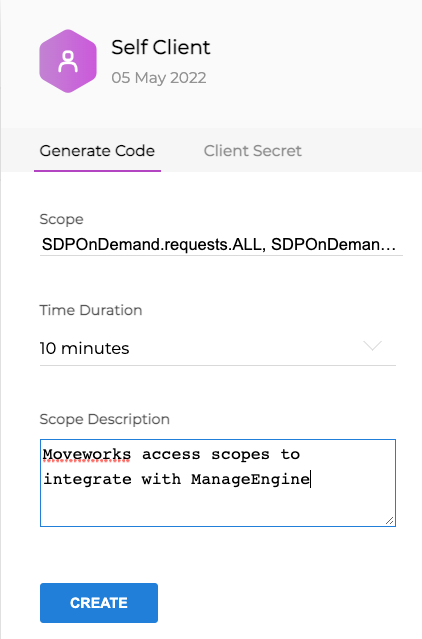
Now click on the Generate Code Tab (this lets Moveworks generate an authorization code to generate access and refresh tokens). Add the following comma separated scopes for the integration:
SDPOnDemand.requests.ALLSDPOnDemand.solutions.ALLSDPOnDemand.users.ALLSDPOnDemand.general.ALLSDPOnDemand.setup.ALL
Please provide these scopes as comma separated values, feel free to copy-paste the following: SDPOnDemand.requests.ALL, SDPOnDemand.solutions.ALL, SDPOnDemand.users.ALL, SDPOnDemand.general.ALL, SDPOnDemand.setup.ALL
-
Set Time Duration as
10 minutesand Add Scope Description asMoveworks access scopes to integrate with ManageEngine
Validate the setup looks like this screenshot:
-
Now Copy the Provided the Authorization Code.
Please share the Domain URL, Client Id, Client Secret & Authorization Code with the Moveworks team.