
Content Activities
What are Content Activities?
Content Activities are a type of process block that displays information to users rather than executing actions in external systems. They allow you to surface relevant content—such as knowledge articles, forms, or formatted text—at key moments in a conversation workflow.
When to Use Content Activities
Content Activities are ideal when you want to:
- Present helpful information instead of executing an action (e.g., when a user doesn’t have permissions to perform an operation)
- Surface a form for ordering or requesting something without direct API integration
- Provide contextual guidance mid-workflow before proceeding to the next step
- Display dynamic results from previous activities in a user-friendly format
Content Types
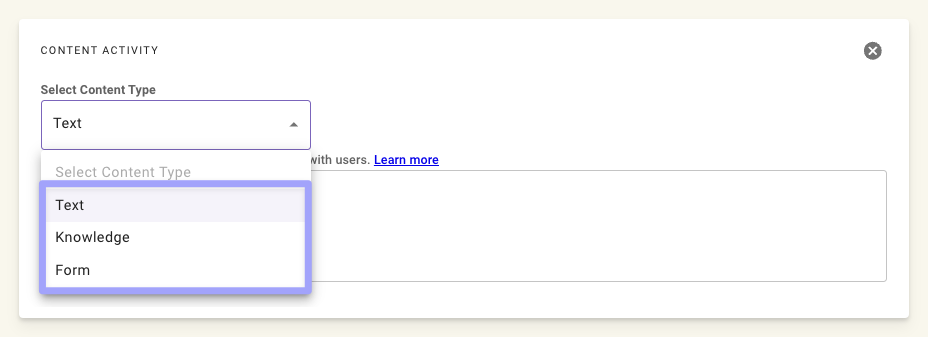
Content Activities support three types of content:
Text (Markdown)
Display formatted text using Markdown syntax. Useful for providing instructions, confirmations, or dynamic messages that reference data from the conversation.
Knowledge Articles
Surface relevant knowledge articles from your organization’s knowledge base. Knowledge articles are ingested from connected systems and can be presented when:
- A user asks a question that has an existing answer in your KB
- The user lacks permissions to execute an action, but a self-service article exists
- You want to provide additional context or instructions
Knowledge articles come from the articles your AI Assistant has ingested from your connected knowledge management systems. Moveworks automatically indexes these articles, making them available for Content Activities to surface contextually.
Forms
Present forms for users to complete requests, place orders, or submit information. Forms provide a guided experience for common service requests.
Forms come from the catalog items and request types your AI Assistant has ingested from your connected service management systems. When a form is surfaced, users can either fill it out in chat (if the form meets fillability requirements) or click through to the web form in the source system.
Forms cannot be used in the middle of a conversation process. A form must be the final step in a workflow branch—you cannot collect form input and then continue to additional activities after submission.
Use Cases
Presenting Knowledge Instead of Executing Actions
When a user lacks the permissions to perform an action, you can use a Content Activity to surface a relevant knowledge article with self-service instructions.
Example Flow:
- User requests: “Reset my MFA”
- Plugin checks if automated reset is available for this user
- If not → Content Activity displays a knowledge article with manual reset steps
Surfacing Forms for Requests
When a user wants to order something or submit a request, you can surface the appropriate form directly in the conversation.
Example Flow:
- User requests: “I need a new laptop”
- Plugin identifies this as a hardware request
- Content Activity displays the “Hardware Request” form
- User completes and submits the form
This approach is useful when:
- You don’t have direct API access to create the request
- The form includes fields that require user input
- You want to leverage existing approval workflows in your ITSM
Chaining Knowledge Articles and Forms
You can chain Content Activities together to surface a knowledge article followed by a form (or vice versa), giving users additional context before or after completing a request.
Example Flow:
- User requests: “I need access to Salesforce”
- Plugin identifies this as an access request
- Content Activity displays a knowledge article explaining Salesforce access levels and policies
- A second Content Activity surfaces the “Salesforce Access Request” form for the user to complete
This pattern is useful when:
- Users need to understand options or policies before filling out a form
- You want to provide confirmation details or next steps after a form submission
- The request involves context that helps users make informed choices in the form
Access Controls
Knowledge articles and forms respect the access controls configured in your enterprise search permissions. This ensures users only see content they’re authorized to access.
If a user doesn’t have access to the knowledge article or form you’re trying to surface, the Content Activity will not display that content. Design your workflows with fallback paths for users without access.
For detailed configuration (ServiceNow mirrored permissions), see Configure ServiceNow Permissions.
Dynamically Referencing Data
Use Mustache syntax ({{key}}) to reference data from the data bank (e.g., slots or outputs from previous actions) in a Content Activity. No data. prefix is needed.
Available keys
Content Activities read from the same data bank as the rest of the conversation process, but the template syntax differs — drop the data. prefix you’d use in DSL or data mapper expressions.
Example: Referencing Slot Values
Example: Accessing Array Elements
For the JSON structure:
Use dot notation:
Example: Referencing an Action Output
If an action activity with output_key: pto_result returns:
A content template can read any of these fields:
DSL syntax is not supported within Mustache syntax. Keep dynamic references simple — dot notation for field and array access only. If you need conditional logic or transformations (date formatting, math, filtering), compute them in an upstream action or data mapper and reference the result here.
Best Practices
- Use knowledge for self-service - When users can’t execute an action, provide helpful articles instead of dead ends
- Surface forms contextually - Present forms when you’ve identified the user’s intent, not as a generic fallback
- Design permission-aware flows - Include conditional logic to handle cases where users lack access to content
- Keep text concise - Content Activities should provide value quickly; link to full articles for details
- Test across user roles - Verify that permissions work correctly for different user groups