
Actions
Introduction
Actions are the individual tasks or operations that AI agents perform to execute business processes within Agent Studio. They are defined within plugins and are essential for automating workflows, such as creating requests, retrieving data, or interacting with external systems. By enabling precise and efficient task execution, actions help organizations streamline operations and reduce manual effort.
This section provides a broad overview of actions, explaining their role and importance in automation. Detailed information on different types of actions and how to implement them will be covered in subsequent sections.
What is an Action?
An action is a specific, discrete operation that an AI agent can carry out as part of a business process. For example, an action might involve:
- Creating a time-off request in an HR system.
- Retrieving a user’s manager information from a CRM.
- Sending a notification to an employee.
- Generating a report based on predefined criteria.
Actions serve as the building blocks of automation, allowing agents to perform individual tasks that, when combined, create comprehensive workflows. Their modularity ensures flexibility and reusability across various use cases.
Types of Actions
Moveworks supports several types of actions to meet various automation needs:
- Built-in Actions: Ready-to-use actions for common operations, such as managing users or handling approvals, provided by Moveworks.
- HTTP Actions: Actions that allow the AI agent to interact with external systems by making HTTP requests to their APIs.
- Script Actions: Custom actions where users can write scripts to perform specialized tasks or data manipulations.
- Compound Actions: Actions that enable the combination of multiple actions into a sequence, allowing for the creation of complex workflows with control flow logic.
Input Arguments
Input arguments are parameters that enable actions to accept dynamic data at runtime, making them more versatile and reusable. All action types in Moveworks—built-in, HTTP, script, and compound—support input arguments.
Defining Input Arguments
For custom actions (HTTP, script, and compound), input arguments are defined in the action’s configuration, typically by specifying the argument’s name and data type.
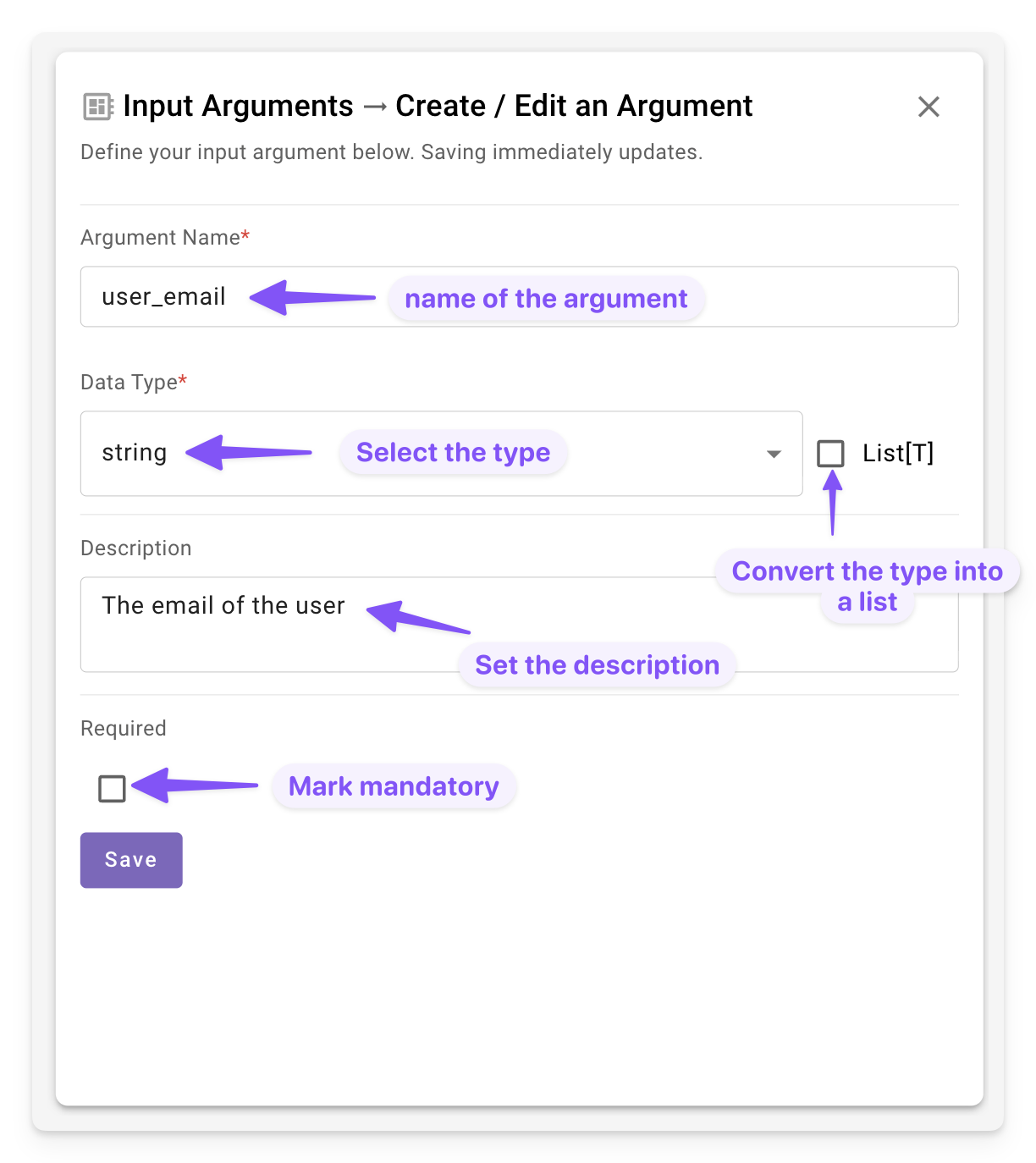
For built-in actions, input arguments are predefined and documented in the Built-in action reference documentation.
When an action is invoked, values for its input arguments must be supplied through mappings from a parent context such as a Conversational Process or Compound Action.
Why Actions Matter
Actions are a cornerstone of Agent Studio, enabling organizations to achieve efficient and scalable automation. They provide the following benefits:
- Task Automation: Actions eliminate repetitive manual tasks, freeing up employees for higher-value work.
- System Integration: They enable seamless interaction with external systems, such as HR, IT, or finance platforms, through standardized interfaces like APIs.
- Consistency and Accuracy: By automating processes, actions ensure tasks are performed uniformly, reducing the risk of human error.
- Customization: Actions allow users to tailor automation to specific business requirements, supporting both simple and complex workflows.
These capabilities make actions indispensable for organizations looking to optimize their operations and enhance productivity.
Best Practices for Working with Actions
To maximize the effectiveness of actions in your automation workflows, consider the following:
- Identify Automation Opportunities: Start by pinpointing repetitive or time-consuming tasks that can benefit from automation.
- Build Modular Actions: Leverage input arguments to make actions flexible and usable across plugins.
- Test Actions Thoroughly: Validate actions in a controlled environment to ensure they perform as expected before deploying them in production.
- Document Configurations: Maintain clear documentation for each action’s setup and parameters to facilitate maintenance and collaboration.