
Webhook Verification Challenge
Introduction
To begin sending webhooks to your listener, some external systems require an initial setup validation known as a verification challenge. This one-time process confirms that your endpoint is correctly configured to receive webhooks, preventing misrouting or unauthorized registrations.
Verification challenges are not mandatory for all systems. Many, like payment processors or code repositories, rely solely on signature verification. However, platforms such as messaging services often mandate challenges to establish trust. For instance, Slack uses a challenge token, while Adobe employs a header code response. This step enhances security by ensuring only legitimate endpoints are registered, protecting against spoofed webhook URLs. Our platform supports this through a declarative UI, allowing you to define rules and responses without custom coding, accommodating a variety of external system requirements.
How Webhook Verification Challenges Work
Webhook verification challenges involve a one-time setup validation where an external system sends a special request to your endpoint to verify its readiness. This process typically follows a challenge-response pattern, ensuring your server, in this case Agent Studio, can correctly respond with expected data or status codes.
Core Concept
The external system initiates a verification request, often distinguishable by unique parameters or headers. Your endpoint must detect this request and respond appropriately, signaling that it is the intended recipient. This might involve returning a specific status code, header value, a challenge token, or a computed value based on the request data.
Challenge-Response Mechanism
- Detection: The system identifies the verification request using predefined conditions, such as a specific HTTP method, query parameter, or header.
- Response: Your endpoint sends a response tailored to the system’s expectations, which could be a simple HTTP status (e.g., 200 OK) or a computed token signed with a shared secret.
Common Variations
- Token-Based: Systems like Slack send a challenge token in the request body or query, expecting it to be echoed back in the response.
- Status-Based: External systems require a specific HTTP status code (e.g., 200) to confirm endpoint validity.
- Header-Based: Other systems will be expect a specific value in the response headers.
- Computed Response: Some systems expect a hashed value (e.g., HMAC) of the challenge data, using a signing secret.
Security Considerations
Challenges prevent unauthorized endpoint registration by requiring active participation. They also mitigate risks of misconfiguration, ensuring your server can handle webhook traffic before full integration. However, improper setup (e.g., incorrect token hashing) can lead to failed verifications, so alignment with the external system’s documentation is critical.
Configuring Verification Challenges in Agent Studio
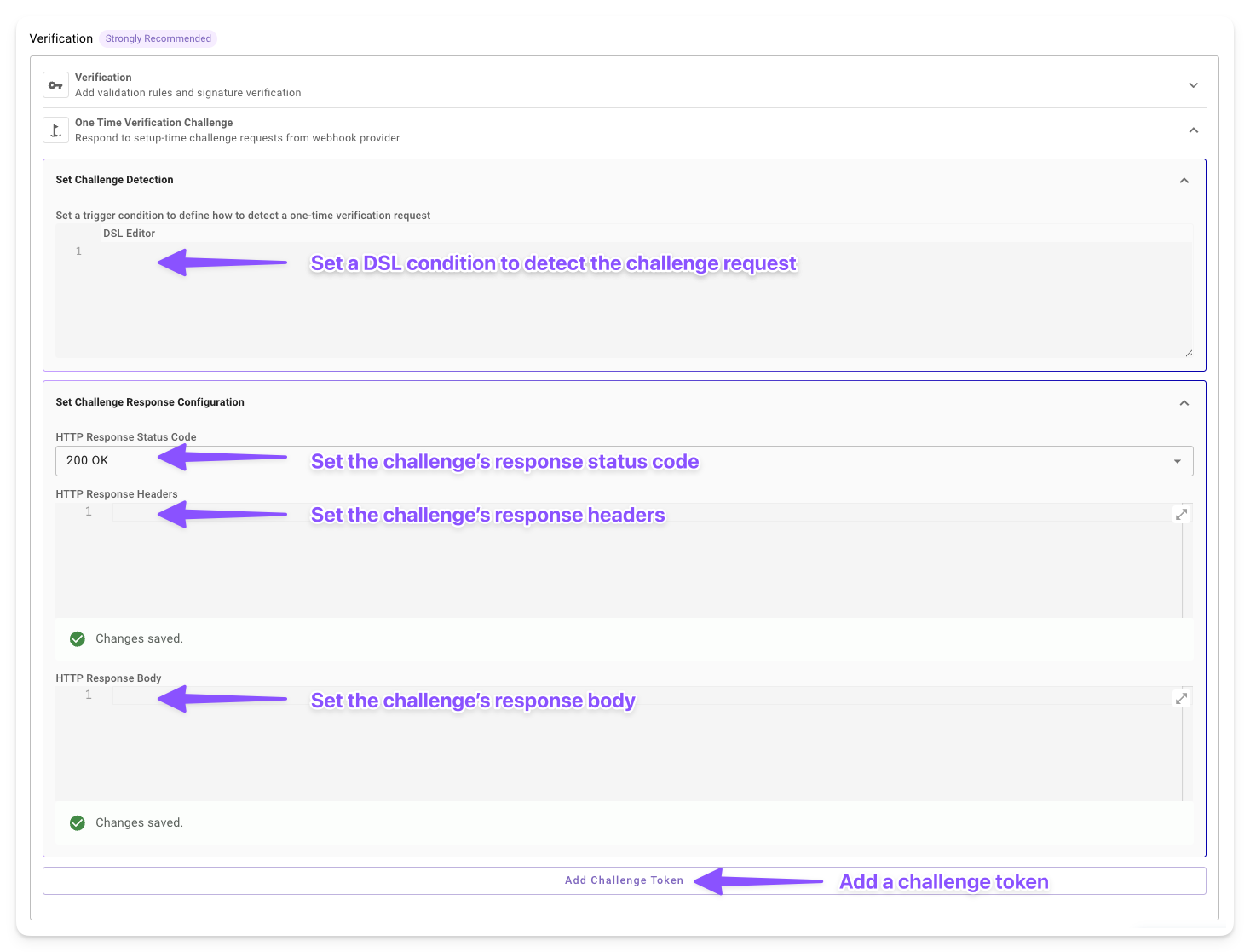
Our UI simplifies setup for webhook listeners, providing a dedicated One Time Verification Challenge panel when configuring your Listener. To begin, create or edit a listener for incoming events:
Field-by-Field Breakdown
-
Set Challenge Detection: Use Moveworks DSL to define rules for detecting verification requests. This field accesses five elements:
-
raw_body: The unparsed HTTP body as bytes (e.g.,
b'{{"event":"update"}}'). -
parsed_body: The JSON-parsed raw body.
-
query_params: URL query parameters destructured as JSON.
-
headers: The headers of the request.
-
method: The method of the request. For example, a rule such as
method == "POST"allows only POST requests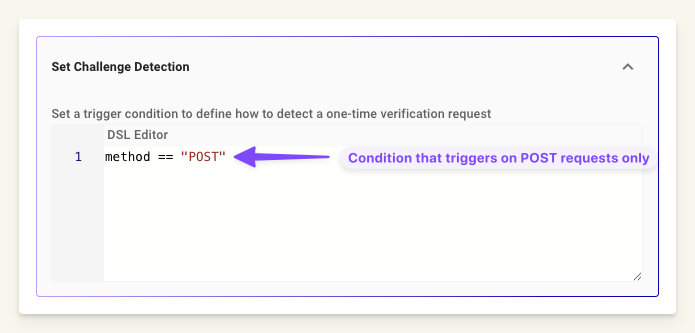
-
-
HTTP Response Status Code: Select a status code to return in the response, aligning with the external system’s requirement. The default is
200 OK, but options like204 No Contentmay apply. Choose based on the system’s documentation. -
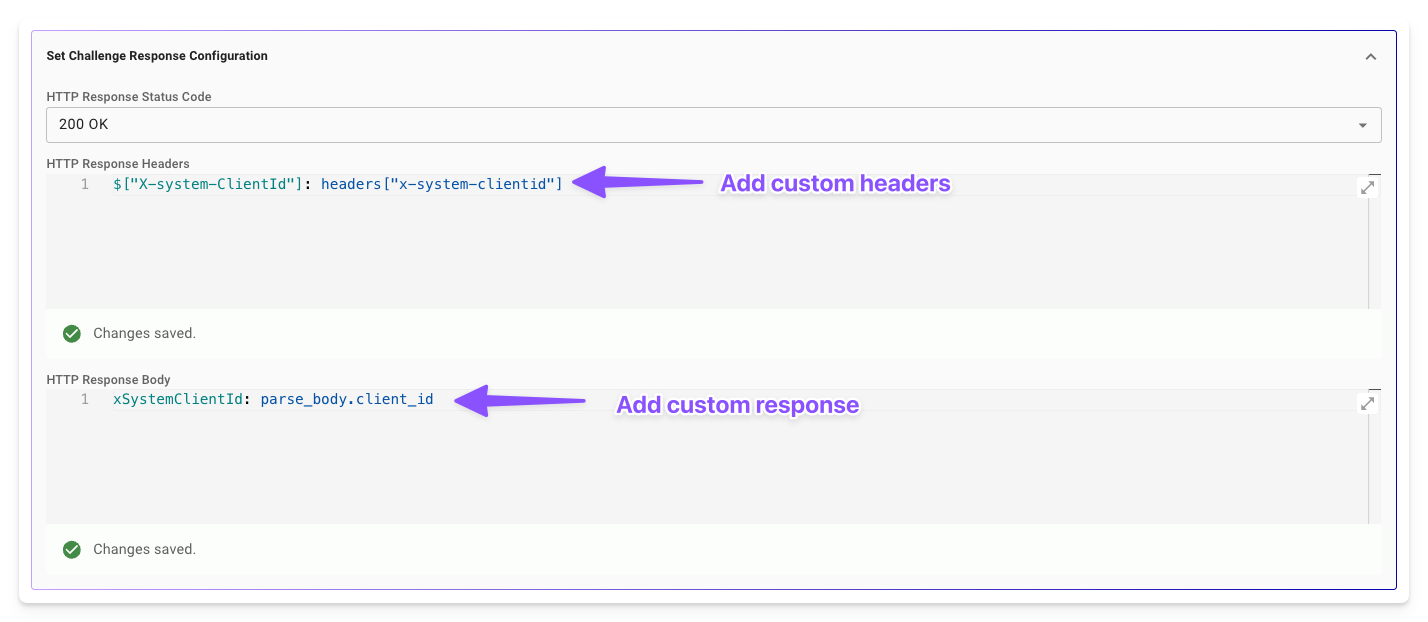
HTTP Response Headers: Use Moveworks Data Mappers to define custom headers for the response. This field supports dynamic values based on request data, enhancing flexibility for specific system needs.
-
HTTP Response Body: Configure the response body using Moveworks Data Mappers. This can include static text or dynamic values, such as a challenge token.
-
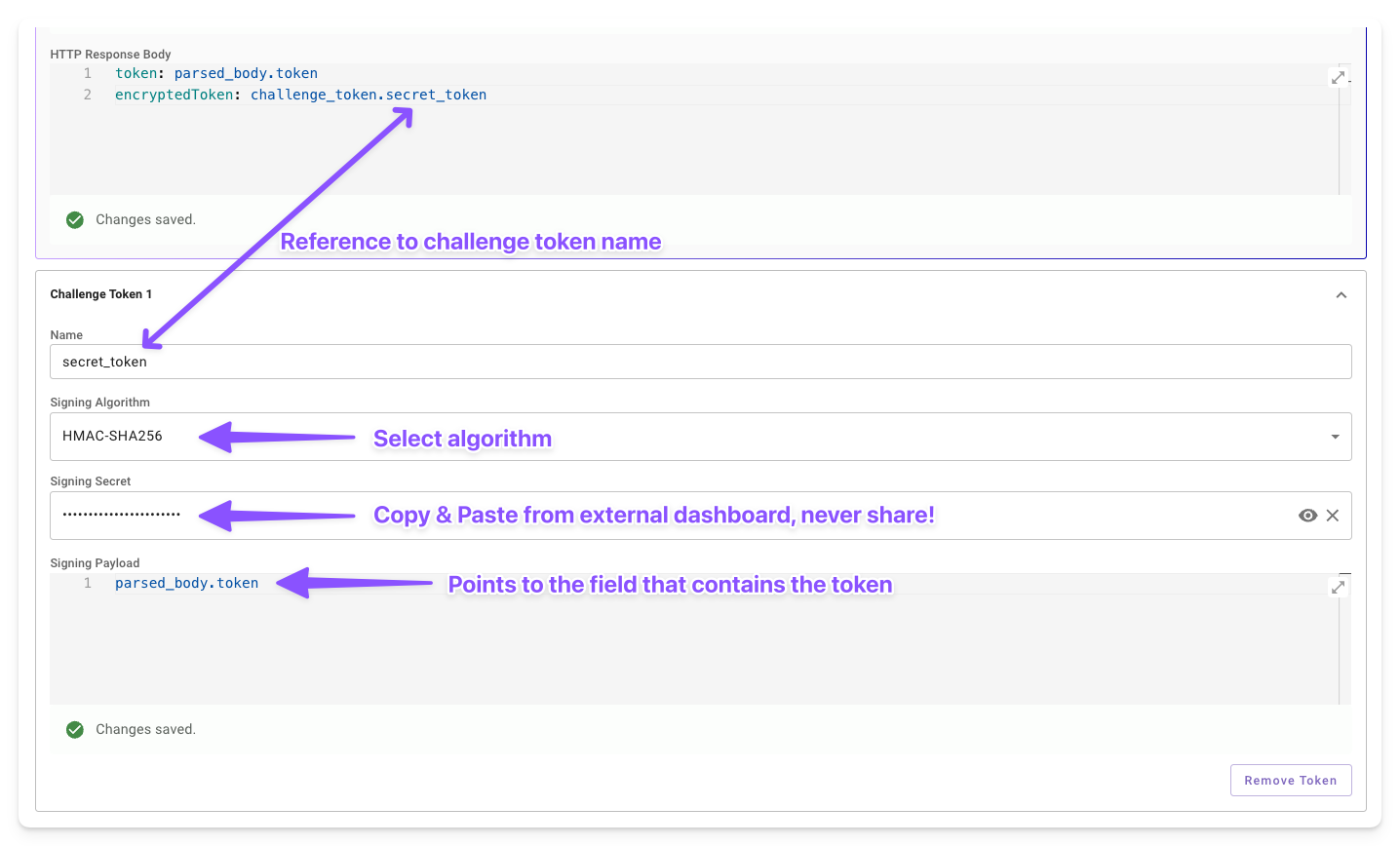
Add Challenge Token: Click this button to create a challenge token for systems requiring a signed response. Each token has four fields:
- Name: Set a unique name (e.g.,
example_name) to reference the token later with the syntaxchallenge_token["name"]. - Signing Algorithm: Select the HMAC variant (e.g.,
HMAC-SHA256) used by the external system. - Signing Secret: Enter the shared secret provided by the system, masked for security.
- Signing Payload: Point to the field containing the challenge token (e.g.,
query_params["challenge"]) using Moveworks Data Mappers.
- Name: Set a unique name (e.g.,
The platform hashes the payload with the secret and algorithm, making the result available in the response body via challenge_token["name"] syntax.
The following diagram visually represents both one-time verification flows. Color coding:
- Green represents inputs
- Blue represents processing
- Red represents validation