
For AI agents: a documentation index is available at the root level at /llms.txt and /llms-full.txt. Append /llms.txt to any URL for a page-level index, or .md for the markdown version of any page.
Logo
DeveloperAcademyCommunityStatus
ReferenceGuides
ReferenceGuides
  • Agent Studio
    • Overview
    • Quickstart Guides
    • Core Concepts
    • Conversation Process
    • Actions
    • Connectors
      • System Connectors
      • HTTP Connectors
        • Basic Auth
        • API Key Auth
        • Bearer Token Auth
        • OAuth 2.0 - Client Credentials
        • OAuth 2.0 - Authorization Code
        • OAuth 2.0 - JWT Bearer Auth
        • OAuth 2.0 - Refresh Token
        • OAuth 2.0 - Password Credentials
        • JWKS Auth
      • Network Allowlisting
    • System Triggers
    • Agent Architect
    • Cookbooks
    • Development and Testing
    • AI Agent Marketplace
    • Developer Tools
  • Agentic AI
    • LLM Fundamentals
    • The Agentic Reasoning Engine
    • Memory Constructs
    • Conversational Context
    • Guardrails
    • Grounding and Hallucinations
    • Continuous Learning
    • LLMs & SLMs
    • Steerability Tools
    • Multilingual Support
  • Core Platform
    • User Identity
    • Moveworks Agent (On-Prem)
    • Approvals Engine
    • Entity Catalog
    • Moveworks Data Objects
    • Security Information and Event Management (SIEM) Logs Overview
DeveloperAcademyCommunityStatus
Agent StudioConnectorsHTTP Connectors

OAuth 2.0 - Password Credentials

||View as Markdown|
Was this page helpful?
Edit this page
Previous

JWKS Auth

Next
Built with

OAuth 2.0 Password Credentials is an authentication method that allows a user to exchange their username and password for an Access Token.

  • This Access Token can be used in subsequent requests to authenticate API calls, typically as a Bearer Token.
    When the Access Token expires, the user’s credentials can be used to obtain a new one from the authorization server.
  • To set this up, choose Oauth2 from the Auth Config dropdown list.

Required Info for the connector.
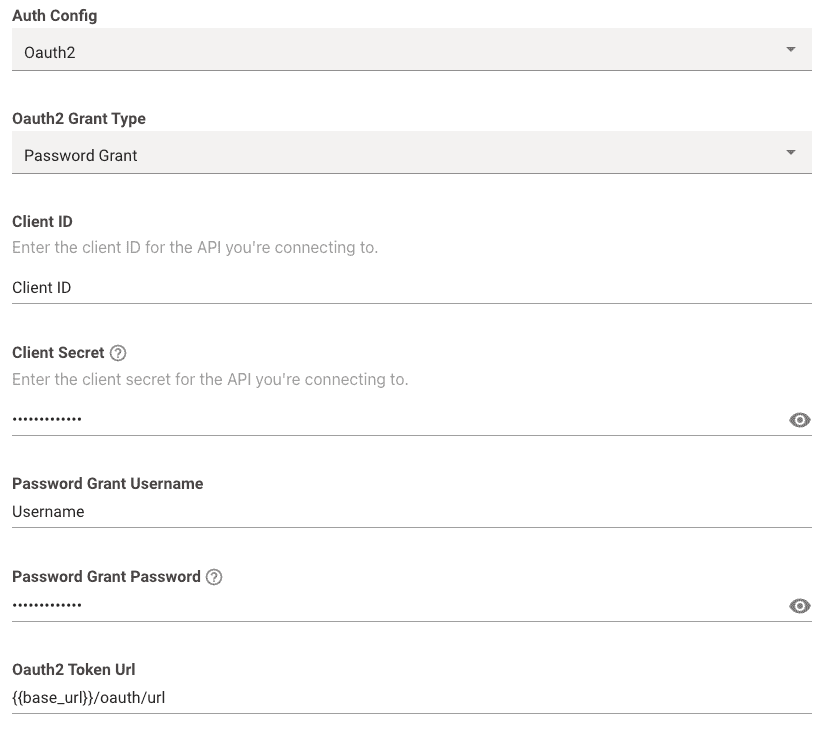
  • Oauth2 Grant Type: This should be set to Password Grant

  • Client ID: This is where you input your actual Client ID value itself.

  • Client Secret: This is where you input your actual Client Secret value itself.

  • Password Grant Username: This is where you input your actual Username value itself.

  • Password Grant Password: This is where you input your actual Password value itself.

  • Oauth2 Token Url: This is where you input the full token URL.

Now we move on to adding the additional info in the connector.
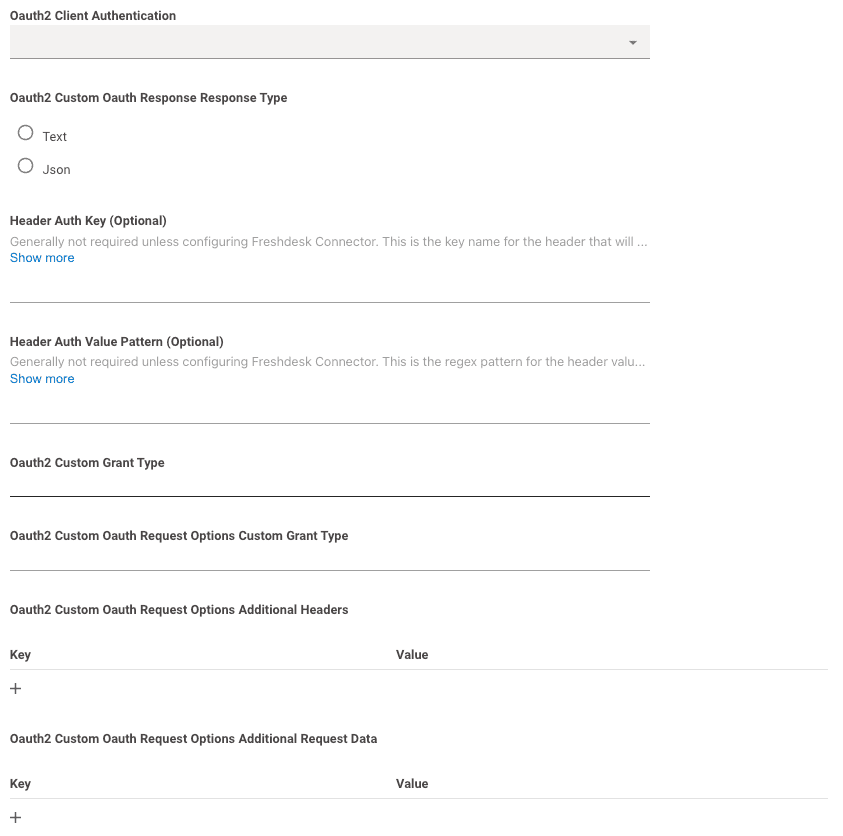
  • Oauth2 Client Authentication: This can be left blank.
    Moveworks will try making the request with both Basic Auth and Request Body Auth by default.
  • Header Auth Key, Header Auth Value Pattern, Oauth2 Custom Grant Type, Oauth2 Custom Oauth Request Options Custom Grant Type should all be left blank.
  • If needed, you can leverage Oauth2 Custom Oauth Request Options Additional Headers to send additional Headers needed for the request.
    • This is what your headers will look like:
    Client-Id: XXX
    Client-Secret: YYY
    Username: AAA
    Password: BBB
    If you want to add any additional headers they’ll get added to the headers:
    Client-Id: XXX
    Client-Secret: YYY
    Username: AAA
    Password: BBB
    Customer-Header: Custom-Value
  • If needed, you can leverage Oauth2 Custom Oauth Request Options Additional Request Data to send additional body data needed for the request.
    • data is sent in x-www-form-urlencoded format in the body like so:
    1curl --location 'URL' \
    2--header 'Content-Type: application/x-www-form-urlencoded' \
    3--data-urlencode 'client_id=abcd-1234' \
    4--data-urlencode 'client_secret=secret123456' \
    5--data-urlencode 'Custom-body=abcde12345' \