
For AI agents: a documentation index is available at the root level at /llms.txt and /llms-full.txt. Append /llms.txt to any URL for a page-level index, or .md for the markdown version of any page.
Logo
DeveloperAcademyCommunityStatus
ReferenceGuides
ReferenceGuides
  • Agent Studio
    • Overview
    • Quickstart Guides
    • Core Concepts
    • Conversation Process
    • Actions
      • LLM Actions
      • Built-in Actions
      • HTTP Actions
      • Script Actions
      • Compound Actions
        • Action
        • Switch
        • For Loop
        • Parallel
        • Return
        • Try Catch and Raise Error
        • Notify
        • Input Arguments
        • Progress Updates
        • Compound Action Patterns
        • Compound Action Data Bank
        • Compound Action Examples
        • Troubleshooting Compound Actions
    • Connectors
    • System Triggers
    • Agent Architect
    • Cookbooks
    • Development and Testing
    • AI Agent Marketplace
    • Developer Tools
  • Agentic AI
    • LLM Fundamentals
    • The Agentic Reasoning Engine
    • Memory Constructs
    • Conversational Context
    • Guardrails
    • Grounding and Hallucinations
    • Continuous Learning
    • LLMs & SLMs
    • Steerability Tools
    • Multilingual Support
  • Core Platform
    • User Identity
    • Moveworks Agent (On-Prem)
    • Approvals Engine
    • Entity Catalog
    • Moveworks Data Objects
    • Security Information and Event Management (SIEM) Logs Overview
DeveloperAcademyCommunityStatus
On this page
  • Overview
  • Key concepts
  • Low-Code Editor
  • Syntax Reference
  • Schema
  • Fields
  • Practical Examples
  • Example 1: Basic HTTP Action
  • Expected Output
  • Example 2: Script Action
  • Python script
  • Action
  • Example 3: Nested Compound Action
  • Nested Compound Action
  • Action calling nested compound action
Agent StudioActionsCompound Actions

Action

||View as Markdown|
Was this page helpful?
Edit this page
Previous

Switch

Next
Built with

Overview

Actions are the core executable units in compound actions, think of them as your agent’s “doers”. Use this expression to invoke predefined actions.

Key concepts

  • Action Types: Supports three types callable via action_name: HTTP actions (for API calls), script actions (for custom logic), and Compound Actions (for reusable workflows).
  • Execution Flow: The expression runs the specified action, storing results in an output key variable for downstream use. Delays handle asynchronous behaviors pausing the execution of the flow.
  • Dynamic Elements: Pass variables from prior steps or user data using Moveworks Data Mapping; outputs capture full API responses or script results.

Low-Code Editor

Add an action step to the editor, then use the right-hand panel to wire it up. Below, follow the annotated steps to build a simple feature request update (e.g., via an HTTP action). Follow the steps to build a simple action expression.
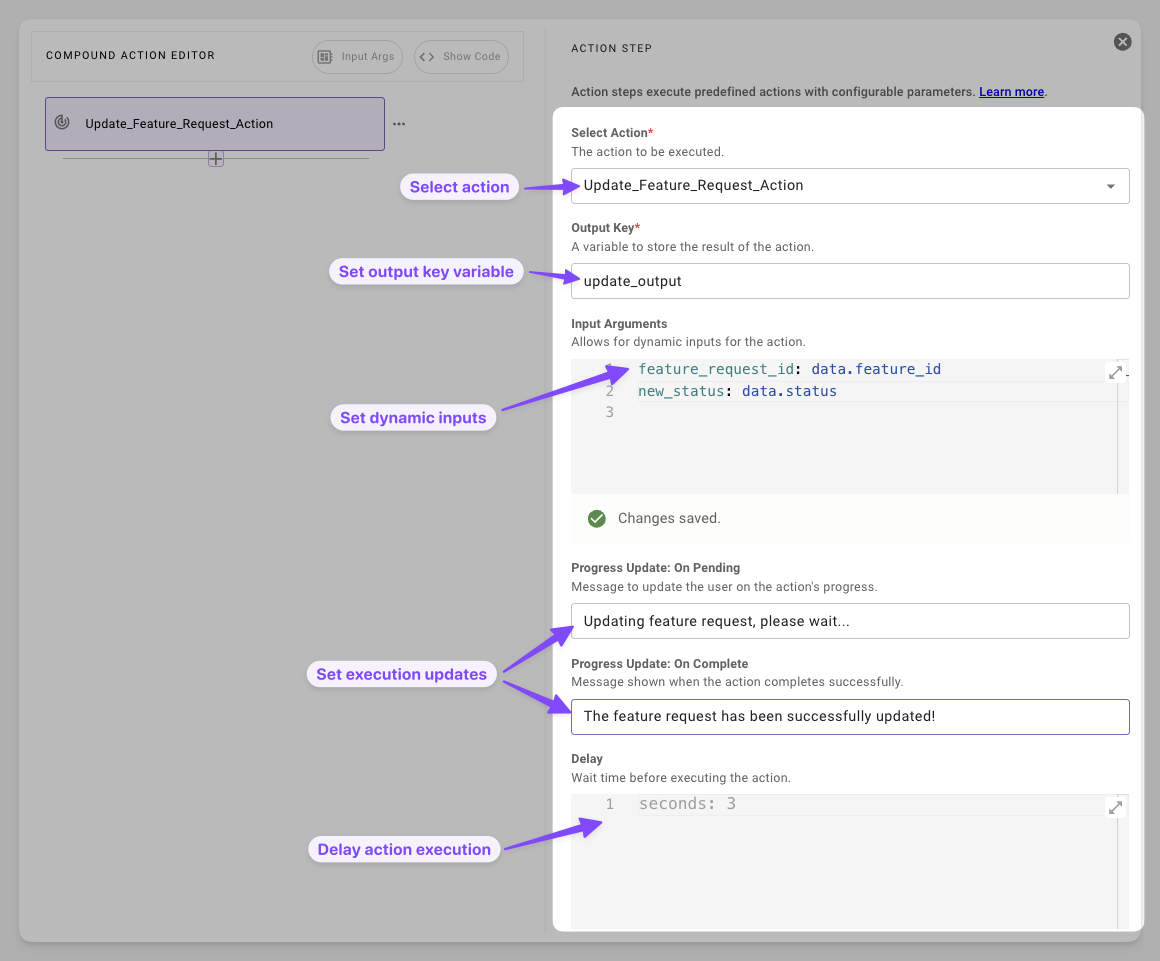
  1. Select Action: Choose from your predefined actions. Tip: If it’s a new action, define it first.
  2. Set Output Key Variable: Name a variable to capture the result. This stores the API response or script output for later steps. Tip: Use descriptive names like update_output to avoid debugging headaches.
  3. Set Dynamic Inputs Map inputs via code editor fields such as feature_request_id: data.feature_id. Common Pitfall: Ensure vars exist upstream.
  4. Set Execution Updates Customize user-facing messages for pending (“Updating feature request, please wait…”) and complete (“The feature request has been successfully updated!”) states.
  5. Delay Action Execution Add a wait (e.g., 3 seconds) via units like seconds or minutes.

Syntax Reference

Schema

1action:
2 action_name: ACTION_NAME* # str: HTTP/script/compound action ID (e.g., 'fetch_user_details')
3 output_key: OUTPUT_VAR* # any: Variable to store results (e.g., 'user_details')
4 input_args: # dict: Dynamic params (uses Data Mapping Syntax)
5 key1: VALUE_EXPR # e.g., data.user_id or static '''abc123'''
6 key2: VALUE_EXPR
7 progress_updates: # dict: User messages (optional)
8 on_pending: 'PENDING_MSG' # e.g., "Fetching details..."
9 on_complete: 'COMPLETE_MSG' # e.g., "Success!"
10 delay_config: # dict: Wait time (optional; DSL number expr per unit)
11 seconds: 'DSL_EXPR' # e.g., "10" or "data.delay"
12 # Other units: minutes, hours, days
13 # Max delay: 30 days (enforced across all units combined)

Fields

FieldTypeMandatoryDescription
action_namestring (action identifier)YesSpecifies the HTTP, script, or Compound Action to run.
output_keystringYesName of variable storing the action’s result (e.g., API response).
input_argsdictionary NoKey-value pairs for action parameters
progress_updatesdictionary {on_pending: string, on_complete: string}NoMessages shown to user during pending and completion states.
delay_configdictionary of DSL number expressionsNoTime units (seconds, minutes, hours, days) for pre-execution wait. Capped at 30 days total.
Delay limit: 30 days max

The combined delay across all units (seconds, minutes, hours, days) cannot exceed 30 days.

  • Static values (e.g., days: "45"): The editor validates these inline and blocks you from saving.
  • Variable values (e.g., days: "data.wait_days"): The platform can only validate these at runtime. If the resolved value exceeds 30 days, the delay step fails with a runtime error when it executes.

If you drive the delay from user input or upstream data, clamp the value in a prior script action to avoid runtime failures.

Practical Examples

Example 1: Basic HTTP Action

Retrieve user info via API, with progress feedback

1action:
2 action_name: fetch_user_details # HTTP action
3 output_key: user_details
4 input_args:
5 user_id: data.user_id # Dynamic from input args
6 delay_config:
7 seconds: "5" # Brief pause before executing
8 progress_updates:
9 on_pending: "Looking up your profile..."
10 on_complete: "Profile loaded!"

Expected Output

1data: {
2 user_details: {
3 "user_id": "abc123",
4 "name": "Jane Smith",
5 "email": "jane@example.com"
6 }
7}

The API response is stored un the user_details output key defined above and is now available in the data bank for any downstream steps.

Example 2: Script Action

Run a script action that add two strings together

Python script

1return str1 + " " + str2

Action

1action:
2 action_name: add_two_strings # Script action
3 output_key: concatenated_strings
4 input_args:
5 str1: meta_info.user.name
6 str2: '''is an AI Engineer'''

Example 3: Nested Compound Action

Run a compound action that approves and notifies a ticket

Nested Compound Action

1# approve_and_notify
2steps:
3 - action:
4 action_name: approve_ticket
5 output_key: approved_ticket_output
6 input_args:
7 ticket_id: data.ticket_id
8 status: '''approved'''
9 - action:
10 action_name: notify_team
11 output_key: notified_team_output
12 input_args:
13 team_id: data.approved_ticket_output.team_id

Action calling nested compound action

1action:
2 action_name: approve_and_notify # Compound action
3 output_key: ticket_status
4 input_args:
5 ticket_id: data.ticket_id
6 progress_updates:
7 on_complete: "Ticket approved and team notified!"