
Multilingual Search
Native Multilingual Search
Search has been re-architected end-to-end. Instead of translating non-English content into an English “pivot” at ingestion and ranking everything in English, Native Multilingual Search ranks documents natively in their original language using next-generation retrieval models. This eliminates the quality loss of double translation and unlocks file search across 30+ languages.
The cross-lingual information retrieval (CLIR) / English-pivot approach we previously used is no longer how multilingual search works. Native Multilingual Search ranks documents in their original language using next-generation retrieval models.
Enterprise Search Web App
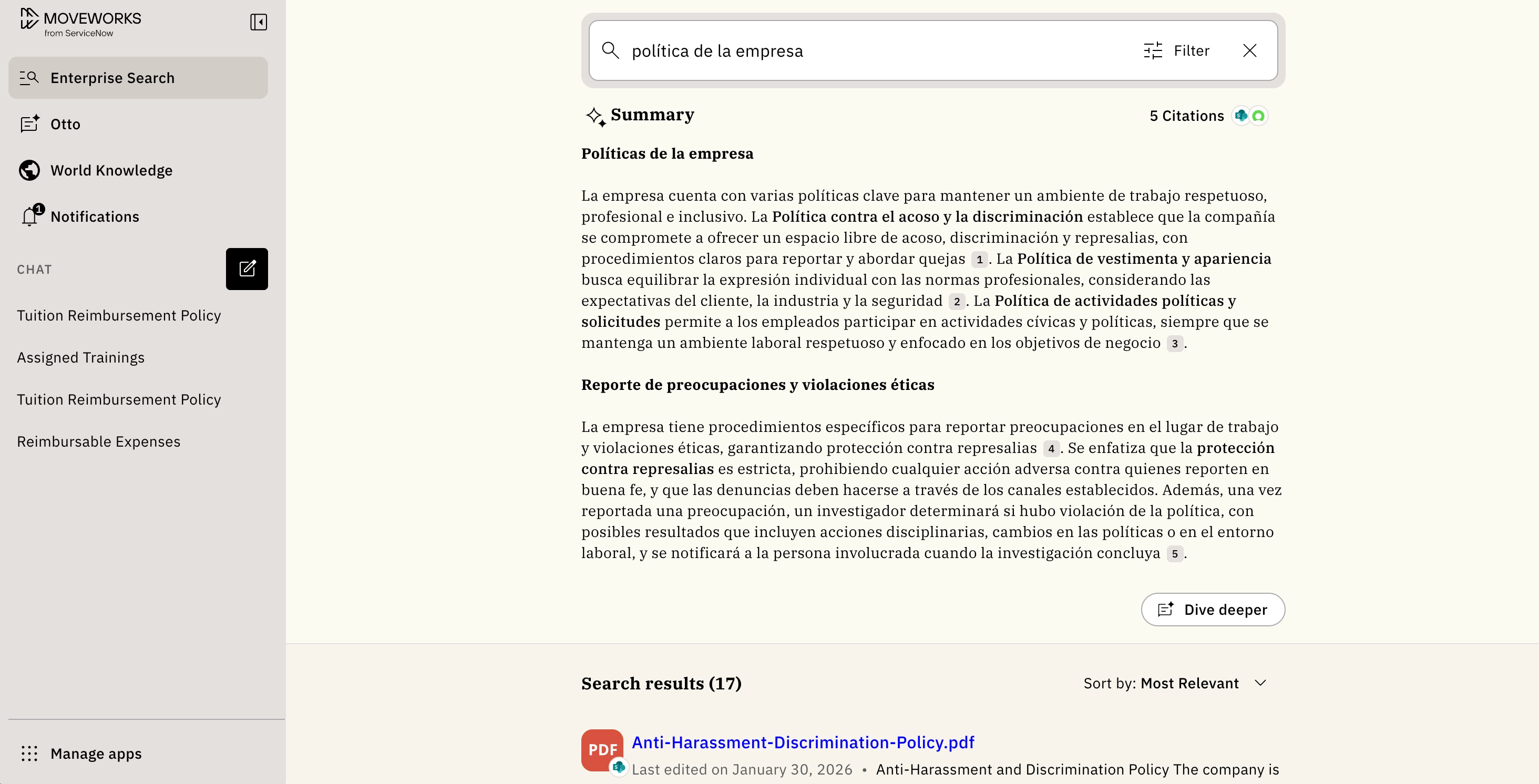
In the Enterprise Search web app, you can type your query in a non-English language and get back relevant results if they exist. There are no settings to configure — language detection happens per query, so you can switch languages between searches at any time.
When you type your query, Search detects it automatically. Relevant results matching the query language will appear at the top, and as of May 2026, non-English search works across files as well as KBs and FAQs. When no strong in-language match exists, the ranker may surface cross-lingual results to ensure all relevant results across all your content are retrieved.
What languages are supported in Native Multilingual Search
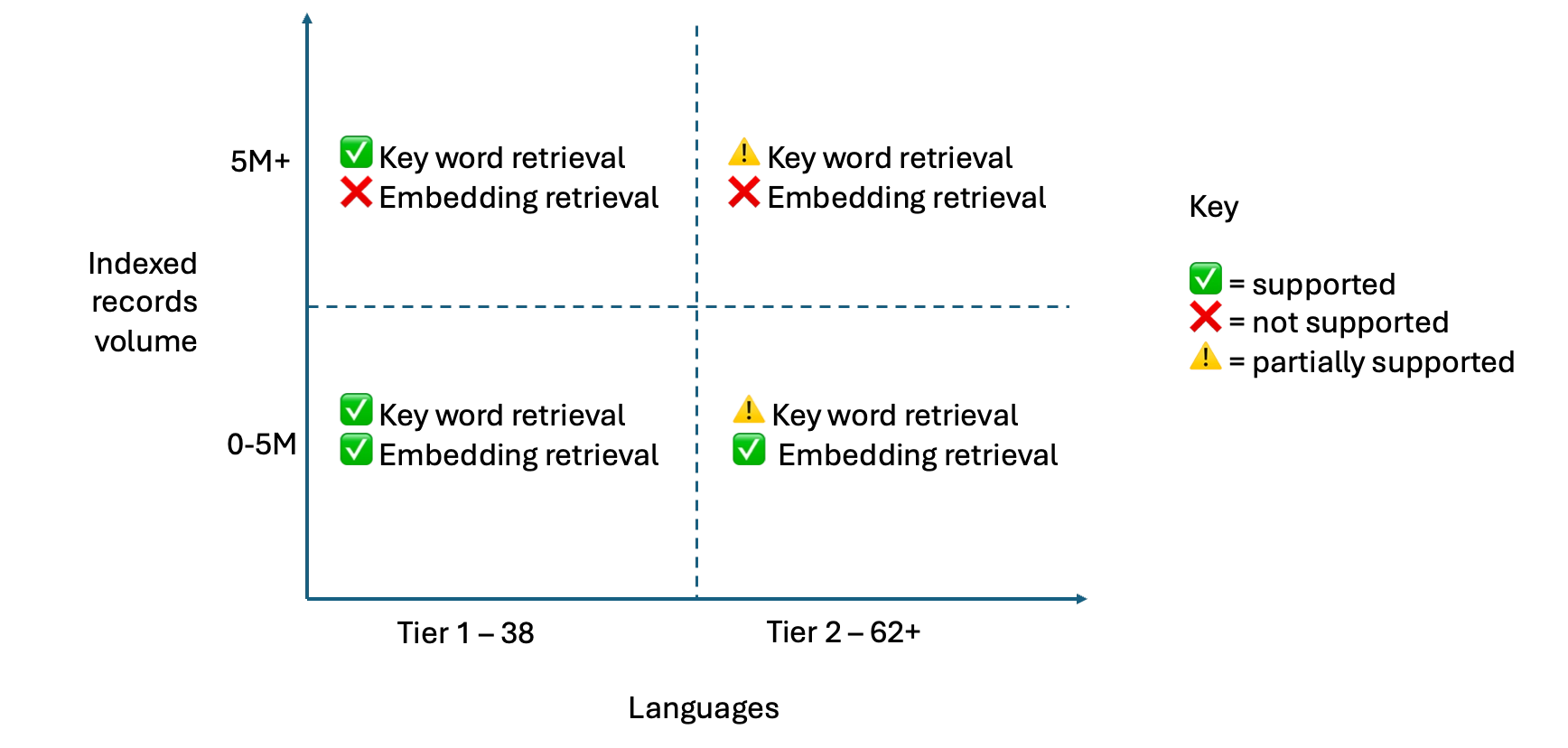
For 38 Tier 1 languages, Search combines both keyword retrieval and embedding retrieval (powered by Google’s Gemma embedding model) for strong relevance and cross-lingual matching, up to a global 5M of ingested documents across all connectors per customer. This gives customers broad language coverage with high-quality matching.
As customers scale beyond 5M documents, Search remains multilingual by leaning on keyword retrieval for those same 38 languages. This path is designed to keep latency predictable at very large scale, with the known tradeoff that some advanced language features (like synonyms and decompounding) may be more limited.
For Tier 2 languages beyond these 38, Search will rely on embedding-based and partial keyword retrieval for up to a global 5M of ingested documents across all connectors per customer. That means even outside the 38-key-language set, users can continue to search and discover relevant content across languages. At this time, we do not support multi-language search for Tier 2 languages beyond 5M documents.
Importantly, native multilingual search improves scale and cost efficiency. Because we no longer need to translate content at the time of ingestion and query understanding, ingestion can be faster and we can support larger corpora. Additionally, it improves precision for navigation and exact keyword matching use-cases compared to before, since now search occurs in the original language of the content.
Language support table
Language and geography as native ranking signals
In Native Multilingual Search, the search ranker treats geography and language as first-class signals rather than post-hoc filters. Admins no longer configure Hard / Soft / Disabled boost — the ranker handles locale-appropriate boosting automatically:
- A user in Germany asking a German question will see German content uprank without any admin action.
- The ranker applies a boost for results that match the query language, and a smaller boost for results that match the user’s preferred language (refer to the Change Language Flow section). This means if equivalent content exists in multiple languages, the ranker will prefer the version that best matches the user’s query language first, followed by their preferred language.
- Cross-lingual matches (e.g., a German query surfacing a relevant English doc) are still possible when strong relevance exists or no good in-language match is available.
Frequently asked questions
Is my query translated into English before search runs?
No. Your query is searched in the language you typed it in, and nothing is translated at search time. Search detects the query language and matches against content in its original language.
Where the language of a query cannot be determined confidently, which is most likely on very short or ambiguous queries, English is used as fallback.
Will search only return content in the language I typed in?
No. Language is a ranking signal rather than a filter. Content in your language is preferred, but content in other languages remains eligible and can be returned when it is relevant.
For a non-English query, English content and content in other languages may be returned. The same applies in reverse: an English query can return relevant non-English content when no English version exists.
If the same article exists in multiple languages, which version is returned?
The version that best matches your query language. Ranking applies the strongest preference when a source matches both your query language and your preferred language, followed by a match on the query language alone, then a match on the preferred language alone, then English.
My preferred language differs from the language I typed in. Which one is used?
Both, for different purposes. Retrieval is not narrowed by either one. Ranking uses both, weighting a match on your query language more heavily than a match on your preferred language. In Assistant, the reply is written in the language of your query, so if your preferred language is set to German and you type in English, you receive an English response.
Do I still configure Hard, Soft, or Disabled boost for language or geography?
No. Those settings no longer apply. Language and location are handled automatically as ranking preferences: matching content ranks higher, and non-matching content remains eligible rather than being removed.