
Multilingual Support
Overview
At Moveworks, every employee deserves the same level of support no matter where they work or what language they speak. With upgraded Native Multilingual Search, the AI Assistant now:
- Continues to understand and respond in 100+ languages, optimized for enterprise use cases.
- Searches knowledge natively in 30+ languages, covering KBAs, FAQs, and files — using next-generation models.
- Primarily responds in the language of the user’s query, with the user’s preferred language as a fallback. There are still cases where the Assistant uses the preferred language — e.g., when the user switches languages often within a single thread, or when a short query doesn’t give clear language signals.
- Uses geography and language as native ranking signals, eliminating the need to manually configure Hard/Soft boost.
What’s changed at a glance
Configure Multilingual Support
To configure the AI Assistant to support multiple languages please follow the guide here.
Technical Deep-dive
What languages are supported by Moveworks?
Moveworks Assistant can understand, respond, and translate in over 100 languages, optimized for enterprise use cases. These include popular languages such as:
How are models used within Multilingual Support?
- When a user types into Moveworks Assistant for the first time, it will leverage a fine-tuned fastText model for language detection, checking if there is a non-English utterance to provide the option to change language.
- While the user can change their preferred response language, the Assistant primarily responds in the language of the user’s query. The user language setting is used to translate in-chat notifications, e.g. Employee Comms, Ticket Updates, Password Expiry notifications, etc, to the user’s preferred language.
- The Moveworks Assistant then handles inbound language understanding in the native language, along with the query rewrite step. Compared to Moveworks Classic, the Moveworks Assistant has better comprehension of non-English utterances.
- The Reasoning Engine will decide the set of relevant plug-ins, extract arguments from the utterance, and keep those arguments either in the original language or translate them from non-English to English if necessary.
- The plug-in will execute its logic. For example, the Enterprise Search plug-in can perform native search over 30+ languages, hence the reasoning engine will pass the query to the Enterprise Search plug-in in the original language and content is retrieved and ranked in the native language.
- When the Reasoning Engine has determined the response back to the user, the response is shown in the user’s query language, aside from in-chat notifications, e.g. Employee Comms, Ticket Updates, Password Expiry notifications, which are shown in the user’s query language.
How is Data Masking and Privacy Done by Multilingual Support?
Moveworks maintains a closed-platform system for translation to respect user privacy data and company Intellectual property.
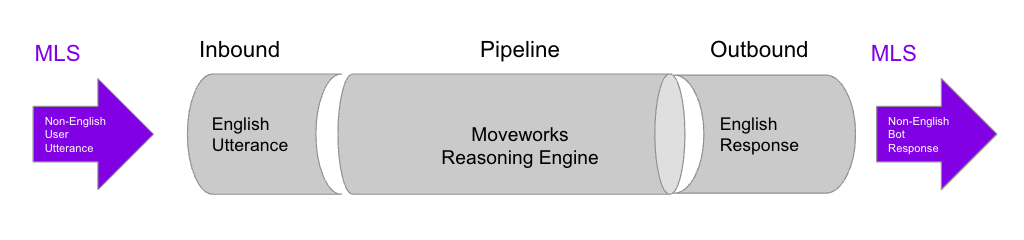
Both the inbound and outbound translation model, e.g. a version of GPT, is hosted adhering to existing Privacy & Security protocols from Moveworks (read more).
Product Features
The Assistant now primarily responds in the language of the user’s query, regardless of the user’s preferred language setting. For example, a user with preferred language = German who types a question in English will get an English answer; if they then ask the next question in German, the Assistant will respond in German. The user’s preferred language is still used as the default for non-conversational surfaces (e.g., Employee Comms, proactive notifications) and as a fallback when the query language is ambiguous.
As with any LLM-driven system, there are still rare cases where the model may fall back to English or the user’s preferred language when language signals are unclear. These are tracked and continue to improve with each model upgrade.
Change Language Flow
There are three ways users can change their preferred language within Moveworks Assistant:
- The Moveworks Assistant can change user’s preferred language through language detection. Simply by interacting with the Moveworks Assistant in one of the supported languages will prompt the user to change the preferred language via a piggyback back response.
- This will work the first time a user speaks a non-English language. If the user switches back to English in the future, the Moveworks Assistant will not present the option again. This is to avoid constantly triggering this skill for non-English users.
- If there is a misdetection of language, a user can click
No, don't ask againand it will never appear again as the user has confirmed that english is their primary language.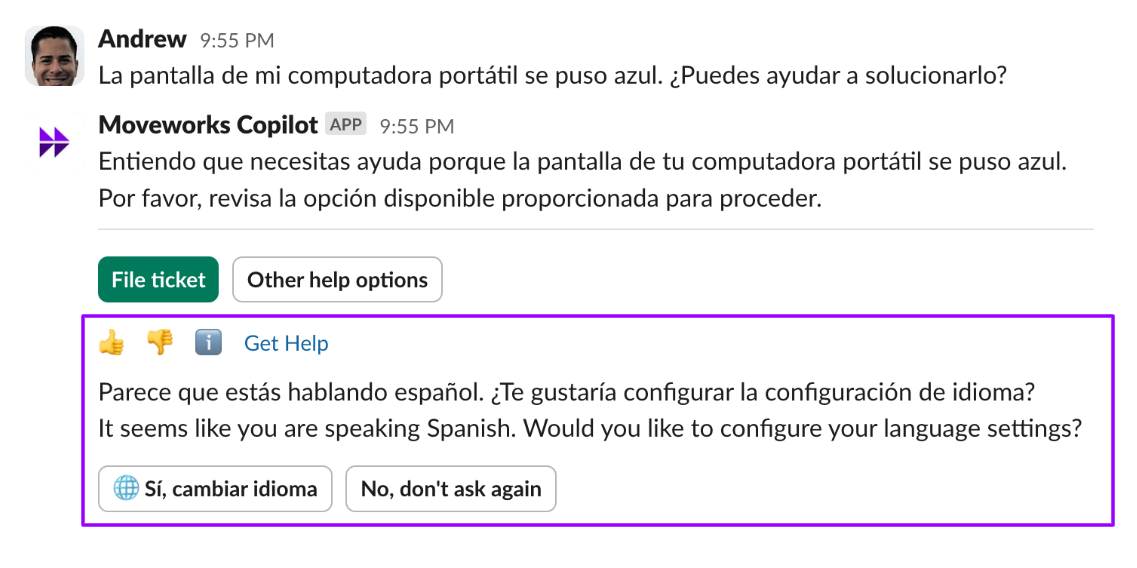
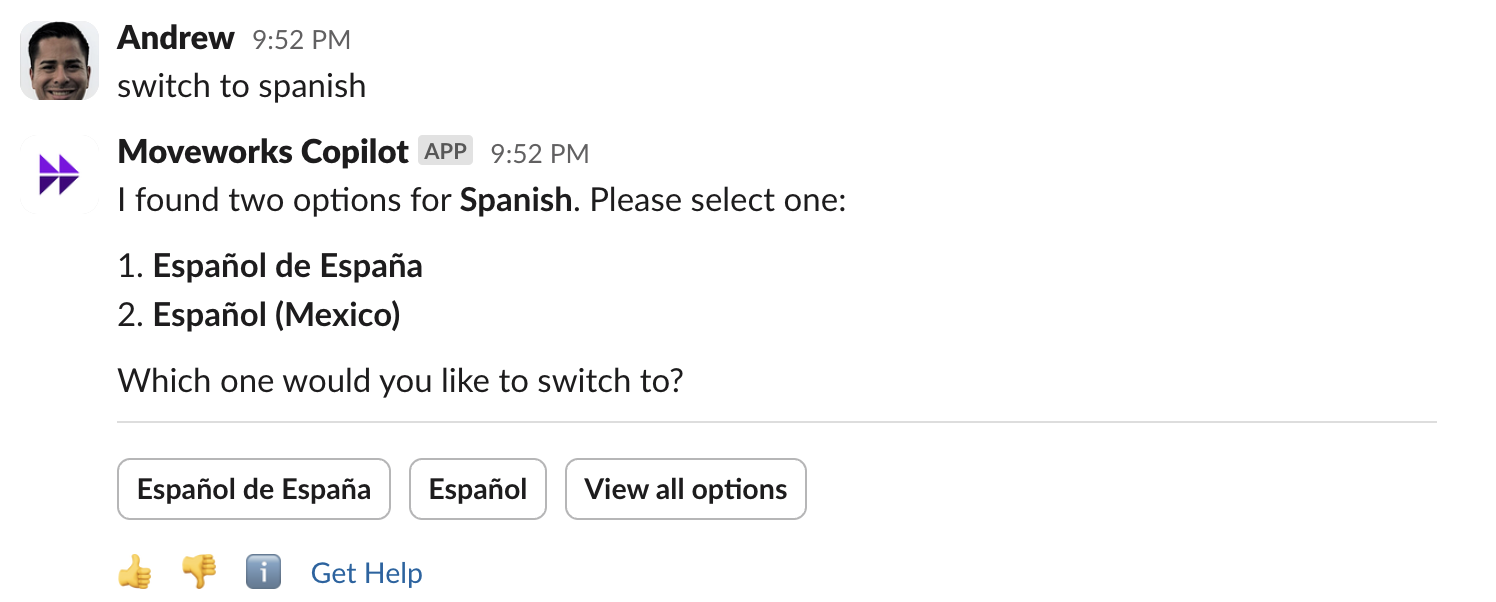
- Users can message the Moveworks Assistant a direct command such as “change language” or “change to Spanish”, either in English or any language, as the Moveworks Assistant analyzes the intent of the request.
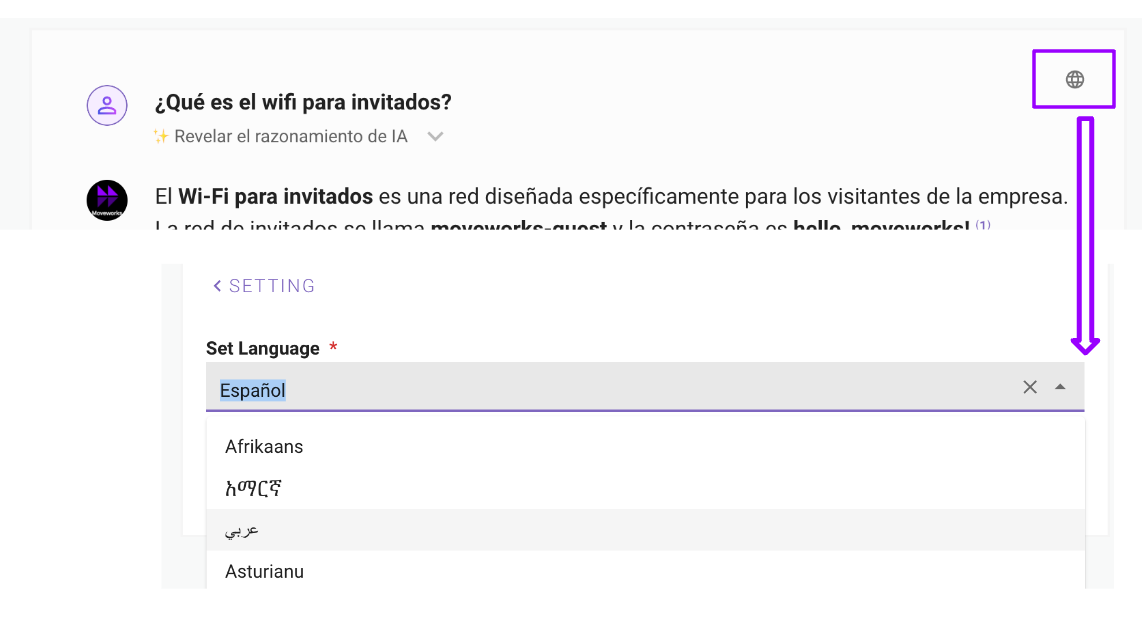
- Users can go to the reference modal and select the language from the 🌐 Icon. Once set, the language setting change will be reflected in web once the user revisits the reference modal.
Translate Conversation between Employees and Agents
Through two different experiences within Moveworks Assistant
- Live Agent Message Brokering: Otherwise known as DTS or Dynamic Translation Service, conversations between employees and agents are translated on-the-fly from non-English (employee) to English (agents). To learn more, click here.
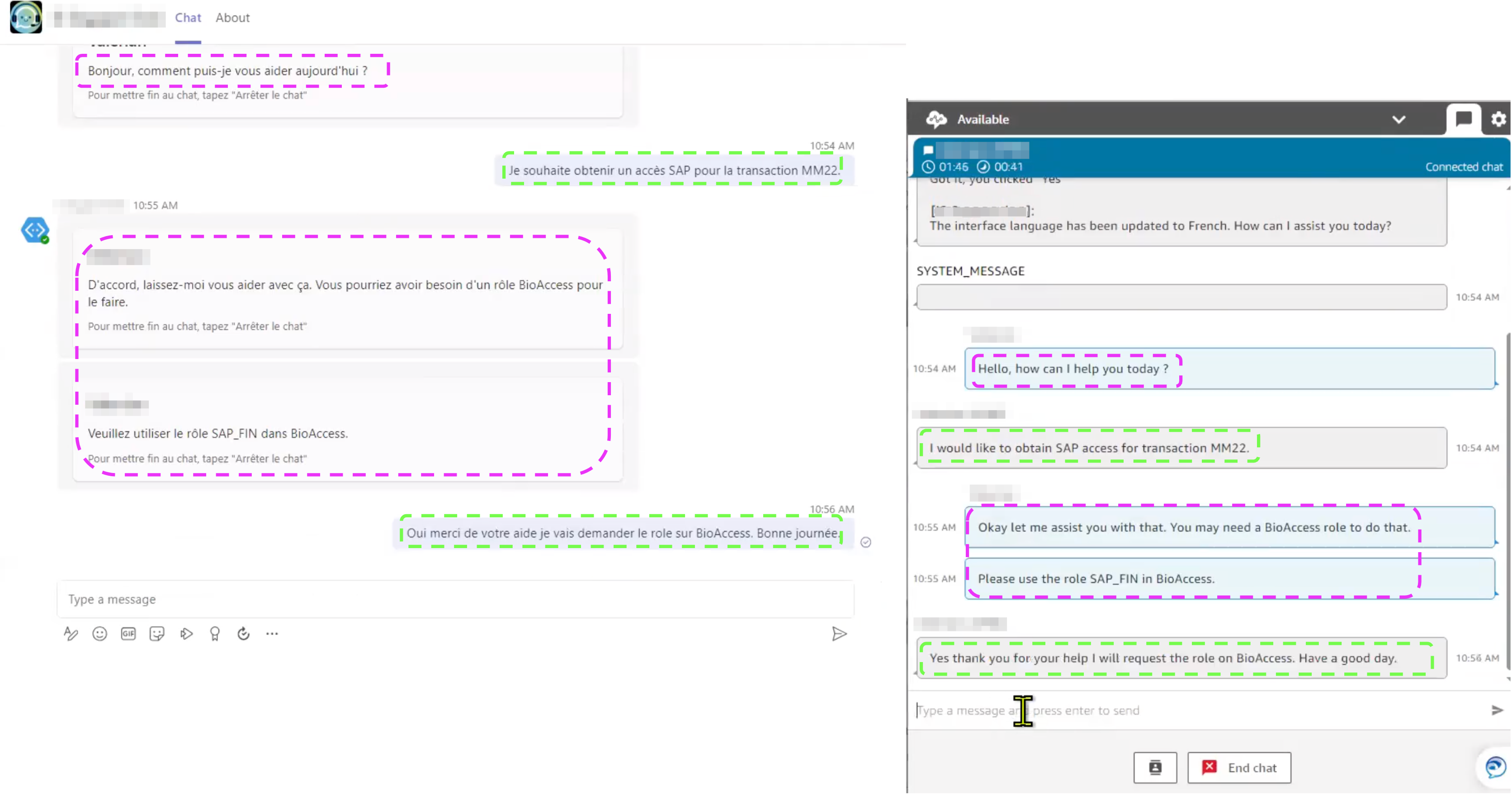
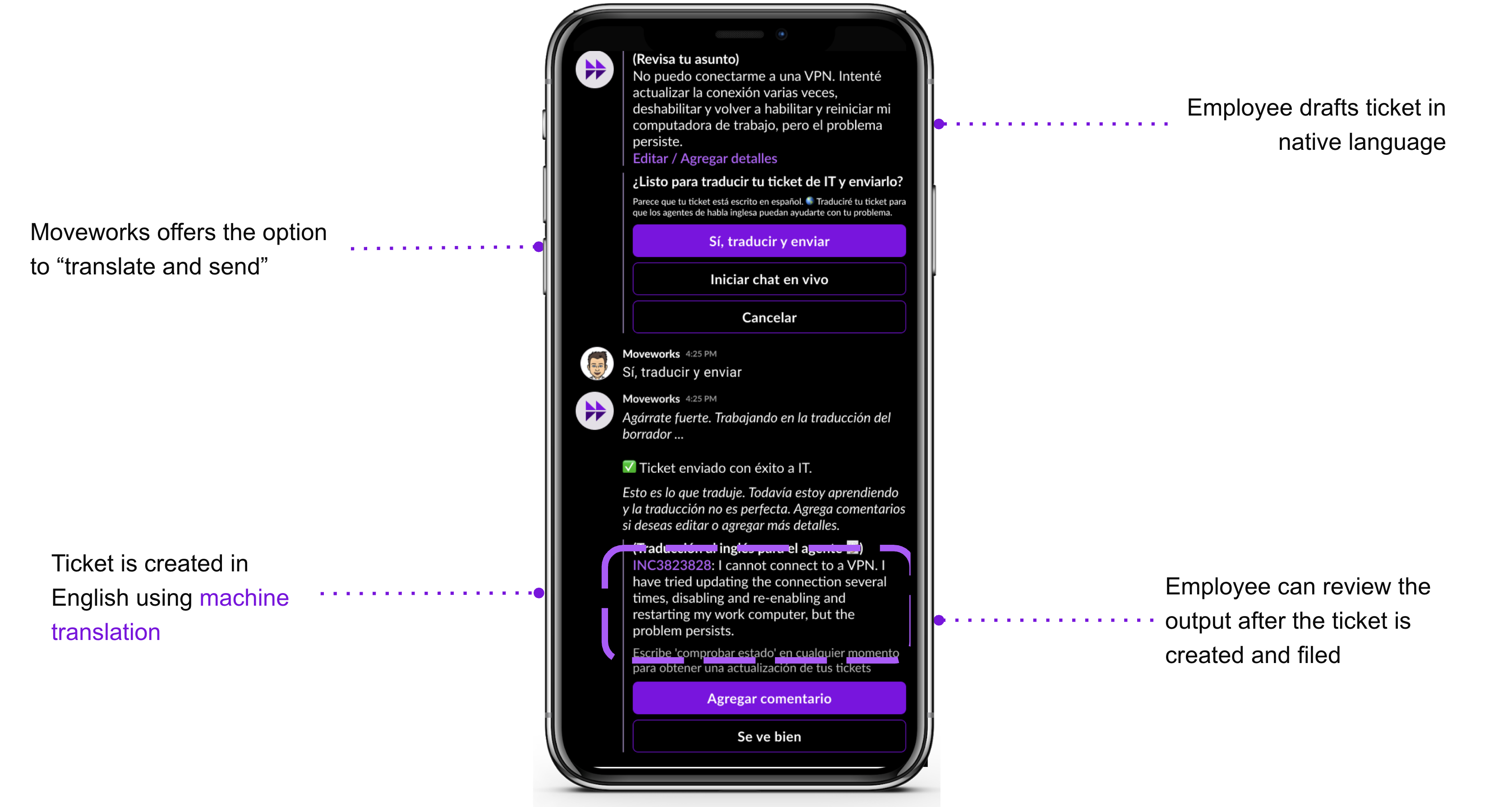
- In-Chat Ticket Translation: The AI Assistant translates tickets filed from in-chat into the ticketing system. The original non-English utterance is stored in the ticket worknote. The translation experience assumes that agents communicate in English.
On-the-fly (OTF) Translation for Various Features
Moveworks leverages OpenAI GPT for outbound translation which has several benefits:
- improved translation quality based on our internal benchmarks and the ability of the GPT model to handle markdown more elegantly.
- better handling of short token translation In our product, form names, query and paths cards & buttons, are examples in which there is little context for the translation model; however, GPT is able to understand and translate with better outcomes.
- supporting multiple locales for certain languages such as Traditional Chinese and Simplified Chinese.
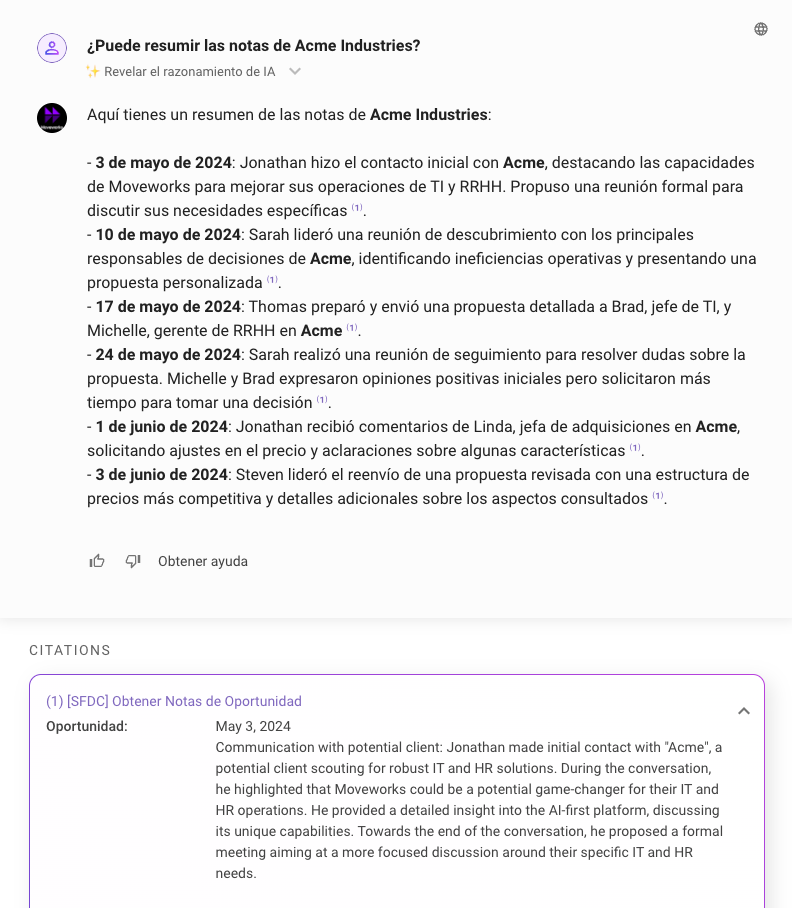
OTF Internal Answers with Knowledge & Files
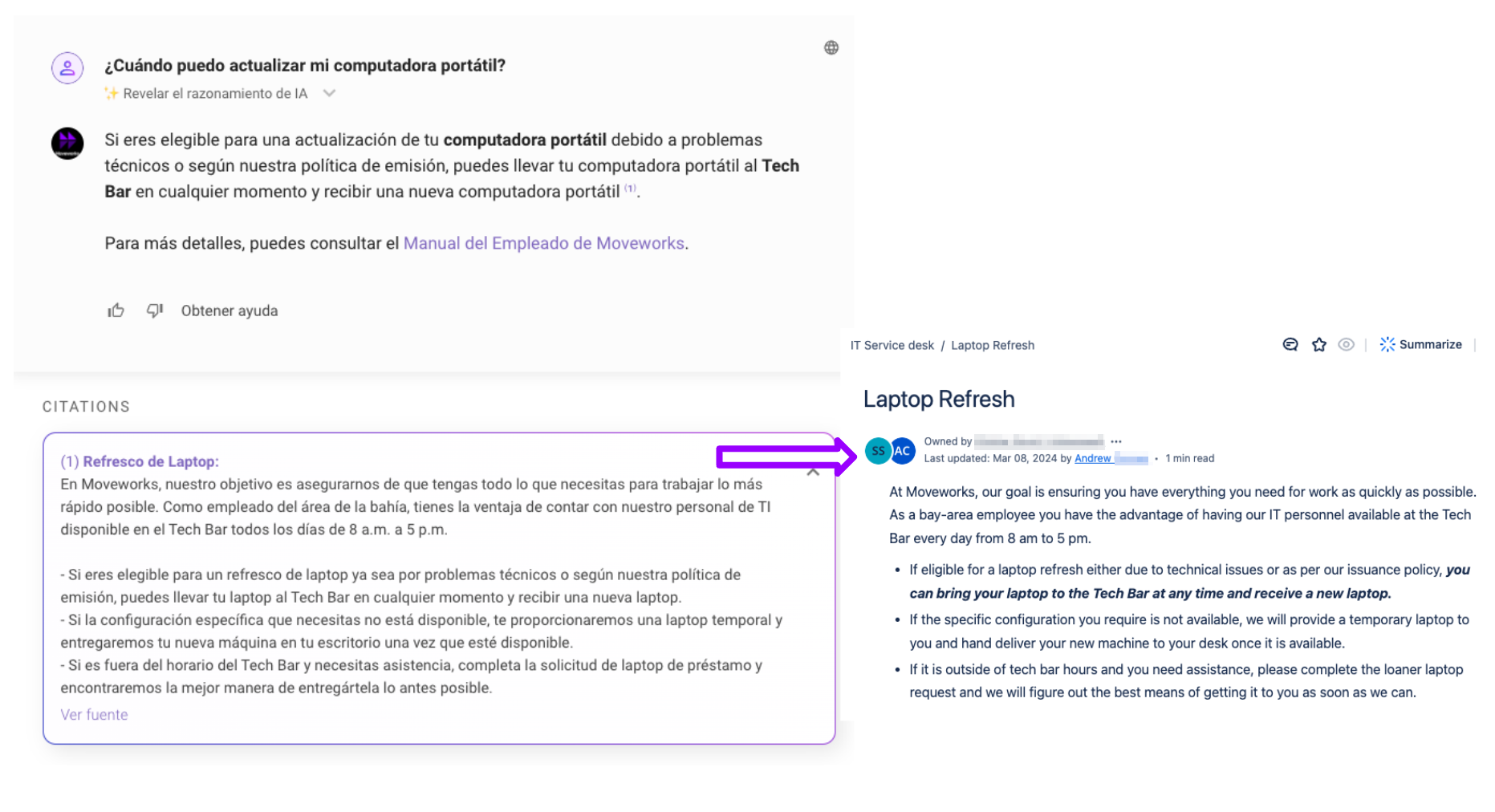
With Native Multilingual Search, the Assistant searches internal answers across configured knowledge bases, FAQs, and files using native multilingual ranking:
- Retrieval is driven by the user’s language, prioritized by the user’s query language then by their preferred language. A German query will surface relevant German and cross-lingual matches, ranked natively in the original content language.
- AI-generated summaries above the citation primarily respond in the user’s query language.
- The previous restriction that non-English KBAs were only served to users configured in that language no longer applies — native ranking handles cross-lingual matching automatically.
- In the Assistant, citations continue to be translated into the user’s preferred language. In the Enterprise Search web app, citations are shown in the original language.
OTF Forms
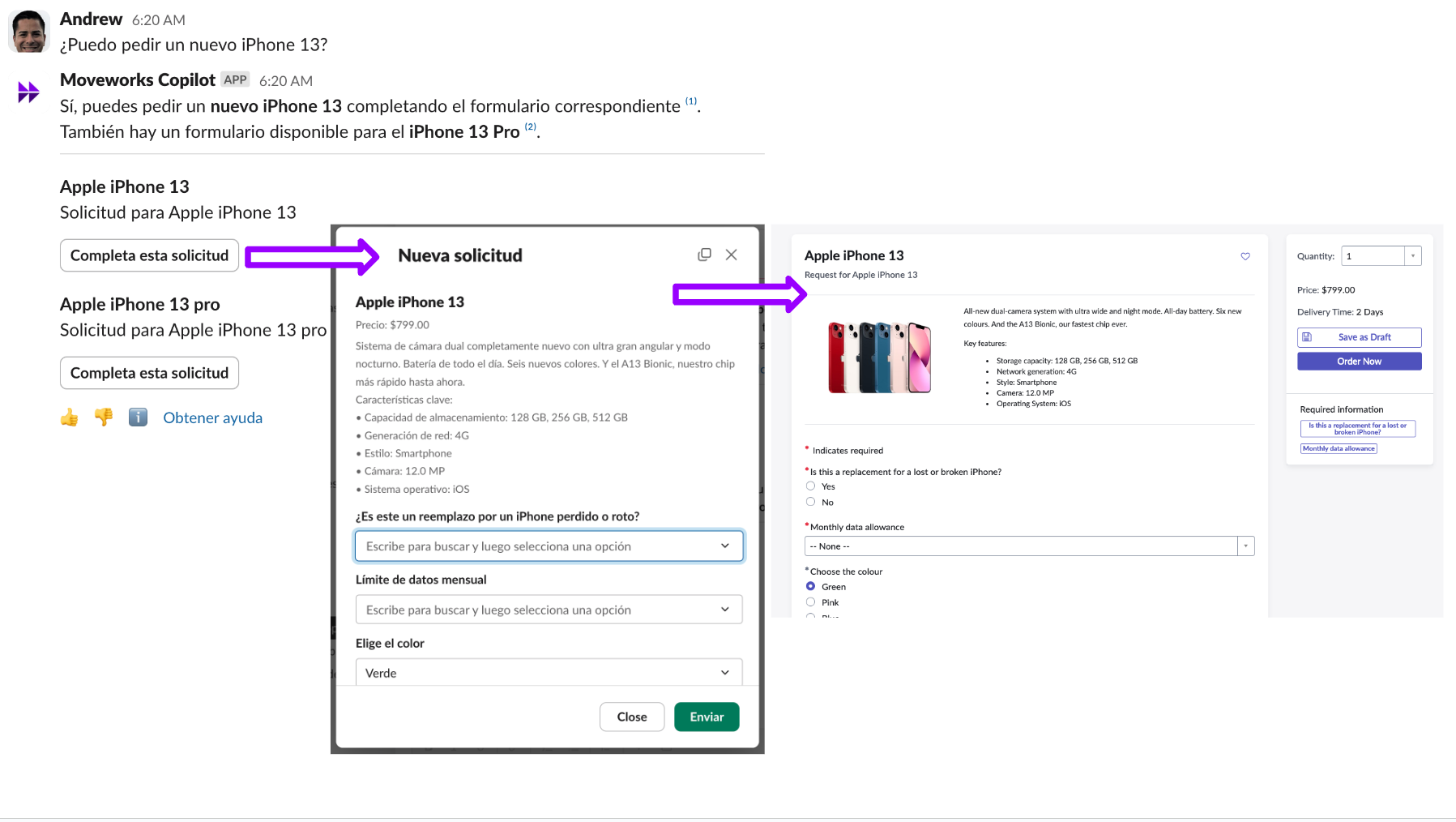
Moveworks searches for relevant natively written English Forms and then translates on-the-fly the in-chat fillable form to the user’s preferred language.
Native search over non-English Forms is not yet optimized — Forms search works best when the underlying Forms are authored in English. The Assistant can still translate an English Form on-the-fly into the user’s preferred language for display and fill-in.
OTF Employee Comms
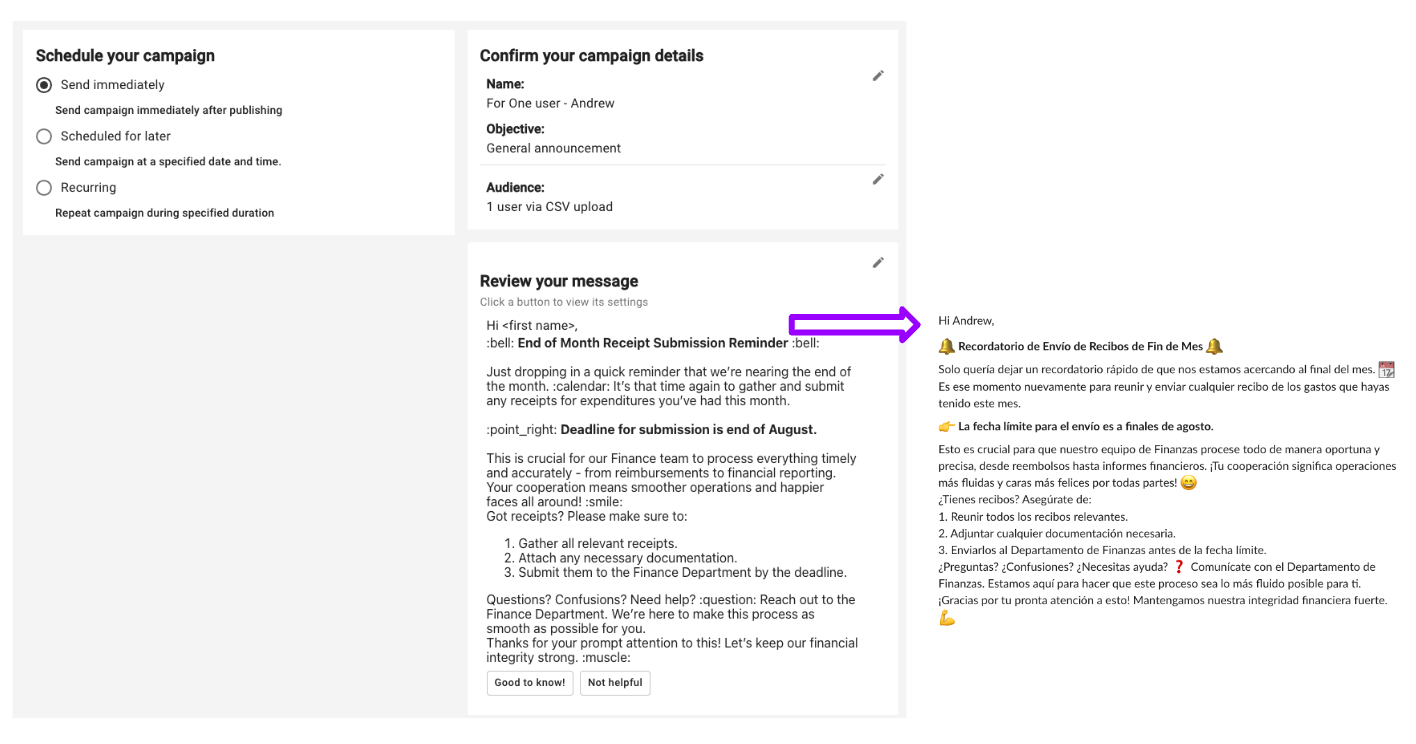
Moveworks Assistant translates employee comms messages into the user’s preferred language. The translation is done in the background without needing to configure in the Employee Comms authoring experience.
If the original comms language is detected to be the same as the user’s preferred language, no translation will happen.
OTF within Agent Studio
Moveworks translates the response from all Agent Studio plugins in the conversation. However, we will not translate any citation values to ensure there is a verifiable source of truth.
OTF in-chat Ticket Updates
When an update is made on the ticket by an agent, Moveworks will send a notification to the user via the AI Assistant. This “Ticket Update” notification will have OTF applied to some but not all fields:
- Ticket field names, e.g. Status, Assigned to, etc will be translated to the user’s language
- Comments added by the agent (in English) will be translated to the user’s language
OTF in-chat Ticket Filing Translation
When a ticket needs to be filed within the AI Assistant, the Ticket Filing Translation (TFT) experience will automatically machine translate the user’s non-English text to English when the ticket is filed. Within the ticket, the short description will be in English; whereas, the work note of the ticket will contain the original non-English text, along with a note of the translation.
The same machine translation applies when a user adds a comment to an existing ticket: the user’s non-English comment is translated to English for the agent. This — together with ticket filing translation — is what the Ticket translation enabled setting (under Multilingual Support → Additional Controls in Moveworks Setup) governs.
Comments are translated in both directions: a comment a user writes is translated into English for the agent, and a comment the agent writes (in English) is translated into the user’s preferred language (see OTF in-chat Ticket Updates above).
Exception: chat transcripts added to the ticket as work notes are not translated to English.
OTF CSAT
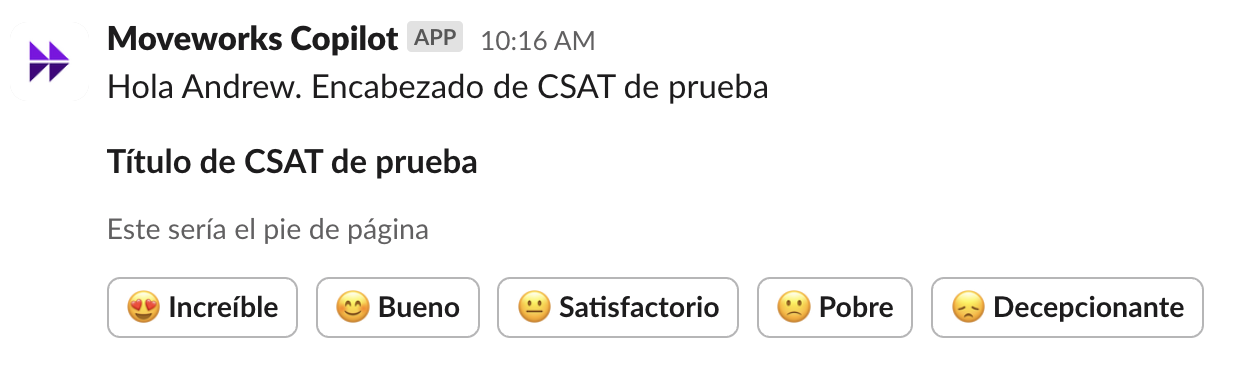
Moveworks translates all CSAT messages to the user’s preferred language. User responses to the free-text questions are not translated, preserved in the original language.
Multilingual Search
For details on how multilingual search works — including the Enterprise Search web app, language coverage, and geography as a ranking signal — see Multilingual Search.
FAQ
Q: Could I edit or correct translation errors within Moveworks setup?
A: Translations for specific source strings that are non-LLM generated can be edited. Refer to the “Translation Overrides Config” section. Translations for LLM-generated text cannot be reliability corrected or edited. Contact Moveworks Support for guidance.
Q: Why is the state value on ticket fields not translated?
A: Moveworks does not translate API values such as status, date, assignee, and more. Currently, LLM are not reliable enough to consistently translate.
Q: Can we set a default language (locale) for all users?
A: Yes - admins can set a default locale like German (de_DE) or Canadian French (fr_CA) for all users on Day 1
Q: Are comments translated between agents and users?
A: Yes, in both directions. Comments an agent adds (in English) are translated into the user’s preferred language, and comments a user adds are translated into English for the agent. One exception: chat transcripts added to the ticket as work notes are not translated to English.
Q: What happened to the Hard / Soft / Disabled language boost admin controls?
A: They’ve been removed in Native Multilingual Search. Geography and language are now native ranking signals — the search ranker automatically upranks locale- and language-appropriate content without manual configuration. If you previously relied on Soft boost to include English fallbacks, you don’t need to do anything: cross-lingual matching is on by default.
Q: Will file search (PDFs, Word, PPT) work in non-English languages?
A: Yes, file search for non-English is now live and supports PDFs, Word documents, PowerPoint decks, and text files. File results appear alongside KBA/FAQ results and follow the same native ranking model.
Q: Do I still need to author duplicate KBAs in each language?
A: No — a single master article is fine for global policies that truly don’t change per region. Native ranking will retrieve it for any query language. If you do maintain language-specific versions, the ranker will prefer the version that matches the user’s locale and query language.
Q: What language are citations shown in?
A: In the Assistant, citations are currently shown in the user’s preferred language. Later in 2026, we will update citations to show in the original language of the source content, with an inline option for the user to translate them into their query language on demand. In the Enterprise Search web app, citations are already shown in the original language.
Q: How are multiple languages handled within a single document?
A: Language detection happens at the document level. The most prevalent language in a document is applied across all of its chunks. If a single article mixes languages, the less prevalent sections may be classified as the dominant language and surface less reliably in retrieval. For best results, keep each document in one language; for global policies that genuinely need to be multilingual, separate documents by language and let native ranking choose the right one.
Q: How do I invoke the geo boost ranking signal? Is there a config for it?
A: There’s no admin config — geo boost is a native ranking signal in Search. To invoke geo boost on a specific document, put the country name in the document title, e.g., “HR policy - Spain” or “IT best practices - France.” The ranker reads the geo signal from the title and upranks that document for users in matching locales without any further setup.