
Return

View as Markdown

Overview

The Return expression signals the end of a compound action’s execution, streaming mapped data back to the chat for user-layer runs. In system-layer runs, it will stop quietly, and any returned data is sent to the caller. The expression also works as an early-return expression, you can place it at the end of the flow or in a Switch case to simplify logic.

Unlike an error-based exit (handled by a raise expression), the return expression exits gracefully, providing a way to output data in a structured format using the output_mapper, which follows the Moveworks Data Mapping Syntax.

Returning from inside a loop

A return placed inside a for loop breaks out of the loop. The current iteration stops at the return, no further iterations run, and the compound action ends with the data you mapped. This lets you stop a loop as soon as you find what you are looking for, instead of iterating through the whole list.

Different behaviors based on content

ContextWhat HappensBest For
User-LayerReturns data and the assistant provides it to the userDeliver results to users
System-LayerReturns data and it is provided toBackend orchestration
️ Keep these in mind
  • Be mindful of our token limits.
  • Return statements have some reserved keywords for Citations (results & result). Please do not use the keyword “result” unless you plan to include an “id” and “friendly_id” (optional) which will create a citation.

Low-Code Editor

Add the Return step and map the data to be returned.
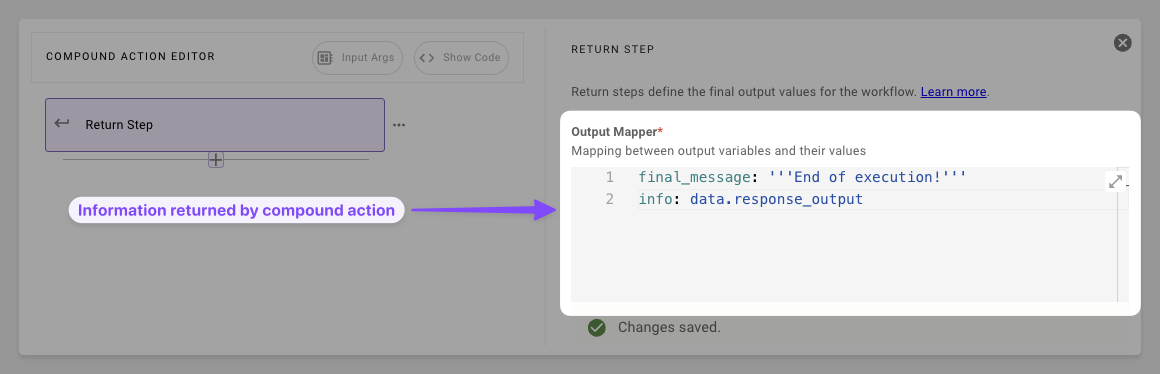
  1. Map the Data: Build the output mapper with keys and DSL, pull from the data bank and transform on the fly.
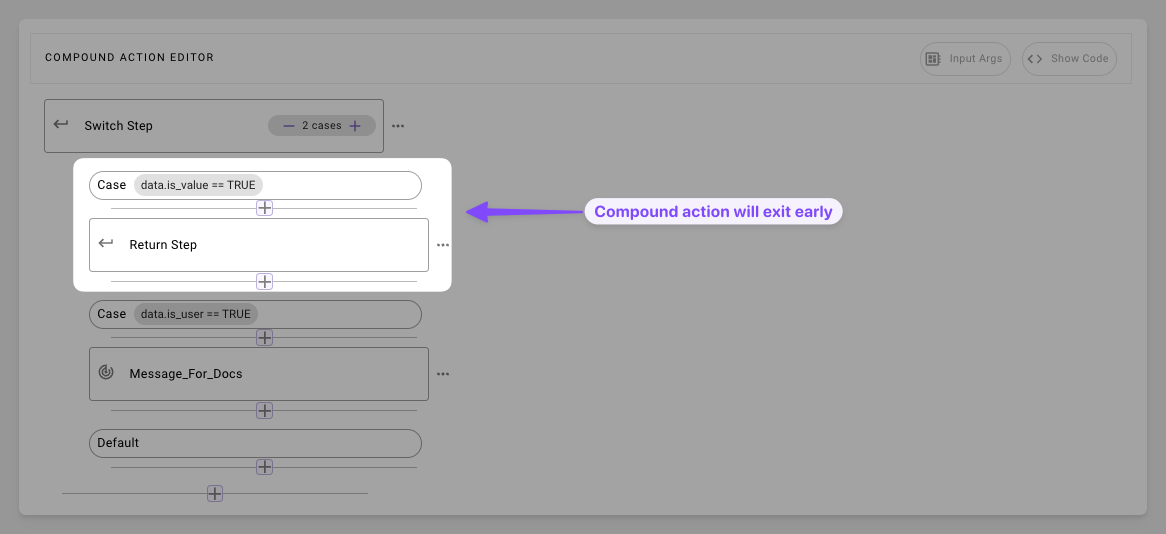
  1. Leave Early: Stop execution early when condition is triggered in switch cases

Syntax Reference

Schema

return:
output_mapper: # Optional dict for structured chat output (user context only)
key1: DSL_MAPPED_VALUE # e.g., "summary: data.results | $JOIN(', ')"
key2: DSL_MAPPED_VALUE # Supports transforms like MAP(), $TITLECASE()
# Reserved: Avoid "result" unless for citations (needs "id"/"friendly_id")

Fields

FieldTypeMandatoryDescription
output_mapperdictNoTransforms and maps data bank variables

Practical Examples

Example 1: Basic Action Handoff

Return the aggregated result of two actions

Compound action

steps:
- action:
action_name: fetch_data_one
output_key: action_output_one # e.g., { "status": "success", "data": { ... } }
- action:
action_name: fetch_data_two
output_key: action_output_two # e.g., { "priority": "2" }
- return:
output_mapper:
output_one: data.action_output_one
output_two: data.action_output_two

Result Expectation

{
"output_one": {
"status": "success",
"data": {
"value": 42,
"description": "The answer to life, the universe, and everything."
}
},
"output_two": {
"priority": "2"
}
}

Example 2: Filtered User List

Transform a list of users

Compound action

steps:
- action:
action_name: fetch_users
output_key: users_output
- return:
output_mapper:
user_list:
MAP():
items: data.users_output
converter:
id: item.id
display_name: item.name.$TITLECASE()

Data bank

{
"data": {
"users_output": [
{ "id": "user1", "name": "alice", "age": 30 },
{ "id": "user2", "name": "bob", "age": 25 },
{ "id": "user3", "name": "charlie", "age": 35 }
]
}
}

Result Expectation

{
"user_list": [
{
"id": 1,
"display_name": "Alice"
},
{
"id": 2,
"display_name": "Bob"
},
{
"id": 3,
"display_name": "Charlie"
}
]
}

Example 3: Early return in Switch

Skip approval process if user is admin

steps:
- switch:
cases:
- condition: meta_info.user.role == "admin"
steps:
- action:
action_name: grant_access_to_grafana
output_key: admin_grafana_access_output
- return: # Early exit here
output_mapper: {}
default:
- steps:
- action:
output_key: create_generic_approval_request_result
action_name: mw.create_generic_approval_request
input_args:
approval_key: '"MANAGER"'
approval_details: '"Need access to Grafana"'
users_requested_for: meta_info.user
- action:
action_name: do_another_action
output_key: another_action_output
- action:
action_name: do_another_action_two
output_key: another_action_output_two

Example 4: Early return from a for loop

Stop looping as soon as a matching ticket is found

steps:
- for:
each: ticket_id
index: ticket_index
in: data.ticket_ids
output_key: ticket_lookup_results
steps:
- action:
action_name: get_ticket_details
output_key: ticket_details
input_args:
ticket_id: ticket_id
- switch:
cases:
- condition: data.ticket_details.status == "open"
steps:
- return: # Breaks out of the loop and ends the compound action
output_mapper:
first_open_ticket: data.ticket_details
- action:
action_name: notify_no_open_tickets
output_key: no_open_tickets_notification

The loop checks one ticket per iteration. The first time a ticket is open, the return exits both the loop and the compound action, so the remaining ticket IDs are never fetched and notify_no_open_tickets never runs. If no ticket matches, the loop completes normally and execution continues with the step after the loop.