
End-User Access Control
End-user access control decides which employees can use a published plugin. There are three common strategies.
Strategy 1: Access Control by System Authentication
Use the access policies already defined in your external system. Agent Studio supports several patterns.
Option 1: JWT User Claims
Pass the user’s information in JWT claims. Your business system executes APIs as that user, preserving the target system’s audit trail and permissions.
See JWT Auth.
Option 2: OAuth 2.0 Authorization Code
Use OAuth 2.0 Authorization Code when the user needs to grant permission before the plugin can take action.
See OAuth 2.0 Authorization Code.
Option 3: RPA Tools
Use browser-based RPA when the right integration APIs are not available. RPA logs into applications on behalf of users, so the keystrokes and button clicks follow that user’s permissions.
Strategy 2: Access Control by Design
A common pattern is to show users only their records. In this approach, your API checks record attributes before returning or changing data.
In this pattern:
- Pass the user’s information into your API from the HTTP action’s data bank.
- Query the record the user wants to see or modify.
- Check the record’s attributes, such as caller, watcher, owner, hiring manager, or employee.
- Return an error if the user should not have access.
This means your process or experience API mirrors the access-control logic of the downstream system.
Strategy 3: Access Control in Moveworks
After publishing a plugin, use launch rules to choose who can use it. This is useful when only some employees should have access, such as licensed users or specific departments.
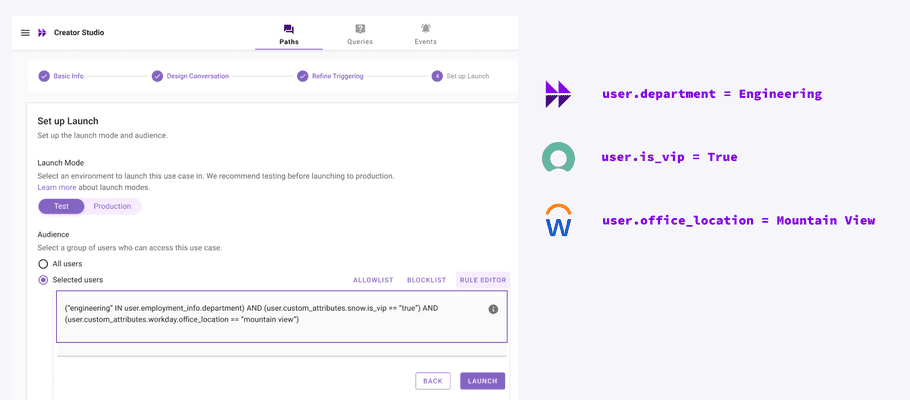
You can build launch rules from user attributes. See User Identity for more details.