For AI agents: a documentation index is available at the root level at /llms.txt and /llms-full.txt. Append /llms.txt to any URL for a page-level index, or .md for the markdown version of any page.
Logo
DeveloperAcademyCommunityStatus
ReferenceGuides
ReferenceGuides
  • Agent Studio
    • Overview
    • Quickstart Guides
    • Core Concepts
    • Conversation Process
    • Actions
    • Connectors
      • System Connectors
      • HTTP Connectors
        • Basic Auth
        • API Key Auth
        • Bearer Token Auth
        • OAuth 2.0 - Client Credentials
        • OAuth 2.0 - Authorization Code
        • OAuth 2.0 - JWT Bearer Auth
        • OAuth 2.0 - Refresh Token
        • OAuth 2.0 - Password Credentials
        • JWKS Auth
      • Network Allowlisting
    • System Triggers
    • Agent Architect
    • Cookbooks
    • Development and Testing
    • AI Agent Marketplace
    • Developer Tools
  • Agentic AI
    • LLM Fundamentals
    • The Agentic Reasoning Engine
    • Memory Constructs
    • Conversational Context
    • Guardrails
    • Grounding and Hallucinations
    • Continuous Learning
    • LLMs & SLMs
    • Steerability Tools
    • Multilingual Support
  • Core Platform
    • User Identity
    • Moveworks Agent (On-Prem)
    • Approvals Engine
    • Entity Catalog
    • Moveworks Data Objects
    • Security Information and Event Management (SIEM) Logs Overview
DeveloperAcademyCommunityStatus
Agent StudioConnectorsHTTP Connectors

OAuth 2.0 - Refresh Token

||View as Markdown|
Was this page helpful?
Edit this page
Previous

OAuth 2.0 - Password Credentials

Next
Built with

OAuth 2.0 with Refresh Token grant type entails sending a valid Client ID and Client Secret in exchange for an Access Token and a Refresh Token.

  • This Access Token is then used in subsequent requests, usually as a Bearer Token, to authenticate the API Request. When this Access Token is expired, the Refresh Token is used to retrieve a new one from the token url.
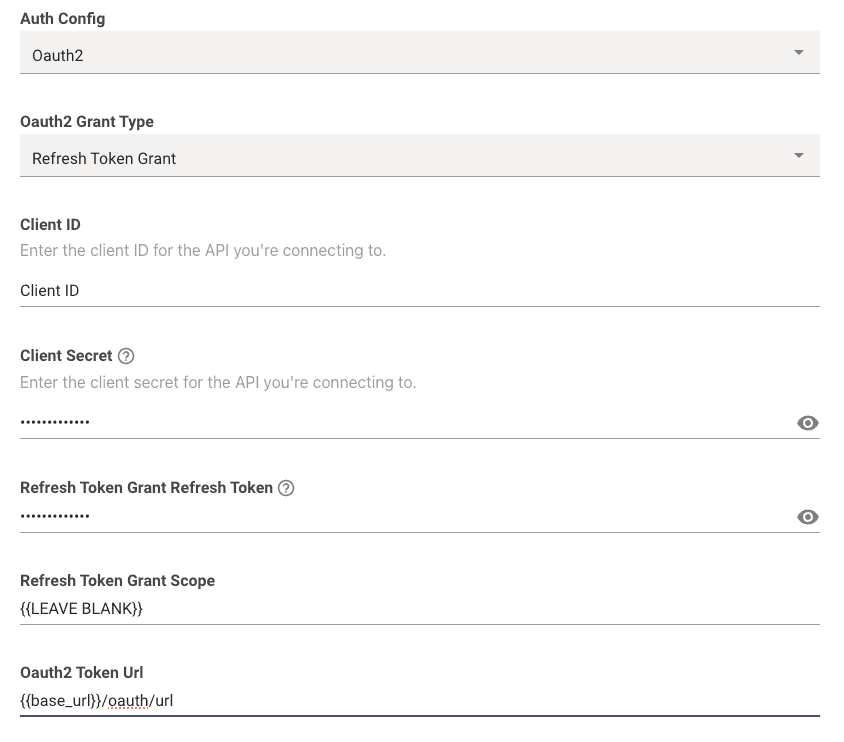
  • To set this up, choose Oauth2 from the Auth Config dropdown list.

  • Oauth2 Grant Type: This should be set to Refresh Token Grant

  • Client ID: This is where you input your actual Client ID value itself.

  • Client Secret: This is where you input your actual Client Secret value itself.

  • Refresh Token Grant Refresh Token: This is where you input your actual Refresh Token value itself.

  • Refresh Token Grant Scope: Leave this blank.

  • Oauth2 Token Url: This is where you input the full token URL.
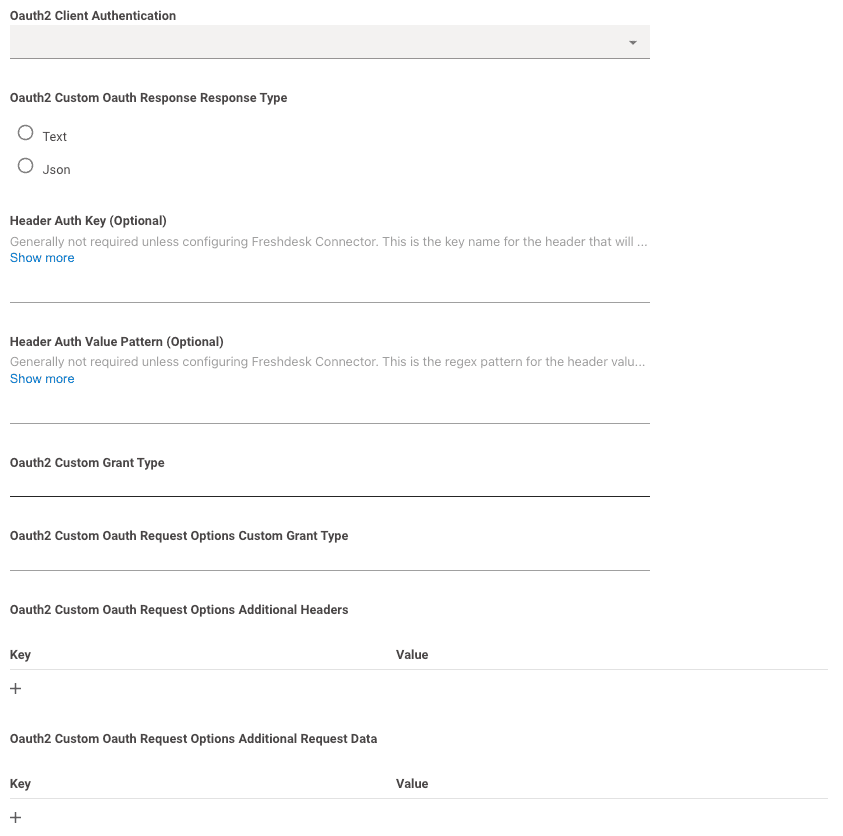
  • Oauth2 Client Authentication: This can be left blank.
    Moveworks will try making the request with both Basic Auth and Request Body Auth by default.
  • Header Auth Key, Header Auth Value Pattern, Oauth2 Custom Grant Type, Oauth2 Custom Oauth Request Options Custom Grant Type, Oauth2 Custom Oauth Request Options Additional Headers, and Oauth2 Custom Oauth Request Options Additional Request Data should all be left blank.