
Python Reference
The Python Script Actions environment is the standard code execution platform, offering broader capabilities than APIthon, including access to a pre-approved and verified list of external libraries.
All Python built-in libraries are available (e.g., json, datetime, re, collections, math). The following external libraries are also supported:
Custom library requests are not currently supported. This capability is on our roadmap but not yet available.
Limitations & Callouts
The Python Script Actions environment has specific restrictions to ensure security and stability.
Execution Timeout
8-Second Hard Timeout: Script execution is strictly limited to 8 seconds. This is a hard limit enforced at the infrastructure level to protect system stability—there are no exceptions. Design your scripts to process data efficiently and avoid heavy computations or large iterations.
Internet Access
Internet access is disabled at the infrastructure level. While network libraries like requests can be imported, all outbound network calls will fail at runtime.
To use data from external systems:
- Retrieve the data using HTTP Actions first
- Pass the data into your Python script as input arguments
File System Warning
Do not use the file system. While you technically have access to a /tmp directory, we strongly discourage any file system interaction.
- Files written to
/tmpare automatically deleted at the end of each request - If deletion fails, your execution environment may become locked
- A locked environment will cause all Python script executions for your user to fail until the underlying infrastructure recycles your environment
- There is no manual recovery process—you must wait for automatic recycling
If you need to process data, keep it in memory and return results directly.
Security Warning
Until a formal code review capability is introduced, any admin has the ability to modify or publish a full Python script in Agent Studio without a secondary approval step. This means that if an admin account were ever compromised, an attacker could immediately author and deploy malicious scripts at will. Implementing a structured review process will be critical to reducing this risk and ensuring the integrity of scripts executed within your AI Assistant.
How to use Python Script Actions
Python Script Actions can be integrated into Compound Actions and Conversational Processes within the agent studio. This section explains how to define and reference the data collected from the user (slots) within your Python script.
The fundamental concept to remember is that the script’s output is determined by the value of the last line of code executed.
1. Defining and Mapping the Input Argument
For your Python script to use data collected from the user (a “slot”), you must define an Input Argument and then map the collected slot value to that argument.
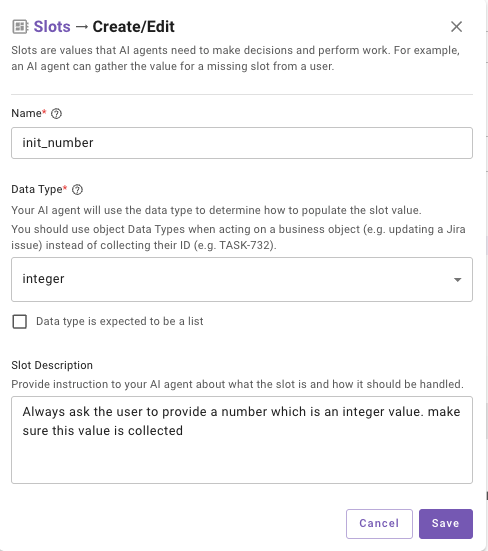
- Define the Slot: When building the plugin using a conversational process or compound action you must define a required slot (e.g., init_number) that the AI Assistant collects from the user. This information will be collected from the user during Plugin execution.
- Defining the Python Script: When selecting the Script Action during the build you can pass Input Arguments to it from a slot we have already fulfilled (e.g., init_number) that specifies the expected Data Type (e.g., integer) and whether it is Required.
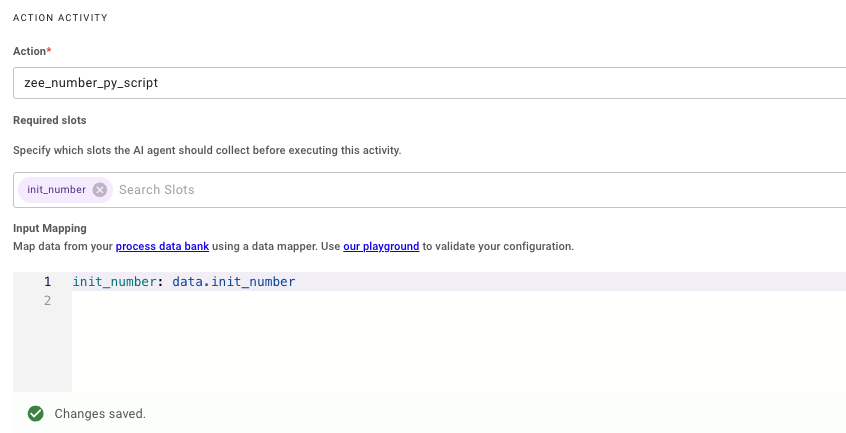
- You will also need to Select the Slot we created earlier under Required Slots so the Slot is collected and passed as an input to the Script Action.
2. Referencing the Slot in the Python Script
Once the Input Mapping is configured, We can now define the Python code in the Script Action. In order to do this you need to select Python in the language selector dropdown.
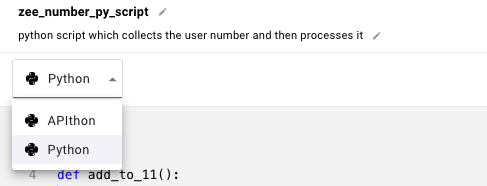
the slot value collected (e.g., 9) is available directly inside the Python function under the name of the Input Argument (init_number).
- Creating the Input Argument: Inside the Script Action you will need to define an Input Argument which will store the slot value being passed from the previous step. The slot value collected (e.g., 9) is available directly inside the Python function under the name of the Input Argument (init_number).
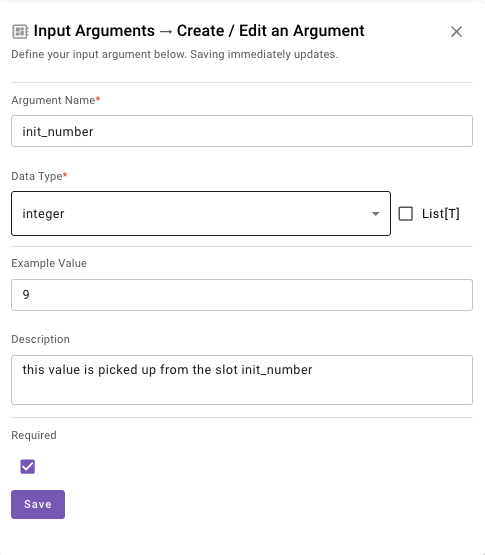
- Using Input Arguments In the Script: Once the Arguments have been set, we can now reference them in the Python Code by using the name of the Input Argument directly init_number. You can then run any lines of code on this.
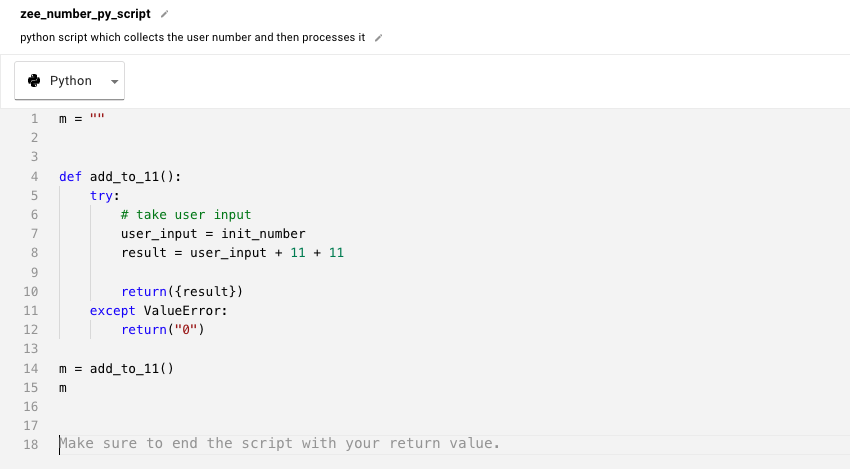
- Returning the Result: Once the code has been executed we need to ensure the last line of the script is returning the required information back which will be stored in the output_key defined by the user. In this example I have initialised variable ‘m’ as an empty String where the final result will be stored.
Ensure the correct Data Type is being selected for Slots, Input Arguments across steps to keep them aligned.
Troubleshooting
- Remember to use | after code: to tell the editor that you’re about to write multiline code
- Make sure your indentation is correct - Python is very picky about this!
- The last line of your code is what gets saved to your output_key
- Use the Test button in the Script Action to verify the code.