
End-User Access Control
End-User Access Control
When building plugins, consider these three access control strategies:
Strategy 1: Access Control by System Authentication
This strategy uses the access control policies defined by your external system to enforce access control. There are three tiers of system-based authentication integrations.
Option 1: Using JWT User Claims
The user’s information is passed in your JWT claims. Your business system then executes any APIs as if they were executed by that user. This preserves the audit trail & permissions of the target user.
See instructions for JWT Auth here.
Option 2: Using OAuth 2.0 Authorization Code Authentication
This is similar to Option 1 (JWT User Claims), but involves a user step to grant permission before the bot can take action.
See instructions for OAuth 2.0 Authorization Code here.
Option 3: Using RPA Tools
When the proper integration APIs are not available with your tools, browser-based RPA is a good fallback. Since RPA logs into applications on behalf of users the keystrokes & button clicks they execute follow that user’s permissions.
Strategy 2: Access Control by Design
A common scenario is ensuring users only see their records. In this design approach, you rely on data attributes on the record to determine if the user should have access to it.
In this scenario, you
- Pass the user’s information into your API based on your HTTP action’s data bank
- Query the record of interest that the user wants to see or modify. You may filter records by the user’s account.
- Check the data attributes of that record (Find the watcher/caller/hiring manager)
- Throw an error if the user shouldn’t have privileges
This requires you to “mirror” the access control logic of your downstream system in your process/experience APIs.
Strategy 3: Access Control In Moveworks (aka. Launch Rules)
After publishing a use case, you can tailor its availability to specific audiences using “rules”. This is especially useful when users lack licenses, allowing you to define a default access control policy.
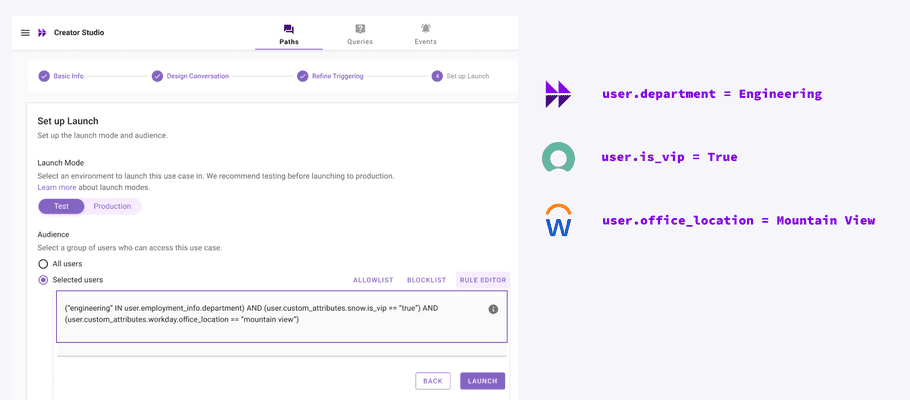
You can pull user attributes from any system to craft these rules. See our user identity documentation for more details.