***
## title: API Audit logs
This feature is launching soon for your organization !!!
# What is API audit logs ?
API audit logs contain a record of each external API call that is being made by Moveworks to your external systems. These logs provide you with information on any HTTP API call, including detailed information on the API URL & Method, HTTP response code, and the API request/response body.
Please note that in API audit logs, we only capture the external system API calls for built-in skills. In order to track external system API calls for Agent Studio, please refer to the Agent Studio logs.
# How does Moveworks calls your external system ?
Moveworks calls your external system through REST API calls and passes the relevant information in the API request body & headers. These API calls are embedded into the Moveworks AI assistant workflows. Moveworks picks up the configured connector for the relevant skills and then calls the external system endpoints.
# When a API audit log is recorded ?
Whenever an API call is being made by Moveworks and the response is being intercepted by the end system, an API audit log is recorded. The SLA for these logs is near-instant, so as soon as a conversation is completed within the AI assistant and the execution is done, the API audit log is also captured for that conversation or for that instance of interaction.
# Where to find the API audit logs ?
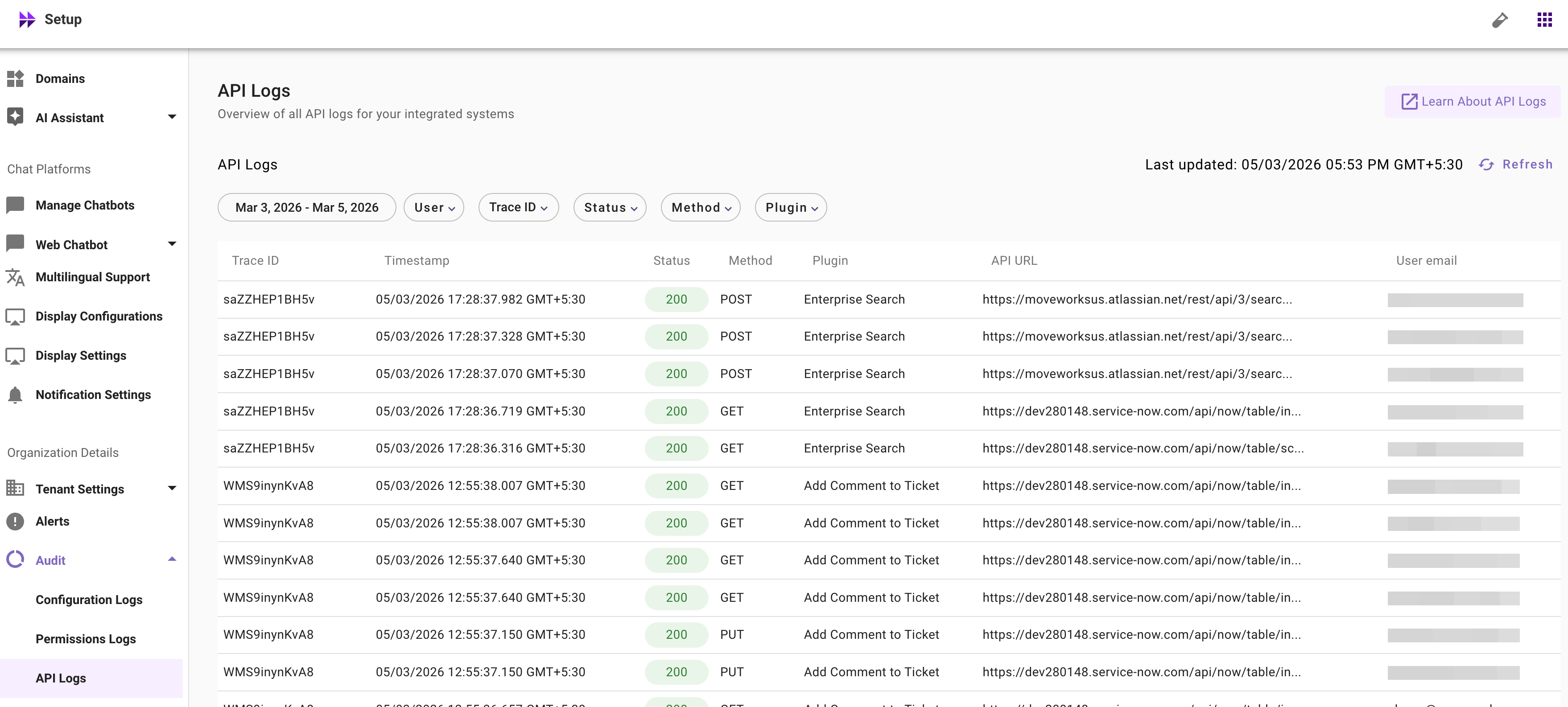
The API audit logs page is available in **Moveworks Setup → Organizational Details → Audit → API logs**
 # Learn to use API audit logs based on a use-case
The primary use case for using API audit logs is to identify if the external system calls that are made by Moveworks are successful or not. In case of a failure, we can validate if there is an issue in the payload that is being sent through Moveworks and determine what needs to be changed in the configuration. For this example, let's go through a use case where a user is trying to file a ticket and let's identify how we can understand the API calls that are being made by Moveworks in this scenario.
For this example, we are going to look up the logs based on the user email and the plugin that was expected to be triggered for a scenario. The plugin would be the "create ticket" plugin here, and the user would be the end user who is testing the AI assistant or having a conversation with the AI assistant
# Learn to use API audit logs based on a use-case
The primary use case for using API audit logs is to identify if the external system calls that are made by Moveworks are successful or not. In case of a failure, we can validate if there is an issue in the payload that is being sent through Moveworks and determine what needs to be changed in the configuration. For this example, let's go through a use case where a user is trying to file a ticket and let's identify how we can understand the API calls that are being made by Moveworks in this scenario.
For this example, we are going to look up the logs based on the user email and the plugin that was expected to be triggered for a scenario. The plugin would be the "create ticket" plugin here, and the user would be the end user who is testing the AI assistant or having a conversation with the AI assistant
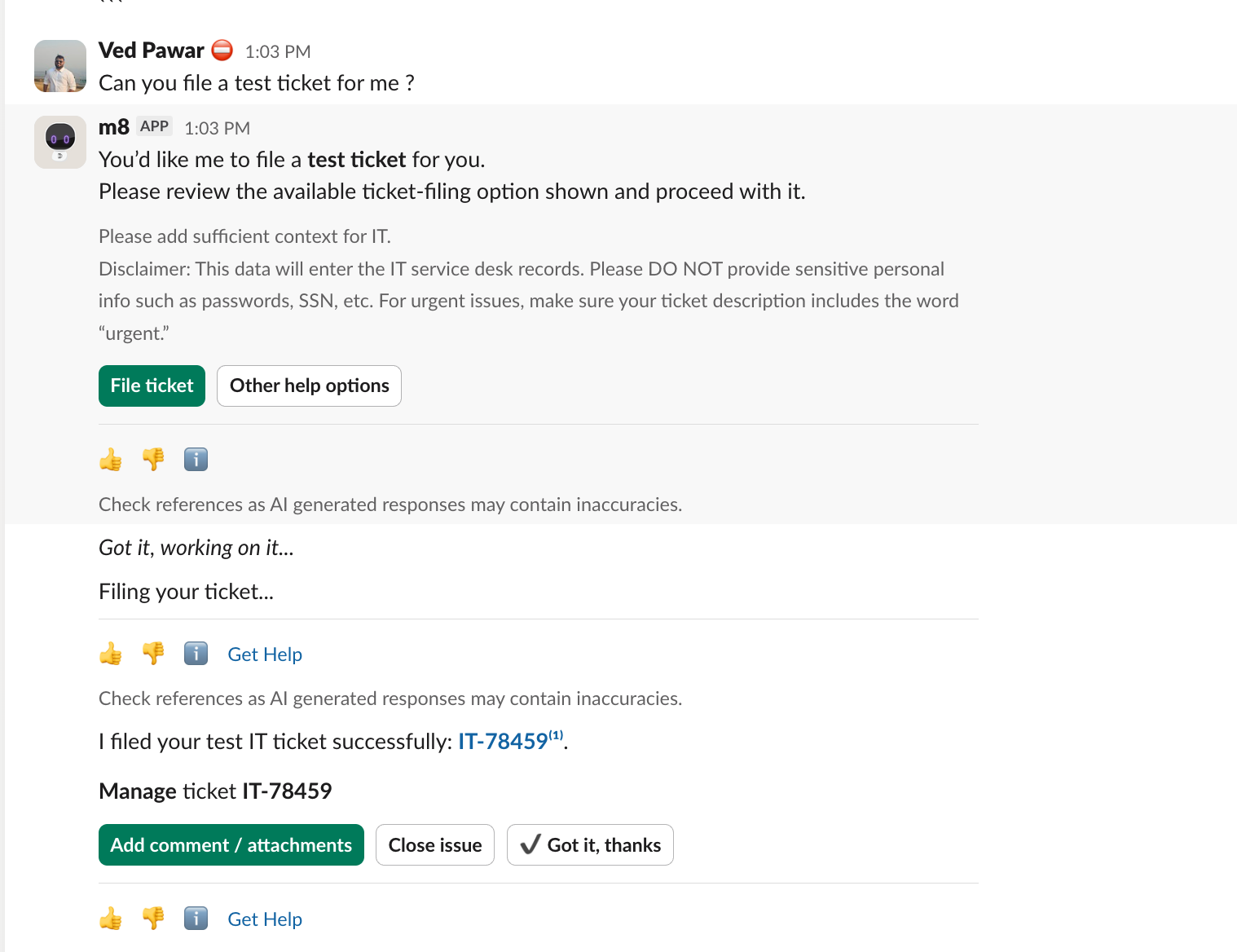 Let’s go to the API audit logs page and check the details for:
* **User: **[vpawar@moveworks.ai](mailto:vpawar@moveworks.ai)
* **Plugin:** create ticket
Let’s go to the API audit logs page and check the details for:
* **User: **[vpawar@moveworks.ai](mailto:vpawar@moveworks.ai)
* **Plugin:** create ticket
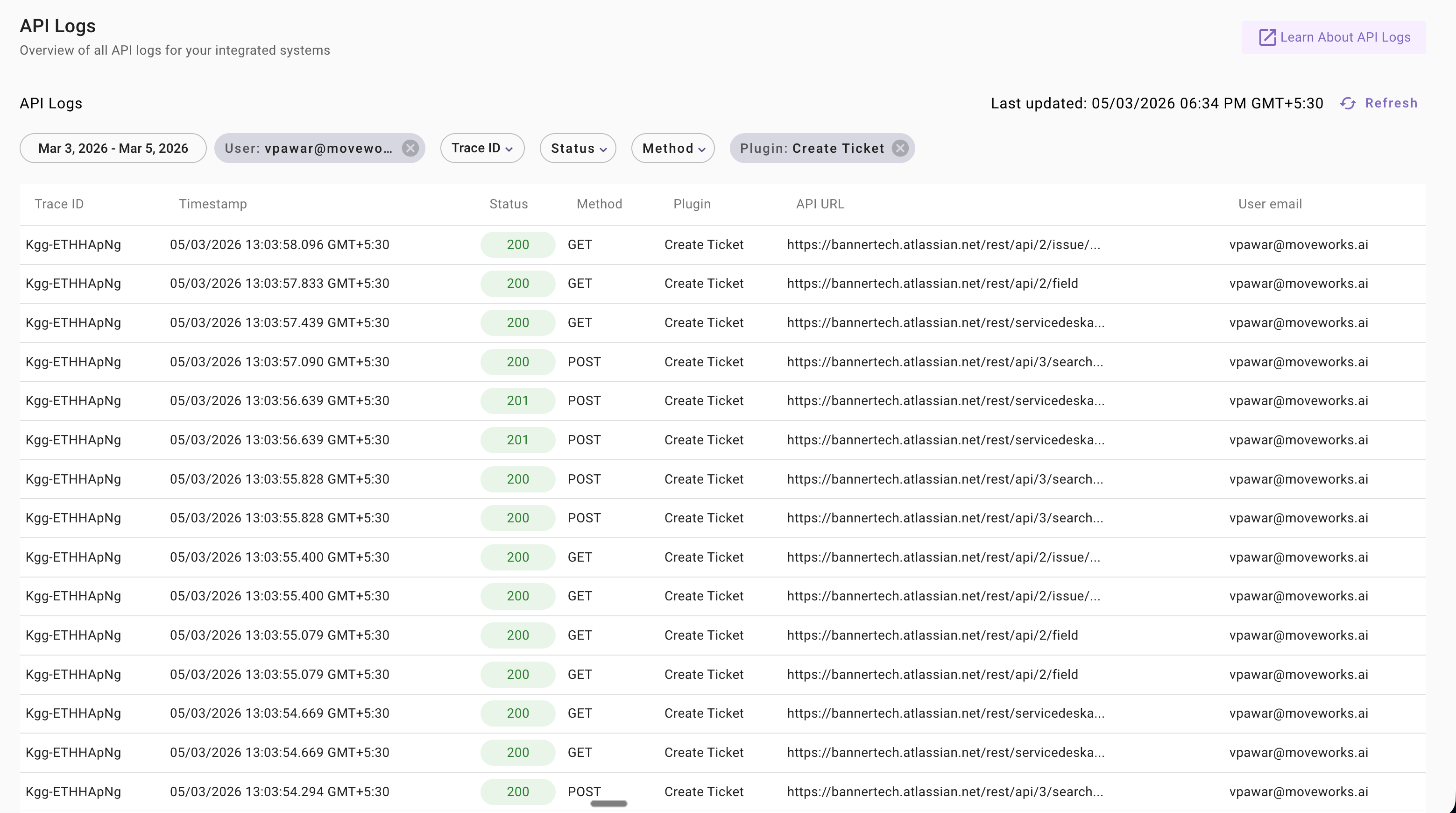 Here we can see we are getting an API request being logged for the user and the create ticket plugin.
* Moveworks internally calls "get ticket" APIs and "post ticket" APIs as well to find more details once a ticket has been created to internally process the ticket and store it into the ticket DB for any use case.
* You might see multiple API calls. Please ensure these API calls are part of the Moveworks built-in plugin workflow and are expected here.
* You might also see some calls which are failing intermittently, but the system also tries to call them again to get the data for create tickets.
Specifically, we are interested in seeing the API call where the exact ticket was made, so let's try to filter this use case and see the HTTP response code as 201. These are the response API calls where the final object, like the ticket object, is being created. As the system executes this API call in an asynchronous manner to achieve maximum efficiency, the timestamp of this might be different, so let's try to filter using the status filter.
Let's try to get to the 201 HTTP response code and see the API calls that are being made there.
Here we can see we are getting an API request being logged for the user and the create ticket plugin.
* Moveworks internally calls "get ticket" APIs and "post ticket" APIs as well to find more details once a ticket has been created to internally process the ticket and store it into the ticket DB for any use case.
* You might see multiple API calls. Please ensure these API calls are part of the Moveworks built-in plugin workflow and are expected here.
* You might also see some calls which are failing intermittently, but the system also tries to call them again to get the data for create tickets.
Specifically, we are interested in seeing the API call where the exact ticket was made, so let's try to filter this use case and see the HTTP response code as 201. These are the response API calls where the final object, like the ticket object, is being created. As the system executes this API call in an asynchronous manner to achieve maximum efficiency, the timestamp of this might be different, so let's try to filter using the status filter.
Let's try to get to the 201 HTTP response code and see the API calls that are being made there.
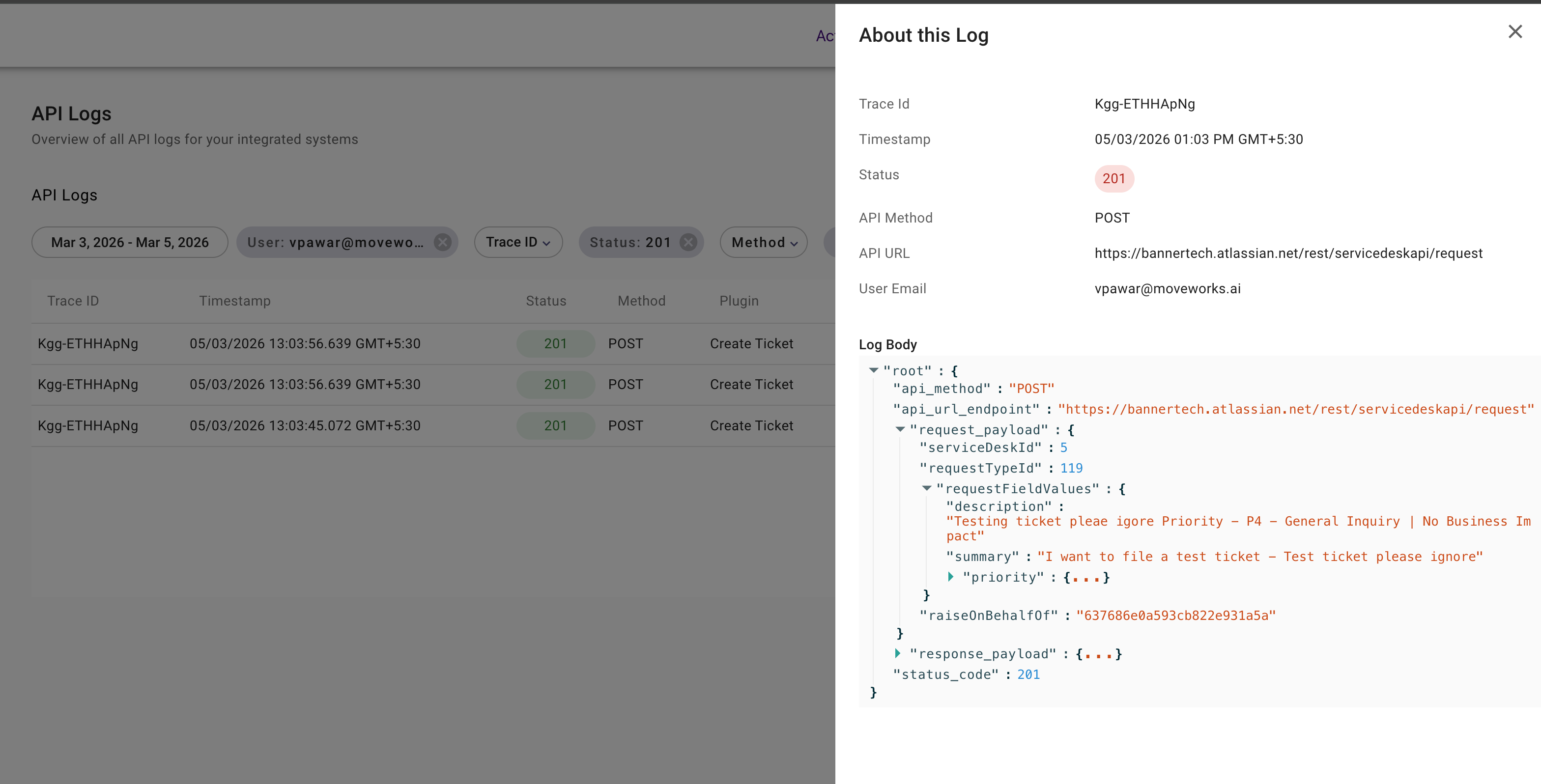 Here, if we see, there are three API calls:
1. The first API call is to create a ticket, which is calling the service desk API request call.
2) The second one is to add comment on the ticket
3. The third API call is to add work-note on the ticket
If we see the request payload, we can visualize what the final data was that was sent to the Jira service desk.
This allows us to debug the API call that is being made by Moveworks in this scenario.
Similarly, you can also debug a scenario if the use case is failing in your AI system; you can look into this page and try to identify if the API call is failing and what the error scenario would be.
# How does the governance works on the API audit logs ?
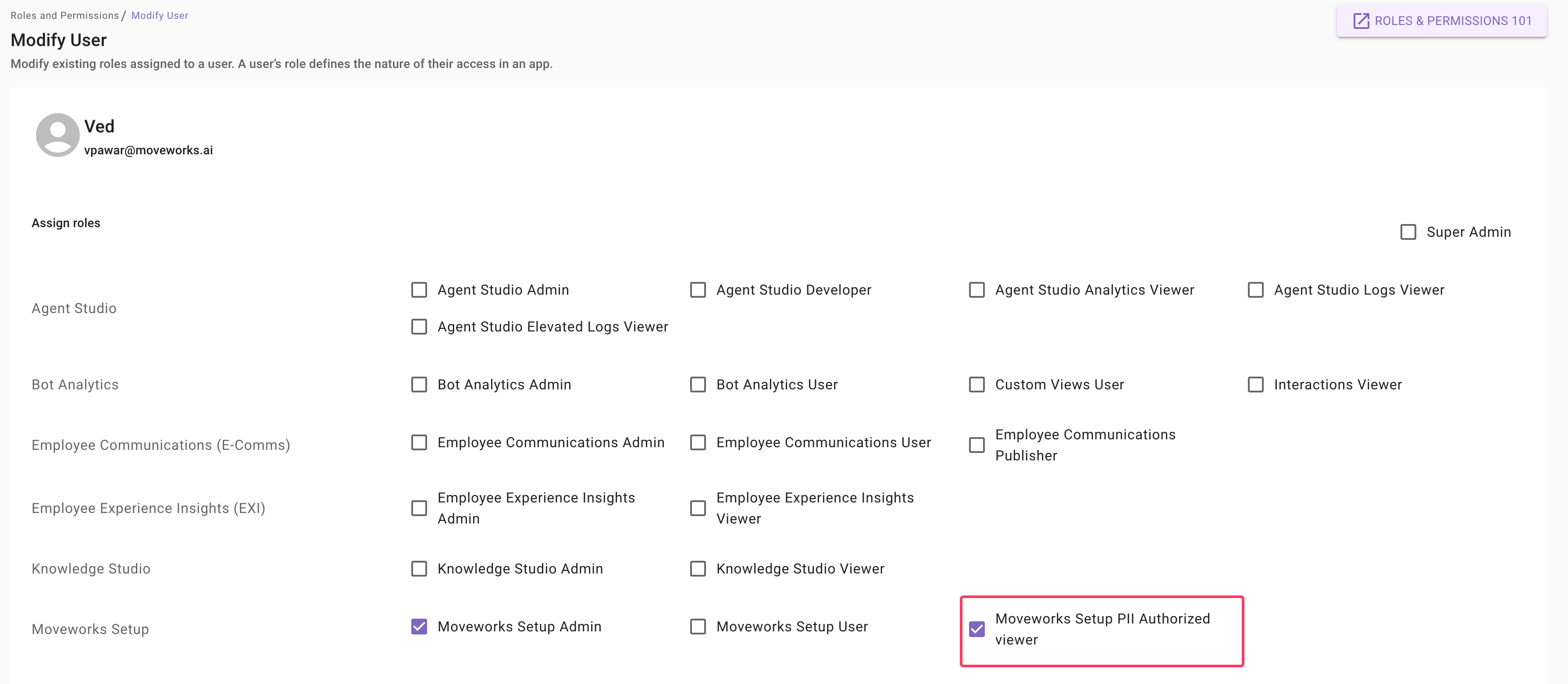
API audit logs are governed to ensure that only users with appropriate access are able to view details such as the request body and the response body. We use the new **PII viewer** role that was introduced in Moveworks Setup. This specific role governs the permission to view PII data.
1\. Any user who is either a **Super Admin**, a **Moveworks Setup Admin**, or a user with this new role can see the page, the API URL, and the request in an un-redacted format.
2\. If a user does not possess the PII viewer permission, they can still view the UI; however, the details are in a redacted format where they cannot access the request details or see the request body that is being sent out to the end system.
The PII role can only be provisioned by Super Admins. Navigate to the **Roles and Permissions** screen in the App Viewer. Here in Moveworks Setup, you will see a new checkbox: **Moveworks Setup PII Role Viewer**.
For any user who is a Moveworks Setup Admin or a Moveworks Setup User, the Super Admin can enable this role.
Please reach out to your Super Admin if you require this role. This will allow you to access and view un-redacted data on the API Audit Logs page.
Here, if we see, there are three API calls:
1. The first API call is to create a ticket, which is calling the service desk API request call.
2) The second one is to add comment on the ticket
3. The third API call is to add work-note on the ticket
If we see the request payload, we can visualize what the final data was that was sent to the Jira service desk.
This allows us to debug the API call that is being made by Moveworks in this scenario.
Similarly, you can also debug a scenario if the use case is failing in your AI system; you can look into this page and try to identify if the API call is failing and what the error scenario would be.
# How does the governance works on the API audit logs ?
API audit logs are governed to ensure that only users with appropriate access are able to view details such as the request body and the response body. We use the new **PII viewer** role that was introduced in Moveworks Setup. This specific role governs the permission to view PII data.
1\. Any user who is either a **Super Admin**, a **Moveworks Setup Admin**, or a user with this new role can see the page, the API URL, and the request in an un-redacted format.
2\. If a user does not possess the PII viewer permission, they can still view the UI; however, the details are in a redacted format where they cannot access the request details or see the request body that is being sent out to the end system.
The PII role can only be provisioned by Super Admins. Navigate to the **Roles and Permissions** screen in the App Viewer. Here in Moveworks Setup, you will see a new checkbox: **Moveworks Setup PII Role Viewer**.
For any user who is a Moveworks Setup Admin or a Moveworks Setup User, the Super Admin can enable this role.
Please reach out to your Super Admin if you require this role. This will allow you to access and view un-redacted data on the API Audit Logs page.
 # What use cases are captured in API audit logs?
In API audit logs, we cover the following use cases and services. The services are plugins, and each plugin records multiple API calls (GET, POST, or PUT) according to the Moveworks workflows for built-in plugins.
**Ticketing**
* When a user tries to file a ticket. - When a user tries to resolve a ticket. - When a user tries to reopen a ticket.
**Live Agent**
* When a live agent connection request is sent through Moveworks. - When a user message is sent to an live agent.
**Approvals**
* When an approval record is updated by the end user.
**Group operations**
* When a new group is created. - When a user is adding a new member to a group.
* When a user is removed from a group.
**Account operations**
* When a user is updating their password.
**Software operations**
* When a user is attempting software provisioning.
**System**
* When Moveworks internally makes an external API call for purposes such as connector validation, etc.
# What use cases are captured in API audit logs?
In API audit logs, we cover the following use cases and services. The services are plugins, and each plugin records multiple API calls (GET, POST, or PUT) according to the Moveworks workflows for built-in plugins.
**Ticketing**
* When a user tries to file a ticket. - When a user tries to resolve a ticket. - When a user tries to reopen a ticket.
**Live Agent**
* When a live agent connection request is sent through Moveworks. - When a user message is sent to an live agent.
**Approvals**
* When an approval record is updated by the end user.
**Group operations**
* When a new group is created. - When a user is adding a new member to a group.
* When a user is removed from a group.
**Account operations**
* When a user is updating their password.
**Software operations**
* When a user is attempting software provisioning.
**System**
* When Moveworks internally makes an external API call for purposes such as connector validation, etc.