
Approval Queue
The Approval Queue is a feature of the harness. It holds each employee’s pending approvals in one place, so the assistant can list them, step through them, and notify the approver, whichever system the approval came from. The queue is populated from more than one source:
- Approval mirroring. Moveworks detects approval records in your systems of record, such as requested items and change requests in ServiceNow, and stores them in the Approval Queue. See Approval Mirroring and ServiceNow Approvals.
- Approvals Engine. Native approvals for Access Groups and Access Software use the Approvals Engine for the approval logic and the Approval Queue for collecting responses. See Access Groups and Access Software.
- Approval steps in plugins. Plugins built on the Agentic Automation Engine can request an approval from a compound action step with the built-in action
mw.create_generic_approval_request, which pauses the compound action until the approver responds. The Mirroring Approvals cookbook uses this step to bring approvals from other business systems into the Approval Queue.
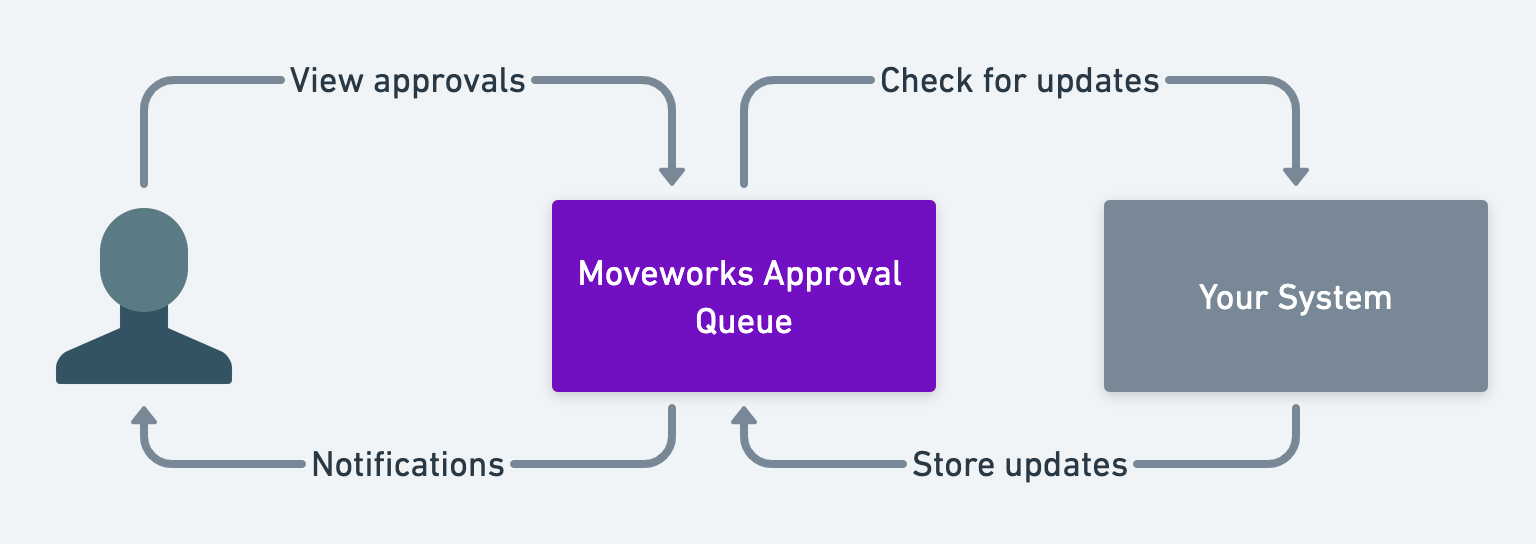
Keeping approvals in the queue, rather than fetching them from each system every time an employee asks, provides many benefits:
- Employees don’t get frustrated waiting tens of seconds for your systems to return necessary data (chat feels ~56x faster on average).
- Your system is not overburdened with calls for every single user.
- Once an approval is in the queue, Moveworks offers some additional powerful interaction patterns for the user which drive ~70% of all approvals.
Note :
- Approvals are removed from the approval queue if not updated in the last 30 days
- Approvals are also removed after they’ve been interacted with once (approved, denied, or no longer required).
Approval Lookups
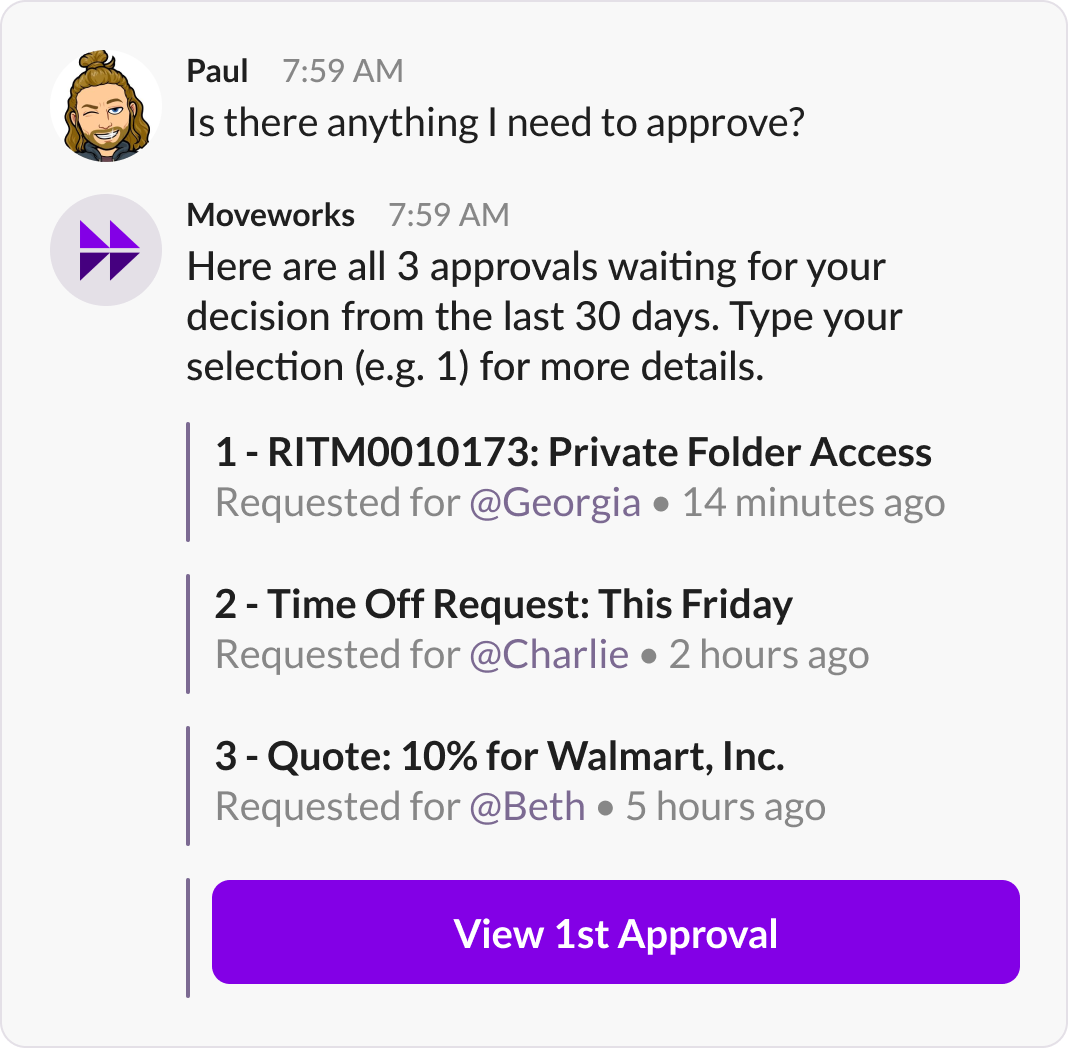
Retrieve the approval any time the user asks for their latest approvals.
Users can ask the Moveworks AI Assistant for a list of their pending approvals. To see more about one, they follow up with its number from the list (for example, 1) or say “Show me more details of the second one”.
Approval Looping
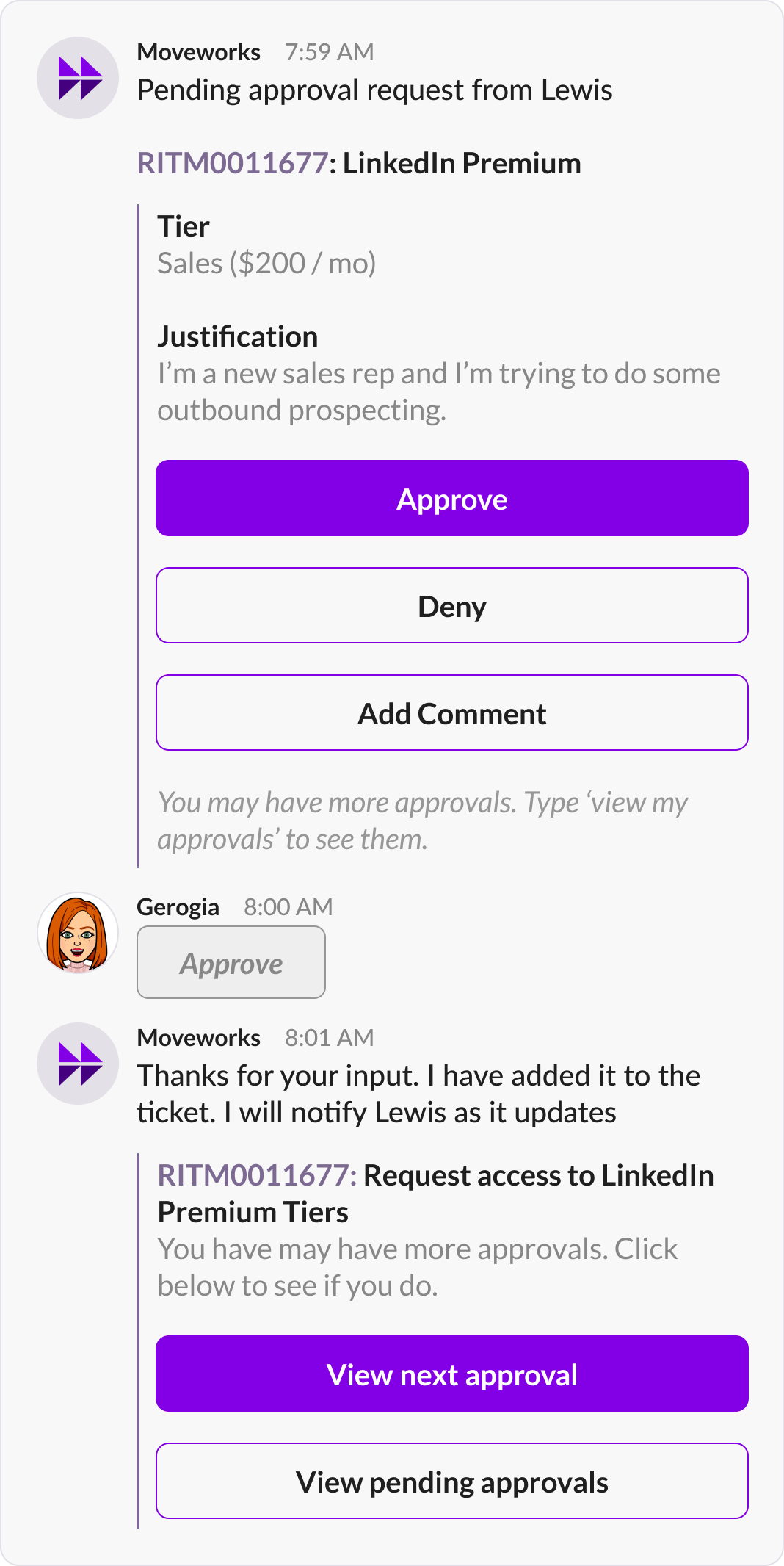
Remind the user about other approvals whenever they act on another approval.
Approval looping adds View next approval and View all approvals buttons, so users can work through all of their pending approvals. After a user approves or denies an approval, View next approval is attached to the confirmation message and opens the next open approval.
Approval Notifications
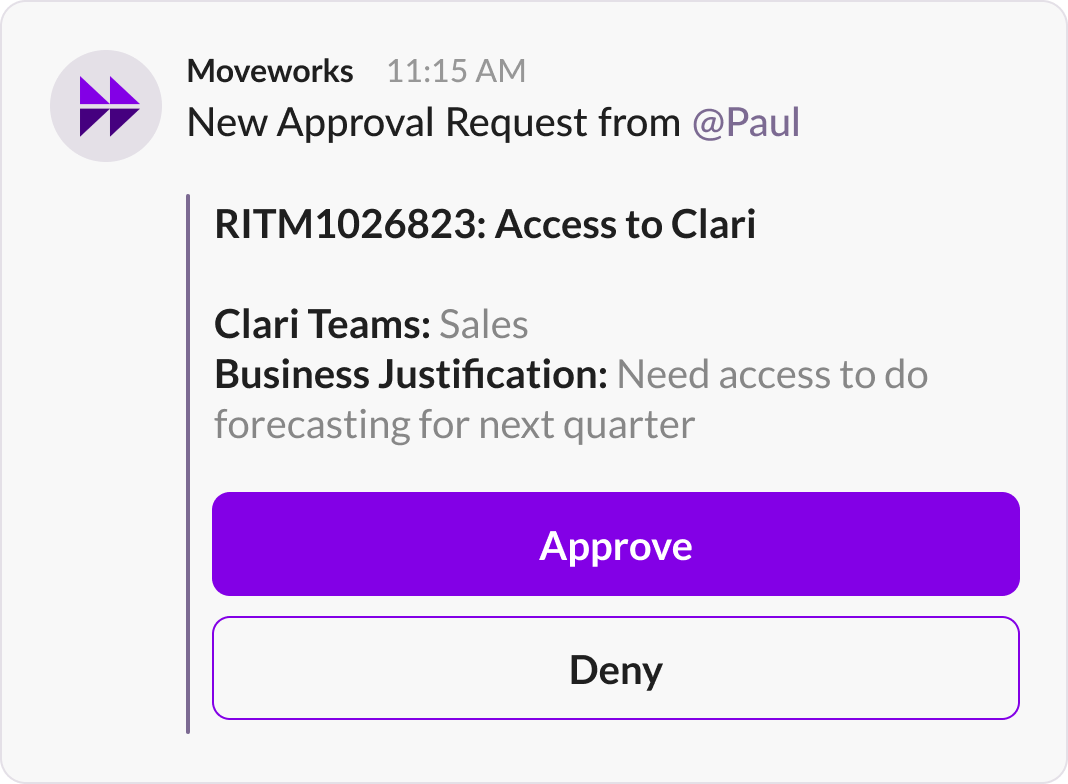
When users are assigned an approval that requires their attention the Moveworks AI Assistant will notify users about their approvals in-chat.
These approvals are delivered as soon as they are detected. Moveworks can control the order in which information is rendered and displayed to a user. See your integration-specific handbook for details on how to control which attributes are shown to a user.
Each approval notification card shows:
- Approval ID: a link that opens the approval in the external approval portal.
- Short description: shown next to the approval ID as the title of the notification.
- Requested by: the employee who requested the approval.
- Requested on: the date and time of the request.
- Action buttons: Approve, Deny, Deny with comments, Add comments, and any others configured for each approval type.
Users can act on a notification by clicking an action button or by replying to it directly in chat.
Notification Control: Silent Delivery
Moveworks can optionally deliver a notification silently. This means that your Moveworks AI Assistant will not send a notification, BUT the user will still be able to view the approval if they engage with our Approval Queue.
This generally works well for power approvers, who receive many notifications a day.
Note: There is no configuration to enable approval notifications to only occur during business hours, Moveworks recommends turning on quiet hours through your Chat Platform itself.
FAQ
Limitations
The AI Assistant shows a summary of each approval and lets users ask for more details.
- Approval ID links open the external approval portal only.
- Pagination (“Show next 10 approvals”) is not supported.
Q: Why does the approval queue only last 30 days?
A: By only showing approvals from the last 30 days, Moveworks provides a stronger end user experience and avoids users feeling overwhelmed with 200 pending approvals over the last 2 years.
This design was decided upon after analyzing millions of approval experiences and identifying that beyond 30 days, most users do not act on approvals.
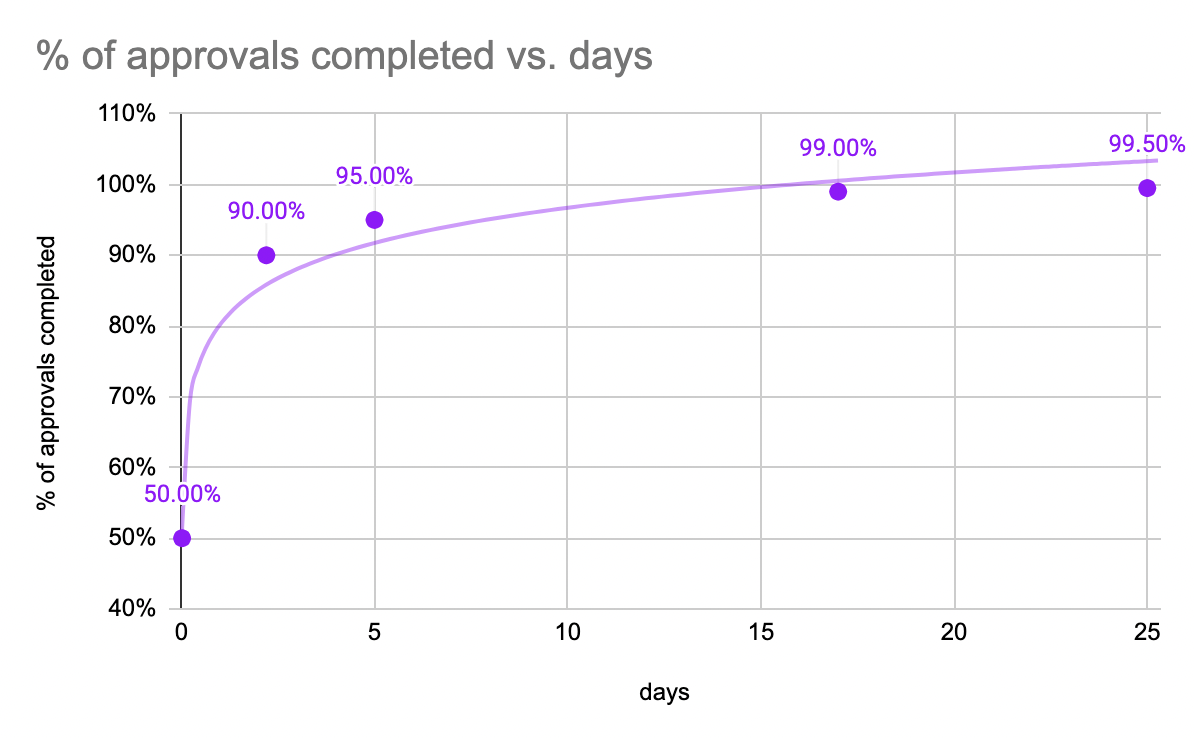
In addition, we have seen that some processes end up in “zombie” states (e.g. a ticket that was cancelled but never closed, an ad hoc approval that was requested but never formally cancelled).
Adding these guardrails, the Moveworks AI Assistant improves the product experience & reduces the system load experienced by your systems of record (e.g. imagine Moveworks fetching approvals that are 2 years old and likely in cold storage — this can cause issues with your instance performance).
Q: Does Moveworks maintain an audit trail?
A: Moveworks maintains an audit trail of which users clicked approve / deny buttons. This is part of our conversational audit and can be requested on demand from your customer success team.
Q: What if I’m seeing approvals that do not belong?
Generally, users will not see approvals >30 days old.
A: There is a small risk that our approval queue may be slightly inconsistent with production (<1% of the time). Examples of these inconsistencies may include a missing approval or an approval that was already completed.
See also
- Approval Mirroring: mirror approval records from systems of record, including ServiceNow Approvals.
- Approvals Engine: native approval workflows for Access Groups and Access Software.
- Built-in Actions:
create_generic_approval_request: request an approval from a compound action. - Mirroring Approvals: build approval mirroring for other systems in Tool Studio.